Yocto Project Zephyr Build
This page describes how to configure and build Zephyr RTOS applications for Cortex-A and Cortex-R processors using Yocto Project. The flow primarily uses SDT, Lopper, and gen-machine-conf tools to parse an XSA and transform it into Zephyr board source files.
Introduction
The Yocto Project can build for a variety of targets: Linux, Zephyr, bare-metal, etc. Using multiconfig one can target a combination of these environments in one single configured build. Zephyr is a real-time operating system (RTOS) that is open-source and hosted by the Linux Foundation. It is a collaborative effort uniting developers and users in building a best-in-class small, scalable, real-time operating system (RTOS) optimized for resource-constrained devices, across multiple architectures. For more details see Zephyr Getting Started Guide
Yocto Zephyr Build Workflows
Yocto Zephyr Build Architecture
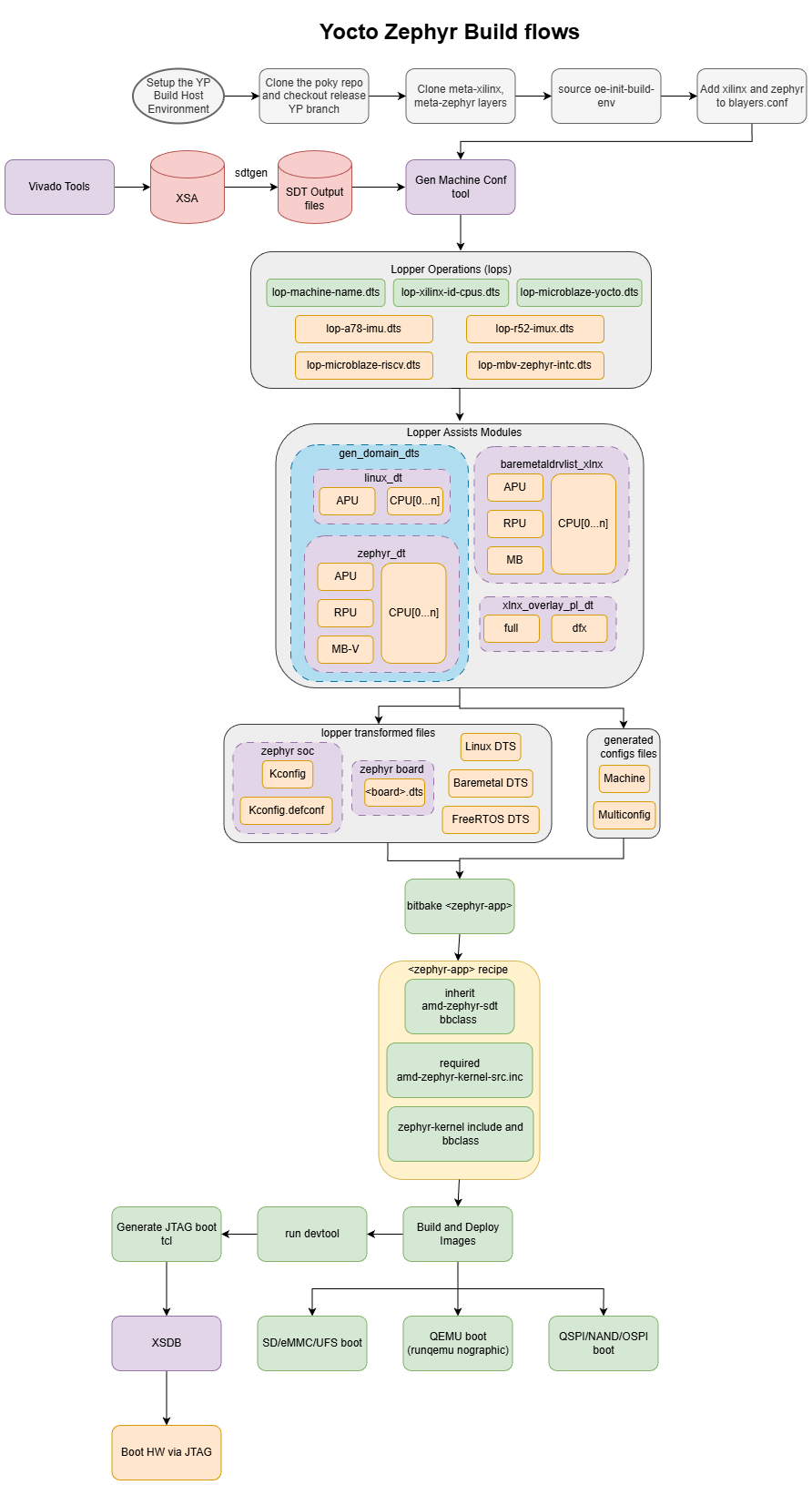
Yocto Zephyr Build Architecture overview.
Lopper Transformation
This section describes how to transform SDT output files to an operating environment standard device tree. Lopper tool is used to prune a system device tree to an Zephyr operating environment standard device tree. Lopper Transformation can be done in two ways.
Manual Transformation
Run the lopper commands manually to transform SDT to standard operating specific environment dt files.
Clone lopper repo:
$ git clone https://github.com/Xilinx/lopper -b <version_branch>
$ export LOPPER_REPO_PATH=$PWD/lopper
$ export LOPPER_DTC_FLAGS="-b 0 -@"
VERSAL-2VE-2VM Cortex-A78 Processor (Example: VEK385 Cortex-A78 Core1)
$ mkdir -p lopper-outputs/vek385-cortexa78-1/
$ export SDT_VEK385_OUTPUT_DIR=<path-to>/versal-2ve-2vm-vek385-sdt-seg/
$ export LOPPER_VEK385_OUTPUT_DIR=$PWD/lopper-outputs/vek385-cortexa78-1/
$ export CONFIG_DTFILE=versal2_apu.dts
$ ${LOPPER_REPO_PATH}/lopper.py -f --enhanced -O ${LOPPER_VEK385_OUTPUT_DIR} ${SDT_VEK385_OUTPUT_DIR}/system-top.dts system-domain.dts -- gen_domain_dts cortexa78_1
$ ls -la ${LOPPER_VEK385_OUTPUT_DIR}
total 232
drwxr-xr-x 2 santraju boulder   4096 Aug 22 17:13 .
drwxr-xr-x 7 santraju boulder   4096 Aug 22 16:36 ..
-rw-r--r-- 1 santraju boulder 227402 Aug 22 17:13 system-domain.dts
$
$ ${LOPPER_REPO_PATH}/lopper.py -f --enhanced -O ${LOPPER_VEK385_OUTPUT_DIR} -i ${LOPPER_REPO_PATH}/lopper/lops/lop-a78-imux.dts ${LOPPER_VEK385_OUTPUT_DIR}/system-domain.dts system-imux.dts
$ ls -la ${LOPPER_VEK385_OUTPUT_DIR}
total 452
drwxr-xr-x 2 santraju boulder   4096 Aug 22 17:13 .
drwxr-xr-x 7 santraju boulder   4096 Aug 22 16:36 ..
-rw-r--r-- 1 santraju boulder 227402 Aug 22 17:13 system-domain.dts
-rw-r--r-- 1 santraju boulder 222828 Aug 22 17:13 system-imux.dts
$
$ ${LOPPER_REPO_PATH}/lopper.py -f --enhanced -O ${LOPPER_VEK385_OUTPUT_DIR} ${LOPPER_VEK385_OUTPUT_DIR}/system-imux.dts ${CONFIG_DTFILE} -- gen_domain_dts cortexa78_1 zephyr_dt
$ ls -la ${LOPPER_VEK385_OUTPUT_DIR}
total 404
drwxr-xr-x 2 santraju boulder   4096 Aug 11 18:33 .
drwxr-xr-x 7 santraju boulder   4096 Aug 22 16:36 ..
-rw-r--r-- 1 santraju boulder 191943 Aug 11 15:40 system-domain.dts
-rw-r--r-- 1 santraju boulder 187968 Aug 11 15:40 system-imux.dts
-rw-r--r-- 1 santraju boulder  21079 Aug 11 15:44 versal2_rpu.dts
$
VERSAL-2VE-2VM Cortex-R52 Processor (Example: VEK385 Cortex-R52 Core0)
$ mkdir -p lopper-outputs/vek385-cortexr52-0/
$ export SDT_VEK385_OUTPUT_DIR=<path-to>/versal-2ve-2vm-vek385-sdt-seg/
$ export LOPPER_VEK385_OUTPUT_DIR=$PWD/lopper-outputs/vek385-cortexr52-0/
$ export CONFIG_DTFILE=versal2_rpu.dts
$ ${LOPPER_REPO_PATH}/lopper.py -f --enhanced -O ${LOPPER_VEK385_OUTPUT_DIR} ${SDT_VEK385_OUTPUT_DIR}/system-top.dts system-domain.dts -- gen_domain_dts cortexr52_0
$ ls -la ${LOPPER_VEK385_OUTPUT_DIR}
total 176
drwxr-xr-x 2 santraju boulder   4096 Jun 17 15:07 .
drwxr-xr-x 4 santraju boulder   4096 Jun  9 13:53 ..
-rw-r--r-- 1 santraju boulder 171372 Jun 17 15:07 system-domain.dts
$
$ ${LOPPER_REPO_PATH}/lopper.py -f --enhanced -O ${LOPPER_VEK385_OUTPUT_DIR} -i ${LOPPER_REPO_PATH}/lopper/lops/lop-r52-imux.dts ${LOPPER_VEK385_OUTPUT_DIR}/system-domain.dts system-imux.dts
$ ls -la ${LOPPER_VEK385_OUTPUT_DIR}
total 340
drwxr-xr-x 2 santraju boulder   4096 Jun 17 15:07 .
drwxr-xr-x 4 santraju boulder   4096 Jun  9 13:53 ..
-rw-r--r-- 1 santraju boulder 171372 Jun 17 15:07 system-domain.dts
-rw-r--r-- 1 santraju boulder 167642 Jun 17 15:07 system-imux.dts
$
$ ${LOPPER_REPO_PATH}/lopper.py -f --enhanced -O ${LOPPER_VEK385_OUTPUT_DIR} ${LOPPER_VEK385_OUTPUT_DIR}/system-imux.dts ${CONFIG_DTFILE} -- gen_domain_dts cortexr52_0 zephyr_dt
$ ls -la ${LOPPER_VEK385_OUTPUT_DIR}
total 348
drwxr-xr-x 2 santraju boulder   4096 Jun 17 15:08 .
drwxr-xr-x 4 santraju boulder   4096 Jun  9 13:53 ..
-rw-r--r-- 1 santraju boulder 171372 Jun 17 15:07 system-domain.dts
-rw-r--r-- 1 santraju boulder 167642 Jun 17 15:07 system-imux.dts
-rw-r--r-- 1 santraju boulder   6911 Jun 17 15:08 versal2_rpu.dts
$
gen-machine-conf
The
gen-machine-conftool automates the Yocto Project flow that transforms an SDT into standard operating-system-specific generated device tree, machine, and multiconfig files.
Yocto AMD Zephyr Meta-Layers
Building AMD Zephyr using Yocto requires the following layers.
-
-
Core layer provides meta data information for the following.
zephyr,zephyr-sample, andzephyr-qemubbclassqemu zephyr wrapper scripts
zephyr-kernel source recipes
zephyr-<apps> recipes
zephyr-sdk generation recipes
-
Core layer provides meta data for pre-defined machine files for different SoC’s, Community Boards, Vendor Boards, and QEMU emulation platform.
-
-
amd-zephyr-sdt bbclass
This class use lopper transformed files such as <board>.dts, Kconfig and Kconfig.defconfig file path is set in machine/multiconfig files are copied and replace with
<zephyr-repo>/boards/amd/<boards>/<board>.dts,<zephyr-repo>/soc/xlnx/<arch>/Kconfigand<zephy-repo>/soc/xlnx/<arch>/Kconfig.defconfigfile during bitbake do_configure tasks.
zephyr-kernel and apps bbappends to build demo application using AMD Zephyr.
Example Yocto AMD Zephyr Machine file
VEK385 Cortex-A78 Core 1
Machine file:
# conf/machine/versal-2ve-2vm-apu.conf
#@TYPE: Machine
#@NAME: versal-2ve-2vm-apu
#@DESCRIPTION: Machine for stock Zephyr BOARD versal2_apu
# Include tune-cortexa72-cortexa53.inc
require conf/machine/include/arm/armv8a/tune-cortexa72-cortexa53.inc
# This machine file demonstrates building the stock Zephyr amd versal2_apu board using
# meta-amd-zephyr layer.
DEFAULTTUNE = "cortexa72-cortexa53"
DISTRO = "amd-zephyr"
TMPDIR = "${TOPDIR}/tmp-versal-2ve-2vm-apu"
# Zephyr RTOS settings
ZEPHYR_BOARD = "versal2_apu"
ARCH:versal-2ve-2vm-apu = "arm"
Multiconfig Machine file
# conf/multiconfig/versal-2ve-2vm-vek385-sdt-seg-cortexa78-1-zephyr.conf
#@TYPE: Machine
#@NAME: versal-2ve-2vm-vek385-sdt-seg-cortexa78-1-zephyr
#@DESCRIPTION: Multiconfig Machine for SDT Zephyr BOARD versal2_apu
DEFAULTTUNE = "cortexa72-cortexa53"
DISTRO = "amd-zephyr"
TMPDIR .= "-${BB_CURRENT_MC}"
# Zephyr RTOS settings
ZEPHYR_BOARD = "versal2_apu"
ARCH:versal-2ve-2vm-apu = "arm"
CONFIG_DTFILE = "${CONFIG_DTFILE_DIR}/versal-2ve-2vm-vek385-sdt-seg-cortexa78-1-zephyr.dts"
Because we are not generating versal-2ve-2vm-vek385-sdt-seg-cortexa78-1-zephyr multiconfig by default, first run a pre-step before building.
Copy
versal-2ve-2vm-vek385-sdt-seg-cortexa78-1-zephyr.dtstometa-amd-adaptive-socs/meta-amd-adaptive-socs-bsp/conf/dtsdirectory.Add
versal-2ve-2vm-vek385-sdt-seg-cortexa78-1-zephyrtoBBMULITICONFIGinmeta-amd-adaptive-socs/meta-amd-adaptive-socs-bsp/conf/versal-2ve-2vm-vek385-sdt-seg.confmachine file. Example:BBMULTICONFIG += "versal-2ve-2vm-vek385-sdt-seg-cortexr52-0-zephyr versal-2ve-2vm-vek385-sdt-seg-cortexr52-1-baremetal versal-2ve-2vm-vek385-sdt-seg-microblaze-pmc versal-2ve-2vm-vek385-sdt-seg-cortexa78-1-zephyr"
VEK385 Cortex-R52 Core 0
Machine file:
# conf/machine/versal-2ve-2vm-rpu.conf
#@TYPE: Machine
#@NAME: versal-2ve-2vm-rpu
#@DESCRIPTION: Machine for stock Zephyr BOARD versal2_rpu
# Include tune-cortexr52
require conf/machine/include/arm/armv8r/tune-cortexr52.inc
# This machine file demonstrates building the stock Zephyr amd versal2_rpu board using
# meta-amd-zephyr layer.
DEFAULTTUNE = "cortexr52"
# GLIBC will not work with Cortex-R.
TCLIBC = "newlib"
DISTRO = "amd-zephyr"
TMPDIR = "${TOPDIR}/tmp-versal-2ve-2vm-rpu"
# Zephyr RTOS settings
ZEPHYR_BOARD = "versal2_rpu"
ARCH:versal-2ve-2vm-rpu = "arm"
Multiconfig Machine file
# meta-amd-adaptive-socs/meta-amd-adaptive-socs-bsp/conf/multiconfig/versal-2ve-2vm-vek385-sdt-seg-cortexr52-0-zephyr.conf
#@TYPE: Machine
#@NAME: versal-2ve-2vm-vek385-sdt-seg-cortexr52-0-zephyr
#@DESCRIPTION: Multiconfig Machine for SDT Zephyr BOARD versal2_rpu
DEFAULTTUNE = "cortexr52"
# GLIBC will not work with Cortex-R.
TCLIBC = "newlib"
DISTRO = "amd-zephyr"
TMPDIR .= "-${BB_CURRENT_MC}"
# Zephyr RTOS settings
ZEPHYR_BOARD = "versal2_rpu"
ARCH:versal-2ve-2vm-rpu = "arm"
CONFIG_DTFILE = "${CONFIG_DTFILE_DIR}/versal-2ve-2vm-vek385-sdt-seg-cortexr52-0-zephyr.dts"
Yocto AMD Zephyr Recipe Template
Here is the example AMD Zephyr Recipe Template.
Note:
Recipe source(ZEPHYR_SRC_DIR) must be one of the following applications in https://github.com/Xilinx/zephyr-amd/tree/master/samples or it fails to build
Create a recipe
$ touch meta-xilinx/meta-amd-zephyr/recipes-kernel/zephyr-kernel/<app-name>.bb
Add the following content to <app-name>.bb
# Inheriting zephyr-sample is a must for all zephyr application recipes
inherit zephyr-sample
# Inheriting amd-zephyr-sdt will use the zephyr-amd repo instead of the upstream one.
inherit amd-zephyr-sdt
# To use SRC_URI_ZEPHYR pointing to zephyr-amd github tree instead of upstream
# zephyr tree we need to add the amd-zephyr-kernel-src include file.
require amd-zephyr-kernel-src.inc
ZEPHYR_SRC_DIR = "${ZEPHYR_BASE}/samples/<app-name>"
# Optional
COMPATIBLE_MACHINE = "<machine-name>"
# Additional CMake flags to be passed to zephyr cmake configuration phase.
EXTRA_OECMAKE += ""
Building Zephyr Applications
Pre-requisites: Set up the build environment and Yocto Project pre-requisites by following Operating System Integration and Development AMD Versal device portfolio
VEK385 Cortex-A78 Core 1:
Without Multiconfig:
$ MACHINE=versal-2ve-2vm-apu bitbake zephyr-helloworld
With Multiconfig:
$ MACHINE=versal-2ve-2vm-vek385-sdt-seg bitbake mc:versal-2ve-2vm-vek385-sdt-seg-cortexa78-1-zephyr:zephyr-helloworld
After the images are built they are deployed in
${TMPDIR}-${BB_CURRENT_MC}/deploy/images/${MACHINE}directory. Here is an example.$ ls -la tmp-versal-2ve-2vm-vek385-sdt-seg-cortexa78-1-zephyr/deploy/images/versal-2ve-2vm-vek385-sdt-seg/ total 4768 drwxr-xr-x 2 santraju boulder 4096 Aug 22 19:49 . drwxr-xr-x 3 santraju boulder 4096 Aug 22 19:49 .. lrwxrwxrwx 2 santraju boulder 66 Aug 22 19:49 zephyr-helloworld.bin -> zephyr-helloworld-versal-2ve-2vm-vek385-sdt-seg-20250823014541.bin lrwxrwxrwx 2 santraju boulder 66 Aug 22 19:49 zephyr-helloworld.elf -> zephyr-helloworld-versal-2ve-2vm-vek385-sdt-seg-20250823014541.elf -rwxr-xr-x 2 santraju boulder 4304900 Aug 22 19:49 zephyr-helloworld-versal-2ve-2vm-vek385-sdt-seg-20250823014541.bin -rwxr-xr-x 2 santraju boulder 544104 Aug 22 19:49 zephyr-helloworld-versal-2ve-2vm-vek385-sdt-seg-20250823014541.elf lrwxrwxrwx 2 santraju boulder 66 Aug 22 19:49 zephyr-helloworld-versal-2ve-2vm-vek385-sdt-seg.bin -> zephyr-helloworld-versal-2ve-2vm-vek385-sdt-seg-20250823014541.bin lrwxrwxrwx 2 santraju boulder 66 Aug 22 19:49 zephyr-helloworld-versal-2ve-2vm-vek385-sdt-seg.elf -> zephyr-helloworld-versal-2ve-2vm-vek385-sdt-seg-20250823014541.elf $
VEK385 Cortex-R52 Core 0:
Without Multiconfig:
$ MACHINE=versal-2ve-2vm-rpu bitbake zephyr-helloworld
With Multiconfig:
$ MACHINE=versal-2ve-2vm-vek385-sdt-seg bitbake mc:versal-2ve-2vm-vek385-sdt-seg-cortexr52-0-zephyr:zephyr-helloworld
After the images are built they are deployed in
${TMPDIR}-${BB_CURRENT_MC}/deploy/images/${MACHINE}directory. Here is an example.$ ls -la tmp-versal-2ve-2vm-vek385-sdt-seg-cortexr52-0-zephyr/deploy/images/versal-2ve-2vm-vek385-sdt-seg/ total 520 drwxr-xr-x 2 santraju boulder 4096 Aug 22 19:22 . drwxr-xr-x 3 santraju boulder 4096 Aug 22 19:22 .. lrwxrwxrwx 2 santraju boulder 66 Aug 22 19:22 zephyr-helloworld.bin -> zephyr-helloworld-versal-2ve-2vm-vek385-sdt-seg-20250823011055.bin lrwxrwxrwx 2 santraju boulder 66 Aug 22 19:22 zephyr-helloworld.elf -> zephyr-helloworld-versal-2ve-2vm-vek385-sdt-seg-20250823011055.elf -rwxr-xr-x 2 santraju boulder 45508 Aug 22 19:22 zephyr-helloworld-versal-2ve-2vm-vek385-sdt-seg-20250823011055.bin -rwxr-xr-x 2 santraju boulder 456148 Aug 22 19:22 zephyr-helloworld-versal-2ve-2vm-vek385-sdt-seg-20250823011055.elf lrwxrwxrwx 2 santraju boulder 66 Aug 22 19:22 zephyr-helloworld-versal-2ve-2vm-vek385-sdt-seg.bin -> zephyr-helloworld-versal-2ve-2vm-vek385-sdt-seg-20250823011055.bin lrwxrwxrwx 2 santraju boulder 66 Aug 22 19:22 zephyr-helloworld-versal-2ve-2vm-vek385-sdt-seg.elf -> zephyr-helloworld-versal-2ve-2vm-vek385-sdt-seg-20250823011055.elf $
XENVMGICV3:
Without Multiconfig:
$ MACHINE=xenvmgicv3 bitbake zephyr-synchronization
After the images are built they are deployed in
${TMPDIR}/deploy/images/${MACHINE}directory. Here is an example.Without Multiconfig:
$ ls -la tmp/deploy/images/xenvmgicv3/
total 1340
drwxr-xr-x 2 santraju boulder    4096 Oct 14 08:44 .
drwxr-xr-x 5 santraju boulder    4096 Oct 14 08:44 ..
lrwxrwxrwx 2 santraju boulder      52 Oct 14 08:44 zephyr-synchronization.bin -> zephyr-synchronization-xenvmgicv3-20251014143550.bin
lrwxrwxrwx 2 santraju boulder      52 Oct 14 08:44 zephyr-synchronization.elf -> zephyr-synchronization-xenvmgicv3-20251014143550.elf
-rwxr-xr-x 2 santraju boulder  311300 Oct 14 08:44 zephyr-synchronization-xenvmgicv3-20251014143550.bin
-rwxr-xr-x 2 santraju boulder 1046136 Oct 14 08:44 zephyr-synchronization-xenvmgicv3-20251014143550.elf
lrwxrwxrwx 2 santraju boulder      52 Oct 14 08:44 zephyr-synchronization-xenvmgicv3.bin -> zephyr-synchronization-xenvmgicv3-20251014143550.bin
lrwxrwxrwx 2 santraju boulder      52 Oct 14 08:44 zephyr-synchronization-xenvmgicv3.elf -> zephyr-synchronization-xenvmgicv3-20251014143550.elf
$