AMD Embedded Development Framework (EDF)
This page and its sub pages describe the AMD Embedded Development Framework and its use to develop embedded software stacks for AMD adaptive SoC and FPGA products.
Introduction to the AMD Embedded Development Framework
The AMD Embedded Development Framework (EDF) is a common framework to support platform-level development and embedded software solutions for AMD adaptive SoC and FPGA products, along with their evaluation boards.
The framework embraces open-source development and currently includes the following:
Support for AMD Vivado Design Suite and Vitis software platform-based flows
Prebuilt embedded software stacks (disk images) and pre-configured BSPs to accelerate platform exploration and product development on AMD adaptive SoC and FPGA products and their evaluation boards
Get evaluation boards up and running using prebuilt images
A rich Linux Kernel and RootFS configuration - minimizing the need to re-build
Multi-stage boot architecture with deferred programmable logic load, using Segmented Configuration where available - minimizing the need to re-build and supporting on-target development
Supports Vitis software platform based flows through the prebuilt images
Open-source tools for embedded software development including a Yocto Project based build environment
Linux OS and RTOS based embedded software stacks
A common starting point for example and reference designs
A curated and common evaluation board experience with recommended flows and configurations
Prebuilt images, source code, and configurations are provided for demonstration purposes only, and are not necessarily suitable outside of a development environment, particularly for production purposes.
Before production deployment of any software-based system, it is recommended that all relevant security updates are applied, and a mechanism for in-field updates is made available throughout the lifetime of the relevant product.
How to Use These Docs
The chapters in the left navigation can be read in two complementary ways, and the same content supports both styles.
Read first, then do. Start with Development Flows for a high-level map of the four developer personas and the architecture they share, then drop into the persona walkthroughs (Getting Started, Application Development and Deployment, OS Integration and Development, Custom Hardware Development) when you are ready to try things on a board. Reach for the Reference appendix when you need the underlying specifications.
Do first, then read. Start with Getting Started: Discovery and Evaluation to power on the board with a prebuilt image, then follow the persona walkthrough that matches the next thing you want to build. Use the persona map and the reference material as lookup whenever something needs more context.
Either path lands you in the same set of walkthroughs eventually; the difference is whether you want the conceptual overview before the hands-on steps or afterwards.
Board Selector
Most pages contain content that applies to several evaluation boards. The Board dropdown at the top of the left sidebar (above the search box) filters that content to a single board: blocks tagged with other boards are hidden, and blocks tagged with your selection lose their per-block board badge so the page reads as if it were written for that board only. The selection persists across pages and survives a reload, so you can pick your board a single time and read straight through.
Choose All Boards to see every block on a page at the same time. Each block then carries a small badge listing the boards it applies to, which is useful when you are comparing flows across boards or writing notes that reference more than one board.
Pages that have no per-board content (the cross-cutting reference chapters, for example) ignore the selection and read the same regardless of the dropdown value, so the choice carries forward without surprise when you navigate between board-specific and shared material.
Search
The Search docs box in the left sidebar searches the full documentation set across all chapters. Use it when you know a term, a command, a file name, or a board name and want to jump straight to the pages that mention it; it is usually the fastest way in for readers who already know what they are looking for.
Prebuilt Disk Images and Board Support Packages (BSP) - All You Need to Build a Running System
AMD EDF disk images are created from board support packages (BSP) and are based on a common specification outlined in this documentation. The BSP contains everything needed to build a running image for a board. They can be used to re-build or extend the prebuilt images for AMD evaluation boards, or as a starting point for enabling a custom board (chip-down design).
BSPs contain:
The hardware design - AMD Vivado Design Suite project
Built from a Vivado Configurable Example Design (CED) - can be extended
Delivered as a Tcl script and prebuilt artifacts (used by Yocto Project to re-build prebuilt disk images)
The embedded software configuration - Yocto Project based
Built from a pre-defined configuration stored in the AMD Yocto Project repository - can be extended
Uses AMD SHEL flows - Software Hardware Exchange Loop (SHEL) Flow
AMD EDF Linux BSP and Prebuilt Disk Images
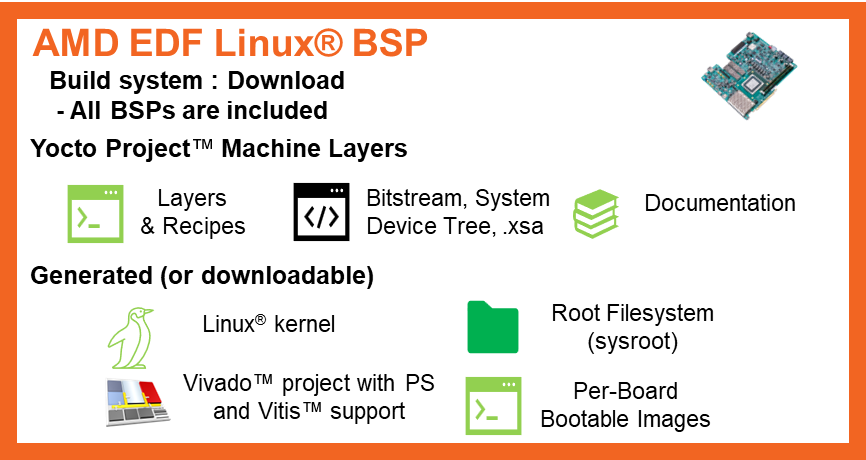
AMD EDF Linux BSP and prebuilt disk image components overview (Linux-only machine)
Linux-only: Builds the required artifacts necessary for the Linux system to boot (no additional platform features).
For the prebuilt Linux-only machine names (for example
MACHINE=versal-2ve-2vm-vek385-revb-sdt-seg for VEK385 RevB), see
List of Yocto prebuilt Machine Names for Supported AMD Evaluation Boards.
Supports boot to AMD EDF Linux OS on the target evaluation board
AMD Vivado Design Suite project - Downloadable as a Tcl file
Prebuilt Vivado tool artifacts - Downloadable, and used by Yocto Project build
EDF Linux BSP disk image and EDF Boot Firmware (New devices and families)
EDF Boot Firmware: Image selector with recovery (OSPI) and Linux utilities
Rich Linux: Utilities, libraries, compilers
FPGA Manager / DFX Manager Linux utilities for programmable logic (PL) firmware management and load
AMD Vitis software platform support: Run your Vitis accelerator on the prebuilt image
Access to software and hardware reference designs through package feed: Download and run
PL payload - BSP base platform: RAM, DMA, GPIO, etc.
Note
AMD ships prebuilt bootable artifacts only for the
multi-domain machines. Linux-only users build the bootable
images from the Linux-only MACHINE (for example
versal-2ve-2vm-vek385-revb-sdt-seg) themselves.
See the relevant sections of this document for more details on architecture and specifications.
AMD EDF Platform BSP and Prebuilt Disk Images
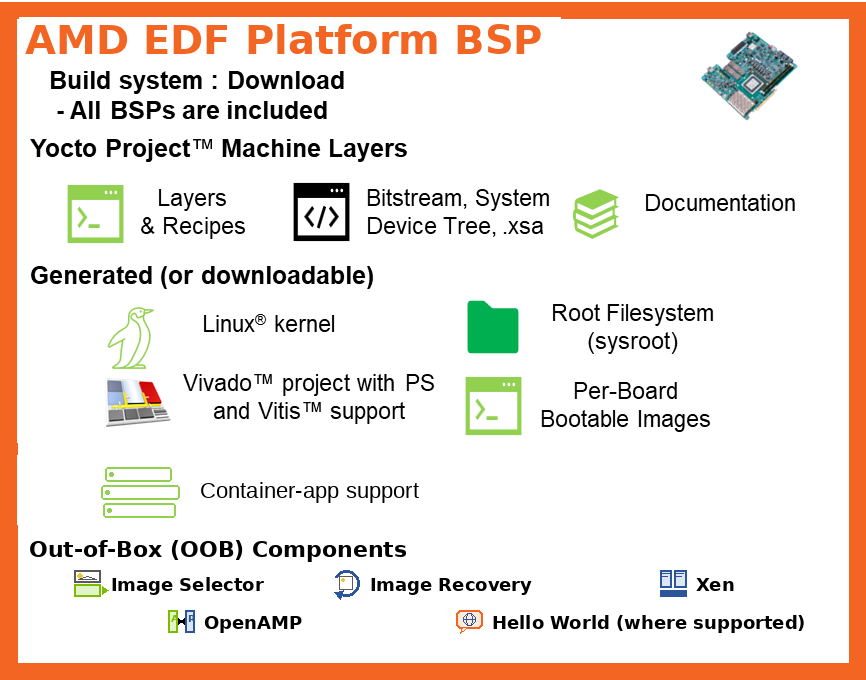
AMD EDF Platform BSP and prebuilt disk image components overview (Multi-domain machine).
Platform / Multi-domain: This machine includes the Linux images along with OOB components such as Image Selector, Image Recovery, Xen, OpenAMP, and a Hello World PL payload demo (where supported by the board).
Beyond everything provided by the EDF Linux BSP, the Platform BSP also adds:
packagegroup-openamp– OpenAMP (remoteproc + RPMsg) and libmetal user-space and kernel support for APU-to-RPU communication, plus the OpenAMP demo firmware set (*-openamp-fw-examples) for the RPUpackagegroup-xen– the Xen hypervisor and Dom0 tooling, plus the systemd-boot EDF Xen entry (installed bysystemd-bootconf-edfwhenxenis inDISTRO_FEATURES)Domain YAML overlays that declare the RPU execution domains and the shared memory regions used by inter-processor communication (see Domain Configuration Impact on the EDF BSPs for how the domain selection drives the resulting BSP)
OOB component set bundled by the multi-domain machines: Image Selector, Image Recovery, Xen, OpenAMP, and a Hello World PL payload demo (where supported by the board)
For the prebuilt multi-domain machine names (for example
MACHINE=versal-2ve-2vm-vek385-revb-multidomain for VEK385 RevB)
and the OOB container, Image-Recovery, OpenAMP, Xen, and
Hello World support matrix, see
List of Yocto prebuilt Machine Names for Supported AMD Evaluation Boards.
Note
The EDF Boot Firmware (image selector with OSPI recovery and Linux utilities) is provided for the evaluation boards that support Multi-stage Boot. See the Packaged BSP for AMD Evaluation Boards table below.
Persona-Based Development Flows
AMD EDF takes a unified and open-source approach with pathways to production with relevant additional work by end users or third-party vendors, enabled by an industry-standard tools flow.
A curated evaluation board experience supports rapid platform exploration and easier development paths—but with support for all device features and boot flows to support custom development.
The experience and development flows are based on common specifications and the following stages or user personas:
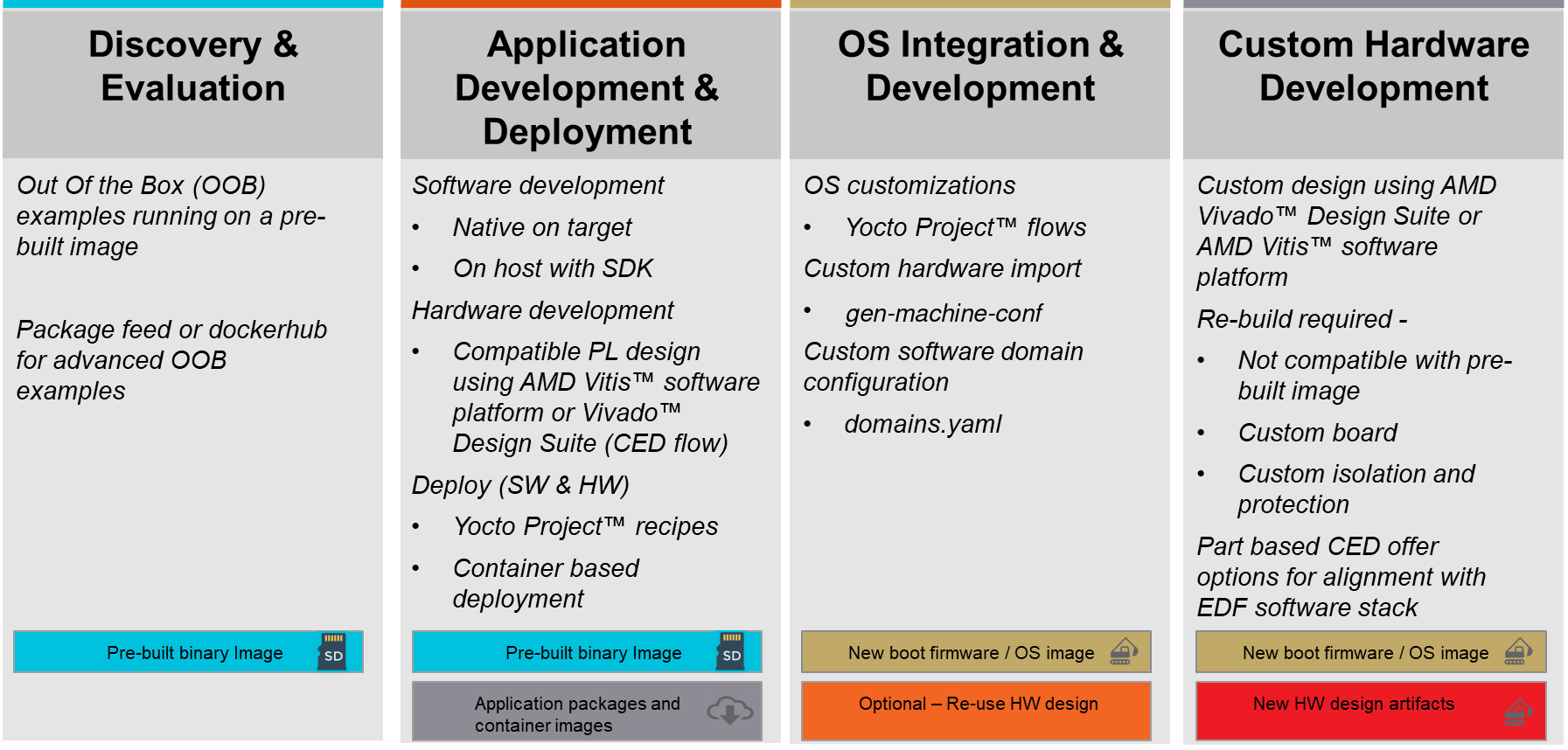
The Development Flow pages (high-level information) and the Getting Started pages (walk-through style tutorials) are split into the personas shown in the preceding diagram.
Key components and features of the framework
Development flow support - Leveraging prebuilt images to reduce re-build cycles
AMD Vivado Design Suite CED-based hardware designs using a common embedded platform starting point
Enables Segmented Configuration based workflows - Run compatible PL designs on the live system using the prebuilt disk images.
Support for AMD Vitis software platforms
SDK for cross platform development
Run Vitis accelerators on the prebuilt live system through Segmented Configuration using the prebuilt disk images
Support for on-target development
Compilers and tool chains available
Walk through tutorials and examples for packaging and deployment inside of Yocto Project build – Application Deployment Using Yocto Recipes
Common base hardware design - Common Specifications
Processing System (PS) minimal specification - Common Specifications
Common boot architecture - Common Specifications
Default - Multi-stage boot using Segmented Configuration on supported devices
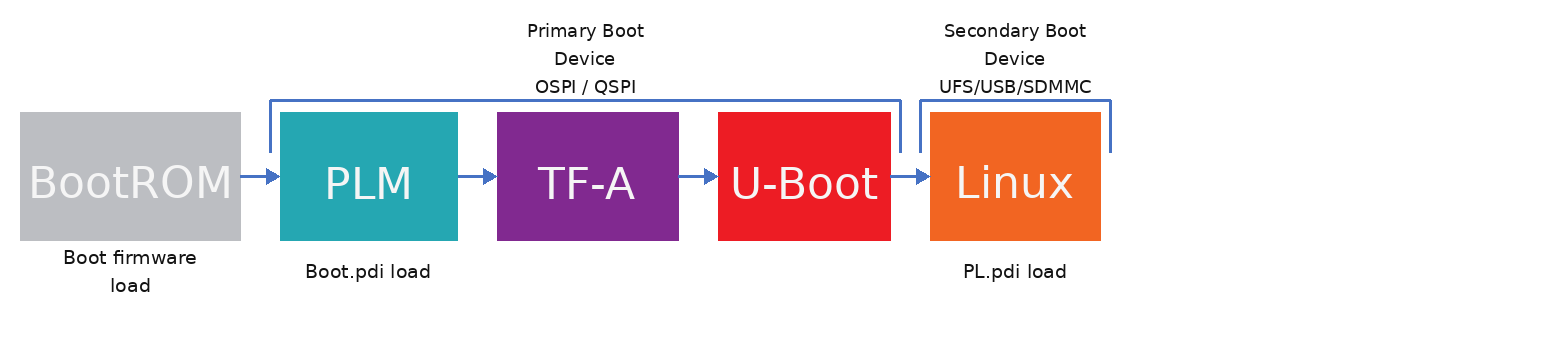
Default multi-stage PDI boot flow used by AMD EDF Versal BSPs.
System memory map specification - Common Specifications
Common Linux kernel configurations and root FS - Common Specifications
Next Steps
The following sub sections provide walk through tutorials, and more details on the flows, architecture, and specification.
We recommend starting with the Development flow pages to get an overview, and then moving to the Getting Started pages, which walk you through booting a prebuilt image on your board.
-
Start here! - High-level introductions to the supported and recommended development flows for hardware and embedded software development.
-
How to get your evaluation board booted to Linux using EDF, and paths to explore further.
-
Specification and architecture information that is applicable to all supported evaluation boards and custom development flows.
Device specific specifications and information
Further to the common specifications, specifications that are specific to device families, series, or portfolios.
Board specific specifications and information
Further to the device-specific specifications, evaluation board specifications including pinout, interfaces, and memory map implementation.
-
General reference links and common acronyms.
-
Download links, release notes, and know issues for AMD EDF releases.
Device and Evaluation Board Support Table
All AMD adaptive SoC and FPGA products are supported by EDF.
Packaged BSP for AMD evaluation boards. See below for current list and additional evaluation boards being added in future releases.
All AMD adaptive SoC and FPGA products through the custom board flow: Vivado Design Suite Project (.xsa) to Yocto Project based build using EDF Linux OS.
Packaged BSP for AMD Evaluation Boards
AMD Evaluation Board |
EDF Linux BSP |
Default Boot Flow |
|---|---|---|
VEK385 RevA/B |
Supported from v25.05 |
Multi-stage boot with deferred PL load |
VEK280 |
Supported from v25.05.1 |
Single-stage boot from SD card with deferred PL load |
VCK190 |
Supported from v25.05.1 |
Single-stage boot from SD card with deferred PL load |
ZCU104 |
Supported from v25.05 |
Single-stage boot from SD card with deferred PL load |
ZCU111 |
Supported from v25.05 |
Single-stage boot from SD card with deferred PL load |
ZCU106 |
Supported from v25.11 |
Single-stage boot from SD card with deferred PL load |
ZCU102 |
Supported from v25.11 |
Single-stage boot from SD card with deferred PL load |
VPK120 |
Supported from v25.11 |
Single-stage boot from SD card with deferred PL load |
VMK180 |
Supported from v25.11 |
Single-stage boot from SD card with deferred PL load |
VPK180 |
Supported from v26.06 |
Single-stage boot from SD card with deferred PL load (QEMU supported; MicroBlaze PMC/PSM multiconfig) |
VMK365 |
Supported from v26.06 |
Single-stage boot from SD card with deferred PL load (Versal 2VE/2VM) |
ZC706 |
Supported from v26.06 |
Single-stage boot from SD card with deferred PL load (FSBL multiconfig; QEMU supported) |