Zephyr Getting Started Guide
This page contains information about how to configure, build, and run Zephyr on supported processors. Instructions are provided for creating a Vivado project, setting up the Zephyr environment, building applications, and running tests.
Introduction
Zephyr support is provided for processors and peripherals, with each release adding or extending support.
The AMD Zephyr repo is available at: https://github.com/Xilinx/zephyr-amd.git
The current Zephyr flow is under development and is being upstreamed. The flow is, therefore, subject to change in subsequent releases.
Supported Processors
Consult the Zephyr Processor Support page for more information.
Supported Peripherals
Consult the Zephyr - Peripheral Support page for more information.
Zephyr RTOS
The Zephyr RTOS consists of the Zephyr kernel, an architecture-specific porting layer, device drivers, various subsystems, and the Zephyr test framework.
Any new hardware is ported to Zephyr based on the hierarchical abstractions (boards, SoC, etc.). Refer to https://docs.zephyrproject.org/latest/hardware/porting/index.html.
A Zephyr distribution comes with west, a command-line-based build
environment which AMD uses.
Using AMD Zephyr
This section describes how to set up a Zephyr environment and how to build test applications for a hardware design.
How to Set Up the Zephyr Environment
Follow the steps mentioned in the Zephyr 3.7.0 Getting Started Guide up to and including installing the Zephyr SDK
Next complete these steps to replace the upstream Zephyr repo with the AMD clone. As AMD upstreams its work, this step diminishes in importance and is expected to be removed.
$ cd <local path>/zephyrproject/
$ mv zephyr zephyr.upstream
$ git clone https://github.com/Xilinx/zephyr-amd.git  -b xilinx_v2026.1 zephyr
$ west update
$ cd zephyr
$ west lopper-install
The Zephyr environment is now ready to build applications, kernel tests, or both.
Creating a Vivado Project
To make sure your hardware design is compatible with the current release of the zephyr-amd repo, it must consist of a supported processor and accompanying supported peripherals. Users can choose to create their own hardware design or leverage Vivado examples. AMD Vivado offers preset design examples for various evaluation boards. Each embedded hardware design offers a subsystem that can be targeted for the real-time and microcontroller configurations. As of now, Zephyr is supported only for the real-time configuration.
After finalizing your design and exporting the XSA file, you can begin integrating with Zephyr.
Generate a SDT Using XSA
Refer to the
AMD Technical Information Portal
for the steps to generate a System Device Tree (SDT) using a hardware design
XSA. The SDT is mandatory to generate a Zephyr device tree and
Kconfig for targeted hardware designs using the west lopper-command.
Use the 2026.1 version of xsct (a different path to Vivado is
sometimes needed to point to a local installation). Replace
output_dir with the directory
where you want the SDT to be output, and design_1_wrapper.xsa with
the name of the XSA file exported above.
$ . /tools/Xilinx/Vivado/2026.1/settings64.sh
$ xsct -eval "sdtgen set_dt_param -dir output_dir -xsa design_1_wrapper.xsa ; sdtgen generate_sdt"
Setting Up the Zephyr Repository for a Targeted Hardware Design
Because each FPGA based hardware design can have different hardware
configurations, users need to update the device tree
(boards/amd/<board_name>/<board_name>.dts) based on the targeted hardware
design. The base address and interrupt IDs might be different from what is
configured in the default devicetree. Users need to either update .dts and
kconfigs (soc/xlnx/<board_name>/Kconfig, soc/xlnx/kconfig.defconfig)
manually based on the hardware design or they can use west lopper-command to
set it up using lopper. Subsequent sections provide steps for setting up the
DTS for a targeted hardware design using west lopper-command.
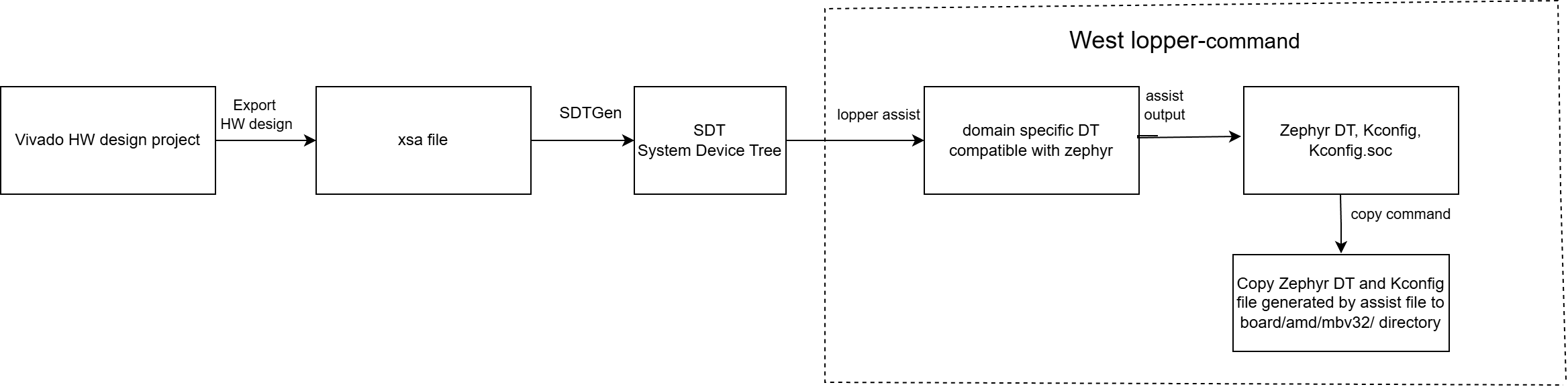
Generating Zephyr device tree and Kconfig with west lopper-command.
The input to the lopper-command is the system device tree, the processor
instance name, and the targeted Zephyr repository path. The steps to call
lopper-command follow. Change the path to the system-top.dts
file to match the directory used for xsct above and
processor_instance_name to match the name of the processor in
your design you are targeting for Zephyr.
$ LOPPER_DTC_FLAGS="-b 0 -@" west lopper-command -p processor_instance_name -s output_dir/system-top.dts -w <local path>/zephyrproject/zephyr
For example:
$ LOPPER_DTC_FLAGS="-b 0 -@" west lopper-command -p cortexr52_0 -s design_1_wrapper/system-top.dts -w ~/zephyrproject/zephyr
After invoking the lopper-command, the Zephyr environment is ready to
build kernel tests/apps for the targeted hardware design. Build an example
test by replacing board with your target in the following commands:
$ cd zephyr
$ west build -p -b board tests/misc/test_build/
The executable is generated at the following location:
<zephyr repository path>/build/zephyr/zephyr.elf
The executable generated after the build command contains the application as well as the kernel.
The expected output for the example application follows:
*** Booting Zephyr OS build 43e80ea32443 ***
threadA: Hello World from arm!
threadB: Hello World from arm!
threadA: Hello World from arm!
threadB: Hello World from arm!
Zephyr Test Runner (Twister):
Zephyr provides some built-in tools for testing. Twister is one of the CLI based tool used to execute/build the tests. It scans for sets of test applications in the Zephyr repository applicable for the targeted platform and builds/executes those tests. It also generates a test report for reference. More details can be found at https://docs.zephyrproject.org/latest/develop/test/twister.html.
Running Twister on AMD Devices
Use the following commands to run twister for an AMD based hardware design:
Change to the Zephyr workspace:
$ cd <zephyr_env_path>/zephyrproject/zephyr
To run a specific test:
$ west flash --runner xsdb --elf-file <path>/zephyr/zephyr.elf --bitstream <path>/system.bit
To run all the tests:
$ ./scripts/twister -p <board_name> --west-runner xsdb --device-testing --device-serial /dev/ttyUSB0 --west-flash="--bitstream=<path>/system.bit"
To run Twister on a customized hardware design you must first configure the Zephyr repository for that design.
Expected Results
We observed a small number of failures, and per our initial analysis these failures are non-critical. Users can also expect some non-critical failures for customized hardware designs.