EDF Common Specifications
This page contains specification and architecture information for the AMD Embedded Development Framework (EDF), which is applicable to all supported evaluation boards and custom development flows.
The sections that follow describe specifications implemented across multiple platforms and device families. Some common specifications can be superseded based on device or evaluation board feature sets. See the device and board specific specification pages for more information.
Boot Architecture for AMD Evaluation boards
For AMD evaluation boards, a common boot architecture is used, implemented in the BSPs and prebuilt disk images provided.
The boot architecture includes support for Arm SystemReady IR and Trusted Firmware-A Platform Security Architecture Firmware Update (PSA FWU).
Platforms are not certified; this is a reference implementation that can be used on a pathway to certification.
For non-secure boot-flow details, refer to the following Technical Reference Manuals:
Versal Gen 1: Versal Adaptive SoC.
Versal Gen 2: Versal AI Edge Series Gen 2.
Multi-Stage Boot with Deferred PL Load* - Default Boot Architecture
This is the default boot flow for BSP and prebuilt images for AMD evaluation boards, supporting the latest AMD adaptive SoC and FPGA devices and AMD EDF development flows.
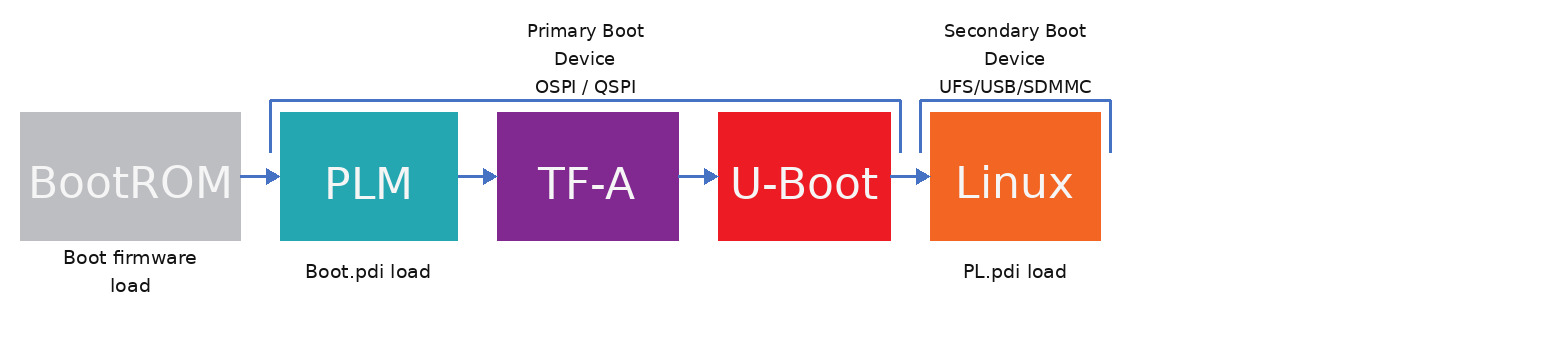
Default multi-stage boot flow used by AMD EDF Versal BSPs and prebuilt images: primary boot from QSPI/OSPI followed by Linux load from a secondary device, with PL load deferred to Linux user space.
Stage 1 - Primary boot device: OSPI / QSPI - AMD EDF boot firmware with image select and recovery
AMD EDF boot firmware - See Common Specifications for detailed information
TF-A runs and loads U-Boot using the device-specific device tree (identified from EEPROM)
U-boot loads and boots a Linux disk image from the secondary boot device
Stage 2 - Secondary boot device: SDMMC / USB / UFS - Common Linux disk image
The Linux disk image boots to a console - programmable logic (PL) not loaded
PL can be loaded from the Linux user space -
The Linux disk image contains PL firmware payloads
See Discovery and Evaluation AMD Versal Device Portfolio for commands to load, re-load, or automate loading of PL payloads
Single-Stage Boot with Deferred PL Load - Optional Boot Flow
A single-stage boot flow is also supported and is used for some AMD EDF Linux BSPs and prebuilt Linux disk images. This flow is Versal-specific and is used by Versal Gen 1 and Gen 2 Linux BSPs that boot from a single primary device.
Zynq UltraScale+ MPSoC uses a different boot sequence (BootROM, FSBL, PMU firmware, ATF, U-Boot, Linux). For ZU+ details, refer to the Zynq UltraScale+ Devices TRM.
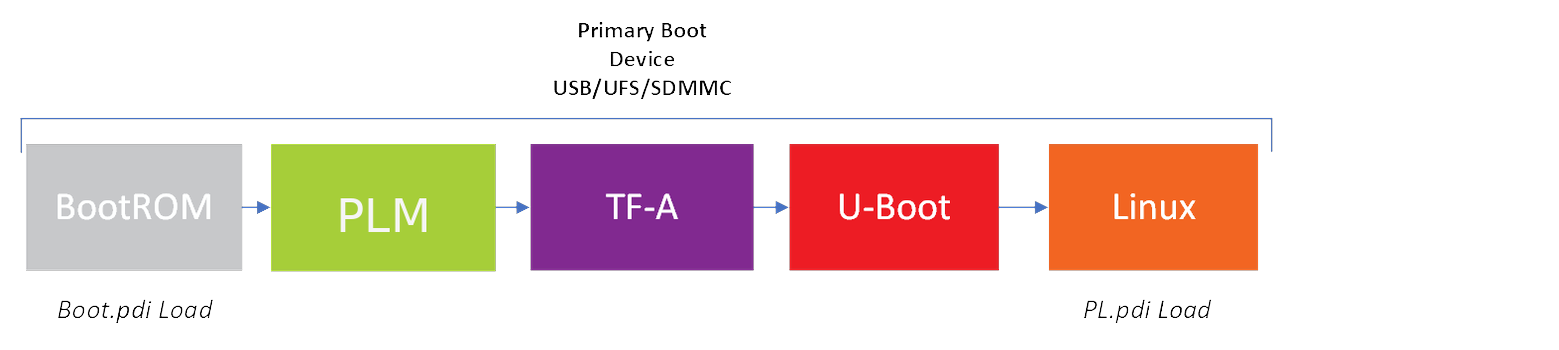
Optional single-stage boot flow used by select AMD EDF Versal BSPs: BootROM loads the PLM, the PLM loads TF-A, TF-A loads U-Boot, and U-Boot boots Linux from the primary boot device with PL load deferred to Linux user space.
Stage 1 - Primary boot device: SD card / UFS / USB
BootROM loads the PLM from the primary boot device, and the PLM loads
Boot.pdi.TF-A is loaded and runs; TF-A loads U-Boot using a board-specific device tree.
U-Boot runs, and then boots the Linux disk image (Common** Linux disk image**) from the primary boot device using a board-specific device tree
The Linux disk image boots to a console - PL not loaded
PL can be loaded from the Linux user space -
The Linux disk image contains PL firmware payloads
See Discovery and Evaluation AMD Versal Device Portfolio for commands to load, re-load, or automate loading of PL payloads
*AMD adaptive SoCs and FPGA with support for Segmented Configuration or deferred PL load: AMD Versal portfolio, AMD Zynq UltraScale+ MPSoC.
** Common Linux disk image across compatible AMD adaptive SoC and FPGA, typically across device series.
AMD EDF supports all boot and configuration options available on AMD adaptive SoCs and FPGAs
Single-stage boot flows (for example, SDCARD), multi-stage boot flows (for example, QSPI / OSPI / SDCARD / UFS)
Segmented Configuration with delayed PL load
Monolithic (or flat) configuration (PL load at PS boot time - Single bitstream / PDI)
Custom boot architectures using alternative boot modes can be created, stored, and built as custom image recipes, allowing end users to reflect their specific platform requirements. See Creating a Custom Image (Link and section needed).
Initial Programming of Primary Boot Device
System Controller enabled evaluation boards
System Controller can be used to program the OSPI / QSPI flash used by the target device.
See System Controller WIKI evaluation board user guide for more information https://xilinx-wiki.atlassian.net/wiki/x/AYCGhw
AMD Vivado Design Suite can also be used to program OSPI / QSPI flash used by the target device, see the relevant Vivado documentation or evaluation board user guide for more information.
Boot Firmware Overview
The AMD EDF boot firmware is an evolution of the Image Selector Application used on AMD Kria SoM, and is normally pre-loaded on AMD evaluation boards, but may need to be manually loaded for Early Access (EA) valuation boards or evaluation boards supported by AMD-EDF but which were originally released prior to 2025.
The boot firmware includes support for:
Multiple boot images (boot.pdi)
Fallback and recovery using an A-B scheme by default.
Arm SystemReady IR and Trusted Firmware-A Platform Security Architecture Firmware Update, also known as PSA FWU
Platforms are not certified; this is a reference implementation that can be used on a pathway to certification.
Flash management from Linux user space
The main components within the AMD EDF Boot firmware are outlined below
Image Selector Application
The Image Selector application boots on a cold reset of the device (POR_B) and acts as a platform controller selecting the “A” or “B” boot image from the firmware store implemented elsewhere in the primary boot non volatile memory device.
In the context of the Platform Security Firmware Update for the A-profile Arm Architecture specification, this is represented by the “BMC/Immutable” component of the boot flow shown in the figure below.
The Image Selectors behavior is data driven, based on the information available in the metadata fields of its primary boot device.
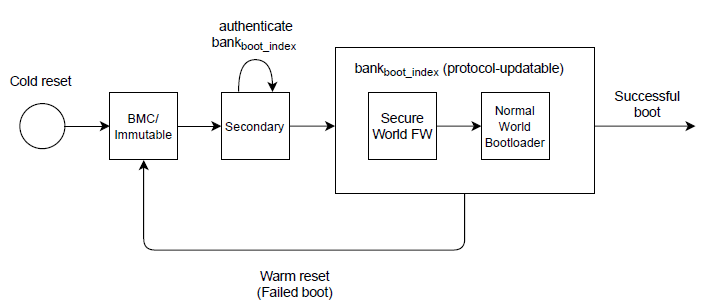
The Image Selector app also implements a function for initiating the Image Recovery application, which you can initiate through physical interaction with the platform at time of POR_B. This is implemented with a MIO-GPIO-attached pushbutton where available.
The Image Selector in Versal devices stores soft reset data such as SystemReady-DT boot counter in the PMC Persistent Global General Storage registers. These “user” facing registers are documented at this public Wiki.
The Image Selector uses PERS_GLOB_GEN_STORAGE4 with the following SystemReady-DT information consolidated within the register, aligned by byte.
MSB = “Magic” number - Unique value to help validate correct register read, Value = 0x1D
MSB-1 = Boot Counter
MSB-2 = Image Selected, Value = 0x0, “A” 0x1 “B”
MSB-3 = Rollback Counter
Image Recovery Application
The Image Recovery application simplifies the process for users to update the primary and secondary boot devices without requiring AMD-Xilinx specific tools. It supports the “Recovery Mode” called out in the Arm Platform Security Firmware Update for the A-profile Arm Architecture specification, and supports update of “A” “B” and the corresponding “Metadata” fields in the primary boot memory device.
The Image Recovery Application is a Linux-based web application that runs on the target and supports
Updating boot firmware (OSPI / QSPI) content and boot slots (A / B)
Updating disk images on secondary boot devices (SD, USB, UFS)
The web interface operates using an IP address (for example, 192.0.2.21:8080), which is displayed on the UART console output of the target when image recovery boot mode is triggered
Image recovery boot mode is triggered by pressing the recovery mode push button on the Evaluation board
It can also be triggered through a register write from u-boot or through XRDB (JTAG) for boards without a recovery mode button.
For detailed instructions on launching the Image Recovery shell, using the web interface, and updating WIC images via Ethernet or USB, see Flash WIC Image to UFS Using Image Recovery Web Tool.
See the boot firmware Linux utility for information on how to update and manage the images in the boot flash (Primary Boot device) from Linux user space (normal runtime image).
Boot Firmware Image Update Utility (fwupdate Tool)
The image update utility is a Linux utility integrated within the Linux OS capable of interfacing with the primary boot device (QSPI/OSPI) and doing the following:
Updating the non-active A or B partition, modifying the necessary meta-data, and preparing the system for a reboot in which it switches to the new firmware (FW) image (boot.pdi). This functionality is referred to as the “Update Client” in the Arm FW Update guide.
Inquiring on the status of the boot device FW contents - To follow
The Boot Firmware Image Update Utility checks the GUID of a given FW before attempting updates to ensure that the FW capsule is aligned with the hardware (HW) target it is about to attempt an update on. The board GUID is located in the Board-ID EEPROM on AMD Evaluation boards.
fwupdtool Tool
The Linux firmware update system, fwupdtool, uses .cab files as
standard containers for firmware update metadata and binaries. These CAB
files are meticulously signed and organized, enabling fwupdtool to verify
their integrity and apply updates securely.
Pre-requisites
The system must be running EDF boot firmware and be configured for multi-state boot
The secondary boot device must be running an image based on EDF, with EFI partitions present
To use the first partition of an SD/USB drive with fwupdtool, make sure that it is formatted as an EFI type.
amd-edf:~$ sudo fdisk -l
...
Disk /dev/sdb: 59.48 GiB, 63864569856 bytes, 124735488 sectors
Disk model: Ultra HS-COMBO
Units: sectors of 1 * 512 = 512 bytes
Sector size (logical/physical): 512 bytes / 512 bytes
I/O size (minimum/optimal): 512 bytes / 512 bytes
Disklabel type: gpt
Disk identifier: 00000000-0000-0000-0000-00004D9B9EF0

Device        Start      End  Sectors  Size Type
/dev/sdb1        64  1048639  1048576  512M EFI System
/dev/sdb2   1048640  2097215  1048576  512M Linux filesystem
/dev/sdb3   2097216 16777279 14680064    7G Linux root (ARM-64)
/dev/sdb4  16777280 18874431  2097152    1G Microsoft basic data
fwupdtool get-devices
The fwupdtool get-devices command is used to display all devices
recognized by fwupdtool on the host system that are eligible for firmware
updates.
It prints device metadata, such as:
Device name & GUID
Firmware version
Vendor
Status (for example, updatable, not updatable)
Flags (for example, internal, requires reboot)
fwupdtool get-devices output
amd-edf:/home/amd-edf# FWUPD_UEFI_ESP_PATH=/efi fwupdtool get-devices
Loading?                 [************************************ ]
WARNING: This package has not been validated, it may not work properly.
amd AMD Versal VEK385 revA
?
??Bank A Space:
?     Device ID:          801b063a5daf54ed4763bdf05365be2960f635b4
?     Summary:            Memory Technology Device
?     Vendor:             DMI:amd
?     GUIDs:              bd5d37df-4d51-5d5e-a085-514ab4dcf384 ? MTD\NAME_Bank-A-Space
?                         dc173611-e6a6-551b-a303-adbd0d9fc51d ? MTD\VENDOR_amd&NAME_Bank-A-Space
?                         ccfc3bb3-7a99-511f-b8a1-e1aedb51b47d ? MTD\VENDOR_amd&PRODUCT_AMD-Versal-VEK385-revA&NAME_Bank-A-Space
?     Device Flags:       ? Internal device
?                         ? Updatable
?                         ? Needs a reboot after installation
?                         ? Cryptographic hash verification is available
?
??Bank B Space:
?     Device ID:          f93c02c7eef61e91938930caed8c9eb899006969
?     Summary:            Memory Technology Device
?     Vendor:             DMI:amd
?     GUIDs:              c06436f3-e1e7-55a5-9567-ec3015ee6c9a ? MTD\NAME_Bank-B-Space
?                         b10adb7f-d896-5c8e-8bef-4467f70cf2fb ? MTD\VENDOR_amd&NAME_Bank-B-Space
?                         6b8a8aaf-f23b-5dd7-9804-26aeb47d704f ? MTD\VENDOR_amd&PRODUCT_AMD-Versal-VEK385-revA&NAME_Bank-B-Space
?     Device Flags:       ? Internal device
?                         ? Updatable
?                         ? Needs a reboot after installation
?                         ? Cryptographic hash verification is available
?
??Image Recovery:
?     Device ID:          7c6b1fbcd3e4899c8719ed709bbce0200f44413f
?     Summary:            Memory Technology Device
?     Vendor:             DMI:amd

...
...

??User Scratchpad:
      Device ID:          bd0d9e0bd371a2f3caa6d12313b6cc72e7263963
      Summary:            Memory Technology Device
      Vendor:             DMI:amd
      GUIDs:              0c4aa683-fd32-556c-8e14-422a5dbeb272 ? MTD\NAME_User-Scratchpad
                          09e0e3e8-10f4-5f7e-a804-cc57f00d9975 ? MTD\VENDOR_amd&NAME_User-Scratchpad
                          0480d7e9-2829-5f81-ab28-8006997ce1e3 ? MTD\VENDOR_amd&PRODUCT_AMD-Versal-VEK385-revA&NAME_User-Scratchpad
      Device Flags:       ? Internal device
                          ? Updatable
                          ? Needs a reboot after installation
                          ? Cryptographic hash verification is available

amd-edf:/home/amd-edf#
Generating Capsule Files (Cab) for Use With fwupdate
Capsule files for use with fwupdate are generated from the EDF Yocto
Project based build environment using the uefi-capsule recipe:
yocto/build $ MACHINE=versal-2ve-2vm-vek385-sdt-seg bitbake uefi-capsule
Note
The uefi-capsule recipe runs only when the target machine sets
PRODUCT_GUID, PRODUCT_NAME, and PRODUCT_URL in its machine
configuration. Machine configs for the supported boards in this release
set these already: VEK280, VEK385 (revA and revB), VRK160, and VRK165.
The recipe also packages an AppStream firmware.metainfo.xml for the cabinet
and validates it at build time with appstreamcli validate --pedantic;
validation failures are surfaced as bitbake warnings so
LVFS-rejection issues
can be caught before submission.
The build deploys the following artifacts under
${TMPDIR}/deploy/images/<machine>/:
Artifact |
Purpose |
|---|---|
|
FWU metadata blob for U-Boot A/B bank management; consumed by
|
|
UEFI capsule wrapping |
|
Acceptance/commit capsule used after a successful trial boot (see Accepting the Update and Existing Trial State). |
|
LVFS / fwupd cabinet packaging the signed capsule
( |
|
Friendly symlink to the |
Installing the CAB Files With fwupdate
The CAB file is installed with the fwupdate tool
amd-edf:/home/amd-edf# FWUPD_UEFI_ESP_PATH=/efi fwupdtool install uefi-capsules-v2/uefi-capsule-versal-2ve-2vm-vek385-sdt-seg-bootfw-firmware.cab
Loading?                 [***************                    ]
WARNING: This package has not been validated, it may not work properly.
Waiting?                 [***********************************]
An update requires a reboot to complete. Restart now? [y|N]: y
During a reboot you can view the logs of the capsule file being applied, and the switch to the Trail state.
Capsule-update reboot log
U-Boot 2025.01-gaedc0ad8e17f-dirty (Jul 01 2025 - 13:49:05 +0000)

CPU:   Versal Gen 2
Silicon: v1.0
Chip:  v1.0
Model: AMD Versal VEK385 revA
DRAM:  2 GiB (effective 10 GiB)

...
...

##################################
Applying capsule fwupd-cb27e54d-8f3a-4c77-8a72-1c76d2d4e938.cap succeeded.
Reboot after firmware update.
INFO:    BL31: Early console setup
INFO:    Successfully initialized new runtime console
NOTICE:  TF-A running on Silicon v0.0, RTL v8.6, PS v8.6, PMC v8.6
INFO:    CPU Revision = 0x3
INFO:    cpu_clock = 100000000Hz, uart_clock = 100000000Hz
NOTICE:  BL31: Executing from 0xbbf00000
NOTICE:  BL31: Secure code at 0x1800000
NOTICE:  BL31: Non secure code at 0x40000000
NOTICE:  BL31: v2.12.0(debug):xlnx_rebase_v2.12_2025.1-dirty
NOTICE:  BL31: Built : 07:04:54, Apr 24 2025
INFO:    GICv3 without legacy support detected.
INFO:    ARM GICv3 driver initialized in EL3
INFO:    Maximum SPI INTID supported: 543
INFO:    SCMI: Server initialized
INFO:    BL31: Initializing runtime services
INFO:    BL31: cortex_a78_ae: CPU workaround for CVE 2024_5660 was applied
INFO:    BL31: cortex_a78_ae: CPU workaround for CVE 2022_23960 was applied
INFO:    BL31: Preparing for EL3 exit to normal world
INFO:    Entry point address = 0x40000000
INFO:    SPSR = 0x3c9


U-Boot 2025.01-gaedc0ad8e17f-dirty (Jul 01 2025 - 13:49:05 +0000)

CPU:   Versal Gen 2
Silicon: v1.0
Chip:  v1.0
Model: AMD Versal VEK385 revA
DRAM:  2 GiB (effective 10 GiB)

...
...

Warning: ethernet@ed920000 (eth1) using random MAC address - 12:81:8b:f8:75:77
, eth1: ethernet@ed920000
Missing TPMv2 device for EFI_TCG_PROTOCOL
Missing RNG device for EFI_RNG_PROTOCOL
Trial State count: attempt 1 out of 3
Accepting the Update and Existing Trial State
If boot is successful, accept the capsule update, exit the Trial State, and initiate a reboot
amd-edf:/home/amd-edf# ls uefi-capsules-v2/
uefi-capsule-versal-2ve-2vm-vek385-sdt-seg-acceptance-capsule.bin  uefi-capsule-versal-2ve-2vm-vek385-sdt-seg-capsule.bin
uefi-capsule-versal-2ve-2vm-vek385-sdt-seg-bootfw-firmware.cab
amd-edf:/home/amd-edf#
amd-edf:/home/amd-edf#
amd-edf:/home/amd-edf# cp uefi-capsules-v2/uefi-capsule-versal-2ve-2vm-vek385-sdt-seg-acceptance-capsule.bin /efi/EFI/UpdateCapsule/
amd-edf:/home/amd-edf#
amd-edf:/home/amd-edf# sudo reboot
During the reboot, you can view the logs of the acceptance capsule file being applied and the automatic reboot.
Device 2: (0:2) Vendor: MICRON Prod.: MT064GBCAV1U31AA Rev: 0302
            Type: Hard Disk
            Capacity: 4096.0 MB = 4.0 GB (1048576 x 4096)
Applying capsule uefi-capsule-versal-2ve-2vm-vek385-sdt-seg-acceptance-capsule.bin succeeded.
Reboot after firmware update.
INFO:    BL31: Early console setup
Image Selector Output at Boot Time (EDF Boot Firmware)
The Image Selector log file displays the status at boot time
active_index: 0 - indicates bank number A, 1 - indicates bank number B
bank_state : FC - Accepted, FE - Not accepted
Image Type Guid: CB27E54D-8F3A-4C77-8A72-1C76D2D4E938 GUID specific to board
ImageSelector Version: 2.0
Boot Count: 1
MaxBootCnt: 4
Rollback counter: 1
Mdata.crc32: D7F6B374
Mdata.version: 2
Mdata.active_index: 0
Mdata.previous_active_index: 1
Mdata.metadata_size: 7C
Mdata.desc_offset: 20
Mdata.bank_state[0]: FC
Mdata.bank_state[1]: FC
Mdata.bank_state[2]: FF
Mdata.bank_state[3]: FF
Mdata.fw_desc.num_banks: 2
Mdata.fw_desc.num_images: 1
Mdata.fw_desc.img_entry_size: 50
Mdata.fw_desc.bank_info_entry_size: 18
Image Type Guid: CB27E54D-8F3A-4C77-8A72-1C76D2D4E938
Location Guid: D7CE8A58-CE2C-11ED-81CD-D324E93AC223
Image Guid: 7E1B930B-F6B2-EF11-8565-EB65D140066B
Image Acceptance: yes
Image Guid: 00D84312-F6B2-EF11-8F4F-8BDDC3AA326D
Image Acceptance: yes

Active bank image version: amd-edf-versal-2ve-2vm-vek385-sdt-seg-bootfw-v25.05.1+release-d5858d
The PLM Output at Boot Time
The PLM UART output also shows status and which image bank (A/B) is in use
[0.154]BOOTMODE: 0x8, MULTIBOOT: 0x2B0     # bank A

[0.154]BOOTMODE: 0x8, MULTIBOOT: 0x10F8    # bank B
U-boot Output at Boot Time
The u-boot UART output also shows Image status
versal2> fw
        FWU Metadata
crc32: 0xa9b9eadb
version: 0x2
size: 0x7c
active_index: 0x0
previous_active_index: 0x1
bank_state[0]: 0xfe
bank_state[1]: 0xfc
bank_state[2]: 0xff
bank_state[3]: 0xff
        Image Info

Image Type Guid: CB27E54D-8F3A-4C77-8A72-1C76D2D4E938
Location Guid: D7CE8A58-CE2C-11ED-81CD-D324E93AC223
Image Guid:  7E1B930B-F6B2-EF11-8565-EB65D140066B
Image Acceptance: no
Image Guid:  00D84312-F6B2-EF11-8F4F-8BDDC3AA326D
Image Acceptance: yes
versal2>
OSPI/QSPI Memory Layout - Common Specification
The OSPI Memory Map bellow illustrates the high-level structure of the memory layout specifically designed to be consistent across multiple memory devices and AMD Evaluation boards.
Each region in the memory map has a designated functionality, as indicated in the “R or R/W” column. This column depicts whether the sector is read-only (R) or both read and write (R/W). Notably, some platforms lock read-only sectors using the hardware-level lock feature built into QSPI/OSPI systems.
By providing a unified framework for memory layouts, the OSPI (Flash) Memory Map simplifies the process of adapting to different memory devices and ensures a seamless experience across multiple platforms.
Offset |
Description |
Size (# sectors) |
R or R/W |
|---|---|---|---|
0x0 |
Image Selector App |
1 |
R |
1 * (sector boundary) |
Image Selector App - Backup |
1 |
R |
+1 sector |
U-Boot variables - Bank A |
1 sector |
R/W |
+1 sector |
U-Boot variables - Bank A |
1 sector |
R/W |
Remaining Device |
User Area |
R/W |
|
X * (sector boundary) |
Image Recovery App |
Size of Image Recovery Linux |
R |
Y * (sector boundary) |
Bank “A” Image Directory |
Accommodate max device image size |
R/W |
Z * (sector boundary) |
Bank “B” Image Directory |
Accommodate max device image size |
R/W |
Image Selector Revision |
1 |
R |
|
Image Recovery Revision |
1 sector |
R |
|
FW Update Metadata |
1 sector |
R/W |
|
FW Update Metadata - Backup |
1 sector |
R/W |
Offsets of the primary boot device are aligned to device sector offsets, to support corresponding erase and lock functions which occur in the physical memory device at sector boundaries.
UEFI Variables SPI Partition Layout (AMD Versal OSPI / QSPI)
This section describes the U-Boot UEFI Variables partition layout for AMD Versal platforms using SPI flash memory (OSPI and QSPI). A dedicated 256 KiB partition supports persistent UEFI variable storage.
Device tree overlays define the partition layout with fixed-partition mappings for 2 Gbit (256 MB) OSPI and 512 Mbit (64 MB) QSPI flash devices.
The following tables show the partition layout starting at offset 0x1560000. The first ~22 MiB of each device contains boot firmware and system partitions as described in the OSPI/QSPI Memory Layout - Common Specification section.
OSPI 2 Gbit (256 MB) Memory Map
Partition Name |
Start address |
Size |
Contents |
Access |
|---|---|---|---|---|
U-Boot Storage Variables Backup |
|
128 KiB |
U-Boot environment variables backup |
RW |
U-Boot UEFI Variables |
|
256 KiB |
UEFI variable storage |
RW |
Bank A Space |
|
114 MiB |
Bank A user area |
RW |
U-Boot Variables Bank A |
|
128 KiB |
Bank A environment variables |
RW |
U-Boot Variables Bank A Backup |
|
128 KiB |
Bank A environment backup |
RW |
Bank B Space |
|
114 MiB |
Bank B user area |
RW |
U-Boot Variables Bank B |
|
128 KiB |
Bank B environment variables |
RW |
U-Boot Variables Bank B Backup |
|
128 KiB |
Bank B environment backup |
RW |
Custom Scratchpad |
|
5.75 MiB |
User-defined scratch space |
RW |
QSPI 512 Mbit (64 MB) Memory Map
Partition Name |
Start address |
Size |
Contents |
Access |
|---|---|---|---|---|
U-Boot Storage Variables Backup |
|
128 KiB |
U-Boot environment variables backup |
RW |
U-Boot UEFI Variables |
|
256 KiB |
UEFI variable storage |
RW |
Bank A Space |
|
16 MiB |
Bank A user area |
RW |
U-Boot Variables Bank A |
|
128 KiB |
Bank A environment variables |
RW |
U-Boot Variables Bank A Backup |
|
128 KiB |
Bank A environment backup |
RW |
Bank B Space |
|
16 MiB |
Bank B user area |
RW |
U-Boot Variables Bank B |
|
128 KiB |
Bank B environment variables |
RW |
U-Boot Variables Bank B Backup |
|
128 KiB |
Bank B environment backup |
RW |
Custom Scratchpad |
|
9.75 MiB |
User-defined scratch space |
RW |
Board-ID EEPROM
AMD Evaluation boards with support for AMD-EDF boot flows contain a Board-ID EEPROM, which includes a unique device identifier used for the UEFI Capsule Update GUID firmware identifier or “image type” that is embedded as part of the capsule header.
The following table provides pre-allocation of GUIDs based on target platforms for the AMD-EDF FW alignment:
Board Name |
GUID (16 bytes) |
|---|---|
VEK280 Evaluation Board |
a1f0d8c9-b3a7-4e09-9f25-7c9823b8a6f2 |
VEK385 Evaluation Board |
cb27e54d-8f3a-4c77-8a72-1c76d2d4e938 |
Over the Air (OTA) Firmware (FW) Deployment - to Follow
AMD-EDF also contains support for OTA FW update. New FW update
capsules can be deployed to AMD targets through Linux packages (.deb,
.rpm) aligned with the platforms target Linux distribution. Package names
are aligned with the platform name, and package revision information is updated
and incrementally aligned with the FW image revision to enable “apt update”-like
operations to grab new FW revisions automatically.
EDF v26.06 - AMD Vivado Design Suite 2026.1
This feature follows in a future release of the AMD Embedded Development Framework
Trusted Platform Module (TPM) - To follow
AMD-EDF boot firmware is architected to support the concept and
implementation of measured boot, where a boot time measurement of each
element FW boot time configuration sequence can be stored.
This functionality is due to be added in a future release.
EDF v26.06 - AMD Vivado Design Suite 2026.1
This feature follows in a future release of the AMD Embedded Development Framework
PS Common Minimum Specification
This specification has a strong device specific element, also see the PS sections of Device specific specifications and information
The default PS configuration aligned with the board defines fixed MIO, clocks, and enabling of clock frequencies enabled by the speed grade of the target device.
MIO Controller - All MIO controllers (for example, I2C, SPI) associated with fixed peripherals of the platform are enabled and configured based on the hardware board design.
MIO I/O Configurations - All MIO default I/O controls (for example,. pull-ups, slew rates) are based on the hardware platform design.
Secondary Boot - Set to
None. The Vivado feature is for a PLM PDI load from the secondary device, but in the context of AMD-EDF, the secondary boot device for boot Linux is managed by U-Boot and not PLM.
The minimal requirements for PS connected peripherals and settings are as follows and also reflect minimal peripheral requirements for evaluation boards:
Embedded Common Platform Configurable Example Design (CED)
The embedded common platform CED is mapped to all supported evaluation boards and enforces common settings and PS minimum specifications to provide a unified starting point for platforms, reference designs, and BSP creation. A part based flow uses the same for custom board development.
The CED implements the PS common minimum specification, and other items to support the EDF common boot architecture, using support in the AMD Vivado Design Suite for segmented configuration. This supports creating multiple compatible PL payloads that can be loaded at runtime onto a single initial boot image.
The files needed to build compatible designs are included in the CED package in the AMD Vivado Design Suite installation.
When the CED is mapped to an Evaluation board, the minimum requirements are extended to ensure that all PS enabled IP supported by the evaluation board are supported.
See Board specific specifications and information
CED Hierarchy
The CED flow also includes hierarchy from AMD Vivado Design Suite version 2026.1, and allows users to build alternative configurations or sub-platforms from a single CED. One CED can generate multiple alternative platform configurations or designs with aligned settings, based on user selections.
The following picture tries to show this hierarchy

EDF v26.06 - AMD Vivado Design Suite 2026.1
The supported alternative PL payloads for VEK385 are limited to
Base - Minimal PL (default)
Extensible - Vitis Extensible Platform
Minimal PL Payload (Default)
This PL design is intentionally simplistic; it gives enough functionality to prove the PL is available.
This PL Payload is also shipped as part of the common disk image, and captured as the “default” PL firmware through dfx-mgr during the Linux boot process.
PL Payload content
AXI Block RAM
AXI-GPIO
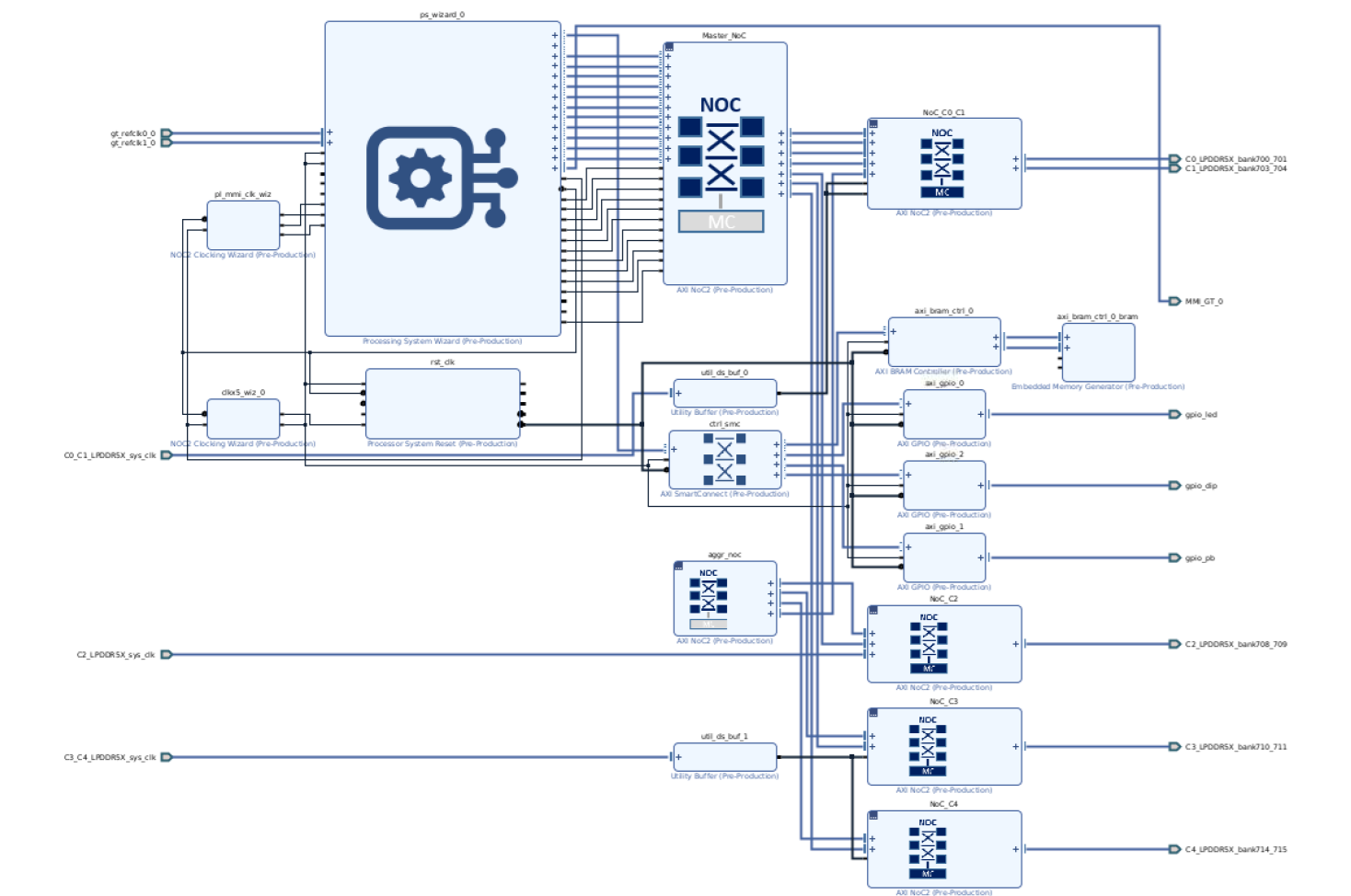
CED 2025.1 example block design with NoC, LPDDR5X, GPIO, and block RAM.
EDF prebuilt Yocto machine definitions
List of Yocto prebuilt Machine Names for Supported AMD Evaluation Boards
Column definitions:
Linux only / Multi-domain- whether the machine builds the Linux-only artifacts or the multi-domain build that also includes the out-of-box (OOB) components (Image Selector, Image Recovery, Xen, OpenAMP, Hello World where supported).OOB container- the OOB container application recipe names bundled by the machine, orNoif none.Image-Recovery- whether the board supports the EDF Image Recovery web app (triggered by the recovery button at POR_B, or via U-Boot / XRDB on boards without a button).OpenAMP- whether RPU OpenAMP demos are included; enable withMACHINE_FEATURES+=openampand add the relevant OpenAMP sample packages in your image.Xen- whether a Xen-enabled platform image / partition is provided; build a Xen image by selecting an EDF Platform WIC image or using the Xen entry in systemd-boot (for example, build targetedf-platform-wic-imagewhere available).Hello world- whether a basic PL payload demo is provided; load by package name withdfx-mgr-client -loadByName <bundle>on the target, or by numeric ID withdfx-mgr-client -load <ID>. Use the value in theIDcolumn ofdfx-mgr-client -listPackage. Example overlay / PDI and load commands are in the board’s firmware bundle or Yocto recipe (dfx_user_dts).
Zynq-7000
Evaluation Board |
Supported boot mode (for prebuilt images) |
Supported Versions |
Board specific machine name |
BOOT FW Supported recipes |
Linux only / Multi-domain |
OOB container |
Image-Recovery |
OpenAMP |
Xen |
Hello world |
|---|---|---|---|---|---|---|---|---|---|---|
ZC702 |
Single Stage with deferred PL Load - SD |
2025.2 and later |
MACHINE=zynq-zc702-sdt-full |
xilinx-bootbin |
Linux only |
No |
No |
No |
No |
No |
ZC706 |
Single Stage with deferred PL Load - SD |
2026.1 and later |
MACHINE=zynq-zc706-sdt-full |
xilinx-bootbin |
Linux only |
No |
No |
No |
No |
No |
Zynq MPSoC
Evaluation Board |
Supported boot mode (for prebuilt images) |
Supported Versions |
Board specific machine name |
BOOT FW Supported recipes |
Linux only / Multi-domain |
OOB container |
Image-Recovery |
OpenAMP |
Xen |
Hello world |
|---|---|---|---|---|---|---|---|---|---|---|
ZCU102 |
Single Stage with deferred PL Load - SD |
2025.2 and later |
MACHINE=zynqmp-zcu102-sdt-full |
xilinx-bootbin |
Linux only |
No |
No |
No |
No |
No |
Single Stage with deferred PL Load - SD |
2026.1 and later |
MACHINE=zynqmp-zcu102-multidomain |
xilinx-bootbin |
Multi-domain |
No |
No |
Yes |
Yes |
No |
|
ZCU104 |
Single Stage with deferred PL Load - SD |
2025.1 and later |
MACHINE=zynqmp-zcu104-sdt-full |
xilinx-bootbin |
Linux only |
container-app-zcu104-vcu |
No |
No |
No |
No |
Single Stage with deferred PL Load - SD |
2026.1 and later |
MACHINE=zynqmp-zcu104-multidomain |
xilinx-bootbin |
Multi-domain |
No |
Yes |
Yes |
No |
No |
|
ZCU106 |
Single Stage with deferred PL Load - SD |
2025.2 and later |
MACHINE=zynqmp-zcu106-sdt-full |
xilinx-bootbin |
Linux only |
container-app-zcu106-vcu |
No |
No |
No |
No |
Single Stage with deferred PL Load - SD |
2026.1 and later |
MACHINE=zynqmp-zcu106-multidomain |
xilinx-bootbin |
Multi-domain |
No |
Yes |
Yes |
No |
No |
|
ZCU208 |
Single Stage with deferred PL Load - SD |
2026.1 and later |
MACHINE=zynqmp-zcu208-sdt-full |
xilinx-bootbin |
Linux only |
No |
No |
No |
No |
No |
Single Stage with deferred PL Load - SD |
2026.1 and later |
MACHINE=zynqmp-zcu208-multidomain |
xilinx-bootbin |
Multi-domain |
No |
No |
No |
Yes |
No |
Zynq RFSoC
Evaluation Board |
Supported boot mode (for prebuilt images) |
Supported Versions |
Board specific machine name |
BOOT FW Supported recipes |
Linux only / Multi-domain |
OOB container |
Image-Recovery |
OpenAMP |
Xen |
Hello world |
|---|---|---|---|---|---|---|---|---|---|---|
ZCU111 |
Single Stage with deferred PL Load - SD |
2025.1 and later |
MACHINE=zynqmp-zcu111-sdt-full |
xilinx-bootbin |
Linux only |
container-app-zcu111-sdfec-rfdc |
No |
No |
No |
No |
Single Stage with deferred PL Load - SD |
2026.1 and later |
MACHINE=zynqmp-zcu111-multidomain |
xilinx-bootbin |
Multi-domain |
No |
Yes |
Yes |
No |
No |
Kria SoM
Evaluation Board |
Supported boot mode (for prebuilt images) |
Supported Versions |
Board specific machine name |
BOOT FW Supported recipes |
Linux only / Multi-domain |
OOB container |
Image-Recovery |
OpenAMP |
Xen |
Hello world |
|---|---|---|---|---|---|---|---|---|---|---|
K24C |
Single Stage with deferred PL Load - SD |
2025.2 and later |
MACHINE=k24c-sm-sdt |
xilinx-bootbin |
Linux only |
No |
No |
Yes |
No |
No |
K24I |
Single Stage with deferred PL Load - SD |
2025.2 and later |
MACHINE=k24i-sm-sdt |
xilinx-bootbin |
Linux only |
No |
No |
Yes |
No |
No |
K26C |
Single Stage with deferred PL Load - SD |
2025.2 and later |
MACHINE=k26-sm-sdt |
xilinx-bootbin |
Linux only |
No |
No |
No |
No |
No |
KD240 |
Multistage with deferred PL load - QSPI + SD |
2025.2 and later |
MACHINE=k24-smk-kd-sdt |
kria-qspi |
Linux only |
No |
No |
No |
No |
No |
Multistage with deferred PL load - QSPI + SD |
2026.1 and later |
MACHINE=k24-smk-kd-sdt-multidomain |
kria-qspi |
Multi-domain |
No |
Yes |
Yes |
No |
No |
|
KR260 |
Multistage with deferred PL load - QSPI + SD |
2025.2 and later |
MACHINE=k26-smk-kr-sdt |
kria-qspi |
Linux only |
No |
No |
No |
No |
No |
Multistage with deferred PL load - QSPI + SD |
2026.1 and later |
MACHINE=k26-smk-kr-sdt-multidomain |
kria-qspi |
Multi-domain |
No |
Yes |
Yes |
No |
No |
|
KV260 |
Multistage with deferred PL load - QSPI + SD |
2025.2 and later |
MACHINE=k26-smk-kv-sdt |
kria-qspi |
Linux only |
No |
No |
No |
No |
No |
Multistage with deferred PL load - QSPI + SD |
2026.1 and later |
MACHINE=k26-smk-kv-sdt-multidomain |
kria-qspi |
Multi-domain |
No |
Yes |
Yes |
No |
No |
Versal
Evaluation Board |
Supported boot mode (for prebuilt images) |
Supported Versions |
Board specific machine name |
BOOT FW Supported recipes |
Linux only / Multi-domain |
OOB container |
Image-Recovery |
OpenAMP |
Xen |
Hello world |
|---|---|---|---|---|---|---|---|---|---|---|
L20 |
Single Stage with deferred PL Load - SD |
2025.1 and later |
MACHINE=versal-vm-p-m1369-00-reva-x-prc-01-reva-sdt-seg |
xilinx-bootbin |
Linux only |
No |
No |
No |
No |
No |
Single Stage with deferred PL Load - SD |
2026.1 and later |
MACHINE=versal-vm-p-m1369-00-reva-x-prc-01-reva-multidomain |
xilinx-bootbin |
Multi-domain |
No |
No |
Yes |
Yes |
No |
|
VCK190 |
Single Stage with deferred PL Load - SD |
2025.1 and later |
MACHINE=versal-vck190-sdt-seg |
xilinx-bootbin |
Linux only |
container-app-vck190-aie-gmio |
No |
No |
No |
No |
2026.1 and later |
MACHINE=versal-vck190-multidomain |
edf-qspi |
Multi-domain |
No |
Yes |
Yes |
Yes |
No |
||
VEK280 |
Single Stage with deferred PL Load - SD |
2025.1 and later |
MACHINE=versal-vek280-sdt-seg |
xilinx-bootbin |
Linux only |
container-app-vek280-aie-gmio, container-app-vek280-vdu |
No |
No |
No |
No |
2026.1 and later |
MACHINE=versal-vek280-multidomain |
edf-ospi |
Multi-domain |
No |
Yes |
Yes |
Yes |
No |
||
VMK180 |
Single Stage with deferred PL Load - SD |
2025.2 and later |
MACHINE=versal-vmk180-sdt-seg |
xilinx-bootbin |
Linux only |
No |
No |
No |
No |
No |
Single Stage with deferred PL Load - SD |
2026.1 and later |
MACHINE=versal-vmk180-multidomain |
xilinx-bootbin |
Multi-domain |
No |
No |
Yes |
Yes |
No |
|
VPK120 |
Single Stage with deferred PL Load - SD |
2025.2 and later |
MACHINE=versal-vpk120-sdt-seg |
xilinx-bootbin |
Linux only |
No |
No |
No |
No |
No |
Single Stage with deferred PL Load - SD |
2026.1 and later |
MACHINE=versal-vpk120-multidomain |
xilinx-bootbin |
Multi-domain |
No |
No |
Yes |
Yes |
No |
|
VPK180 |
Single Stage with deferred PL Load - SD |
2026.1 and later |
MACHINE=versal-vpk180-sdt-seg |
xilinx-bootbin |
Linux only |
No |
No |
No |
No |
No |
Single Stage with deferred PL Load - SD |
2026.1 and later |
MACHINE=versal-vpk180-multidomain |
xilinx-bootbin |
Multi-domain |
No |
No |
Yes |
Yes |
No |
|
VPK360 |
2026.1.1 and later |
MACHINE=versal-2vp-vpk360-sdt-seg |
xilinx-bootbin |
Linux only |
No |
No |
No |
No |
No |
|
2026.1.1 and later |
MACHINE=versal-2vp-vpk360-multidomain |
edf-ospi |
Multi-domain |
No |
Yes |
Yes |
Yes |
No |
||
VRK160 |
Single Stage with deferred PL Load - SD |
2025.1 and later |
MACHINE=versal-vrk160-sdt-seg |
edf-ospi |
Linux only |
No |
No |
No |
No |
No |
2026.1 and later |
MACHINE=versal-vrk160-multidomain |
edf-ospi |
Multi-domain |
No |
Yes |
Yes |
Yes |
No |
||
VRK160 revB |
Single Stage with deferred PL Load - SD |
2026.1.1 and later |
MACHINE=versal-vrk160-revb-sdt-seg |
xilinx-bootbin |
Linux only |
No |
No |
No |
No |
No |
2026.1.1 and later |
MACHINE=versal-vrk160-revb-multidomain |
edf-ospi |
Multi-domain |
No |
Yes |
Yes |
Yes |
No |
||
VRK165 |
Single Stage with deferred PL Load - SD |
2025.2 and later |
MACHINE=versal-vrk165-sdt-seg |
edf-ospi |
Linux only |
No |
No |
No |
No |
No |
2026.1 and later |
MACHINE=versal-vrk165-multidomain |
edf-ospi |
Multi-domain |
No |
Yes |
Yes |
No |
No |
||
VRK165 revB |
Single Stage with deferred PL Load - SD |
2026.1.1 and later |
MACHINE=versal-vrk165-revb-sdt-seg |
edf-ospi |
Linux only |
No |
No |
No |
No |
No |
2026.1.1 and later |
MACHINE=versal-vrk165-revb-multidomain |
xilinx-bootbin |
Multi-domain |
No |
Yes |
Yes |
No |
No |
Versal-2ve-2vm
Evaluation Board |
Supported boot mode (for prebuilt images) |
Supported Versions |
Board specific machine name |
BOOT FW Supported recipes |
Linux only / Multi-domain |
OOB container |
Image-Recovery |
OpenAMP |
Xen |
Hello world |
|---|---|---|---|---|---|---|---|---|---|---|
VEK385 revA |
2025.1 and later |
MACHINE=versal-2ve-2vm-vek385-sdt-seg |
xilinx-bootbin |
Linux only |
container-app-vek385-aie-gmio |
No |
No |
No |
No |
|
2026.1 and later |
MACHINE=versal-2ve-2vm-vek385-multidomain |
edf-ospi |
Multi-domain |
No |
Yes |
Yes |
Yes |
Yes |
||
VEK385 revB |
2025.2 and later |
MACHINE=versal-2ve-2vm-vek385-revb-sdt-seg |
xilinx-bootbin |
Linux only |
container-app-vek385-aie-gmio |
No |
No |
No |
No |
|
2026.1 and later |
MACHINE=versal-2ve-2vm-vek385-revb-multidomain |
edf-ospi |
Multi-domain |
No |
Yes |
Yes |
Yes |
Yes |
||
VEK386 |
2026.1 and later |
MACHINE=versal-2ve-2vm-vek386-sdt-seg |
xilinx-bootbin |
Linux only |
No |
No |
No |
No |
No |
|
2026.1 and later |
MACHINE=versal-2ve-2vm-vek386-multidomain |
edf-ospi |
Multi-domain |
No |
Yes |
Yes |
No |
No |
||
VMK365 |
Single Stage with deferred PL Load - SD |
2026.1 and later |
MACHINE=versal-2ve-2vm-vmk365-sdt-seg |
xilinx-bootbin |
Linux only |
No |
No |
No |
No |
No |
EDF Common Disk Images: Yocto Machine Definitions and Recipes
Device Family |
Common disk image machine name |
EDF Linux disk image supported recipes |
EDF Platform disk image supported recipes |
|---|---|---|---|
Zynq-7000 |
MACHINE=amd-cortexa9thf-neon-common |
edf-linux-disk-image |
No |
Zynq MPSoC |
MACHINE=amd-cortexa53-mali-common |
edf-linux-disk-image |
edf-platform-disk-image |
Zynq RFSoC |
MACHINE=amd-cortexa53-common |
edf-linux-disk-image |
edf-platform-disk-image |
Versal |
MACHINE=amd-cortexa72-common |
edf-linux-disk-image |
edf-platform-disk-image |
Versal-2ve-2vm |
MACHINE=amd-cortexa78-mali-common |
edf-linux-disk-image |
edf-platform-disk-image |
Kria SoM |
MACHINE=amd-cortexa53-mali-common |
edf-linux-disk-image-kria |
edf-platform-disk-image-kria |
Domain Configuration Impact on the EDF BSPs
AMD EDF differentiates BSP content through the Yocto
MACHINE selection. Each supported evaluation board exposes two
machine forms: a Linux-only machine and, where available, a
Multi-domain machine. See
List of Yocto prebuilt Machine Names for Supported AMD Evaluation Boards
for the full list of both forms side by side. The selected
MACHINE drives which execution domains the resulting
BSP provisions. The domain configuration files (domain
YAML) that the machine consumes then determine how those domains
behave at runtime.
- Linux-only machine
Builds the required artifacts necessary for the Linux system to boot, with no additional platform features. The BSP is built from the
APU_Linuxexecution domain, provisions Linux on the APU only, and does not includepackagegroup-openamporpackagegroup-xen. Use this form when the target runs Linux on the APU only, with no software deployed on the RPU.VEK385 RevB example:
MACHINE=versal-2ve-2vm-vek385-revb-sdt-seg
- Platform / Multi-domain machine
Includes the Linux images along with OOB components such as Image Selector, Image Recovery, Xen, OpenAMP, and a Hello World PL payload demo (where supported by the board). Beyond everything provided by the Linux-only machine, the multi-domain machine also adds:
packagegroup-openamp– OpenAMP (remoteproc + RPMsg) and libmetal user-space and kernel support for APU-to-RPU communication, plus the OpenAMP demo firmware set (*-openamp-fw-examples) for the RPUpackagegroup-xen– the Xen hypervisor and Dom0 toolingDomain YAML overlays that declare the RPU execution domains and the shared memory regions that inter-processor communication uses
The systemd-boot “EDF Xen” entry is not part of
packagegroup-xen; thesystemd-bootconf-edfrecipe installs it (edf-xen.confunder/boot/loader/entries/) whenxenis inDISTRO_FEATURES.The RPU workload (for example Zephyr, FreeRTOS, or baremetal) is selected via the
os,typefield in the domain YAML and built by the matching*-openamp-fw-examplesrecipe rather than by the multi-domain machine itself.Use this form on multi-domain (heterogeneous) targets that run Linux on the APU together with a real-time or bare-metal workload on the RPU.
VEK385 RevB example:
MACHINE=versal-2ve-2vm-vek385-revb-multidomain
BSP Content by Machine Form
Machine form |
Domain layout |
Linux on APU |
RPU payload |
OpenAMP / libmetal |
Xen |
|---|---|---|---|---|---|
Linux-only (for example
|
Single domain ( |
Yes |
No |
No |
No |
Multi-domain (for example
|
Multi-domain ( |
Yes |
OpenAMP demo firmware ( |
Yes ( |
Yes ( |
Role of Domain Configuration Files
Domain YAML files define which software runs on each processor and
which resources (memory, devices) it owns. Fields such as
os,type (linux, zephyr, freertos, baremetal),
cpus, memory, reserved-memory, and chosen (kernel
bootargs and stdout-path) directly drive how the
Linux-only and multi-domain BSPs are composed and how the
resulting image behaves at boot.
See also
Domain Configuration Files Usage in Yocto Machine Definitions for the end-to-end domain YAML integration and development workflow, including the base + overlay composition model, field reference, and OpenAMP / libmetal overlay details.
Files Required for Booting a System
Image Name |
SoC devices |
Description |
|---|---|---|
OSPI |
|
|
QSPI |
|
|
BOOT.bin |
|
Boot.bin used for JTAG/SD boot mode. |
Linux Kernel Image |
|
Linux kernel image |
EDF Linux SD Disk WIC Image |
|
EDF General Purpose(GP) SD Linux WIC image with dual partition first partition(boot.bin) and second partition (including kernel, boot script, rootfs) which can be flashed to SD card onboard |
EDF Linux Disk WIC Image |
|
EDF General Purpose(GP) Linux WIC image with single partition (including kernel, boot script, rootfs) which can be flashed to SD card or onboard UFS Flash. |
EDF Linux Disk tar file |
|
EDF General Purpose(GP) Linux tar file with single partition (including kernel, boot script) which can be extracted on NFS mount. |
EDF Platform WIC Image |
|
EDF Platform WIC Image consists of multiple partitions (GP Linux, Xen, kernel, boot script) that can be flashed to SD card or onboard UFS Flash. |
Ramdisk Image |
|
Ramdisk rootfs image using TFTP boot. This is not part of prebuilt image, and must be manually created. |
TF-A
EDF v26.06 - AMD Vivado Design Suite 2026.1
Documentation of the TF-A specification to follow
Additional Information
U-Boot
EDF v26.06
Previous versions of EDF were configured to use U-Boot distroboot by default and required a boot script, but EDF is now configured to boot using UEFI by default - if distroboot is required then U-Boot needs to be reconfigured.
U-Boot serves as a standardized bootloader implementation that enables Arm System Ready IR support. To learn more about Arm System Ready IR, refer to the official Arm documentation: Arm SystemReady IR In practice this means that EDF attempts to boot the board using a standard UEFI boot flow - by searching for and running a default UEFI executable.
During the boot process, u-boot enumerates the available bootable devices and generates temporary UEFI boot entries for each of them before presenting the user with a list of bootable devices. The order and number of devices depend on the hardware being booted - the specific board in question and the USB/SD devices which are plugged in.
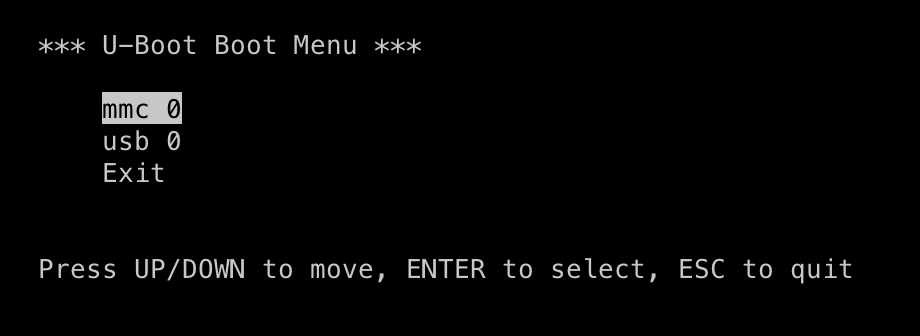
U-Boot interactive boot menu listing detected boot devices.
Select a device, or wait for the timeout to expire and the first device
is booted automatically. u-boot then tries to boot from the EFI System
Partition (ESP), which is /efi by default, by finding and executing the default
EFI executable (/EFI/BOOT/BOOTX64.efi). If u-boot is unable to boot
the first boot option it falls through to the next until all entries are
exhausted.
For terminal commands on selecting boot configuration see:
SD Mode - Development Flows
systemd-boot
systemd-boot is included in the default EDF images as the default EFI executable and serves as a simple boot manager, presenting the user with a menu of boot options. systemd-boot uses several configuration files which are deployed to the /efi partition and, by default, contains two boot options; “EDF Linux” and “EDF Xen” with a short timeout
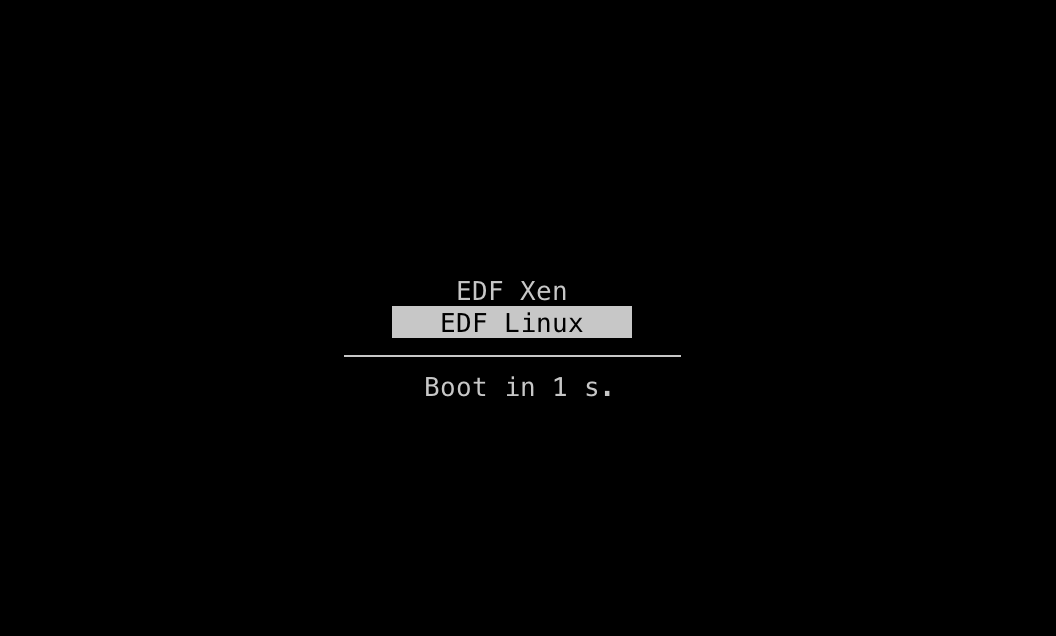
Both options use the same root filesystem and “EDF Linux” (default) boots the kernel directly while “EDF Xen” boots the Xen kernel first in Dom0-mode before booting the kernel.
The systemd-boot configuration files can be found in /efi/loader/loader.conf and /efi/loader/entries/*.conf - the kernel command line can be found in the relevant entry.
The systemd-boot configuration can also be updated/modified using the
bootctl command -
https://www.freedesktop.org/software/systemd/man/latest/bootctl.html
Further information available here: https://www.freedesktop.org/software/systemd/man/latest/systemd-boot.html
EDF Linux OS
Linux Kernel Configurations Used by AMD EDF
Minimal, base, and debug kernel configurations are provided, and are common across multiple AMD adaptive SoC and FPGA device series and device portfolios. These configurations support the AMD evaluation board experience. Validation and optimization can be required for production use.
Minimal: A minimal configuration to optimize kernel size for use on
platforms with restricted resources and boot time. Built from the
linux-xlnx-small recipe.
Base: A rich kernel configuration focused on ease of use rather than
performance, debug, or boot time. Built from the linux-xlnx recipe.
Debug: Based on the Base configuration, but with additional features for kernel debug.
Kernel configuration locations
The kernel configurations used by AMD EDF are maintained and built
within the meta-amd-edf and meta-xilinx Yocto Project layers. They are
based on the kernel configuration maintained in linux-xlnx
(GitHub - Xilinx/linux-xlnx: The official Linux kernel from Xilinx).
The BSP configuration content that used to ship as in-tree
defconfig files inside the linux-xlnx source repository now
lives in the Yocto layers named in the preceding paragraph, so
each EDF release ships a single source of truth for the kernel
symbols used to build its BSP images. The in-layer fragments
go through the same review path as the rest of each layer’s metadata,
so kernel-config changes land alongside the recipe changes that
depend on them rather than in a separate upstream submission. The
in-layer trees that hold the content are:
The EDF-specific wiring (optional feature sets, debug overlays, audit support) lives in
meta-amd-edf/recipes-kernel/linux-xlnx/linux-xlnx-edf.inc.The shared AMD Adaptive SoC kmeta fragments (CoreSight, HDMI module, USB gadget supplement, tracing, sanitizers, lockup detector) live under
meta-xilinx/meta-xilinx-core/recipes-kernel/linux/linux-xlnx/in thelinux-xlnx-kmetasubtree.The hand-curated
amd_aarch64_mini_defconfigused by the Minimal profile ships undermeta-xilinx/meta-xilinx-core/recipes-kernel/linux/linux-xlnx-small/; the supplyinglinux-xlnx-smallrecipe sits in the parentrecipes-kernel/linux/directory.
Kernel Configuration Detail
The EDF Linux kernel configuration ships in three profiles:
Base is the default EDF kernel configuration. It replaces the in-tree BSP
defconfighistorically maintained inside linux-xlnx. It is built from thelinux-xlnxrecipe againstxilinx_defconfigand adds the optional feature sets the EDF layer wires throughCOMBINED_FEATURES(USB gadget, USB Wi-Fi), plus Time-Sensitive Networking wired through themeta-xilinx-tsnlayer’sENABLE_TSNlever on TSN-enabled machines. The base also enables the PCIe NVMe framework unconditionally.Debug is the same as Base with diagnostic instrumentation layered on top through
ENABLE_KERNEL_DEBUG = "1".Minimal is the reduced-footprint profile curated for image-recovery and other restricted-flash images. It is built from the
linux-xlnx-smallrecipe against a hand-curatedamd_aarch64_mini_defconfigand is intended to be paired with theamd-edf-smalldistribution.
The sub-subsections that follow cover each profile in turn,
along with the supplying .scc / .cfg fragments and the
layer trees they live in, so a reader who needs to enable a
single feature without rebuilding the full set has the file
paths to grep for.
Base
Built from the linux-xlnx recipe
(meta-xilinx/meta-xilinx-core/recipes-kernel/linux/), extended by
the EDF layer linux-xlnx-edf.inc
(meta-amd-edf/recipes-kernel/linux-xlnx/). Supports all AMD
Adaptive SoC families (Zynq 7000, ZynqMP, Versal, Versal Gen 2,
MicroBlaze V).
Arm 64-bit based Adaptive SoC (AMD Versal portfolio, AMD Zynq
UltraScale+ MPSoC): base Linux defconfig
arch/arm64/configs/xilinx_defconfig from
linux-xlnx.
Arm 32-bit based Adaptive SoC (AMD Zynq 7000 SoCs): base Linux
defconfig arch/arm/configs/xilinx_zynq_defconfig from
linux-xlnx.
Key characteristics:
All common AMD Adaptive SoC drivers enabled through
xilinx_defconfigper architectureXen hypervisor support (when
xenis inDISTRO_FEATURES)OCI container support with eBPF, network bridging, and Kubernetes configuration fragments (when
virtualizationis inDISTRO_FEATURES)HDMI module support on Versal and Versal Gen 2
LTTng tracing and kprobes enabled
systemd audit support (when
systemdis inDISTRO_FEATURES)
The base kernel also enables the NVMe framework so that PCIe-based NVMe storage works out-of-the-box across EDF platforms:
CONFIG_NVME_CORE=y
CONFIG_BLK_DEV_NVME=y
Platform bring-up exercises the following NVMe drives to validate PCIe-based NVMe storage:
Board / interface |
NVMe drive |
|---|---|
ZC706 |
Seagate FireCuda 520 Series PCIe Gen4 SSD |
ZCU102 |
Crucial T700 PCIe Gen5 M.2 |
ZCU106 |
Toshiba KXG60PNV2T04 2 TB NVMe drive |
VCK190 (PL PCIe Gen4) |
Crucial P3 Plus 1 TB PCIe 4.0 3D NAND NVMe M.2 SSD (CT1000P3PSSD8) and Corsair MP600 1 TB NVMe drive (FMC) |
VCK190 (CPM4) |
Samsung 960 EVO 250 GB |
VEK385 |
Samsung V-NAND SSD 990 EVO |
VPK120 (PL PCIe Gen5) |
Corsair MP600 GS PCIe Gen4 x4 NVMe M.2 2280 SSD (high-density TLC NAND) |
VPK120 (CPM5 controller 0) |
Corsair MP600 GS PCIe Gen4 x4 NVMe M.2 2280 SSD (high-density TLC NAND) |
VPK120 (CPM5 controller 1) |
Samsung V-NAND SSD 980 PRO |
Optional Feature Sets
The Base configuration wires three optional feature sets through
COMBINED_FEATURES tokens and per-machine variables. Each
lever conditionally appends one or more .scc fragments to
KERNEL_FEATURES:
Feature |
Lever |
Wiring file |
|---|---|---|
USB Gadget Support |
|
|
USB Wi-Fi Driver Support |
|
|
Time-Sensitive Networking |
|
|
USB Gadget Support
The wiring appends two fragments. The base set comes from
features/usb/usb-gadgets.scc in the upstream Yocto kernel
cache, and the EDF supplement
features/usb-gadgets-extra/usb-gadgets-extra.scc lives in
linux-xlnx-kmeta (under
meta-xilinx/meta-xilinx-core/recipes-kernel/linux/linux-xlnx/).
The base fragment turns on:
USB_GADGETUSB_LIBCOMPOSITEUSB_CONFIGFS*USB_MASS_STORAGEUSB_ZEROand other gadget functions
The EDF supplement adds:
USB_ACMUSB_F_HIDUSB_CONFIGFS_F_HIDUSB_GADGET_DEBUG_FSUSB_F_SS_LB
USB Wi-Fi Driver Support
The wiring appends features/wifi/wifi-usb.scc and
features/iwd/iwd-crypto.scc from the upstream Yocto kernel
cache, plus the local wifi-usb-extra.cfg supplement under
meta-xilinx/meta-xilinx-core/recipes-kernel/linux/linux-xlnx/.
The base set covers USB Wi-Fi chipset drivers from:
Atheros
Broadcom
MediaTek
Ralink
Realtek
The EDF supplement extends coverage to Wi-Fi 6 and Wi-Fi 6E adapters:
MediaTek MT76* USB
Realtek RTW88* USB
Realtek RTW89* USB
CARL9170
RFKILL
Time-Sensitive Networking
The wiring in linux-xlnx-tsn.inc appends
features/tsn-extra/tsn-extra.scc from the local
tsn-kmeta tree under
meta-xilinx-tsn/recipes-kernel/linux-xlnx/linux-xlnx/.
The fragment turns on:
CONFIG_NET_SCH_CBS- the credit-based shaper qdiscCONFIG_NET_SCH_TAPRIO- the time-aware priority qdiscCONFIG_NET_SCH_NETEM- the network emulator qdiscCONFIG_NET_CLS_*- TC classifiersCONFIG_NET_ACT_SKBEDIT- the skbedit traffic-control action
The supporting multi-queue priority infrastructure
(CONFIG_NET_SCH_MQPRIO and the shared
CONFIG_NET_SCH_MQPRIO_LIB helper library) is part of the
base xilinx_defconfig, and Kconfig pulls it in
automatically when either CBS or TAPRIO is on.
Time-Sensitive Networking applies only to selected platforms and
depends on the underlying Ethernet controller.
Debug
Debug kernel features stay off by default. To turn them on, set
the following in local.conf or in the EDF machine
configuration:
ENABLE_KERNEL_DEBUG = "1"
Based on the Base configuration. linux-xlnx-edf.inc
(meta-amd-edf/recipes-kernel/linux-xlnx/) defines the debug
feature set as EDF_KERNEL_DEBUG_FEATURES, a list of fourteen
.scc fragments. Six come from the upstream Yocto kernel
cache and eight live in linux-xlnx-kmeta under
meta-xilinx/meta-xilinx-core/recipes-kernel/linux/linux-xlnx/.
Each bullet below names the supplying tree and the headline
CONFIG_* knobs the fragment turns on:
Dynamic debug printk (
cfg/debug/printk/debug-dynamic-debug.scc, yocto-kernel-cache): addsCONFIG_DYNAMIC_DEBUG.KFENCE memory safety (
features/kfence/kfence.scc, yocto-kernel-cache): addsCONFIG_KFENCE.Shared IRQ debug (
cfg/debug/irq/debug-shirq.scc, yocto-kernel-cache): addsCONFIG_DEBUG_SHIRQ.Panic-on-oops (
cfg/debug/misc/debug-panic-oops.scc, yocto-kernel-cache): addsCONFIG_PANIC_ON_OOPS.Workqueue watchdog (
cfg/debug/lock_hang/debug-wq-watchdog.scc, yocto-kernel-cache): addsCONFIG_WQ_WATCHDOG.Kernel function tracer (
cfg/debug/tracer/debug-kernel-func.scc, yocto-kernel-cache): addsCONFIG_FUNCTION_TRACERandCONFIG_FUNCTION_GRAPH_TRACER.CoreSight debug (
features/coresight/debug-coresight.scc,linux-xlnx-kmeta): addsCONFIG_CORESIGHT_CTCU,CORESIGHT_TPDM,CORESIGHT_TPDA,CORESIGHT_DUMMY,CORESIGHT_TNOC.CoreSight ETM (
features/coresight/etm-debug.scc,linux-xlnx-kmeta): addsCONFIG_ETM4X_IMPDEF_FEATURE.DWARF5 debug info (
features/debug/debug-info-dwarf5.scc,linux-xlnx-kmeta): addsCONFIG_DEBUG_INFO_DWARF5(and turnsDEBUG_INFO_NONEoff).Lockup detector (
features/debug/lockup.scc,linux-xlnx-kmeta): addsCONFIG_LOCKUP_DETECTOR,SOFTLOCKUP_DETECTOR,HARDLOCKUP_DETECTOR,HARDLOCKUP_DETECTOR_BUDDY.RCU debug (
features/debug/rcu-debug.scc,linux-xlnx-kmeta): addsCONFIG_RCU_CPU_STALL_CPUTIME.Sanitizer support (
features/debug/sanitizer.scc,linux-xlnx-kmeta): addsCONFIG_UBSANplus the bounds-checking sub-knobs (UBSAN_BOUNDS,UBSAN_BOUNDS_STRICT,UBSAN_BOOL,UBSAN_ENUM).DRM debug (
features/drm/drm-debug.scc,linux-xlnx-kmeta): addsCONFIG_DRM_DEBUG_MODESET_LOCK.Full tracing (
features/tracing/debug-tracing.scc,linux-xlnx-kmeta): addsCONFIG_FPROBE,DYNAMIC_FTRACE, and the ftrace direct-call / function-graph supporting knobs.
The base xilinx_defconfig already turns on a substantial
CoreSight subset (CONFIG_CORESIGHT,
CORESIGHT_LINK_AND_SINK_TMC, CORESIGHT_CATU,
CORESIGHT_SINK_TPIU, CORESIGHT_SINK_ETBV10,
CORESIGHT_SOURCE_ETM4X, CORESIGHT_STM,
CORESIGHT_CPU_DEBUG, CORESIGHT_CPU_DEBUG_DEFAULT_ON,
CORESIGHT_CTI, CORESIGHT_CTI_INTEGRATION_REGS,
CORESIGHT_TRBE). The EDF debug fragments listed earlier add
only the remainder.
CONFIG_KASAN and CONFIG_PROVE_LOCKING stay off on
arm64 platforms because the Yocto kernel cache does not
support them on arm64.
To enable individual features without enabling the full debug set,
append directly to KERNEL_FEATURES in local.conf:
KERNEL_FEATURES:append = " features/kfence/kfence.scc"
KERNEL_FEATURES:append = " features/debug/lockup.scc"
See the Yocto Project KERNEL_FEATURES documentation
for full details on the variable and its usage. For background on the
.scc feature files, see Yocto Project Advanced Kernel Metadata.
Minimal
Built from the linux-xlnx-small recipe
(meta-xilinx/meta-xilinx-core/recipes-kernel/linux/), which uses a
hand-curated amd_aarch64_mini_defconfig instead of the standard
xilinx_defconfig. Currently aarch64-only (Versal and ZynqMP
families).
The characteristics below describe the kernel as built by the
amd-edf-small
distro (the configuration the recipe is curated for, used by Image
Recovery and by other restricted-flash images). Setting
PREFERRED_PROVIDER_virtual/kernel = "linux-xlnx-small" under the
default amd-edf distro does not produce this profile - see
Pairing With a Distribution below. Key
characteristics compared to the base configuration:
Reduced driver set: basic serial (PL011, Xilinx PS UART), I2C, SPI, GPIO, MMC/UFS, and USB host/gadget/storage only
No Xen hypervisor or OCI container support
No EDF debug feature overlays
amd_aarch64_mini_defconfigsetsCONFIG_NR_CPUS=2and requestsCONFIG_EFIoff (# CONFIG_EFI is not set)
Two knobs are worth calling out because they look like exceptions on a stock-config inspection of the built kernel:
CONFIG_KPROBESis on.linux-xlnx.incappendsfeatures/kprobestoKERNEL_FEATURESunconditionally (LTTng depends on it), andlinux-xlnx-smallinherits that wiring throughrequire linux-xlnx_*.bb. The EDF debug overlays (the ones listed under Debug) are still off in the Minimal build; only the kprobes infrastructure itself is on.The base
xilinx_defconfigfragments are not applied to this recipe, so anything that fragment would normally pull in (Xilinx CPM PCIe controllers, AMD MDB PCIe Root Port, AI Engine driver, HDMI module, etc.) is absent unless a downstream machine layer adds an explicit.cfgfragment through alinux-xlnx-smallbbappend.
Pairing With a Distribution
The Minimal profile is curated for the amd-edf-small distro,
which clears xen and virtualization from DISTRO_FEATURES
(see amd-edf-small for the full diff).
Under that distro the distro-gated kmeta appends in
linux-xlnx.inc (Xen, OCI / virtualization) drop out, so the
driver and feature absences listed above are what the recipe is
designed to deliver.
Selecting linux-xlnx-small as PREFERRED_PROVIDER_virtual/kernel
under any other distro (for example amd-edf, where xen and
virtualization are on by default on aarch64) leaves the
distro-driven appends from linux-xlnx.inc active. The most
visible effects on the built kernel are:
CONFIG_XEN=y/CONFIG_XEN_DOM0=yfromfeatures/xen/xen.scc(appended whenxenis inDISTRO_FEATURES);the OCI container set (eBPF, network bridging, Kubernetes Kconfig) from
features/ocicontainer/ocicontainer.sccand the EDF additions inlinux-xlnx-edf.inc(appended whenvirtualizationis inDISTRO_FEATURES); andCONFIG_EFI=yin the built kernel, despite# CONFIG_EFI is not setinamd_aarch64_mini_defconfig.make defconfighonors the fragment directly, but a later step in the kernel-yocto configuration pipeline (the kmeta merge driven by distro-appendedKERNEL_FEATURES) re-enables the symbol; the exact merge step has not been pinned down.
If you want the Minimal profile, pair the kernel with
DISTRO = "amd-edf-small" (or with another distro that clears
xen and virtualization). Mixing linux-xlnx-small into
a full amd-edf build produces a small-defconfig base with the
full distro feature set merged on top, which is not the
image-recovery / restricted-flash profile this recipe is intended
for.
AMD Embedded Development Framework (EDF) Distributions
The Yocto Project DISTRO variable (see the
Yocto Project reference)
selects the distribution policy configuration. It controls the init manager,
distro features, preferred providers, and other system-wide defaults for every
image. AMD EDF provides two distributions, defined in
meta-amd-edf/conf/distro/.
amd-edf
The full AMD EDF distribution, used for all standard EDF images.
It extends poky-altcfg with the following additions:
Init manager: systemd
Default user:
amd-edf(no password, sudo enabled, expires on first login)Default hostname:
amd-edfEFI boot: systemd-boot (
EFI_PROVIDER = "systemd-boot")Distro features (aarch64):
multiarch,security,virtualization,openamp,tpm,vmsep,xen,efi,polkitDistro features (arm):
multiarch,security,virtualization,vmsepBase utils: full
packagegroup-core-base-utils(not busybox)Wireless daemon: iwd (iNet Wireless Daemon, replaces wpa-supplicant)
License packages generated for all installed software
The default local.conf sets DISTRO = "amd-edf".
DISTRO = "amd-edf"
amd-edf-small
A reduced-footprint variant of amd-edf, intended for images that
must fit within constrained flash partitions such as an image recovery
partition. It requires the linux-xlnx-small kernel. Introduced
in EDF 26.06.
Key differences from amd-edf:
Kernel:
linux-xlnx-smallwith compressed image type (Image.lzmaon aarch64,uImageon arm) instead of the fulllinux-xlnxkernelInit manager: sysvinit instead of systemd
Base utils: busybox instead of full coreutils
Distro features: no multiarch, security, or virtualization; aarch64 retains
openampandefionly
To use the small EDF distribution, set in local.conf:
DISTRO = "amd-edf-small"
The meta-xilinx-imgrcvry Image Recovery layer’s
xilinx-image-recovery builds on top of amd-edf-small.
See Image Recovery Application for details on the Image Recovery application.
Linux RootFS
AMD EDF provides two root fs configurations:
Minimal (A True Small Footprint Configuration):
This variant aims to provide a minimal footprint with essential functionalities. It is designed to be lightweight, simple, and best-suited for embedded systems with strict resource constraints.
VEK385 - AMD Vivado Design Suite 2026.1
Specification and configuration for the minimal root fs configuration is scheduled for a future release.
Full:
This variant is the most feature-rich, offering a robust set of packages and components for a complete platform experience. It includes software stacks, multimedia codecs, networking support, and other packages catering to a wide range of use-cases.
The image .bb files (BitBake recipes for images) are typically found in the
meta-edf layer of a Yocto project. The standard image recipes are in
meta-edf/recipes-extended/images/.
The build system takes the MACHINE_FEATURES (available in the .conf file), into consideration and modifies the RootFS configuration accordingly.
After the build process is complete, Yocto generates the manifest file based on the chosen image recipe and rootfs configurations. The manifest file offers a view of what packages and their versions are included in the built image.
Linux-only and Platform Image Variants
The Full RootFS is split into two image recipes that share the same base package set but differ in which platform extensions are included:
edf-linux-disk-imageis the Linux-only image. It contains the EDF console rootfs without Xen or OpenAMP packages, and is the right starting point for general-purpose Linux development.edf-platform-disk-imageextends the Linux-only image with Xen and OpenAMP packages, gated on the matchingDISTRO_FEATURES(xenandopenamp). The platform image is available on aarch64 targets only — both Versal-family aarch64 machines and ZynqMPcortexa53/cortexa53-malimachines build it. On ZynqMP the platform image in this release ships Xen and the OpenAMP runtime packages; per-board OpenAMP firmware examples follow in a future release.
For the workflows that build and deploy that firmware into the disk image (single-step on a board MACHINE, or split-machine on a common MACHINE with prebuilt firmware tarballs), see Installing OpenAMP Firmware Into EDF Yocto Linux Images.
Both recipes pull in the shared AMD-EDF_IMAGE_FULL_INSTALL package set.
The platform-only additions are collected in AMD-EDF_PLATFORM_INSTALL,
which is also pulled in by edf-image-everything so that the package
feed remains a superset of either disk image.
Build the image variant that matches the development task:
Linux-only image (no Xen or OpenAMP):
$ MACHINE=amd-cortexa72-common bitbake edf-linux-disk-image
Platform image for Versal (adds Xen and OpenAMP firmware examples):
$ MACHINE=amd-cortexa72-common bitbake edf-platform-disk-image
Platform image for ZynqMP (Xen + OpenAMP packages, with per-board OpenAMP firmware example tarballs in 26.1.1):
$ MACHINE=amd-cortexa53-mali-common bitbake edf-platform-disk-image
Kria SoM Image Variants
The Kria SoM uses two distinct machine families. The Kria-specific System Device
Tree (SDT) machines in meta-kria (k26-smk-kv-sdt for KV260,
k26-smk-kr-sdt for KR260, k24-smk-kd-sdt for KD240, etc.) remain in use
to build the per-SoM boot firmware (QSPI image and boot.bin) and
follow the existing Kria firmware update process.
The EDF common machine amd-cortexa53-mali-common builds the Kria
Linux and platform disk images via edf-linux-disk-image-kria and
edf-platform-disk-image-kria, which add Kria-specific components to the
EDF base:
Linux-only Kria image (no Xen or OpenAMP):
$ MACHINE=amd-cortexa53-mali-common bitbake edf-linux-disk-image-kria
Platform Kria image (adds Xen and Kria OpenAMP firmware examples):
$ MACHINE=amd-cortexa53-mali-common bitbake edf-platform-disk-image-kria
Kria OpenAMP firmware examples follow the same board-specific
installation pattern used by the current Versal Gen 1 OpenAMP
examples, under
/lib/firmware/xilinx/<board>/rpu/0/<firmware>.elf in the
root filesystem.
The -g option is used in the bitbake command to enable various debugging
features, especially the task dependency visualization using .dot files.
When used with the build command, it generates log files and .dot files that
represent task dependency graphs for the specified target.
Usage:
$ bitbake -g <your-target>
Upon executing this command, a set of .dot files are generated in the
tmp/deploy/tasks/ directory.
System Level Memory Map
The system level memory map shown here focuses on the DDR, OCM, and TCM allocations within the AMD EDF architecture.
The following table defines the default allocations used by AMD EDF, and what AMD reference designs use as their starting points. Due to the nature of device tree definition, end users can change this.
Start Addr |
Size (MB) |
Description |
Fixed/Variable |
XMPU |
|---|---|---|---|---|
Low DDR - 2 GB |
||||
0x000 0000 0000 |
16 |
Versal PLM |
Fixed |
Yes - PLM FW |
0x000 0100 0000 |
6 |
TF-A - Transfer list / handoffs |
Fixed |
TBD |
0x000 0160 0000 |
2 |
TF-A - Core runtime memory |
Fixed |
Yes - TF-A FW |
0x000 0180 0000 |
128 |
OP-TEE shared buffers & dynamic TAs |
Fixed |
Yes - Secure OS/Secure Partition |
0x000 0980 0000 |
40 |
RPU Core 0-9 OpenAMP (4 MB / core) |
Scale # RPUs |
Yes - RPU |
0x000 0C00 0000 |
320 |
Scale # ISPs |
Yes - RPU |
|
0x000 2000 0000 |
1536 |
Linux - Low DDR |
LOW_DDR Remainder |
No |
High DDR |
||||
0x008 0000 0000 |
0-3800 |
ISP frame buffer allocation |
Scale # ISPs |
|
Platform dependent |
Platform dependent |
Multimedia system reservations |
Use case dependent |
|
Platform dependent |
Platform dependent |
Linux - High DDR |
HIGH_DDR Remainder |
|
Platform dependent |
Platform dependent |
Linux CMA |
Variable |
|
Platform dependent |
Platform dependent |
PL & AIE dedicated allocations |
DDR Memory Map
The following represents the map reflecting the number of RPUs and physical memory available in the platform.
Start Addr |
Size (MB) |
Description |
Fixed/Variable |
XMPU |
|---|---|---|---|---|
Low DDR - 2 GB |
||||
0x000 0000 0000 |
16 |
Versal PLM |
Fixed |
Yes - PLM FW |
0x000 0100 0000 |
6 |
TF-A - Transfer list / handoffs |
Fixed |
TBD |
0x000 0160 0000 |
2 |
TF-A - Core runtime memory |
Fixed |
Yes - TF-A FW |
0x000 0180 0000 |
128 |
OP-TEE shared buffers & dynamic TAs |
Fixed |
Yes - Secure OS/Secure Partition |
0x000 0980 0000 |
8 |
RPU Core 0-1 OpenAMP allocations (4 MB / core) |
x2 RPU Cores |
Yes - RPU |
32 |
Free memory |
|||
0x000 0C00 0000 |
320 (400 MB requested) |
RPU+:term:ISP reservation |
x3 ISP |
Yes - RPU |
0x000 2000 0000 |
1536 |
Linux - Low DDR |
LOW_DDR Remainder |
No |
High DDR |
||||
0x008 0000 0000 |
2048 |
ISP frame buffer allocation (DDRMC closest to ISPs) |
Scale # ISPs |
|
Platform dependent |
Linux - High DDR |
HIGH_DDR Remainder |
||
Platform dependent |
PL & AIE dedicated allocations |
Machine Emulation
AMD EDF supports full system emulation using QEMU through the
standard Yocto Project runqemu tooling, extended with AMD-specific
components for accurate SoC boot emulation.
runqemu
runqemu is the Yocto Project script for launching QEMU system
emulation. See the Yocto Project QEMU documentation for
full upstream usage details.
Basic usage:
$ runqemu <qemuboot.conf> [options...]
Common arguments:
Argument |
Description |
|---|---|
|
Disable video console; direct serial output to stdio (recommended) |
|
User-mode networking, no root privileges required. SSH forwarded to host port 2222 |
|
Do not write changes back to disk or flash images |
|
Pass additional arguments directly to the underlying QEMU binary or
to |
qemuboot.conf
runqemu reads its configuration from a .qemuboot.conf file (an
INI-format file under a [config_bsp] section). Key variables
consumed by runqemu:
Variable |
Description |
|---|---|
|
The QEMU binary to launch. For AMD FPGA targets this is set to
|
|
Path to the boot.bin file. Used by |
|
Default filesystem type (for example, |
|
Board-specific QEMU arguments appended to the command line, including
|
|
Memory configuration arguments passed to QEMU (for example, |
|
Path to the QEMU hardware device tree for the emulated board |
|
Path to the native sysroot |
For AMD FPGA targets, runqemu passes the full argument list to
qemu-system-amd-fpga-multiarch (through qb_system_name), which then
orchestrates multiple QEMU sub-processes and launches them with
-machine-path <dir> for inter-process communication.
qemu-system-amd-fpga-multiarch
qemu-system-amd-fpga-multiarch is an AMD FPGA boot orchestrator that
emulates the on-chip-loader (OCL) behavior of AMD FPGA SoCs. It is invoked
automatically by runqemu through qb_system_name and is not typically
called directly. Source code is available at
github.com/Xilinx/qemu-bootbin-helper.
The script parses and extracts the boot.bin, loads firmware components to
the correct memory addresses, and launches the appropriate QEMU
sub-processes connected through a shared -machine-path directory.
The boot.bin booted by QEMU is always the one extracted from the flash or
disk image, never the one passed through -kernel. The default runqemu
flow automatically fills -kernel from qb_default_kernel. When
-kernel is supplied, the wrapper byte-compares the two and aborts with
Error: boot.bin does not match kernel file at offset N if they differ,
as a guardrail against booting a stale or unrelated boot.bin file. Use the
same build for both boot.bin files, or pass -nokernel to skip validation.
Required arguments (set through qb_opt_append):
Argument |
Description |
|---|---|
|
SoC architecture. One of: |
|
Boot mode number, corresponding to the hardware boot mode pins. Valid values depend on the architecture (see table) |
|
Arguments for the PMU MicroBlaze QEMU instance (ZynqMP only). Mandatory for ZynqMP |
|
Arguments for the PLM MicroBlaze QEMU instance (Versal, Versal Gen 2). Mandatory for Versal family |
|
Arguments for the ASU RISC-V QEMU instance (Versal Gen 2 only). Mandatory for Versal Gen 2 |
Optional arguments:
Argument |
Description |
|---|---|
|
Multiboot offset (in 32 KB blocks) into the flash image at which to search for a valid boot.bin. Default is 0 |
|
(ZynqMP only) Boot through the FSBL, loading all components as on real hardware. Can hang on some configurations if FSBL performs hardware initialization not supported by QEMU |
|
(ZynqMP only) Bypass the FSBL and load PMU firmware and TF-A directly to memory. This is the default ZynqMP boot mode |
|
Skip validation of the |
|
Directory used for inter-process communication between QEMU instances.
Set automatically by |
Supported boot modes by architecture:
Architecture |
Mode |
Boot Source |
|---|---|---|
|
1 |
QSPI |
|
5 |
SD0 |
|
1, 2 |
QSPI |
|
3 |
SD0 |
|
5, 14 |
SD1 |
|
6 |
eMMC1 |
|
1, 2 |
QSPI |
|
3 |
SD0 |
|
5, 14 |
SD1 |
|
6 |
eMMC1 |
|
8 |
|
|
1, 2 |
QSPI |
|
3 |
SD0 |
|
5, 14 |
SD1 |
|
6 |
eMMC1 |
|
8 |
|
|
11 |
Per-SoC emulation behavior:
- Zynq
The boot.bin is extracted from the emulated QSPI or SD image. The FSBL is skipped – execution begins at the next executable in the boot.bin (typically U-Boot) with the environment pre-configured to match the state after FSBL execution. CPU1 is parked at reset with a WFI loop to prevent it from executing stale memory.
- ZynqMP
The boot.bin is extracted from the emulated QSPI or SD image. Two QEMU instances are launched: a MicroBlaze instance for the PMU, and an AArch64 instance for the APU. By default (
-boot pmufw), the PMU firmware and TF-A are loaded directly to memory, bypassing the FSBL. With-boot fsbl, the FSBL executes and loads all subsequent components as on real hardware – however this may hang on some boards due to hardware initialization not supported in emulation. The R5 reset state is managed so that only loaded R5 cores are released from reset.- Versal (Gen1)
The boot.bin is extracted from the emulated QSPI or OSPI or SD image. Two QEMU instances are launched: a MicroBlaze instance for the PLM, and an AArch64 instance for the APU. The PLM executable, CDO, PSM firmware, and boot header are extracted and loaded to memory. The PLM then orchestrates the remainder of the boot process, loading TF-A, U-Boot, and Linux in the same sequence as real hardware.
- Versal Gen 2 (versal2ve2vm)
The boot.bin is extracted from the emulated OSPI or UFS or SD image. Three QEMU instances are launched: a MicroBlaze instance for the PLM, a RISC-V instance for the ASU, and an AArch64 instance for the APU. HashBlock0, the PLM executable, and CDO are extracted and loaded to memory. The PMC ROM magic values required for emulation are also written to memory. The PLM then drives the remainder of the boot as on hardware.
qemuboot-tool
qemuboot-tool is an AMD tool used to manipulate and combine
qemuboot.conf files. It merges machine-specific firmware configuration
with common machine disk image configuration to produce a single
combined.qemuboot.conf for use with runqemu. Source code is
available at
meta-xilinx/meta-xilinx-core/scripts/qemuboot-tool.
The output of qemuboot-tool is written to stdout and should be
redirected to a file.
Commands:
Command |
Description |
|---|---|
|
Load a new |
|
Load a |
|
Remove a named variable from the current set. Exits with an error if the variable is not present |
Commands can be chained in a single invocation and are processed in order.
Usage:
$ qemuboot-tool <command> <argument> [<command> <argument> ...] > output.qemuboot.conf
Examples:
Combine machine and common machine artifacts for an OSPI-boot board (for example, VEK385):
$ qemuboot-tool \
    load BOOT-versal-2ve-2vm-vek385-revb-sdt-seg.qemuboot.conf \
    remove image_link_name \
    remove image_name \
    merge edf-linux-disk-image-amd-cortexa78-mali-common.rootfs.qemuboot.conf \
    > combined.qemuboot.conf
Combine machine and common machine artifacts for an SD-boot board (for example, ZCU102), then copy boot.bin into the disk image:
$ qemuboot-tool \
    load BOOT-zynqmp-zcu102-sdt-full.qemuboot.conf \
    remove image_link_name \
    remove image_name \
    merge edf-linux-disk-image-amd-cortexa53-mali-common.rootfs.qemuboot.conf \
    > combined.qemuboot.conf
$ wic cp BOOT-zynqmp-zcu102-sdt-full.bin \
    edf-linux-disk-image-amd-cortexa53-mali-common.rootfs.wic.qemu-sd:1/boot.bin
Override the qb_mem variable with an updated memory configuration
generated by the gen_qemu_mem_cfg lopper assist:
$ lopper -O . system-top.dts -- \
    ${OECORE_NATIVE_SYSROOT}/usr/lib/python3/site-packages/lopper/assists/gen_qemu_mem_cfg.py
$ qemuboot-tool \
    load BOOT-<machine>.qemuboot.conf \
    remove image_link_name \
    remove image_name \
    merge edf-linux-disk-image-<common-machine>.rootfs.qemuboot.conf \
    remove qb_mem \
    merge memory.qemuboot.conf \
    > combined.qemuboot.conf
Serial Port Configuration
QEMU maps each physical serial device in the emulated board to a
-serial argument on the APU command line. The number of
-serial arguments must equal the number of serial devices defined
in the QEMU hardware device tree (qb_dtb). The board’s
qemuboot.conf file stores the default -serial sequence in
qb_opt_append.
The hardware device tree (qb_dtb) describes the physical serial
devices present in the emulated board and assigns each one a QEMU
serial port index. The domain device tree (for example, the Linux APU
device tree) describes the software view of those ports: its
aliases node maps logical serial names to hardware addresses, and
its chosen node’s stdout-path property identifies which serial
port the domain uses as standard output. Correlating the two trees
reveals which QEMU serial index carries the console for a given domain.
Both the hardware device tree (qb_dtb) and the domain device tree
are typically supplied as compiled DTB files. Use dtc to convert
them to human-readable DTS before inspecting them:
$ dtc -I dtb -O dts -o hardware.dts <hardware>.dtb
$ dtc -I dtb -O dts -o domain.dts <domain>.dtb
Identifying the hardware serial ports
Inspect the QEMU hardware device tree (the file referenced by
qb_dtb in qemuboot.conf). Hardware device trees enumerate
serial ports using one or both of the following mechanisms.
Chardev Properties
Serial device nodes can carry a chardev property that assigns
them a QEMU serial port identifier (serial0, serial1, and so
forth). The numeric suffix of the identifier is the zero-based index of the
corresponding -serial argument on the QEMU command line.
For example, the following hardware device tree entries define five serial ports for a Versal Gen 2 board:
ppu0_mdm_uart@0xf0110000 {
        compatible = "xlnx,xps-uartlite";
        chardev = "serial0";
};

ppu1_mdm_uart@0xf0310000 {
        compatible = "xlnx,xps-uartlite";
        chardev = "serial1";
};

serial@0xf1920000 {
        compatible = "pl011";
        chardev = "serial2";
};

serial@0xf1930000 {
        compatible = "pl011";
        chardev = "serial3";
};

asu_mdm_uart@0xebef0000 {
        compatible = "xlnx,xps-uartlite";
        chardev = "serial4";
};
This device tree fragment defines five hardware serial ports, requiring five
-serial arguments.
Root Aliases Node
Hardware device trees can also enumerate serial ports through an
aliases node at the root of the tree, where property names of
the form serialN point to the node path of the corresponding
serial device. The numeric suffix of the alias name is the
zero-based index of the corresponding -serial argument.
For example:
aliases {
        serial0 = "/amba/serial@ff000000";
        serial1 = "/amba/serial@ff010000";
};
These two alias entries define two hardware serial ports, requiring
two -serial arguments.
A hardware device tree can use both mechanisms simultaneously.
Correlating Hardware Ports To The Application’s Console
Domain DTS source files are available alongside the Yocto Project
machine artifacts in the dts/<machine>/ directory. The Linux APU
domain file is also available in the machine artifacts as
system.dtb, a symlink to the device tree in the devicetree
subdirectory.
To identify which hardware serial port carries the application’s console,
inspect the domain device tree (typically the Linux APU device tree).
The aliases node often maps domain serial names to physical
addresses, and the chosen node’s stdout-path identifies the
console port.
Example domain device tree entries:
/ {
        axi {
                serial@f1920000 {
                        compatible = "arm,pl011\0arm,primecell";
                        device_type = "serial";
                        port-number = <0x00>;
                };

                serial@f1930000 {
                        compatible = "arm,pl011\0arm,primecell";
                        device_type = "serial";
                        port-number = <0x00>;
                };
        };

        aliases {
                serial0 = "/axi/serial@f1920000";
                serial1 = "/axi/serial@f1930000";
        };

        chosen {
                stdout-path = "serial1:115200n8";
        };
};
Matching physical addresses across both device trees gives the following mapping:
HW serial |
Domain serial |
Device |
Type |
Address |
|---|---|---|---|---|
|
|
|
|
|
|
|
|
|
|
|
|
|
|
|
|
|
|
|
|
|
|
|
|
In this example, stdout-path = "serial1:115200n8" refers to domain
serial1, which maps to hardware serial3 (address
0xf1930000). Linux uses the fourth -serial argument (serial3).
The corresponding qb_opt_append serial sequence is:
-serial null -serial null -serial null -serial mon:stdio -serial null
The null placeholders are required because QEMU expects one -serial
argument per hardware serial port; omitting one shifts the indices of every
later port.
Adjusting The Serial Port Configuration
qb_opt_append in the qemuboot.conf file controls the
-serial arguments. To change which port appears in the
runqemu terminal, edit qb_opt_append, replacing the existing
-serial entries with the desired values.
Caution
Do not use qb_serial_opt for this purpose. That field specifies
additional optional serial port devices and is not used by AMD EDF.
Serial port mapping must be configured through qb_opt_append.
Commonly used -serial character device types:
Type |
Description |
|---|---|
|
Connect the port to the terminal running |
|
Discard all output from this serial port. |
|
Redirect output to a file. Useful for capturing output from a secondary serial port without cluttering the terminal. |
|
Expose the serial port as a TCP socket for connection by an external terminal emulator. |
See the QEMU Character Device documentation for the full list of supported chardev types.
Automating the Mapping with qemu-serial-port-tool
The preceding sections walk through the manual procedure: dump the
hardware and domain device trees with dtc, locate chardev and
aliases entries, match them by physical address, count -serial
slots, and construct the qb_opt_append string. The
qemu-serial-port-tool script automates every one of those steps and
is the fastest way to produce a correct qb_opt_append string for a
new board. The manual procedure is retained for readers who need to
debug the mapping by hand or who want to understand what the tool is
doing.
qemu-serial-port-tool is shipped by meta-xilinx-core; the source
is at
meta-xilinx/meta-xilinx-core/scripts/qemu-serial-port-tool.
The tool accepts a qemuboot.conf (it reads qb_dtb from the file
automatically) or a hardware DTB / DTS directly, and one
or more domain trees through --domain. It runs dtc internally
when the input is binary, so no manual conversion is required.
Usage:
$ qemu-serial-port-tool --help
usage: qemu-serial-port-tool [-h] [--domain DOMAIN [DOMAIN ...]] [--stdout]
                             hardware_dtb

List QEMU serial ports from hardware DTB and correlate with domain DTBs

positional arguments:
  hardware_dtb          Path to the hardware DTB file or a qemuboot.conf file

options:
  -h, --help            show this help message and exit
  --domain DOMAIN [DOMAIN ...]
                        Path(s) to domain DTB/DTS file(s)
  --stdout              Generate QEMU -serial command line directing stdout to
                        mon:stdio
Arguments:
Argument |
Description |
|---|---|
|
Path to the hardware DTB / DTS file or a
|
|
One or more domain DTB / DTS files (Linux APU, Zephyr, Cortex-R, baremetal, and so forth). Repeat or list multiple files to correlate several domains in a single run. |
|
In addition to the correlation table, print the
|
Example: hardware-only listing
With only the hardware device tree, the tool prints the QEMU
-serial index for every physical port. This is the same list as
manually inspecting the chardev or aliases entries:
$ qemu-serial-port-tool BOOT-versal-2ve-2vm-vek385-revb-sdt-seg.qemuboot.conf
+-----------+------------------+--------------+------------+
| hw serial | device           | type         | address    |
+-----------+------------------+--------------+------------+
| serial0   | ppu0_mdm_uart    | xps-uartlite | 0xf0110000 |
| serial1   | ppu1_mdm_uart    | xps-uartlite | 0xf0310000 |
| serial2   | serial           | pl011        | 0xf1920000 |
| serial3   | serial           | pl011        | 0xf1930000 |
+-----------+------------------+--------------+------------+
Example: correlating with a domain device tree
Pass the Linux APU domain tree (available alongside the machine
artifacts as dts/<machine>/cortexa78-linux.dts from the SDT-seg
build, or as the per-domain system.dtb from a non-seg Linux build)
to map domain serial aliases onto hardware ports:
$ qemu-serial-port-tool \
     BOOT-versal-2ve-2vm-vek385-revb-sdt-seg.qemuboot.conf \
     --domain dts/versal-2ve-2vm-vek385-revb-sdt-seg/cortexa78-linux.dts \
     --stdout

Domain: dts/versal-2ve-2vm-vek385-revb-sdt-seg/cortexa78-linux.dts
+-----------+---------------+---------------+--------------+------------+
| hw serial | domain serial | device        | type         | address    |
+-----------+---------------+---------------+--------------+------------+
| serial0   |               | ppu0_mdm_uart | xps-uartlite | 0xf0110000 |
| serial1   |               | ppu1_mdm_uart | xps-uartlite | 0xf0310000 |
| serial2   |               | serial        | pl011        | 0xf1920000 |
| serial3   | serial1       | serial        | pl011        | 0xf1930000 |
+-----------+---------------+---------------+--------------+------------+

stdout-path: (serial1:115200n8)
domain serial1 is hardware serial3

qemu configuration: -serial null -serial null -serial null -serial mon:stdio
The final qemu configuration line is the exact string to drop into
qb_opt_append in the qemuboot.conf (or to pass through
qemuparams="..." on the runqemu command line). It matches the
VEK385 (Rev B) default shipped in meta-amd-adaptive-socs.
Because --domain accepts multiple files, the same invocation can
describe the serial layout for every domain on a multi-domain board
(Linux APU, Cortex-R52 baremetal or Zephyr, MicroBlaze
PMC, and so forth). Each domain produces its own correlation
table, which makes the tool useful well beyond the Linux console case
covered by the manual walkthrough.
MicroBlaze V
MicroBlaze V (MicroBlaze RISC-V, also referred to as MB-V) is AMD’s implementation of a RISC-V soft processor for AMD FPGAs and SoCs. This section covers the MB-V Linux architecture, prerequisites, and boot specification common across all supported boot media and board targets. Board-specific build and boot instructions are covered in Building and Booting Linux on the SCU200 MicroBlaze V Platform.
Prerequisites
Before you start, make sure you have the following:
AMD Vivado 2026.1 for FPGA design and bitstream generation
AMD Vitis 2026.1 for software development tools
An EDF Yocto build environment – see Setting Up the Yocto Environment for initial setup
An SCU200 evaluation board
A serial console application such as PuTTY, minicom, or MobaXterm
Architecture
MicroBlaze V Linux Boot Overview
Linux boots on MicroBlaze V from either persistent (QSPI/OSPI) or non-persistent (JTAG+TFTP) storage media. An MB-V device has the following top-level requirements.
On a reset event, the MB-V processor flushes its instruction pipeline
and immediately begins fetching instructions from the reset vector,
defined by the Vector Base Address (C_BASE_VECTORS + 0x0). This
address is configurable in Vivado during MicroBlaze IP customization.
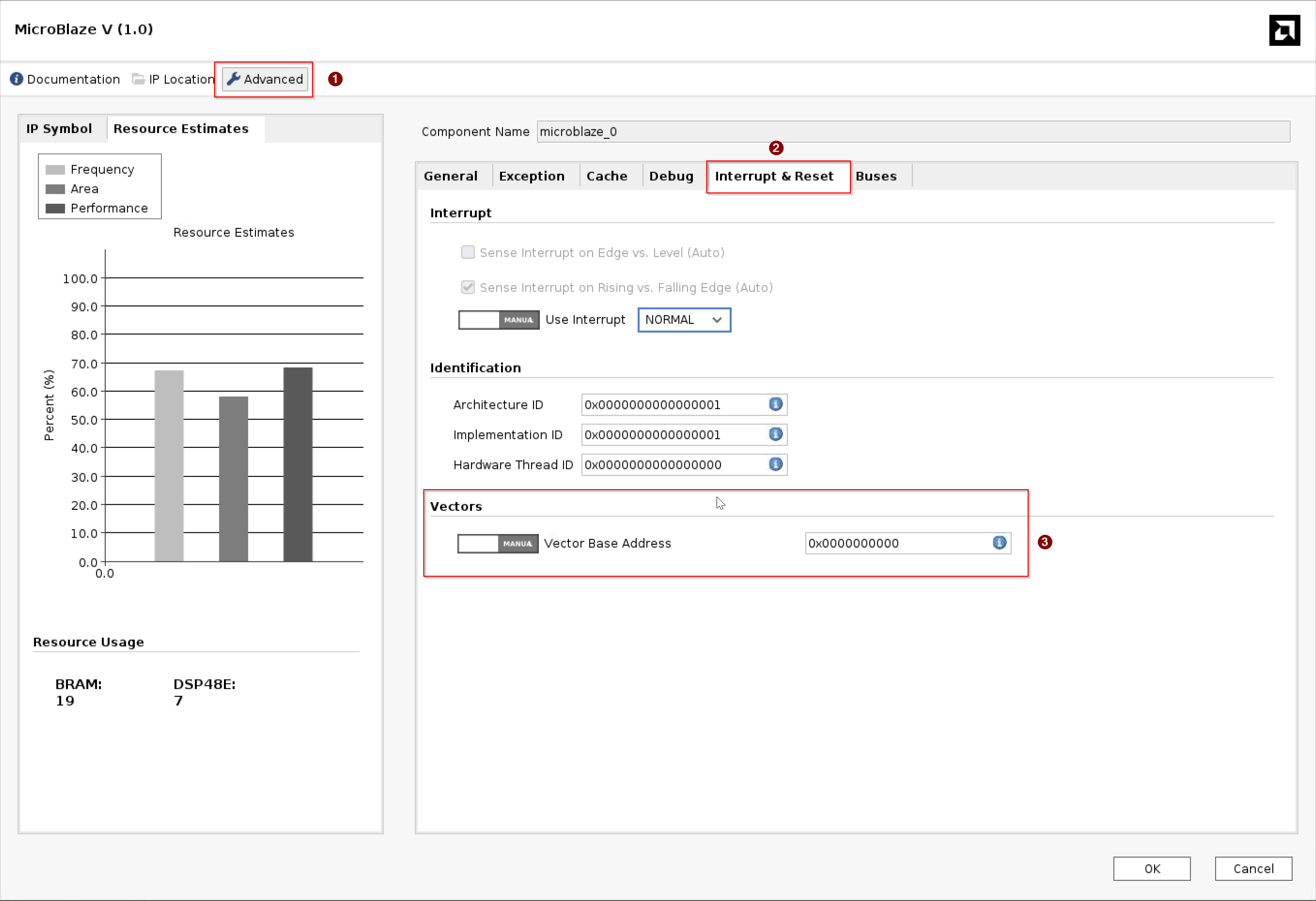
Vivado MicroBlaze V Vector Base Address configuration.
The initial boot code – the first-stage bootloader U-Boot SPL (Secondary Program Loader) – must reside at the reset vector address. This is done by initializing a small bank of MB-V local memory at the reset vector address in the FPGA bitstream or PDI (Programmable Device Image). That bank comprises the Local Memory Bus (LMB), the LMB block RAM controller, and the Block Memory Generator.
Note
A reset does not clear general-purpose registers (r1–r31) or instruction/data caches. Software must explicitly invalidate caches and must not assume registers are zeroed at startup.
The following boot media are supported:
JTAG: After the bitstream or PDI is loaded by using JTAG, the processor waits for the user to download the initial boot code (U-Boot SPL) directly into memory.
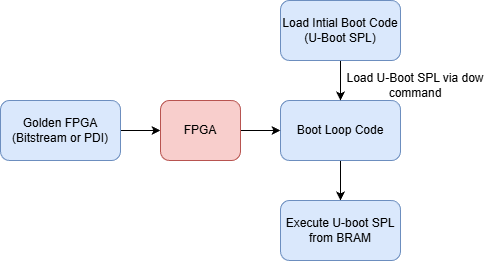
SPI Flash (QSPI/OSPI): U-Boot SPL is merged with the golden FPGA image into a single bitstream or RCDO by using the UpdateMEM tool. The combined image is converted to
.mcsformat and flashed to the board QSPI or OSPI device by using Vivado Flash Programmer.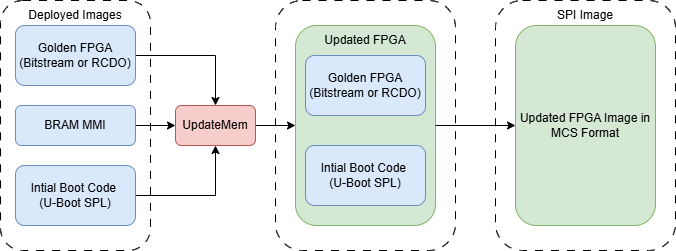
MicroBlaze V SPI flash boot image preparation.
Supported RISC-V ISA configurations
MB-V Linux boot in this release is 64-bit, on the SCU200
machines. Both set the RISC-V ISA (Instruction Set
Architecture) tune rv64imafdcb_zicsr_zifencei_zbc_zicbom, which
adds the Zbc carry-less multiply extension to the
rv64imafdc_zicbom_zicsr_zifencei_zba_zbb_zbs baseline that the
other 64-bit MicroBlaze V machines carry. The prebuilt SCU200 images
are compiled for the SCU200 tune, so a core customized to the baseline
cannot run them.
Linux Boot Flow
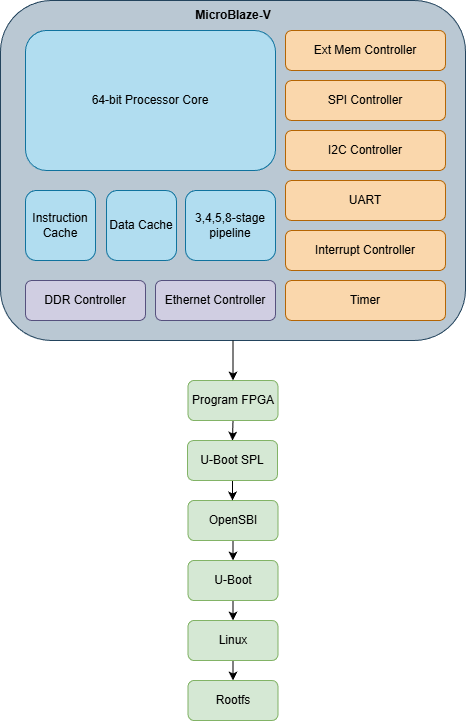
MicroBlaze V Linux boot flow.
The following steps describe the Linux boot flow for MB-V:
Program the PL with the PDI that initializes DRAM, clocks, and peripherals.
U-Boot SPL executes from block RAM at the reset vector address.
U-Boot SPL loads OpenSBI firmware (
fw_dynamic) to DRAM.U-Boot SPL loads the U-Boot FIT Image (OpenSBI firmware, U-Boot binary, and DTB) to DRAM.
U-Boot SPL jumps to the OpenSBI entry point.
OpenSBI initializes and switches the CPU from M-mode to S-mode, then jumps to U-Boot.
U-Boot initializes drivers, console, storage, and networking.
U-Boot loads
boot.scr, which in turn loads the Linux kernel and ramdisk.U-Boot boots Linux by using
booti.Linux starts userspace by using systemd.
Note
U-Boot and Linux can use SBI (Supervisor Binary Interface) for machine-level services through OpenSBI.
Required Boot Files
Files |
EDF support |
SCU200 (Spartan UltraScale+) |
|---|---|---|
FPGA image |
Yes |
|
First-stage bootloader |
Yes |
U-Boot SPL ( |
Second-stage bootloader |
Yes |
|
Linux kernel |
Yes |
|
Root filesystem (ramdisk) |
Yes |
|
Supported Boot Modes
Boot medium |
QEMU |
SCU200 |
|---|---|---|
JTAG (all images) |
No |
Yes |
No |
Yes |
|
No |
Yes |
Flash Memory Layout
For the UpdateMEM requirements see Booting From Flash, and for the full OSPI flash partition table see OSPI Memory Map (SCU200).
Booting From Flash
For persistent (QSPI/OSPI) flash boot, the following applies:
The FPGA bitstream or PDI and U-Boot SPL must be packaged into a single combined image by using the
updatememtool. As soon as the MB-V reset is released the combined image executes U-Boot SPL from block RAM.U-Boot SPL hands off to OpenSBI (
fw_dynamic, payload = U-Boot), which in turn hands off to U-Boot, which boots Linux.
The full boot hand-off chain is:
Bitstream/PDI + U-Boot SPL (block RAM)
  └─> OpenSBI (DRAM, M-mode → S-mode)
        └─> U-Boot (S-mode)
              └─> Linux kernel + rootfs
UpdateMEM Requirements
The updatemem tool merges an ELF or binary bootloader file into
the block RAM blocks of an existing FPGA bitstream or RCDO file.
The following applies:
updatememreads a BIT or RCDO file, an MMI (Memory Map Information) file, and a data file as input, and writes a new BIT or RCDO file as output.The MMI file describes how individual block RAM instances are grouped into a contiguous address space (address block).
updatememdoes not support.binfiles as the-dataargument; use the ELF file instead.updatememhas dependencies on multiple device data files and Vivado libraries. It cannot be shipped as a standalone native tool the waybootgencan, so it must be run from a Vivado installation.
QSPI/OSPI Memory Layout
The primary boot device memory layout must align with the requirements of the target device boot. The following notes apply to all flash boot targets:
U-Boot SPL is merged with the golden FPGA image at offset
0x0, occupying the first partition.The U-Boot FIT Image, boot script, kernel, and rootfs follow at fixed offsets in later partitions.
There is no in-kernel decompressor for compressed kernel images. If a compressed kernel is required, it must be decompressed in U-Boot before handing off to the kernel.
OSPI Memory Map (SCU200)
Applies to the SCU200 board, which uses a Micron mt35xu01g 1 Gbit
(128 MB) OSPI device.
Partition |
Start address |
Size |
Contents |
Approximate size |
Access |
|---|---|---|---|---|---|
0 |
|
0xA00000 (10 MB) |
8 MB |
RW |
|
1 |
|
0x200000 (2 MB) |
U-Boot FIT Image |
1 MB |
RW |
2 |
|
0x40000 (256 KB) |
U-Boot boot script |
256 KB |
RW |
3 |
|
0x340000 (3.25 MB) |
U-Boot environment storage |
0–3.25 MB |
RW |
4 |
|
0x2200000 (34 MB) |
Linux kernel (uncompressed) |
34 MB |
RW |
5 |
|
0x4E80000 (78.5 MB) |
Root filesystem ( |
50–78 MB |
RW |
RAM Disk Images and Yocto Project Machines
The following sections list the Yocto Project machine names and pre-built image names for the supported MB-V evaluation boards.
MB-V Linux BSP ramdisk image
Pre-built image names
Linux ramdisk image:
core-image-minimal-mbv64-scu200-sdt.rootfs.cpio.gz.u-boot, andcore-image-minimal-mbv64-scu200-revb-sdt.rootfs.cpio.gz.u-bootfor the Rev B boardU-Boot FIT Image:
u-boot-fitImage-mbv64-scu200-sdt.itb, andu-boot-fitImage-mbv64-scu200-revb-sdt.itbfor the Rev B board
Yocto Project machine names and build targets
$ MACHINE=mbv64-scu200-sdt bitbake core-image-minimal
For the Rev B board:
$ MACHINE=mbv64-scu200-revb-sdt bitbake core-image-minimal
MicroBlaze V References
Disk images and Yocto Project Machines
AMD EDF disk image targets are built from the different Linux Kernel and root FS configurations.
AMD EDF Linux BSP Disk Image
All binary disk images are based on the EDF Linux distribution
Prebuilt image names
EDF v26.06 release
EDF boot firmware (OSPI image)
Versal AI Edge Series Gen 2 VEK385
edf-ospi-versal-2ve-2vm-vek385-multidomain.bin
EDF Linux disk image Disk Image
Versal AI Edge Series Gen 2
edf-linux-disk-image-amd-cortexa78-mali-common.rootfs.wic.xzZCU104
edf-linux-disk-image-amd-cortexa53-mali-common+zynqmp-zcu104-sdt-full.rootfs.wic.xzZCU111
edf-linux-disk-image-amd-cortexa53-common+zynqmp-zcu111-sdt-full.rootfs.wic.xz
Yocto Project pre-defined Machine names and build targets
EDF v26.06 release
EDF boot firmware (OSPI image)
Versal AI Edge Series Gen 2 VEK385 MACHINE=versal-2ve-2vm-vek385-multidomain bitbake edf-ospi
EDF Linux disk image
Versal AI Edge Series Gen 2
MACHINE=amd-cortexa78-mali-common
bitbake edf-linux-disk-image
Versal AI Edge
MACHINE=amd-cortexa72-common bitbake
edf-linux-disk-image
AMD Zynq UltraScale+ MPSoC eg/ev family
MACHINE=amd-cortexa53-mali-common bitbake edf-linux-disk-imageAMD Zynq UltraScale+ MPSoC cg/dr family
MACHINE=amd-cortexa53-common
bitbake edf-linux-disk-image
Boot.bin
VEK385
MACHINE=versal-2ve-2vm-vek385-sdt-seg bitbake xilinx-bootbinZCU104
MACHINE=zynqmp-zcu104-sdt-full bitbake xilinx-bootbinZCU111
MACHINE=zynqmp-zcu111-sdt-full bitbake xilinx-bootbinVEK280
MACHINE=versal-vek280-sdt-seg bitbake xilinx-bootbin