PetaLinux to EDF Migration Guide
For new EDF work, see the AMD Embedded Development Framework (EDF) page.
Warning
This page and the included tutorials are for reference purposes only. Users who hit bugs or errors during the migration are expected to debug them on their own. AMD is happy to provide support, but issues introduced by the migration process itself are not in scope for that support.
Overview
PetaLinux
PetaLinux is an embedded Linux Software Development Kit (SDK) targeting FPGA-based system-on-chip (SoC) designs or FPGA designs.
EDF
The AMD Embedded Development Framework (EDF) is a common framework to support platform level development and embedded software solutions for AMD adaptive SoC and FPGA products, along with their evaluation boards.
BSP Directory Structure
PetaLinux BSP
The .bsp file contains:
Prebuilt images
Design files
Configuration files
EDF BSP
The BSP is split across multiple locations and does not use a .bsp
tar file. In PetaLinux, there are no Tcl sources for design file generation, but
in EDF, the design Tcls are open-sourced.
Resources:
Migration Steps: PetaLinux to Yocto EDF
Note
There is no direct conversion from a PetaLinux XSA-based project to EDF. First, migrate the PetaLinux XSCT project to a PetaLinux SDT project. Then, migrate the SDT project to EDF using the steps outlined in the following section.
Steps to Migrate a PetaLinux XSCT Project to a PetaLinux SDT Project
This section describes the process of migrating an existing PetaLinux project created using XSA into the PetaLinux SDT.
These steps assume you have a PetaLinux project created using the XSCT flow by following the guidelines in UG1144: Creating an Empty Project and have made certain configurations. Make sure that the XSCT project is complete and functional.
Step 1: Create New PetaLinux SDT Project
Create a new directory outside of the PetaLinux XSCT project.
Step 2: Copy and Integrate PetaLinux XSCT Customizations into PetaLinux SDT Project
Copy the entire meta-user layer into PetaLinux SDT Project:
Locate meta-user in your PetaLinux XSCT project.
$ cd <petalinux_xsct_project>/project-spec/meta-user
This directory contains board-specific recipes (for example, U-Boot, kernel, rootfs configs).
Copy it into the project-spec directory of the SDT project, or overwrite the existing meta-user directory:
$ cp -r <petalinux_xsct_project>/project-spec/meta-user <petalinux_sdt_project>/project-spec/meta-user
These include the main system configuration and root filesystem configuration:
$ cp <petalinux_xsct_project>/project-spec/configs/config <petalinux_sdt_project>/project-spec/configs/config
$ cp <petalinux_xsct_project>/project-spec/configs/rootfs_config <petalinux_sdt_project>/project-spec/configs/rootfs_config
Step 3: Verify Configuration in the PetaLinux SDT Project
Check configurations through menuconfig:
$ yes | petalinux-config --silentconfig
$ petalinux-config -c u-boot
$ petalinux-config -c kernel
$ petalinux-config -c rootfs
Make sure all custom options are carried forward.
Step 4: Build and Verify the Image (Optional Step)
Build the complete project, verify the generated images:
$ petalinux-build
After the migration from the PetaLinux XSCT project to the PetaLinux SDT project is complete, proceed to migrate the PetaLinux SDT project to EDF using the steps outlined in the following section.
Example user configuration in PetaLinux Project
Kernel Configuration
To configure the kernel, run the following:
$ petalinux-config -c kernel
This opens a kernel configuration menu. The menu can take some time to load.
For example: Remove ZynqMP SHA3 support from kernel configuration.
Navigate to “Device Drivers → ZynqMP SHA3” in the kernel configuration and deselect the option to exclude SHA3 support.
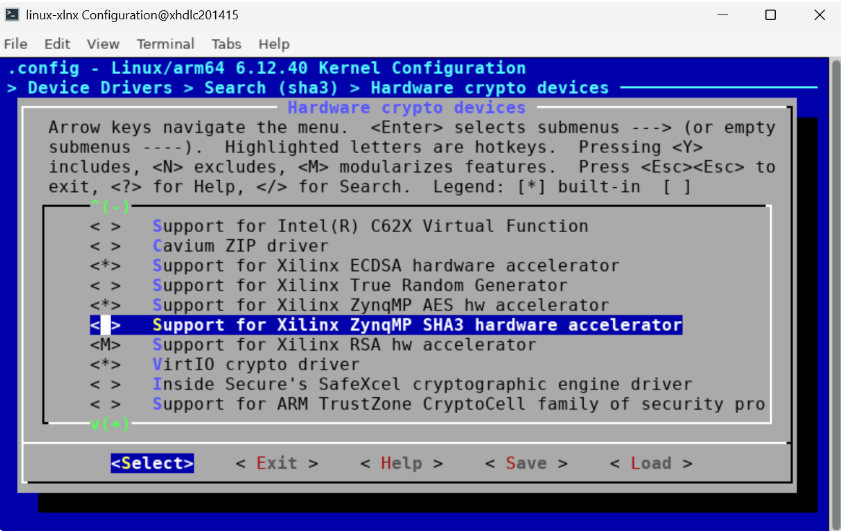
Deselecting the ZynqMP SHA3 driver in the kernel menuconfig.
Root Filesystem Configuration
To configure the root filesystem, run:
$ petalinux-config -c rootfs
For example: Adding util-linux package to the root filesystem
Follow Versal CPM5 PCIe Root Port Design Linux: PetaLinux image generation.
U-Boot Configuration
To configure U-Boot, run:
$ petalinux-config -c u-boot
For example: update the autoboot delay to five seconds:
Navigate to [*] Autoboot → Boot options → (2) Delay before automatically booting and change the value from 2 to 5.
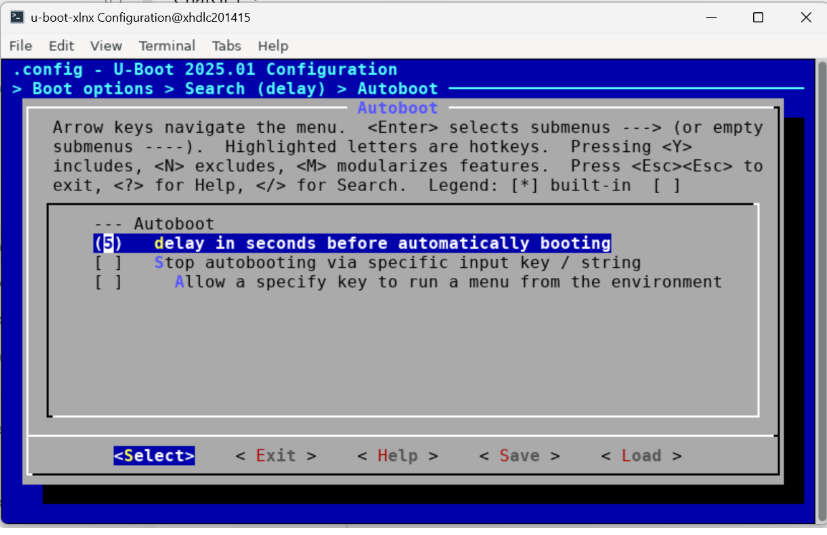
Setting the U-Boot autoboot delay to five seconds in menuconfig.
Steps to Migrate a PetaLinux SDT Project to Yocto EDF
This section describes the process of migrating an existing PetaLinux project to the SDT Yocto EDF flow.
Step 1: Create a Yocto EDF Project
Create a new directory outside of the PetaLinux project.
Set up the Yocto environment: Operating System Integration and Development AMD Versal device portfolio
Step 2: Copy and Integrate PetaLinux Customizations into Yocto EDF
Copy the entire meta-user layer into Yocto (EDF):
Locate meta-user in your PetaLinux project:
$ cd <petalinux_project>/project-spec/meta-user
This directory contains board-specific recipes (for example U-Boot, kernel, rootfs configs).
Copy it into the EDF Yocto source tree:
$ cp -r <petalinux_project>/project-spec/meta-user <edf_workspace>/sources/meta-user
Add the layer to Yocto build (using bitbake-layers):
$ cd <edf_workspace>/build
Add layer:
$ bitbake-layers add-layer ../sources/meta-user
Verify with:
$ bitbake-layers show-layers
Copy configuration files from PetaLinux to EDF:
plnxtool.conf, machine, and multiconfig from the PetaLinux project to the Yocto EDF build configuration:$ cp <petalinux_project>/build/conf/plnxtool.conf <edf_workspace>/build/conf/
$ cp -r <petalinux_project>/build/conf/machine \
<petalinux_project>/build/conf/multiconfig \
<edf_workspace>/build/conf/
conf/machine/xlnx-zynqmp-zcu102-rev1-0.conf:CONFIG_DTFILE_DIR := "${@bb.utils.which(d.getVar('BBPATH'), 'conf/../../../PetaLinux/xilinx-zcu102-2026.1/components/plnx_workspace/device-tree')}"
Update this path according to your project directory structure.
Step 3: Build EDF Images
Build the boot.bin and the EDF SoC Common disk images.
For instructions, see Operating System Integration and Development AMD Versal device portfolio.
Note
If you make any changes in bsp.cfg, comment out the
platform-top.h include in
sources/meta-user/recipes-bsp/u-boot/u-boot-xlnx_%.bbappend,
for example:
FILESEXTRAPATHS:prepend := "${THISDIR}/files:"

#SRC_URI:append = " file://platform-top.h"
SRC_URI:append = "file://bsp.cfg"
SRC_URI += "file://user_2025-10-27-13-13-00.cfg"
This prevents build errors such as:
No rule to make target include/config.h:3:10: fatal error:
configs/platform-top.h: No such file or directory
Verifying User Added PetaLinux Configuration in the EDF Project
At Build Level
Use Yocto commands to confirm migrated configurations:
Verify the boot configuration updates with
bitbake -c menuconfig u-boot-xlnx.Verify the kernel configuration changes with
bitbake -c menuconfig linux-xlnx.Confirm that the changes are reflected in the corresponding configuration.
On Target
Boot the Images From the Storage Boot Medium
Add
boot.binto the EDF disk images (EFI partition in the WIC image). For instructions, see Development Flows.Write the EDF Linux disk image (WIC) to the boot media and boot the board up to Linux. For instructions, see Discovery and Evaluation AMD ZynqMP device portfolio.
Verify the boot using the checks below.
Hit any key to stop autoboot: 5
amd-edf:/home/amd-edf# ls /sys/bus/platform/devices/ | grep sha3
amd-edf:/home/amd-edf# dmesg | grep sha3
util-linux is included in the root filesystem:amd-edf:/home/amd-edf# which mkfs.cramfs
amd-edf:/home/amd-edf# mkfs.cramfs --version
amd-edf:/home/amd-edf# ls /usr/sbin | grep util
Verification on hardware:
PetaLinux-to-EDF migration boot log
Connecting to device com0.  Use Ctrl-\ to escape.
Zynq MP First Stage Boot Loader
Release 2025.2   Oct 24 2025  -  13:29:14
PMU Firmware 2025.2     Oct 24 2025   13:29:14
PMU_ROM Version: xpbr-v8.1.0-0
NOTICE:  BL31: Non secure code at 0x8000000
NOTICE:  BL31: v2.12.0(release):xlnx_rebase_v2.12_2025.1-165-g894ecd073-dirty
NOTICE:  BL31: Built : 08:14:53, Oct 16 2025


U-Boot 2025.01-g91d06b67db04 (Oct 17 2025 - 09:09:58 +0000)

CPU:   ZynqMP
Silicon: v3
Chip:  zu9eg
Model: ZynqMP ZCU102 Rev1.0
Board: Xilinx ZynqMP
DRAM:  2 GiB (effective 4 GiB)
gpio_hog_of_to_plat: wrong gpios property, 2 values needed -22
gpio_hog_of_to_plat: wrong gpios property, 2 values needed -22
EL Level:       EL2
Secure Boot:    not authenticated, not encrypted
Core:  79 devices, 30 uclasses, devicetree: board
NAND:  0 MiB
MMC:   mmc@ff170000: 0
Loading Environment from FAT... Unable to use mmc 0:2...
In:    serial
Out:   serial,vidconsole
Err:   serial,vidconsole
Bootmode: LVL_SHFT_SD_MODE1
Reset reason:   DEBUG
Net:
ZYNQ GEM: ff0e0000, mdio bus ff0e0000, phyaddr 12, interface rgmii-id

Warning: ethernet@ff0e0000 (eth0) using random MAC address - 4e:4a:f9:80:71:e4
eth0: ethernet@ff0e0000

scanning bus for devices...
SATA link 0 timeout.
Target spinup took 0 ms.
AHCI 0001.0301 32 slots 2 ports 6 Gbps 0x3 impl SATA mode
flags: 64bit ncq pm clo only pmp fbss pio slum part ccc apst
  Device 0: (1:0) Vendor: ATA Prod.: ST3160215SCE Rev: 3.AC
            Type: Hard Disk
            Capacity: 152627.8 MB = 149.0 GB (312581809 x 512)
starting USB...
Bus usb@fe200000: Register 2000440 NbrPorts 2
Starting the controller
USB XHCI 1.00
scanning bus usb@fe200000 for devices... 2 USB Device(s) found
       scanning usb for storage devices... 1 Storage Device(s) found
Hit any key to stop autoboot:  0
switch to partitions #0, OK
mmc0 is current device
Scanning mmc 0:2...
Found U-Boot script /boot.scr
977 bytes read in 9 ms (105.5 KiB/s)
## Executing script at 20000000
Checking for kernel:Image
Loading Image at 0x200000
32780800 bytes read in 2126 ms (14.7 MiB/s)
Working FDT set to 7bcd52c0
Cannot persist EFI variables without system partition
Missing TPMv2 device for EFI_TCG_PROTOCOL
Missing RNG device for EFI_RNG_PROTOCOL
No RNG device
Booting /Image
EFI stub: Booting Linux Kernel...
EFI stub: EFI_RNG_PROTOCOL unavailable
EFI stub: Using DTB from configuration table
EFI stub: Exiting boot services...
[    0.000000] Booting Linux on physical CPU 0x0000000000 [0x410fd034]
[    0.000000] Linux version 6.12.40-xilinx-g3f587f532ea7 (oe-user@oe-host) (aarch64-amd-linux-gcc (GCC) 13.4.0, GNU ld (GNU Binutils) 2.42.0.20240723) #1 SMP Thu Oct 23 09:14:44 UTC 2025
[    0.000000] KASLR disabled due to lack of seed
[    0.000000] Machine model: ZynqMP ZCU102 Rev1.0
[    0.000000] earlycon: cdns0 at MMIO 0x00000000ff000000 (options '115200n8')
[    0.000000] printk: legacy bootconsole [cdns0] enabled
[    0.000000] efi: EFI v2.10 by Das U-Boot
[    0.000000] efi: ESRT=0x87ffc2040 RTPROP=0x87ffc4040 SMBIOS 3.0=0x7bd08000 MEMRESERVE=0x87ffa0040
[    0.000000] esrt: Reserving ESRT space from 0x000000087ffc2040 to 0x000000087ffc20a0.
[    0.000000] OF: reserved mem: Reserved memory: No reserved-memory node in the DT
[    0.000000] Zone ranges:
[    0.000000]   DMA      [mem 0x0000000000000000-0x00000000ffffffff]
[    0.000000]   DMA32    empty
[    0.000000]   Normal   [mem 0x0000000100000000-0x000000087fffffff]
[    0.000000] Movable zone start for each node
[    0.000000] Early memory node ranges
[    0.000000]   node   0: [mem 0x0000000000000000-0x000000007bd07fff]
[    0.000000]   node   0: [mem 0x000000007bd08000-0x000000007bd08fff]
[    0.000000]   node   0: [mem 0x000000007bd09000-0x000000007fd5ffff]
[    0.000000]   node   0: [mem 0x000000007fd60000-0x000000007fd6ffff]
[    0.000000]   node   0: [mem 0x000000007fd70000-0x000000007fefffff]
[    0.000000]   node   0: [mem 0x0000000800000000-0x000000087ffc3fff]
[    0.000000]   node   0: [mem 0x000000087ffc4000-0x000000087ffc4fff]
[    0.000000]   node   0: [mem 0x000000087ffc5000-0x000000087ffc7fff]
[    0.000000]   node   0: [mem 0x000000087ffc8000-0x000000087ffe8fff]
[    0.000000]   node   0: [mem 0x000000087ffe9000-0x000000087ffeafff]
[    0.000000]   node   0: [mem 0x000000087ffeb000-0x000000087ffebfff]
[    0.000000]   node   0: [mem 0x000000087ffec000-0x000000087fffffff]
[    0.000000] Initmem setup node 0 [mem 0x0000000000000000-0x000000087fffffff]
[    0.000000] On node 0, zone Normal: 256 pages in unavailable ranges
[    0.000000] cma: Reserved 256 MiB at 0x000000006bc00000 on node -1
[    0.000000] psci: probing for conduit method from DT.
[    0.000000] psci: PSCIv1.1 detected in firmware.
[    0.000000] psci: Using standard PSCI v0.2 function IDs
[    0.000000] psci: MIGRATE_INFO_TYPE not supported.
[    0.000000] psci: SMC Calling Convention v1.5
[    0.000000] percpu: Embedded 31 pages/cpu s90072 r8192 d28712 u126976
[    0.000000] Detected VIPT I-cache on CPU0
[    0.000000] CPU features: detected: ARM erratum 845719
[    0.000000] alternatives: applying boot alternatives
[    0.000000] Kernel command line: earlycon console=ttyPS0,115200 root=/dev/ram0 rw init_fatal_sh=1 root=/dev/mmcblk0p3 ro rootwait uio_pdrv_genirq.of_id=generic-uio
[    0.000000] Unknown kernel command line parameters "init_fatal_sh=1", will be passed to user space.
[    0.000000] Dentry cache hash table entries: 524288 (order: 10, 4194304 bytes, linear)
[    0.000000] Inode-cache hash table entries: 262144 (order: 9, 2097152 bytes, linear)
[    0.000000] Built 1 zonelists, mobility grouping on.  Total pages: 1048320
[    0.000000] mem auto-init: stack:all(zero), heap alloc:off, heap free:off
[    0.000000] software IO TLB: area num 4.
[    0.000000] software IO TLB: mapped [mem 0x000000007bd60000-0x000000007fd60000] (64MB)
[    0.000000] SLUB: HWalign=64, Order=0-3, MinObjects=0, CPUs=4, Nodes=1
[    0.000000] rcu: Hierarchical RCU implementation.
[    0.000000] rcu:     RCU event tracing is enabled.
[    0.000000] rcu:     RCU restricting CPUs from NR_CPUS=16 to nr_cpu_ids=4.
[    0.000000]  Tracing variant of Tasks RCU enabled.
[    0.000000] rcu: RCU calculated value of scheduler-enlistment delay is 25 jiffies.
[    0.000000] rcu: Adjusting geometry for rcu_fanout_leaf=16, nr_cpu_ids=4
[    0.000000] RCU Tasks Trace: Setting shift to 2 and lim to 1 rcu_task_cb_adjust=1 rcu_task_cpu_ids=4.
[    0.000000] NR_IRQS: 64, nr_irqs: 64, preallocated irqs: 0
[    0.000000] GIC: Adjusting CPU interface base to 0x00000000f902f000
[    0.000000] Root IRQ handler: gic_handle_irq
[    0.000000] GIC: Using split EOI/Deactivate mode
[    0.000000] rcu: srcu_init: Setting srcu_struct sizes based on contention.
[    0.000000] arch_timer: cp15 timer(s) running at 99.99MHz (phys).
[    0.000000] clocksource: arch_sys_counter: mask: 0x1ffffffffffffff max_cycles: 0x170f8de2d3, max_idle_ns: 440795206112 ns
[    0.000001] sched_clock: 57 bits at 100MHz, resolution 10ns, wraps every 4398046511101ns
[    0.008452] Console: colour dummy device 80x25
[    0.012561] Calibrating delay loop (skipped), value calculated using timer frequency.. 199.98 BogoMIPS (lpj=399960)
[    0.022974] pid_max: default: 32768 minimum: 301
[    0.027719] Mount-cache hash table entries: 8192 (order: 4, 65536 bytes, linear)
[    0.034991] Mountpoint-cache hash table entries: 8192 (order: 4, 65536 bytes, linear)
[    0.044569] rcu: Hierarchical SRCU implementation.
[    0.047603] rcu:     Max phase no-delay instances is 1000.
[    0.053002] Timer migration: 1 hierarchy levels; 8 children per group; 1 crossnode level
[    0.061248] Remapping and enabling EFI services.
[    0.065732] smp: Bringing up secondary CPUs ...
[    0.262081] Detected VIPT I-cache on CPU1
[    0.262151] CPU1: Booted secondary processor 0x0000000001 [0x410fd034]
[    0.558059] Detected VIPT I-cache on CPU2
[    0.558109] CPU2: Booted secondary processor 0x0000000002 [0x410fd034]
[    0.871215] Detected VIPT I-cache on CPU3
[    0.871265] CPU3: Booted secondary processor 0x0000000003 [0x410fd034]
[    0.871332] smp: Brought up 1 node, 4 CPUs
[    0.901369] SMP: Total of 4 processors activated.
[    0.906067] CPU: All CPU(s) started at EL2
[    0.910159] CPU features: detected: 32-bit EL0 Support
[    0.915292] CPU features: detected: CRC32 instructions
[    0.920471] alternatives: applying system-wide alternatives
[    0.926991] Memory: 3746772K/4193280K available (18944K kernel code, 2380K rwdata, 5848K rodata, 4736K init, 505K bss, 180052K reserved, 262144K cma-reserved)
[    0.940935] devtmpfs: initialized
[    0.953058] clocksource: jiffies: mask: 0xffffffff max_cycles: 0xffffffff, max_idle_ns: 7645041785100000 ns
[    0.957196] futex hash table entries: 1024 (order: 4, 65536 bytes, linear)
[    0.969016] 24624 pages in range for non-PLT usage
[    0.969032] 516144 pages in range for PLT usage
[    0.969226] pinctrl core: initialized pinctrl subsystem
[    0.979081] SMBIOS 3.7.0 present.
[    0.981899] DMI: xlnx ZynqMP ZCU102 Rev1.0/ZynqMP ZCU102 Rev1.0, BIOS 2025.01-g91d06b67db04 01/01/2025
[    0.991215] DMI: Memory slots populated: 0/0
[    0.997426] NET: Registered PF_NETLINK/PF_ROUTE protocol family
[    1.002134] DMA: preallocated 512 KiB GFP_KERNEL pool for atomic allocations
[    1.008521] DMA: preallocated 512 KiB GFP_KERNEL|GFP_DMA pool for atomic allocations
[    1.016322] DMA: preallocated 512 KiB GFP_KERNEL|GFP_DMA32 pool for atomic allocations
[    1.024118] audit: initializing netlink subsys (disabled)
[    1.029629] audit: type=2000 audit(0.944:1): state=initialized audit_enabled=0 res=1
[    1.029943] thermal_sys: Registered thermal governor 'step_wise'
[    1.037433] hw-breakpoint: found 6 breakpoint and 4 watchpoint registers.
[    1.050087] ASID allocator initialised with 65536 entries
[    1.055560] Serial: AMBA PL011 UART driver
[    1.070014] /axi/pcie@fd0e0000: Fixed dependency cycle(s) with /axi/pcie@fd0e0000
[    1.072035] /axi/interrupt-controller@f9010000: Fixed dependency cycle(s) with /axi/interrupt-controller@f9010000
[    1.085826] /axi/pcie@fd0e0000: Fixed dependency cycle(s) with /axi/pcie@fd0e0000
[    1.089670] /axi/pcie@fd0e0000: Fixed dependency cycle(s) with /axi/pcie@fd0e0000/legacy-interrupt-controller
[    1.106399] /axi/display@fd4a0000: Fixed dependency cycle(s) with /dpcon
[    1.107515] /dpcon: Fixed dependency cycle(s) with /axi/display@fd4a0000
[    1.120795] HugeTLB: registered 1.00 GiB page size, pre-allocated 0 pages
[    1.121940] HugeTLB: 0 KiB vmemmap can be freed for a 1.00 GiB page
[    1.128215] HugeTLB: registered 32.0 MiB page size, pre-allocated 0 pages
[    1.135000] HugeTLB: 0 KiB vmemmap can be freed for a 32.0 MiB page
[    1.141263] HugeTLB: registered 2.00 MiB page size, pre-allocated 0 pages
[    1.148048] HugeTLB: 0 KiB vmemmap can be freed for a 2.00 MiB page
[    1.154314] HugeTLB: registered 64.0 KiB page size, pre-allocated 0 pages
[    1.161099] HugeTLB: 0 KiB vmemmap can be freed for a 64.0 KiB page
[    1.235456] raid6: neonx8   gen()  2270 MB/s
[    1.303520] raid6: neonx4   gen()  2224 MB/s
[    1.371607] raid6: neonx2   gen()  2124 MB/s
[    1.439688] raid6: neonx1   gen()  1811 MB/s
[    1.507759] raid6: int64x8  gen()  1415 MB/s
[    1.575836] raid6: int64x4  gen()  1569 MB/s
[    1.643903] raid6: int64x2  gen()  1399 MB/s
[    1.711987] raid6: int64x1  gen()  1034 MB/s
[    1.712028] raid6: using algorithm neonx8 gen() 2270 MB/s
[    1.784069] raid6: .... xor() 1655 MB/s, rmw enabled
[    1.784115] raid6: using neon recovery algorithm
[    1.788783] iommu: Default domain type: Translated
[    1.792796] iommu: DMA domain TLB invalidation policy: strict mode
[    1.802942] SCSI subsystem initialized
[    1.803163] usbcore: registered new interface driver usbfs
[    1.808219] usbcore: registered new interface driver hub
[    1.813527] usbcore: registered new device driver usb
[    1.818642] mc: Linux media interface: v0.10
[    1.822841] videodev: Linux video capture interface: v2.00
[    1.828318] pps_core: LinuxPPS API ver. 1 registered
[    1.833255] pps_core: Software ver. 5.3.6 - Copyright 2005-2007 Rodolfo Giometti <giometti@linux.it>
[    1.842399] PTP clock support registered
[    1.846326] EDAC MC: Ver: 3.0.0
[    1.849675] scmi_core: SCMI protocol bus registered
[    1.854431] efivars: Registered efivars operations
[    1.859297] zynqmp-ipi-mbox mailbox@ff9905c0: Registered ZynqMP IPI mbox with TX/RX channels.
[    1.867987] zynqmp-ipi-mbox child@ff300000: Registered ZynqMP IPI mbox with TX/RX channels.
[    1.876070] zynqmp-ipi-mbox child@ff310000: Registered ZynqMP IPI mbox with TX/RX channels.
[    1.884412] zynqmp-ipi-mbox child@ff320000: Registered ZynqMP IPI mbox with TX/RX channels.
[    1.892761] zynqmp-ipi-mbox child@ff330000: Registered ZynqMP IPI mbox with TX/RX channels.
[    1.901119] zynqmp-ipi-mbox child@ff331000: Registered ZynqMP IPI mbox with TX/RX channels.
[    1.909472] zynqmp-ipi-mbox child@ff332000: Registered ZynqMP IPI mbox with TX/RX channels.
[    1.917819] zynqmp-ipi-mbox child@ff333000: Registered ZynqMP IPI mbox with TX/RX channels.
[    1.926175] zynqmp-ipi-mbox child@ff340000: Registered ZynqMP IPI mbox with TX/RX channels.
[    1.934531] zynqmp-ipi-mbox child@ff350000: Registered ZynqMP IPI mbox with TX/RX channels.
[    1.942964] zynqmp-ipi-mbox child@ff300000: Registered ZynqMP IPI mbox with TX/RX channels.
[    1.951236] zynqmp-ipi-mbox child@ff310000: Registered ZynqMP IPI mbox with TX/RX channels.
[    1.959584] zynqmp-ipi-mbox child@ff320000: Registered ZynqMP IPI mbox with TX/RX channels.
[    1.967941] zynqmp-ipi-mbox child@ff330000: Registered ZynqMP IPI mbox with TX/RX channels.
[    1.976291] zynqmp-ipi-mbox child@ff331000: Registered ZynqMP IPI mbox with TX/RX channels.
[    1.984642] zynqmp-ipi-mbox child@ff332000: Registered ZynqMP IPI mbox with TX/RX channels.
[    1.992997] zynqmp-ipi-mbox child@ff333000: Registered ZynqMP IPI mbox with TX/RX channels.
[    2.001354] zynqmp-ipi-mbox child@ff340000: Registered ZynqMP IPI mbox with TX/RX channels.
[    2.009701] zynqmp-ipi-mbox child@ff350000: Registered ZynqMP IPI mbox with TX/RX channels.
[    2.018190] zynqmp-ipi-mbox child@ff300000: Registered ZynqMP IPI mbox with TX/RX channels.
[    2.026415] zynqmp-ipi-mbox child@ff310000: Registered ZynqMP IPI mbox with TX/RX channels.
[    2.034762] zynqmp-ipi-mbox child@ff320000: Registered ZynqMP IPI mbox with TX/RX channels.
[    2.043112] zynqmp-ipi-mbox child@ff330000: Registered ZynqMP IPI mbox with TX/RX channels.
[    2.051469] zynqmp-ipi-mbox child@ff331000: Registered ZynqMP IPI mbox with TX/RX channels.
[    2.059818] zynqmp-ipi-mbox child@ff332000: Registered ZynqMP IPI mbox with TX/RX channels.
[    2.068174] zynqmp-ipi-mbox child@ff333000: Registered ZynqMP IPI mbox with TX/RX channels.
[    2.076526] zynqmp-ipi-mbox child@ff340000: Registered ZynqMP IPI mbox with TX/RX channels.
[    2.084883] zynqmp-ipi-mbox child@ff350000: Registered ZynqMP IPI mbox with TX/RX channels.
[    2.093575] FPGA manager framework
[    2.096796] Advanced Linux Sound Architecture Driver Initialized.
[    2.103272] Bluetooth: Core ver 2.22
[    2.106209] NET: Registered PF_BLUETOOTH protocol family
[    2.111509] Bluetooth: HCI device and connection manager initialized
[    2.117872] Bluetooth: HCI socket layer initialized
[    2.122732] Bluetooth: L2CAP socket layer initialized
[    2.127783] Bluetooth: SCO socket layer initialized
[    2.135770] clocksource: Switched to clocksource arch_sys_counter
[    2.139111] VFS: Disk quotas dquot_6.6.0
[    2.142676] VFS: Dquot-cache hash table entries: 512 (order 0, 4096 bytes)
[    2.155916] NET: Registered PF_INET protocol family
[    2.156123] IP idents hash table entries: 65536 (order: 7, 524288 bytes, linear)
[    2.165364] tcp_listen_portaddr_hash hash table entries: 2048 (order: 3, 32768 bytes, linear)
[    2.171112] Table-perturb hash table entries: 65536 (order: 6, 262144 bytes, linear)
[    2.178832] TCP established hash table entries: 32768 (order: 6, 262144 bytes, linear)
[    2.186945] TCP bind hash table entries: 32768 (order: 8, 1048576 bytes, linear)
[    2.194893] TCP: Hash tables configured (established 32768 bind 32768)
[    2.200736] UDP hash table entries: 2048 (order: 4, 65536 bytes, linear)
[    2.207436] UDP-Lite hash table entries: 2048 (order: 4, 65536 bytes, linear)
[    2.214642] NET: Registered PF_UNIX/PF_LOCAL protocol family
[    2.220637] RPC: Registered named UNIX socket transport module.
[    2.226077] RPC: Registered udp transport module.
[    2.230769] RPC: Registered tcp transport module.
[    2.235467] RPC: Registered tcp-with-tls transport module.
[    2.240948] RPC: Registered tcp NFSv4.1 backchannel transport module.
[    2.247395] PCI: CLS 0 bytes, default 64
[    2.252681] Initialise system trusted keyrings
[    2.255865] workingset: timestamp_bits=46 max_order=20 bucket_order=0
[    2.262435] squashfs: version 4.0 (2009/01/31) Phillip Lougher
[    2.268323] NFS: Registering the id_resolver key type
[    2.273078] Key type id_resolver registered
[    2.277233] Key type id_legacy registered
[    2.281250] nfs4filelayout_init: NFSv4 File Layout Driver Registering...
[    2.287940] nfs4flexfilelayout_init: NFSv4 Flexfile Layout Driver Registering...
[    2.295487] jffs2: version 2.2. (NAND) (SUMMARY)  © 2001-2006 Red Hat, Inc.
[    2.358170] NET: Registered PF_ALG protocol family
[    2.358222] xor: measuring software checksum speed
[    2.363412]    8regs           :  2519 MB/sec
[    2.367765]    32regs          :  2510 MB/sec
[    2.372197]    arm64_neon      :  2352 MB/sec
[    2.375153] xor: using function: 8regs (2519 MB/sec)
[    2.380123] Key type asymmetric registered
[    2.384209] Asymmetric key parser 'x509' registered
[    2.389123] Block layer SCSI generic (bsg) driver version 0.4 loaded (major 243)
[    2.396572] io scheduler mq-deadline registered
[    2.401006] io scheduler kyber registered
[    2.405023] io scheduler bfq registered
[    2.411860] irq-xilinx: /amba_pl/interrupt-controller@80020000: num_irq=1, edge=0x1
[    2.418446] ledtrig-cpu: registered to indicate activity on CPUs
[    2.461252] Serial: 8250/16550 driver, 4 ports, IRQ sharing disabled
[    2.463772] Serial: AMBA driver
[    2.475320] brd: module loaded
[    2.479054] loop: module loaded
[    2.495918] CAN device driver interface
[    2.497212] usbcore: registered new interface driver asix
[    2.499534] usbcore: registered new interface driver ax88179_178a
[    2.505638] usbcore: registered new interface driver cdc_ether
[    2.511465] usbcore: registered new interface driver net1080
[    2.517119] usbcore: registered new interface driver cdc_subset
[    2.523038] usbcore: registered new interface driver zaurus
[    2.528607] usbcore: registered new interface driver cdc_ncm
[    2.534262] usbcore: registered new interface driver r8153_ecm
[    2.540331] VFIO - User Level meta-driver version: 0.3
[    2.546098] usbcore: registered new interface driver uas
[    2.550536] usbcore: registered new interface driver usb-storage
[    2.556520] usbcore: registered new device driver onboard-usb-dev
[    2.564021] rtc_zynqmp ffa60000.rtc: registered as rtc0
[    2.567831] rtc_zynqmp ffa60000.rtc: setting system clock to 2025-10-30T23:31:17 UTC (1761867077)
[    2.576780] i2c_dev: i2c /dev entries driver
[    2.583298] usbcore: registered new interface driver uvcvideo
[    2.586705] Driver for 1-wire Dallas network protocol.
[    2.593049] device-mapper: ioctl: 4.48.0-ioctl (2023-03-01) initialised: dm-devel@lists.linux.dev
[    2.600905] Bluetooth: HCI UART driver ver 2.3
[    2.605149] Bluetooth: HCI UART protocol H4 registered
[    2.610281] Bluetooth: HCI UART protocol BCSP registered
[    2.615601] Bluetooth: HCI UART protocol LL registered
[    2.620722] Bluetooth: HCI UART protocol ATH3K registered
[    2.626125] Bluetooth: HCI UART protocol Three-wire (H5) registered
[    2.632427] Bluetooth: HCI UART protocol Intel registered
[    2.637786] Bluetooth: HCI UART protocol QCA registered
[    2.643031] usbcore: registered new interface driver bcm203x
[    2.648682] usbcore: registered new interface driver bpa10x
[    2.654246] usbcore: registered new interface driver bfusb
[    2.659735] usbcore: registered new interface driver btusb
[    2.665230] usbcore: registered new interface driver ath3k
[    2.670792] EDAC MC: ECC not enabled
[    2.674607] EDAC DEVICE0: Giving out device to module zynqmp-ocm-edac controller zynqmp_ocm: DEV ff960000.memory-controller (INTERRUPT)
[    2.686928] sdhci: Secure Digital Host Controller Interface driver
[    2.692593] sdhci: Copyright(c) Pierre Ossman
[    2.696936] sdhci-pltfm: SDHCI platform and OF driver helper
[    2.703441] SMCCC: SOC_ID: ID = jep106:0049:0000 Revision = 0x24738093
[    2.709202] zynqmp_firmware_probe Platform Management API v1.1
[    2.714961] zynqmp_firmware_probe Trustzone version v1.0
[    2.752691] securefw securefw: securefw probed
[    2.752904] xilinx_ecdsa xilinx_ecdsa.0: ECDSA is not supported on the platform
[    2.759203] zynqmp-aes zynqmp-aes.0: will run requests pump with realtime priority
[    2.766694] usbcore: registered new interface driver usbhid
[    2.772058] usbhid: USB HID core driver
[    2.779651] hw perfevents: enabled with armv8_cortex_a53 PMU driver, 7 (0,8000003f) counters available
[    2.786759] fpga_manager fpga0: Xilinx ZynqMP FPGA Manager registered
[    2.792311] usbcore: registered new interface driver snd-usb-audio
[    2.798591] pktgen: Packet Generator for packet performance testing. Version: 2.75
[    2.806159] IPVS: Registered protocols (TCP, UDP, SCTP, AH, ESP)
[    2.811384] IPVS: Connection hash table configured (size=4096, memory=32Kbytes)
[    2.818796] IPVS: ipvs loaded.
[    2.821835] Initializing XFRM netlink socket
[    2.826031] NET: Registered PF_INET6 protocol family
[    2.831617] Segment Routing with IPv6
[    2.834640] In-situ OAM (IOAM) with IPv6
[    2.838594] sit: IPv6, IPv4 and MPLS over IPv4 tunneling driver
[    2.844812] NET: Registered PF_PACKET protocol family
[    2.849489] NET: Registered PF_KEY protocol family
[    2.854297] Bridge firewalling registered
[    2.858269] can: controller area network core
[    2.862643] NET: Registered PF_CAN protocol family
[    2.867405] can: raw protocol
[    2.870364] can: broadcast manager protocol
[    2.874545] can: netlink gateway - max_hops=1
[    2.878980] Bluetooth: RFCOMM TTY layer initialized
[    2.883768] Bluetooth: RFCOMM socket layer initialized
[    2.888956] Bluetooth: RFCOMM ver 1.11
[    2.892642] Bluetooth: BNEP (Ethernet Emulation) ver 1.3
[    2.897943] Bluetooth: BNEP filters: protocol multicast
[    2.903165] Bluetooth: BNEP socket layer initialized
[    2.908135] Bluetooth: HIDP (Human Interface Emulation) ver 1.2
[    2.914043] Bluetooth: HIDP socket layer initialized
[    2.919035] 8021q: 802.1Q VLAN Support v1.8
[    2.923438] 9pnet: Installing 9P2000 support
[    2.927476] Key type dns_resolver registered
[    2.931831] NET: Registered PF_VSOCK protocol family
[    2.946599] registered taskstats version 1
[    2.946737] Loading compiled-in X.509 certificates
[    2.959256] Btrfs loaded, zoned=no, fsverity=no
[    3.140846] ff000000.serial: ttyPS0 at MMIO 0xff000000 (irq = 26, base_baud = 6249375) is a xuartps
[    3.149931] printk: legacy console [ttyPS0] enabled
[    3.149931] printk: legacy console [ttyPS0] enabled
[    3.154859] printk: legacy bootconsole [cdns0] disabled
[    3.154859] printk: legacy bootconsole [cdns0] disabled
[    3.166091] ff010000.serial: ttyPS1 at MMIO 0xff010000 (irq = 27, base_baud = 6249375) is a xuartps
[    3.179524] of-fpga-region fpga-region: FPGA Region probed
[    3.187838] nwl-pcie fd0e0000.pcie: host bridge /axi/pcie@fd0e0000 ranges:
[    3.194753] nwl-pcie fd0e0000.pcie:      MEM 0x00e0000000..0x00efffffff -> 0x00e0000000
[    3.202777] nwl-pcie fd0e0000.pcie:      MEM 0x0600000000..0x07ffffffff -> 0x0600000000
[    3.210929] nwl-pcie fd0e0000.pcie: Link is DOWN
[    3.216098] nwl-pcie fd0e0000.pcie: PCI host bridge to bus 0000:00
[    3.222290] pci_bus 0000:00: root bus resource [bus 00-ff]
[    3.227774] pci_bus 0000:00: root bus resource [mem 0xe0000000-0xefffffff]
[    3.234648] pci_bus 0000:00: root bus resource [mem 0x600000000-0x7ffffffff pref]
[    3.242163] pci 0000:00:00.0: [10ee:d021] type 01 class 0x060400 PCIe Root Port
[    3.249489] pci 0000:00:00.0: PCI bridge to [bus 00]
[    3.254452] pci 0000:00:00.0:   bridge window [mem 0x00000000-0x000fffff]
[    3.261247] pci 0000:00:00.0:   bridge window [mem 0x00000000-0x000fffff 64bit pref]
[    3.269035] pci 0000:00:00.0: PME# supported from D0 D1 D2 D3hot
[    3.277844] pci 0000:00:00.0: bridge configuration invalid ([bus 00-00]), reconfiguring
[    3.285994] pci_bus 0000:01: busn_res: [bus 01-ff] end is updated to 01
[    3.292622] pci 0000:00:00.0: PCI bridge to [bus 01]
[    3.297590] pci_bus 0000:00: resource 4 [mem 0xe0000000-0xefffffff]
[    3.303860] pci_bus 0000:00: resource 5 [mem 0x600000000-0x7ffffffff pref]
[    3.315006] xilinx-zynqmp-dpdma fd4c0000.dma-controller: Xilinx DPDMA engine is probed
[    3.323934] spi-nor spi0.0: found mt25qu512a, expected m25p80
[    3.330284] 3 fixed-partitions partitions found on MTD device spi0.0
[    3.336658] Creating 3 MTD partitions on "spi0.0":
[    3.341456] 0x000000000000-0x000001e00000 : "qspi-boot"
[    3.347640] 0x000001e00000-0x000001e40000 : "qspi-bootenv"
[    3.353944] 0x000001e40000-0x000004240000 : "qspi-kernel"
[    3.365633] xilinx-axipmon ffa00000.perf-monitor: Probed Xilinx APM
[    3.372406] xilinx-axipmon fd0b0000.perf-monitor: Probed Xilinx APM
[    3.379074] xilinx-axipmon fd490000.perf-monitor: Probed Xilinx APM
[    3.385741] xilinx-axipmon ffa10000.perf-monitor: Probed Xilinx APM
[    3.393091] i2c i2c-0: using pinctrl states for GPIO recovery
[    3.399031] i2c i2c-0: using generic GPIOs for recovery
[    3.404672] pca953x 0-0020: supply vcc not found, using dummy regulator
[    3.411369] pca953x 0-0020: using no AI
[    3.416565] pca953x 0-0021: supply vcc not found, using dummy regulator
[    3.423252] pca953x 0-0021: using no AI
[    3.427943] pca954x 0-0075: supply vdd not found, using dummy regulator
[    3.442659] i2c i2c-0: Added multiplexed i2c bus 2
[    3.453795] i2c i2c-0: Added multiplexed i2c bus 3
[    3.504031] i2c i2c-0: Added multiplexed i2c bus 4
[    3.508972] i2c i2c-0: Added multiplexed i2c bus 5
[    3.513777] pca954x 0-0075: registered 4 multiplexed busses for I2C mux pca9544
[    3.521156] cdns-i2c ff020000.i2c: 400 kHz mmio ff020000 irq 55
[    3.528260] i2c i2c-1: using pinctrl states for GPIO recovery
[    3.534211] i2c i2c-1: using generic GPIOs for recovery
[    3.539867] pca954x 1-0074: supply vdd not found, using dummy regulator
[    3.546957] at24 6-0054: supply vcc not found, using dummy regulator
[    3.553893] at24 6-0054: 1024 byte 24c08 EEPROM, writable, 1 bytes/write
[    3.560634] i2c i2c-1: Added multiplexed i2c bus 6
[    3.566061] si5341 7-0036: no regulator set, defaulting vdd_sel to 2.5V for out
[    3.573374] si5341 7-0036: no regulator set, defaulting vdd_sel to 2.5V for out
[    3.580677] si5341 7-0036: no regulator set, defaulting vdd_sel to 2.5V for out
[    3.587986] si5341 7-0036: no regulator set, defaulting vdd_sel to 2.5V for out
[    3.595295] si5341 7-0036: no regulator set, defaulting vdd_sel to 2.5V for out
[    3.602604] si5341 7-0036: no regulator set, defaulting vdd_sel to 2.5V for out
[    3.609913] si5341 7-0036: no regulator set, defaulting vdd_sel to 2.5V for out
[    3.617214] si5341 7-0036: no regulator set, defaulting vdd_sel to 2.5V for out
[    3.625344] si5341 7-0036: Chip: 5341 Grade: 1 Rev: 1
[    3.654518] i2c i2c-1: Added multiplexed i2c bus 7
[    3.661594] si570 8-005d: registered, current frequency 300000000 Hz
[    3.667997] i2c i2c-1: Added multiplexed i2c bus 8
[    3.675056] si570 9-005d: registered, current frequency 156250000 Hz
[    3.681459] i2c i2c-1: Added multiplexed i2c bus 9
[    3.686489] si5324 10-0069: si5328 probed
[    3.741597] si5324 10-0069: si5328 probe successful
[    3.746520] i2c i2c-1: Added multiplexed i2c bus 10
[    3.751542] i2c i2c-1: Added multiplexed i2c bus 11
[    3.756571] i2c i2c-1: Added multiplexed i2c bus 12
[    3.761592] i2c i2c-1: Added multiplexed i2c bus 13
[    3.766475] pca954x 1-0074: registered 8 multiplexed busses for I2C switch pca9548
[    3.774231] pca954x 1-0075: supply vdd not found, using dummy regulator
[    3.781173] i2c i2c-1: Added multiplexed i2c bus 14
[    3.786209] i2c i2c-1: Added multiplexed i2c bus 15
[    3.791234] i2c i2c-1: Added multiplexed i2c bus 16
[    3.796267] i2c i2c-1: Added multiplexed i2c bus 17
[    3.801295] i2c i2c-1: Added multiplexed i2c bus 18
[    3.806328] i2c i2c-1: Added multiplexed i2c bus 19
[    3.811360] i2c i2c-1: Added multiplexed i2c bus 20
[    3.816396] i2c i2c-1: Added multiplexed i2c bus 21
[    3.821292] pca954x 1-0075: registered 8 multiplexed busses for I2C switch pca9548
[    3.828902] cdns-i2c ff030000.i2c: 400 kHz mmio ff030000 irq 56
[    3.840791] cdns-wdt fd4d0000.watchdog: Xilinx Watchdog Timer with timeout 60s
[    3.848489] cdns-wdt ff150000.watchdog: Xilinx Watchdog Timer with timeout 10s
[    3.856198] cpufreq: cpufreq_online: CPU0: Running at unlisted initial frequency: 1199880 KHz, changing to: 1200000 KHz
[    3.869230] [drm] Initialized zynqmp-dpsub 1.0.0 for fd4a0000.display on minor 0
[    3.907296] mmc0: SDHCI controller on ff170000.mmc [ff170000.mmc] using ADMA 64-bit
[    3.962383] mmc0: new high speed SDHC card at address aaaa
[    3.968273] mmcblk0: mmc0:aaaa SL16G 14.8 GiB
[    3.977997]  mmcblk0: p1 p2 p3 p4
[    4.915802] zynqmp-dpsub fd4a0000.display: [drm] Cannot find any crtc or sizes
[    4.924144] zynqmp-dpsub fd4a0000.display: ZynqMP DisplayPort Subsystem driver probed
[    4.932401] ahci-ceva fd0c0000.ahci: supply ahci not found, using dummy regulator
[    4.939975] ahci-ceva fd0c0000.ahci: supply phy not found, using dummy regulator
[    4.947453] ahci-ceva fd0c0000.ahci: supply target not found, using dummy regulator
[    4.965445] ahci-ceva fd0c0000.ahci: AHCI vers 0001.0301, 32 command slots, 6 Gbps, platform mode
[    4.974325] ahci-ceva fd0c0000.ahci: 2/2 ports implemented (port mask 0x3)
[    4.981195] ahci-ceva fd0c0000.ahci: flags: 64bit ncq sntf pm clo only pmp fbs pio slum part ccc sds apst
[    4.991708] scsi host0: ahci-ceva
[    4.995389] scsi host1: ahci-ceva
[    4.998832] ata1: SATA max UDMA/133 mmio [mem 0xfd0c0000-0xfd0c1fff] port 0x100 irq 61 lpm-pol 0
[    5.007614] ata2: SATA max UDMA/133 mmio [mem 0xfd0c0000-0xfd0c1fff] port 0x180 irq 61 lpm-pol 0
[    5.020684] macb ff0e0000.ethernet eth0: Cadence GEM rev 0x50070106 at 0xff0e0000 irq 52 (4e:4a:f9:80:71:e4)
[    5.048755] xhci-hcd xhci-hcd.1.auto: xHCI Host Controller
[    5.054268] xhci-hcd xhci-hcd.1.auto: new USB bus registered, assigned bus number 1
[    5.062041] xhci-hcd xhci-hcd.1.auto: hcc params 0x0238f625 hci version 0x100 quirks 0x0000808002000810
[    5.071478] xhci-hcd xhci-hcd.1.auto: irq 62, io mem 0xfe200000
[    5.077512] xhci-hcd xhci-hcd.1.auto: xHCI Host Controller
[    5.083005] xhci-hcd xhci-hcd.1.auto: new USB bus registered, assigned bus number 2
[    5.090675] xhci-hcd xhci-hcd.1.auto: Host supports USB 3.0 SuperSpeed
[    5.097353] usb usb1: New USB device found, idVendor=1d6b, idProduct=0002, bcdDevice= 6.12
[    5.105622] usb usb1: New USB device strings: Mfr=3, Product=2, SerialNumber=1
[    5.112841] usb usb1: Product: xHCI Host Controller
[    5.117718] usb usb1: Manufacturer: Linux 6.12.40-xilinx-g3f587f532ea7 xhci-hcd
[    5.125019] usb usb1: SerialNumber: xhci-hcd.1.auto
[    5.130284] hub 1-0:1.0: USB hub found
[    5.134078] hub 1-0:1.0: 1 port detected
[    5.138368] usb usb2: New USB device found, idVendor=1d6b, idProduct=0003, bcdDevice= 6.12
[    5.146638] usb usb2: New USB device strings: Mfr=3, Product=2, SerialNumber=1
[    5.153863] usb usb2: Product: xHCI Host Controller
[    5.158736] usb usb2: Manufacturer: Linux 6.12.40-xilinx-g3f587f532ea7 xhci-hcd
[    5.166062] usb usb2: SerialNumber: xhci-hcd.1.auto
[    5.171242] hub 2-0:1.0: USB hub found
[    5.175011] hub 2-0:1.0: 1 port detected
[    5.179920] input: gpio-keys as /devices/platform/gpio-keys/input/input0
[    5.186990] of_cfs_init
[    5.189458] of_cfs_init: OK
[    5.192366] clk: Disabling unused clocks
[    5.197274] PM: genpd: Disabling unused power domains
[    5.202653] ALSA device list:
[    5.205613]   #0: DisplayPort Monitor
[    5.330129] ata1: SATA link down (SStatus 0 SControl 330)
[    5.491777] ata2: SATA link up 3.0 Gbps (SStatus 123 SControl 330)
[    5.556701] ata2.00: ATA-8: ST3160215SCE, 3.ACF, max UDMA/133
[    5.562451] ata2.00: 312581808 sectors, multi 0: LBA48 NCQ (depth 32)
[    5.615008] ata2.00: configured for UDMA/133
[    5.619569] scsi 1:0:0:0: Direct-Access     ATA      ST3160215SCE     F    PQ: 0 ANSI: 5
[    5.628627] sd 1:0:0:0: [sda] 312581808 512-byte logical blocks: (160 GB/149 GiB)
[    5.636144] sd 1:0:0:0: [sda] Write Protect is off
[    5.639816] usb 2-1: new SuperSpeed USB device number 2 using xhci-hcd
[    5.647495] sd 1:0:0:0: [sda] Write cache: enabled, read cache: enabled, doesn't support DPO or FUA
[    5.656632] sd 1:0:0:0: [sda] Preferred minimum I/O size 512 bytes
[    5.721365] sd 1:0:0:0: [sda] Attached SCSI disk
[    5.761578] usb 2-1: New USB device found, idVendor=054c, idProduct=09c2, bcdDevice= 1.00
[    5.769776] usb 2-1: New USB device strings: Mfr=1, Product=2, SerialNumber=3
[    5.776907] usb 2-1: Product: Storage Media
[    5.781090] usb 2-1: Manufacturer: Sony
[    5.784926] usb 2-1: SerialNumber: 5C07104BE29515C213
[    5.791586] usb-storage 2-1:1.0: USB Mass Storage device detected
[    5.798012] scsi host2: usb-storage 2-1:1.0
[    5.952353] EXT4-fs (mmcblk0p3): orphan cleanup on readonly fs
[    5.960052] EXT4-fs (mmcblk0p3): mounted filesystem 80c57074-5d0b-492d-9b18-5002b2ed582e ro with ordered data mode. Quota mode: none.
[    5.972118] zynqmp-dpsub fd4a0000.display: [drm] Cannot find any crtc or sizes
[    5.972137] VFS: Mounted root (ext4 filesystem) readonly on device 179:3.
[    5.989540] devtmpfs: mounted
[    5.993688] Freeing unused kernel memory: 4736K
[    5.998270] Run /sbin/init as init process
[    6.585311] systemd[1]: systemd 255.21^ running in system mode (+PAM -AUDIT -SELINUX -APPARMOR +IMA -SMACK +SECCOMP -GCRYPT -GNUTLS +OPENSSL +ACL +BLKID -CURL -ELFUTILS -FIDO2 -IDN2 -IDN -IPTC +KMOD -LIBCRYPTSETUP +LIBFDISK -PCRE2 -PWQUALITY -P11KIT -QRENCODE -TPM2 -BZIP2 -LZ4 -XZ -ZLIB +ZSTD -BPF_FRAMEWORK +XKBCOMMON +UTMP +SYSVINIT default-hierarchy=unified)
[    6.617225] systemd[1]: Detected architecture arm64.

Welcome to AMD Embedded Development Framework Linux distribution 25.11+development-5f383d8ae735e3dbfdb09cef4cce47cfa2c9dcc4 (scarthgap)!

[    6.659944] systemd[1]: Hostname set to <amd-edf>.
[    6.676306] systemd[1]: Initializing machine ID from random generator.
[    6.682968] systemd[1]: Installed transient /etc/machine-id file.
[    6.897051] scsi 2:0:0:0: Direct-Access     Sony     Storage Media    PMAP PQ: 0 ANSI: 6
[    6.995777] systemd[1]: /usr/lib/systemd/system/xen-qemu-dom0-disk-backend.service:11: PIDFile= references a path below legacy directory /var/run/, updating /var/run/xen/qemu-dom0.pid → /run/xen/qemu-dom0.pid; please update the unit file accordingly.
[    7.299471] systemd[1]: Queued start job for default target Multi-User System.
[    7.344207] systemd[1]: Created slice Slice /system/getty.
[  OK  ] Created slice Slice /system/getty.
[    7.361581] systemd[1]: Created slice Slice /system/modprobe.
[  OK  ] Created slice Slice /system/modprobe.
[    7.381513] systemd[1]: Created slice Slice /system/serial-getty.
[  OK  ] Created slice Slice /system/serial-getty.
[    7.401078] systemd[1]: Created slice User and Session Slice.
[  OK  ] Created slice User and Session Slice.
[    7.420054] systemd[1]: Started Dispatch Password Requests to Console Directory Watch.
[  OK  ] Started Dispatch Password Requests to Console Directory Watch.
[    7.439975] systemd[1]: Started Forward Password Requests to Wall Directory Watch.
[  OK  ] Started Forward Password Requests to Wall Directory Watch.
[    7.459905] systemd[1]: Expecting device /dev/disk/by-label/boot...
         Expecting device /dev/disk/by-label/boot...
[    7.479835] systemd[1]: Expecting device /dev/disk/by-label/esp...
         Expecting device /dev/disk/by-label/esp...
[    7.495963] systemd[1]: Reached target Path Units.
[  OK  ] Reached target Path Units.
[    7.507872] systemd[1]: Reached target Remote File Systems.
[  OK  ] Reached target Remote File Systems.
[    7.523873] systemd[1]: Reached target Slice Units.
[  OK  ] Reached target Slice Units.
[    7.535894] systemd[1]: Reached target Swaps.
[  OK  ] Reached target Swaps.
[    7.573047] systemd[1]: Listening on RPCbind Server Activation Socket.
[  OK  ] Listening on RPCbind Server Activation Socket.
[    7.595953] systemd[1]: Reached target RPC Port Mapper.
[  OK  ] Reached target RPC Port Mapper.
[    7.612409] systemd[1]: Listening on Syslog Socket.
[  OK  ] Listening on Syslog Socket.
[    7.624085] systemd[1]: Listening on initctl Compatibility Named Pipe.
[  OK  ] Listening on initctl Compatibility Named Pipe.
[    7.644627] systemd[1]: Listening on Journal Audit Socket.
[  OK  ] Listening on Journal Audit Socket.
[    7.664181] systemd[1]: Listening on Journal Socket (/dev/log).
[  OK  ] Listening on Journal Socket (/dev/log).
[    7.684307] systemd[1]: Listening on Journal Socket.
[  OK  ] Listening on Journal Socket.
[    7.696399] systemd[1]: Listening on Network Service Netlink Socket.
[  OK  ] Listening on Network Service Netlink Socket.
[    7.724214] systemd[1]: Listening on udev Control Socket.
[  OK  ] Listening on udev Control Socket.
[    7.740174] systemd[1]: Listening on udev Kernel Socket.
[  OK  ] Listening on udev Kernel Socket.
[    7.756208] systemd[1]: Listening on User Database Manager Socket.
[  OK  ] Listening on User Database Manager Socket.
[    7.812032] systemd[1]: Mounting Huge Pages File System...
         Mounting Huge Pages File System...
[    7.827032] systemd[1]: Mounting POSIX Message Queue File System...
         Mounting POSIX Message Queue File System...
[    7.844054] systemd[1]: Mount /proc/xen files was skipped because of an unmet condition check (ConditionPathExists=/proc/xen).
[    7.858663] systemd[1]: Mounting Kernel Debug File System...
         Mounting Kernel Debug File System...
[    7.875124] systemd[1]: Mounting Kernel Trace File System...
         Mounting Kernel Trace File System...
[    7.894995] systemd[1]: Mounting Temporary Directory /tmp...
         Mounting Temporary Directory /tmp...
[    7.912269] systemd[1]: Starting Create List of Static Device Nodes...
         Starting Create List of Static Device Nodes...
[    7.935266] systemd[1]: Starting Load Kernel Module configfs...
         Starting Load Kernel Module configfs...
[    7.951465] systemd[1]: Starting Load Kernel Module dm_mod...
         Starting Load Kernel Module dm_mod...
[    7.971300] systemd[1]: Starting Load Kernel Module drm...
         Starting Load Kernel Module drm...
[    7.987385] systemd[1]: Starting Load Kernel Module fuse...
         Starting Load Kernel Module fuse...
[    8.003421] systemd[1]: Starting Load Kernel Module loop...
         Starting Load Kernel Module loop...
[    8.027444] systemd[1]: Starting RPC Bind...
         Starting RPC Bind...
[    8.043698] systemd[1]: Starting File System Check on Root Device...
         Starting File System Check on Root Device..[    8.051865] sd 2:0:0:0: [sdb] 15199296 512-byte logical blocks: (7.78 GB/7.25 GiB)
.
[    8.065056] sd 2:0:0:0: [sdb] Write Protect is off
[    8.070966] sd 2:0:0:0: [sdb] No Caching mode page found
[    8.076291] sd 2:0:0:0: [sdb] Assuming drive cache: write through
[    8.091006] systemd[1]: Starting Journal Service...
         Starting Journal Service...
[    8.110256] systemd[1]: Starting Load Kernel Modules...
         Starting Load Kernel Modules...
[    8.119600] systemd[1]: Starting Generate network units from Kernel command line...
         Starting Generate network units from Kernel com[    8.130035]  sdb: sdb1
mand line...
[    8.140686] sd 2:0:0:0: [sdb] Attached SCSI removable disk
[    8.144280] systemd[1]: Starting Coldplug All udev Devices...
         Starting Coldplug All udev Devices...
[    8.158445] systemd[1]: Started RPC Bind.
[  OK  ] Started RPC Bind.
[    8.163287] systemd[1]: Mounted Huge Pages File System.
[    8.173223] systemd[1]: Mounted POSIX Message Queue File System.

[  OK  ] Mounted POSIX Message Queue File Sys[    8.185337] systemd[1]: Mounted Kernel Debug File System.
tem.
[  OK  ] Mounted Kernel Debug File Sys[    8.196565] systemd[1]: Mounted Kernel Trace File System.
tem.
[  OK  ] Mounted Kernel Trace File Sy[    8.207942] systemd[1]: Mounted Temporary Directory /tmp.
stem.
[  OK  ] Mounted Temporary Directo[    8.219541] systemd[1]: Finished Create List of Static Device Nodes.
ry /tmp.
[  OK  ] Finished Create List of[    8.231565] systemd[1]: modprobe@configfs.service: Deactivated successfully.
 Static Device Nodes.
[    8.244294] systemd[1]: Finished Load Kernel Module configfs.
[  OK  ] Finished Load Kernel Module configfs[    8.252491] systemd[1]: modprobe@dm_mod.service: Deactivated successfully.
.
[    8.255737] systemd-journald[254]: Collecting audit messages is enabled.
[    8.264571] systemd[1]: Finished Load Kernel Module dm_mod.
[    8.272408] openvswitch: Open vSwitch switching datapath
[  OK  ] Finished Load Kernel Module dm_mod    8.285090] systemd[1]: modprobe@drm.service: Deactivated successfully.
0m.
[    8.297272] systemd[1]: Finished Load Kernel Module drm.
[  OK  ] Finished Load Kernel Module drm.[    8.303865] systemd[1]: modprobe@fuse.service: Deactivated successfully.

[    8.316875] systemd[1]: Finished Load Kernel Module fuse.
[  OK  ] Finished Load Kernel Module fuse.
[    8.336984] systemd[1]: modprobe@loop.service: Deactivated successfully.
[    8.344753] systemd[1]: Finished Load Kernel Module loop.
[  OK  ] Finished Load Kernel Module loop.
[    8.364943] systemd[1]: Finished File System Check on Root Device.
[  OK  ] Finished File System Check on Root Device.
[    8.384285] systemd[1]: Started Journal Service.
[  OK  ] Started Journal Service.
[  OK  ] Finished Generate network units from Kernel command line.
         Mounting Kernel Configuration File System...
         Starting Remount Root and Kernel File Systems...
         Starting Repartition Root Disk...
         Starting Create Static Device Nodes in /dev gracefully...
[  OK  ] Mounted Kernel Configuration File System.
[    8.537247] EXT4-fs (mmcblk0p3): re-mounted 80c57074-5d0b-492d-9b18-5002b2ed582e r/w.
[  OK  ] Finished Remount Root and Kernel File Systems.
[  OK  ] Finished Repartition Root Disk.
         Starting Grow Root File System...
         Starting Flush Journal to Persistent Storage    8.623282] EXT4-fs (mmcblk0p3): resizing filesystem from 1572864 to 1572864 blocks
m...
[  OK  ] Finished Create Static Device Nodes in /dev gracefully.
         Starting Create System Users...
[  OK  ] Finished Load Kernel Modules.
[    8.811118] systemd-journald[254]: Received client request to flush runtime journal.
         Mounting NFSD configuration filesystem...
         Starting Apply Kernel Variables...
[  OK  ] Finished Grow Root File System.
[  OK  ] Finished Flush Journal to Persistent Storage.
[  OK  ] Mounted NFSD configuration filesystem.
[  OK  ] Finished Apply Kernel Variables.
[    8.934542] audit: type=1334 audit(1761867083.859:2): prog-id=6 op=LOAD
[    8.941263] audit: type=1334 audit(1761867083.859:3): prog-id=7 op=LOAD
[    8.947951] audit: type=1334 audit(1761867083.859:4): prog-id=8 op=LOAD
         Starting User Database Manager...
[  OK  ] Started User Database Manager.
[  OK  ] Finished Create System Users.
[  OK  ] Finished Coldplug All udev Devices.
         Starting Create Static Device Nodes in /dev...
[  OK  ] Finished Create Static Device Nodes in /dev.
[  OK  ] Reached target Preparation for Local File Systems.
         Mounting /var/volatile...
[    9.466640] audit: type=1334 audit(1761867084.391:5): prog-id=9 op=LOAD
[    9.473338] audit: type=1334 audit(1761867084.391:6): prog-id=10 op=LOAD
         Starting Rule-based Manager for Device Events and Files...
[  OK  ] Mounted /var/volatile.
         Starting Load/Save OS Random Seed...
[  OK  ] Started Rule-based Manager for Device Events and Files.
[   10.157296] macb ff0e0000.ethernet end0: renamed from eth0
[   10.170305] random: crng init done
[  OK  ] Finished Load/Save OS Random Seed.
[  OK  ] Found device /dev/disk/by-label/boot.
[  OK  ] Found device /dev/disk/by-label/esp.
         Mounting /boot...
         Starting Load Kernel Module fuse...
[  OK  ] Finished Load Kernel Module fuse.
[   11.688375] EXT4-fs (mmcblk0p2): mounted filesystem 3302cf26-bf29-4e77-a2a9-463de35140a2 r/w with ordered data mode. Quota mode: none.
[  OK  ] Mounted /boot.
         Mounting /boot/efi...
[  OK  ] Mounted /boot/efi.
[  OK  ] Reached target Local File Systems.
         Starting Rebuild Dynamic Linker Cache...
         Starting Automatic Boot Loader Update...
         Starting Commit a transient machine-id on disk...
         Starting Create System Files and Directories...
[  OK  ] Listening on Load/Save RF Kill Switch Status /dev/rfkill Watch.
         Starting Virtual Console Setup...
[  OK  ] Finished Create System Files and Directories.
         Starting Rebuild Journal Catalog...
[   12.472114] audit: type=1334 audit(1761867087.399:7): prog-id=11 op=LOAD
         Starting Network Name Resolution...
[   12.484222] audit: type=1334 audit(1761867087.411:8): prog-id=12 op=LOAD
         Starting Network Time Synchronization...
         Starting Record System Boot/Shutdown in UTMP...
[  OK  ] Finished Automatic Boot Loader Update.
[  OK  ] Finished Record System Boot/Shutdown in UTMP.
[  OK  ] Started Network Time Synchronization.
[  OK  ] Reached target System Time Set.
[  OK  ] Finished Commit a transient machine-id on disk.
[  OK  ] Finished Rebuild Journal Catalog.
[  OK  ] Finished Virtual Console Setup.
[  OK  ] Started Network Name Resolution.
[  OK  ] Reached target Host and Network Name Lookups.
[  OK  ] Finished Rebuild Dynamic Linker Cache.
         Starting Run pending postinsts...
         Starting Update is Completed...
[   16.076956] Unloading old XRT Linux kernel modules
[   16.089165] Loading new XRT Linux kernel modules
[  OK  ] Finished Update is Completed.
[   16.121063] zocl: loading out-of-tree module taints kernel.
[   16.232496] INFO: Creating ICD entry for Xilinx Platform
[   18.418180] audit: type=1334 audit(1761867093.343:9): prog-id=13 op=LOAD
[   18.425039] audit: type=1334 audit(1761867093.355:10): prog-id=6 op=UNLOAD
[   18.431950] audit: type=1334 audit(1761867093.363:11): prog-id=14 op=LOAD
[   18.438761] audit: type=1334 audit(1761867093.367:12): prog-id=15 op=LOAD
[   18.445558] audit: type=1334 audit(1761867093.367:13): prog-id=7 op=UNLOAD
[   18.452453] audit: type=1334 audit(1761867093.367:14): prog-id=8 op=UNLOAD
[   18.459341] audit: type=1334 audit(1761867093.375:15): prog-id=16 op=LOAD
[   18.466144] audit: type=1334 audit(1761867093.383:16): prog-id=17 op=LOAD
[   18.472946] audit: type=1334 audit(1761867093.383:17): prog-id=9 op=UNLOAD
[   18.479832] audit: type=1334 audit(1761867093.383:18): prog-id=10 op=UNLOAD
[  OK  ] Finished Run pending postinsts.
[  OK  ] Reached target System Initialization.
[  OK  ] Started Daily rotation of log files.
[  OK  ] Started Daily Cleanup of Temporary Directories.
[  OK  ] Reached target Timer Units.
[  OK  ] Listening on D-Bus System Message Bus Socket.
         Starting Docker Socket for the API...
         Starting sshd.socket...
[  OK  ] Listening on Docker Socket for the API.
[  OK  ] Listening on sshd.socket.
[  OK  ] Reached target Socket Units.
[  OK  ] Reached target Basic System.
         Starting Save/Restore Sound Card State...
[  OK  ] Started Job spooling tools.
[  OK  ] Started Periodic Command Scheduler.
         Starting D-Bus System Message Bus...
         Starting dfx-mgrd Dynamic Function eXchange...
         Starting IPv6 Packet Filtering Framework...
         Starting IPv4 Packet Filtering Framework...
         Starting Authorization Manager...
[  OK  ] Started System Logging Service.
         Starting User Login Management...
         Starting OpenSSH Key Generation...
[  OK  ] Started dfx-mgrd Dynamic Function eXchange.
[  OK  ] Finished Save/Restore Sound Card State.
[  OK  ] Started D-Bus System Message Bus.
[  OK  ] Finished IPv6 Packet Filtering Framework.
[  OK  ] Finished IPv4 Packet Filtering Framework.
[  OK  ] Reached target Preparation for Network.
[  OK  ] Reached target Sound Card.
         Starting dfx-mgrd Default Firmware Load Service...
         Starting Network Configuration...
[  OK  ] Started User Login Management.
[  OK  ] Finished dfx-mgrd Default Firmware Load Service.
[  OK  ] Started Network Configuration.
[  OK  ] Reached target Network.
         Starting containerd container runtime...
         Starting Wait for Network to be Configured...
         Starting Permit User Sessions...
         Starting Target Communication Framework agent...
[  OK  ] Started Xinetd A Powerful Replacement For Inetd.
[  OK  ] Finished Permit User Sessions.
[  OK  ] Started Getty on tty1.
[  OK  ] Started Serial Getty on ttyPS0.
[  OK  ] Started Serial Getty on ttyPS1.
[  OK  ] Reached target Login Prompts.
[  OK  ] Started Target Communication Framework agent.
[  OK  ] Started Authorization Manager.
         Starting Modem Manager...
[  OK  ] Finished OpenSSH Key Generation.
[  OK  ] Started Modem Manager.
[  OK  ] Started containerd container runtime.
[  OK  ] Finished Wait for Network to be Configured.
[  OK  ] Reached target Network is Online.
         Starting Docker Application Container Engine...

AMD Embedded Development Framework Linux distribution 25.11+development-5f383d8ae735e3dbfdb09cef4cce47cfa2c9dcc4 amd-edf ttyPS0

amd-edf login: amd-edf
You are required to change your password immediately (administrator enforced).
New password:
Retype new password:
Sorry, passwords do not match.

Authentication token manipulation error

AMD Embedded Development Framework Linux distribution 25.11+development-5f383d8ae735e3dbfdb09cef4cce47cfa2c9dcc4 amd-edf ttyPS0

amd-edf login: amd-edf
You are required to change your password immediately (administrator enforced).
New password:
Retype new password:

WARNING: AMD Embedded Development Framework is a reference Yocto Project
distribution that should be used for testing and development purposes only.
It is recommended that you create your own distribution for production use.

amd-edf:~$ sudo -s

We trust you have received the usual lecture from the local System
Administrator. It usually boils down to these three things:

    #1) Respect the privacy of others.
    #2) Think before you type.
    #3) With great power comes great responsibility.

For security reasons, the password you type will not be visible.

Password:
amd-edf:/home/amd-edf# ls /sys/bus/platform/devices/ | grep sha3
amd-edf:/home/amd-edf# dmesg | grep sha3
amd-edf:/home/amd-edf# which mkfs.cramfs
/usr/sbin/mkfs.cramfs
amd-edf:/home/amd-edf# ls /usr/sbin | grep util
blkid.util-linux
blockdev.util-linux
brctl.bridge-utils
chroot.coreutils
fdisk.util-linux
findfs.util-linux
flash_eraseall.mtd-utils
flash_lock.mtd-utils
flash_unlock.mtd-utils
flashcp.mtd-utils
fsck.util-linux
fsfreeze.util-linux
fstrim.util-linux
hwclock.util-linux
losetup.util-linux
mkswap.util-linux
nanddump.mtd-utils
nandwrite.mtd-utils
nologin.util-linux
pivot_root.util-linux
readprofile.util-linux
rfkill.util-linux
rtcwake.util-linux
sulogin.util-linux
swapoff.util-linux
swapon.util-linux
switch_root.util-linux
amd-edf:/home/amd-edf# mkfs.cramfs --version
mkfs.cramfs from util-linux 2.40.4
amd-edf:/home/amd-edf#
Design Overview
Design flow step |
PetaLinux Tool/Work flow |
Yocto EDF Tool/Work flow |
|---|---|---|
Hardware platform creation (for custom hardware only) |
AMD Vivado design tools |
AMD Vivado design tools |
Create a PetaLinux project |
petalinux-create project |
repo init + repo sync with Yocto manifest, source edf-init-build-env |
Initialize a PetaLinux project (for custom hardware only) |
petalinux-config –get-hw-description |
gen-machine-conf –hw-description design.xsa |
Configure system-level options |
petalinux-config |
Edit conf/local.conf and bblayers.conf |
Create user components |
petalinux-create apps/modules |
Create custom layers and recipes |
Configure U-Boot |
petalinux-config -c u-boot |
MACHINE=<machine-name> bitbake -c menuconfig u-boot-xlnx |
Configure the Linux kernel |
petalinux-config -c kernel |
MACHINE=<machine-name> bitbake -c menuconfig linux-xlnx |
Configure the root filesystem |
petalinux-config -c rootfs |
Modify IMAGE_INSTALL in local.conf |
Build the system |
petalinux-build |
MACHINE=<machine-name> bitbake <image-name> |
Package for deploying the system |
petalinux-package |
Artifacts appear in tmp/deploy/images/<machine>/ |
Boot the system for testing |
petalinux-boot |
Boot through TFTP or Use SD card with generated boot files |
Creating a Project
Setting up the PetaLinux / Yocto Environment
In PetaLinux, the tools must be on PATH before you can use them, but no
per-project initialization is required. In Yocto, the build environment must
be initialized in the project before running bitbake commands.
For either flow, repeat this setup at the start of each new shell session.
PetaLinux Example
Source the PetaLinux tool environment, then change into the project directory:
$ source /opt/tools/PetaLinux/2026.1/tool/settings.sh
$ cd xilinx-zcu102-2026.1
EDF Example
Change into the workspace and source the Yocto build environment:
$ cd yocto/rel-v2026.1
$ source edf-init-build-env
Create a New Empty Project From a Template
Create a new empty project from a board / architecture template, with no BSP artifacts pre-applied.
PetaLinux Example
With PetaLinux, the architecture is specified as the template given at project creation time:
$ petalinux-create -t project -n <PROJECT NAME> --template [microblaze,zynq,zynqMP,versal,versal-net]
EDF Project Example
In a Yocto project, the machine is not chosen at project-creation time;
the default is zynqmp-generic. Set a different machine either by
editing build/conf/local.conf after the project is created or by
passing MACHINE=<target> on the bitbake command line.
For the list of prebuilt machines, see Common Specifications.
Install the repo tool, create the workspace, and run
repo init / repo sync as described in
Setting Up the Yocto Environment. Then initialize
the build environment:
$ source edf-init-build-env
For more details, see Operating System Integration and Development.
Create a New Project and Target a Specific prebuilt BSP
A PetaLinux BSP is a configuration file containing all of the necessary
settings and artifacts required to build a project with the PetaLinux tools for
a given hardware project. The file has a .bsp extension, and can
be downloaded from the AMD website for a given board.
PetaLinux Example
Download a BSP file from the AMD website - for example, xilinx-zcu102-v2026.1-<build>.bsp.
Create a new PetaLinux project using the BSP:
$ petalinux-create --type project -s xilinx-zcu102-v2026.1-<build>.bsp
$ cd xilinx-zcu102-2026.1/
For more details, see UG1144: Creating a Project Using PetaLinux BSP.
EDF Project Example
EDF does not use .bsp files. Instead, it ships prebuilt
machine configurations (in the
meta-amd-adaptive-socs/meta-amd-adaptive-socs-bsp layer and similar
layers) that you select during Yocto project setup.
To create an EDF project, follow the steps in the Create a New Empty Project From a Template section above.
Configuring
Importing a Hardware Configuration
PetaLinux Example
$ petalinux-config --get-hw-description <path to XSA file>
EDF Example
Use the gen-machine-conf tool to generate a Yocto machine configuration from your XSA or SDT.
See the gen-machine-conf gen-machine-conf/README.md for reference.
U-Boot Configuration Updates
PetaLinux Example
Open the U-Boot configuration menu:
$ petalinux-config -c u-boot
Custom settings are stored in
project-spec/meta-user/recipes-bsp/u-boot/files/user.cfg.
EDF Example
Launch the U-Boot menuconfig in the Yocto environment:
$ bitbake -c menuconfig u-boot-xlnx
To persist your changes, copy the generated .config to your layer’s
defconfig:
$ cp tmp/work/<machine>/u-boot-xlnx/<version>/build/.config <layer>/recipes-bsp/u-boot/u-boot-xlnx/defconfig
Kernel Configuration Updates
PetaLinux Example
Open the kernel configuration menu to enable or disable drivers, options, or features:
$ petalinux-config -c kernel
Changes are stored in
project-spec/meta-user/recipes-kernel/linux/linux-xlnx/user.cfg.
EDF Example
Launch the kernel menuconfig in the Yocto environment:
$ bitbake -c menuconfig linux-xlnx
To persist your changes, copy the generated .config to your layer’s
defconfig:
$ cp tmp/work/<machine>/linux-xlnx/<version>/build/.config <layer>/recipes-kernel/linux/linux-xlnx/defconfig
Building
PetaLinux Example
$ petalinux-build # The default image built is petalinux-image-minimal
EDF Example
Unlike the PetaLinux flow, the EDF flow uses a two-step build to produce the boot artifacts.
The first step builds the board-coupled boot firmware:
boot.bin: PDI /.bit, PLM, FSBL, U-Boot, DTB, TF-A, and (Versal Gen 2 only) OP-TEE.SPI flash memory image: image-sel, image-recovery, and the dual
boot.binpartition layout.
Build the boot.bin image:
$ MACHINE=<machine-name> bitbake xilinx-bootbin
Build the OSPI image:
$ MACHINE=<machine-name> bitbake edf-ospi
The second step builds the platform-specific boot artifacts (kernel image, root filesystem) for MPSoC, Versal, and Versal Gen 2 platforms.
Build SoC Common disk image (WIC) containing general purpose (GP) Linux:
$ MACHINE=amd-cortexa53-common bitbake edf-linux-disk-image
Build the SoC Common full command-line image:
$ MACHINE=amd-cortexa53-common bitbake core-image-full-cmdline
Yocto provides many other image targets, and you can customize each one further. For a list of common image types, see the Yocto Reference Manual: Images.
Packaging
Generate the Boot Image
This step is used to generate a boot.bin file for booting the target. The
file usually contains a PDI file, PLM, PSM firmware,
TF-A, U-Boot bootloader, and DTB.
PetaLinux Example
$ petalinux-package --boot --u-boot
EDF Example
$ MACHINE=<machine-name> bitbake xilinx-bootbin
Generate MCS Image
PetaLinux Example
$ petalinux-package --boot --u-boot --format MCS
EDF Example
No direct command generates an MCS image file, but the meta-xilinx flash booting documentation describes how to accomplish this.
WIC/SD Card Image
PetaLinux Example
$ petalinux-package --boot --fsbl zynqmp_fsbl.elf --fpga system.bit --u-boot --force
$ petalinux-package --wic
EDF Example
The following commands can help:
$ MACHINE=zynqmp-zcu102-sdt-full bitbake xilinx-bootbin
$ MACHINE=amd-cortexa53-mali-common bitbake edf-linux-disk-image
Combine boot firmware with platform images
Install the Yocto application SDK to get the
wicutility.Source the SDK environment. For example:
$ source amd-cortexa72-common_meta-edf-app-sdk/sdk/environment-setup-cortexa72-cortexa53-amd-linux
Run
wic cpto copy the boot binary into partition 1 of the.wicimage. For example:$ wic cp boot.bin edf-linux-disk-image-amd-cortexa53-mali-common.rootfs.wic:1
For more detail on how to write an SD card image, see the meta-xilinx storage booting documentation or Flashing and Booting the PetaLinux Image Using WIC Image.
Booting
Boot Image on QEMU
PetaLinux Example
$ petalinux-boot --qemu --u-boot
$ petalinux-boot --qemu --kernel
EDF Example
Prebuilt images for Zynq, ZynqMP, and Versal are available. The EDF
QEMU
flow uses runqemu with combined qemuboot.conf files - see
Machine Emulation in the Common
Specifications reference for tool documentation.
Follow these steps to obtain the QEMU images:
Operating System Integration and Development AMD Versal device portfolio
Operating System Integration and Development AMD ZynqMP device portfolio
Boot Image on Hardware with JTAG
PetaLinux Example
$ petalinux-boot --jtag
EDF Example
DDR-Based Boot from Prebuilt Images
The EDF release artifacts include the boot.bin needed for
DDR-based boot, but TFTP boot also needs a ramdisk
(cpio.gz.u-boot) image, which is not built by default. To obtain
the ramdisk and boot from it:
Set up the Yocto build environment by following Operating System Integration and Development AMD Versal device portfolio.
Build the SoC Common ramdisk image, replacing
<machine-name>with the target machine (for example,zynqmp-zcu102-sdt-full):$ MACHINE=<machine-name> bitbake core-image-minimal
Boot the resulting images through TFTP by following the Boot Images: Using TFTP to Boot Wiki page.
Customizing the Root Filesystem
This guide is intended as a cross reference, but AMD is moving toward doing things “the Yocto Project way”. As a result, some PetaLinux practices are changing; AMD strongly recommends that you become familiar with the Yocto Development Manual: Customizing Images.
Including Prebuilt Applications
PetaLinux Example
$ petalinux-create -t apps --template install --name myapp --enable
$ cd <plnx-proj-root>/project-spec/meta-user/recipes-apps/myapp/files
$ rm myapp
$ cp <path-to-prebuilt-app> ./
Yocto Example
This example is longer than the PetaLinux equivalent because it spells
out every supporting file (including the source code for the
whoami_whereami.sh script) instead of relying on a template. The
PetaLinux flow above achieves the same goal by copying a template from
the tool installation.
Step 1: Create a New Application Layer
Only perform this step if you do not already have an application layer created:
$ bitbake-layers create-layer ../sources/meta-myapplications
$ bitbake-layers add-layer ../sources/meta-myapplications
Step 2: Add Your Prebuilt Application and Makefile
Create the directory for the recipe’s files and switch into it:
$ mkdir -p ../sources/meta-myapplications/recipes-whowhere/whowhere/files
$ pushd ../sources/meta-myapplications/recipes-whowhere/whowhere/files
Create whoami_whereami.sh with the following contents:
#!/bin/sh
echo "You are" $(whoami) "on machine" $(hostname) "running" $(uname -s) $(uname -r)
Step 3: Make a Bitbake Recipe
The recipe points the build system at your sources and tells it to install the resulting script into the root filesystem.
Create ../whowhere_0.1.bb with the following contents:
FILESEXTRAPATHS:prepend = "${THISDIR}/files:"
LICENSE = "CLOSED"
LIC_FILES_CHKSUM = ""
SRC_URI = "file://whoami_whereami.sh"
S = "${WORKDIR}"
do_install () {
    install -Dm 0755 ${S}/whoami_whereami.sh ${D}${bindir}/whoami_whereami
}
Step 4: Change the Directory Back, and Build the Application
$ popd
$ bitbake whowhere
Step 5: Add the Application to the Image and Test
For ad-hoc testing, append the package to IMAGE_INSTALL in your
build’s conf/local.conf:
$ echo 'IMAGE_INSTALL:append = " whowhere"' >> conf/local.conf
$ bitbake edf-linux-disk-image
For long-term inclusion, prefer a custom image recipe or a package
group over a per-build local.conf change so that the image
composition lives in version control. Layer-level conf/layer.conf
is for layer metadata (BBPATH, BBFILE_COLLECTIONS, layer
dependencies) and is not the right place to set IMAGE_INSTALL.
Creating and Adding Custom Applications
PetaLinux Example
$ petalinux-create -t apps --name myapp --enable
Yocto Example
This example is longer than the PetaLinux equivalent because it spells
out every supporting file (including the hello-world.c source and
its Makefile) instead of relying on a template. The PetaLinux flow
above achieves the same goal by copying a template from the tool
installation.
Step 1: Create a New Application Layer
Only perform this step if you do not already have an application layer created:
$ bitbake-layers create-layer ../sources/meta-myapplications
$ bitbake-layers add-layer ../sources/meta-myapplications
Step 2: Add Your Source Code and Makefile
Create the directory for the recipe’s files and switch into it:
$ mkdir -p ../sources/meta-myapplications/recipes-hello-world/hello-world/files
$ pushd ../sources/meta-myapplications/recipes-hello-world/hello-world/files
Create hello-world.c with the following contents:
#include <stdio.h>

int main(void)
{
    printf("Hello, World!\n");
    return 0;
}
Create Makefile with the following contents:
Important
make requires that a Makefile use real tabs for
indentation. The block below uses four-space indentation
because sphinx-lint forbids hard tabs in the documentation
source; replace the leading four spaces on each indented
line with a tab when you copy the snippet into your file.
all: hello-world

hello-world: hello-world.c
    $(CC) $(CFLAGS) $(LDFLAGS) $^ -o $@

install:
    install -d $(DESTDIR)$(BINDIR)
    install -m 0755 hello-world $(DESTDIR)$(BINDIR)

uninstall:
    $(RM) $(DESTDIR)/hello-world

clean:
    $(RM) hello-world
Step 3: Make a Bitbake Recipe
The recipe points the build system at your sources, tells it to invoke
make to build them, and tells it to install the resulting binary
into the root filesystem.
Create ../hello-world_0.1.bb with the following contents:
FILESEXTRAPATHS:prepend := "${THISDIR}/files:"
LICENSE = "CLOSED"
LIC_FILES_CHKSUM = ""
SRC_URI = "file://hello-world.c \
           file://Makefile"
S = "${WORKDIR}"
do_compile () {
    oe_runmake
}
do_install () {
    oe_runmake install DESTDIR=${D} BINDIR=${bindir}
}
Step 4: Change Back Directory, and Build the Application
$ popd
$ bitbake hello-world
Step 5: Add the Application to the Image and Test
As with the prebuilt-application example above, append to
IMAGE_INSTALL in conf/local.conf for ad-hoc testing, and use a
custom image recipe or package group for long-term inclusion:
$ echo 'IMAGE_INSTALL:append = " hello-world"' >> conf/local.conf
$ bitbake edf-linux-disk-image
Creating and Adding Custom Kernel Modules
PetaLinux Example
$ petalinux-create -t modules --name mymodule --enable
Yocto Example
See Incorporating Out-of-Tree Modules in the Yocto Mega Manual for details on building out-of-tree kernel modules. A brief example based on those instructions follows.
Step 1: Create a New Application Layer
Only perform this step if you do not already have an application layer created:
$ bitbake-layers create-layer ../sources/meta-myapplications
$ bitbake-layers add-layer ../sources/meta-myapplications
Step 2: Copy the Poky meta-skeleton hello-mod Recipe Into the Local Layer
$ mkdir -p ../sources/meta-myapplications/recipes-kernel
$ pushd ../sources/meta-myapplications/recipes-kernel
$ cp -rv ../../poky/meta-skeleton/recipes-kernel/hello-mod .
Step 3: Add the Kernel Module to the Image
Yocto autogenerates a kernel-module-hello package from the
out-of-tree recipe. For ad-hoc testing, append it to IMAGE_INSTALL
in conf/local.conf:
$ echo 'IMAGE_INSTALL:append = " kernel-module-hello"' >> conf/local.conf
For long-term inclusion, prefer a custom image recipe or a package
group, or use MACHINE_EXTRA_RRECOMMENDS in a machine.conf or
distro override; layer-level conf/layer.conf is for layer
metadata and is not the right place to set image or machine
composition.
Step 4: Build Root Filesystem With the Included Out-of-Tree Module
$ popd
$ bitbake edf-linux-disk-image
Kernel modules can be found in /lib/modules/<kernel-version> on the running
target:
$ ls /lib/modules/`uname -r`/extra
hello.ko
$ sudo modprobe hello
[   62.576953] hello: loading out-of-tree module taints kernel.
[   62.578843] Hello World!
$ sudo rmmod hello
[  477.634516] Goodbye Cruel World!
Application Auto Run at Startup
PetaLinux Example
Follow the steps in PetaLinux Yocto Tips: How to Auto Run an Application at Startup.
Yocto Example
Follow the steps in PetaLinux Yocto Tips: How to Auto Run an Application at Startup, adapting only the steps called out below; all other steps apply unchanged.
Step 1: Replace petalinux-create with a Yocto Layer
Instead of using petalinux-create to create an application, make a
new layer if needed, enable it for build, and create an empty directory
ready to receive the myapp-init.service and myappinit.bb files:
$ bitbake-layers create-layer ../sources/meta-myapplications
$ bitbake-layers add-layer ../sources/meta-myapplications
$ mkdir -p ../sources/meta-myapplications/recipes-apps/myapp-init/files
Create the myappinit.bb, files/myapp-init.service, and
files/myapp-init files (per the upstream tip’s instructions) under
../sources/meta-myapplications/recipes-apps/myapp-init.
Step 2: Create the systemd Unit File (no change)
Create files/myapp-init.service exactly as shown in the upstream
tip.
Step 3: Edit the Recipe (no change)
Edit myappinit.bb exactly as shown in the upstream tip (use the
“2022.1 PetaLinux release onwards” variant).
Step 4: Edit the Daemon Wrapper (no change)
Edit files/myapp-init exactly as shown in the upstream tip. This
step is only required when DISTRO_FEATURES includes sysvinit.
Step 5: Build with bitbake Instead of petalinux-build
Build the recipe directly with bitbake:
$ bitbake myappinit
If the recipe builds, append it to IMAGE_INSTALL in
conf/local.conf for ad-hoc testing (use a custom image recipe or
package group for long-term inclusion):
$ echo 'IMAGE_INSTALL:append = " myappinit"' >> conf/local.conf
Then build the image:
$ bitbake core-image-minimal # (or an image of your choice)
Adding Layers
PetaLinux Example
$ petalinux-config
→ Yocto Settings → User Layers
Yocto Example
Customizing Your Build for Specific Hardware has documentation on the bitbake-layers command. A quick example for a locally hosted layer follows. Read the Yocto Mega Manual for more examples.
Enable the new layer using the bitbake-layers command:
$ bitbake-layers add-layer ../sources/meta-myapplications
Confirm that it is enabled using:
$ bitbake-layers show-layers
Adding an Existing Recipe into the Root Filesystem
PetaLinux Example
Locate the recipe and add CONFIG_<recipename> to
<plnx-proj-root>/project-spec/meta-user/conf/user-rootfsconfig,
then run:
$ petalinux-config -c rootfs
Select the package and then run:
$ petalinux-build
Yocto Example
For ad-hoc testing, append the recipe to IMAGE_INSTALL in
conf/local.conf:
$ echo 'IMAGE_INSTALL:append = " myrecipe"' >> conf/local.conf
For long-term inclusion, prefer a custom image recipe or a package group so that the image composition lives in version control. Then build the image:
$ bitbake edf-linux-disk-image
Adding a Package Group
PetaLinux Example
The full step-by-step guide is in UG1144. The high-level steps are:
Create a
.bbfile.Add the configuration to
user-rootfsconfig.Run the following command to select the package group:
$ petalinux-config -c rootfs
Yocto Example
GUI package group modification functionality is not directly
replicated in Yocto, the Yocto project expects this functionality to be
text based. Users can
add package groups to an image recipe (recommended for longer term use) or
conf/local.conf (only recommended for adding packaged groups temporarily).
See Customizing Images Using Custom Package Groups for further details on how to customize and add package groups.
AMD maintained package groups can be found by searching for packagegroups in
the meta-xilinx layers. For example using the command find ./ -name
"``packagegroup”``
Customizing Device Trees
PetaLinux Example
Device Tree Configuration
This section describes which files are safe to modify for the device tree configuration and how to add new information into the device tree.
Prerequisites
This section assumes that you have the PetaLinux tools software platform ready for building a Linux system customized to your hardware platform. For more information, see Importing Hardware Configuration. Knowledge of DTS syntax is required to customize the default DTS.
Configuring Device Tree
User-modifiable PetaLinux device tree configuration is associated with the
following config files, that are located at
<plnx-proj-root>/project-spec/meta-user/recipes-bsp/device-tree/files/:
system-user.dtsi
The generated files are in the
<plnx-proj-root>/components/plnx_workspace/device-tree/device-tree/
directory.
Caution
These DTSI files are autogenerated. Do not edit these files.
For more details on device tree files, see PetaLinux Project Structure.
To add information such as the Ethernet PHY, include the information in the
system-conf.dtsifile. In this case, device tree should include the information relevant for your specific platform as information (here, Ethernet PHY information) is board-level and board-specific.The
system-user.dtsiis automatically created when you configure your PetaLinux project. Once created, the tools do not update it automatically.
Note
The need for this manual interaction is because some information is
“board level,” and the tools do not have a way of predicting what
belongs here. Refer to the Linux kernel Device Tree bindings documents
(Documentation/devicetree/bindings from the root of the kernel
source) for the details of the bindings of each device.
An example of a well-formed device tree node for the system-user.dtsi is as follows:
/dts-v1/;
/include/ "system-conf.dtsi"
/ {
};
&gem0 {
    phy-handle = <&phy0>;
    ps7_ethernet_0_mdio: mdio {
        phy0: phy@7 {
            compatible = "marvell,88e1116r";
            device_type = "ethernet-phy";
            reg = <7>;
        };
    };
};
Important
Make sure that the device tree node name, MDIO address, and compatible strings correspond to the naming conventions used in your specific system.
The following example demonstrates adding the sample-user-1.dtsi file:
Include
system-user-1.dtsifromproject-spec/meta-user/recipes-bsp/device-tree/files/system-user.dtsi. The file should look like the following:/include/ "system-conf.dtsi" /include/ "system-user-1.dtsi" / { };
Add
file://system-user-1.dtsitoproject-spec/meta-user/recipes-bsp/device-tree/device-tree.bbappend. The file should look like this:FILESEXTRAPATHS:prepend := "${THISDIR}/files:" SRC_URI += "file://system-user.dtsi" SRC_URI += "file://system-user-1.dtsi"
It is not recommended to change anything in
<plnx-proj-root>/components/plnx_workspace/device-tree/device-tree/.Use system user DTSIs to add, modify, or delete nodes or values. System user DTSIs are appended last, so their values take precedence over any earlier definition.
Yocto Example
Device Tree Recipe
Yocto uses recipes and layers to manage device tree sources. The recommended way
to customize is to append your own .dtsi overlays through a
device-tree.bbappend in your custom layer.
Steps to Add Custom Device Tree Support (including SDT flow)
Create/Edit a custom layer (if not already present):
$ bitbake-layers create-layer ../sources/meta-mycustom
$ bitbake-layers add-layer ../sources/meta-mycustom
Add your custom
.dtsifile:
Place
system-user.dtsi(or any custom overlay) in../sources/meta-mycustom/recipes-bsp/device-tree/files/.
Create/edit
device-tree.bbappendin the same directory:FILESEXTRAPATHS:prepend := "${THISDIR}/files:" EXTRA_DT_INCLUDE_FILES:append:linux = " system-user.dtsi"
Verification:
Use dtc to inspect the final device tree:
$ dtc -I dtb -O dts -o system.dts example-zcu102-zynqmp-system.dtb
Apply Patches
PetaLinux Example
See the following sections of the PetaLinux Yocto Tips Wiki page:
Yocto Example
Create the layer:
$ bitbake-layers create-layer ../sources/meta-user
Add the layer:
$ bitbake-layers add-layer ../sources/meta-user
Create the
filesdirectory:$ mkdir -p ../sources/meta-user/recipes-bsp/u-boot/files
Copy the patch into the
filesdirectory:$ cp -rf 0001-uboot-test.patch ../sources/meta-user/recipes-bsp/u-boot/files
Add the
u-boot-xlnx_%.bbappendfile under../sources/meta-user/recipes-bsp/u-boot/:FILESEXTRAPATHS:prepend := "${THISDIR}/files:" SRC_URI:append = " file://0001-uboot-test.patch"
PetaLinux Yocto Tips
See the PetaLinux Yocto Tips Wiki page for more details.
Technical Frequently Asked Questions
The Yocto Project’s Technical FAQ provides clear, concise answers to common technical questions and issues. It is a quick reference for troubleshooting problems and understanding system functionality.
See the Yocto Project Technical FAQ.