Development Flows
This page is the persona map for AMD Embedded Development Framework (EDF). It introduces the four developer personas the rest of the documentation is organized around, and links into the walkthrough chapters that cover each persona end to end.
Introduction
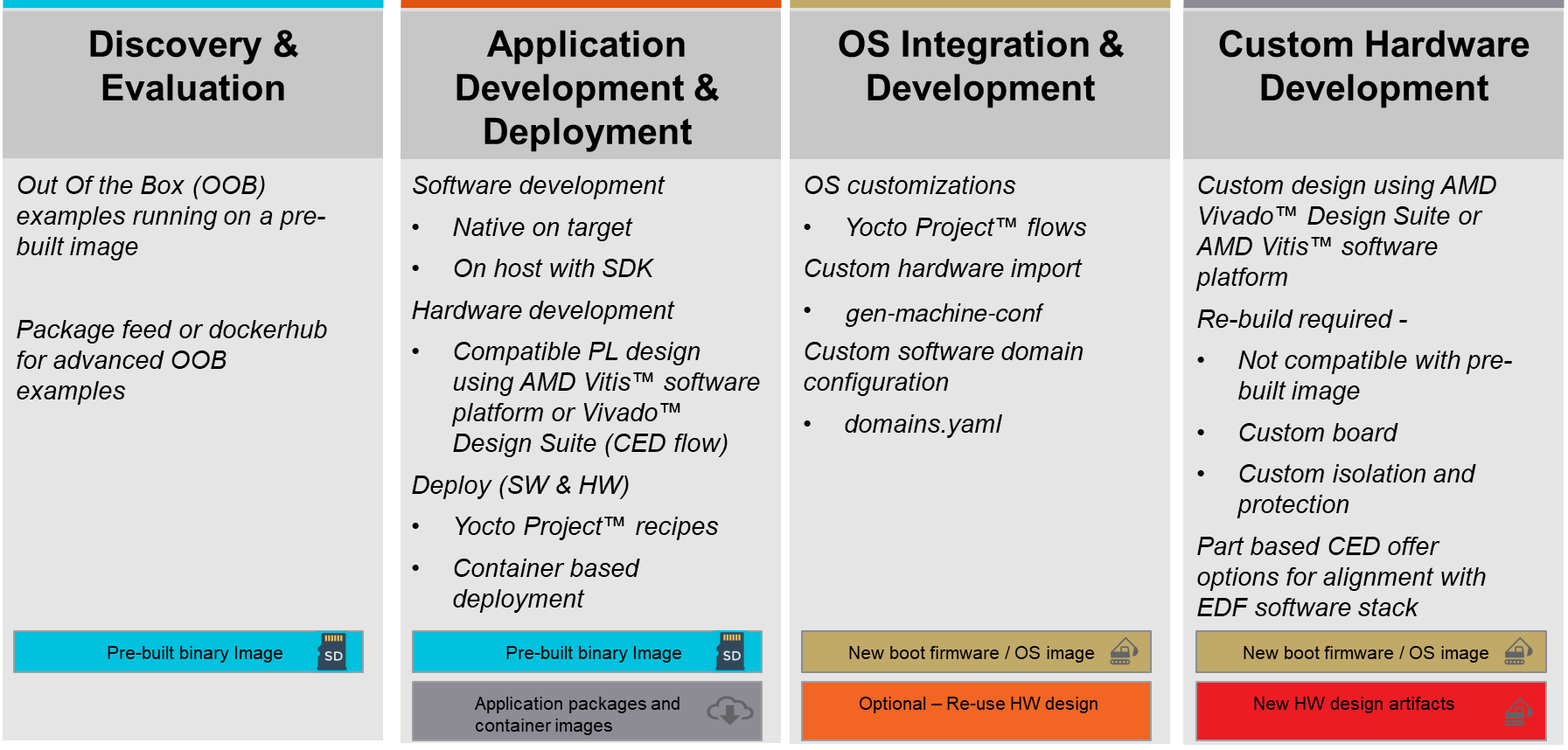
The four personas are ordered left to right by how much of the prebuilt EDF stack the developer re-uses. The leftmost persona boots a prebuilt image and explores reference designs. The rightmost persona regenerates the full hardware design and the boot firmware. Most users move along the flow as their project matures, so the personas are progressive rather than mutually exclusive.
Embedded Common Platform CED and Sub Platforms
All four personas share a common starting point: the Embedded Common Platform, an AMD Vivado Configurable Example Design (CED) that holds the common specifications for the evaluation board experience. Reference designs and flows use it as their base.
Note
The common processing system and NoC implementation guarantee that PL designs can be loaded after the initial Linux boot.
Common entry point from the Vivado Design Suite CED menu.
Segmented configuration enabled by default if supported by the target device.
Default and common PL payload, intentionally simple so it focuses on enabling streamlined customer workflows and simplified testing procedures.
The default PL payload (bitstream) is included in EDF disk images and captured as
defaultthroughdfx-mgrduring the Linux boot process.
The CED is mapped to different boards. It accounts for board-specific connectivity by implementing distinct connections and constraints to match the physical I/O of each board.
CED Hierarchy
The Embedded Common Platform CED is configurable at build time in Vivado with alternative PL and IP payloads. There are board- and part-based CED to support evaluation boards and chip-down flows.

For the EDF boot architecture and the full common specifications, see EDF Common Specifications, Device Specific Specifications and Information, and Board Specific Specifications and Information.
Discovery and Evaluation
The first persona is exploration: power on the board, watch the prebuilt image come up, and try the reference designs that ship with it. No build, no configuration; the goal is to confirm the board works and to get a feel for what the prebuilt EDF stack can do out of the box.
Not every flow applies to every evaluation board, because the board’s BSP chooses a boot architecture. For example, the VEK385 ships with a multistage boot, so the single-stage SD-mode setup does not apply; the VEK280 ships with a single-stage boot, so the multistage QSPI / OSPI -> SD / UFS setup does not apply. The walkthrough page calls each step out per board.
For the full walkthrough – updating the System Controller firmware, multistage and single-stage boot setup, and image recovery and selection – see Getting Started: Discovery and Evaluation.
Application Development and Deployment
The second persona writes applications on top of the prebuilt
image. Hardware components include PL and AIE
payloads (typically PDI and xclbin), and software
components are device drivers and Linux user-space libraries and
applications. Development can happen on the target with native
compilers or on a host with the EDF SDK; Segmented
Configuration lets a new PL payload load into the running
system without a rebuild and reboot. When the application is
ready, the Yocto Project handles packaging and over-the-air
deployment.
For the full walkthrough – on-target and SDK-based software development, hardware application development, and Yocto-recipe deployment – see Application Development and Deployment.
OS Integration and Development
The third persona builds custom OS images. In the simplest case that is a plain Linux image; in more complex scenarios it can involve hypervisors, containers, multiple OSes across processing domains (RTOSes, bare-metal companions), and low-level boot components such as PMU, PLM, PSM firmware, U-Boot, Arm TF-A, and OP-TEE. EDF uses the Yocto Project as its build system; basic to advanced Yocto knowledge is expected here, depending on the task.
For the full walkthrough – Yocto build setup, disk image build,
QEMU images, and SDK build – see OS Integration and Development.
For the cross-persona Yocto reference (components, environment
setup, gen-machine-conf, source builds, build-time
optimization), see Yocto Project.
Custom Hardware Development
The fourth persona regenerates the hardware design. That covers generating a base hardware design and its firmware package, plus application-specific designs (Vivado RTL or Vitis software platform). The flow produces the handoff artifacts the software and OS domains need, and feeds back into the OS Integration walkthrough to build the complete runtime image.
For the full walkthrough, see Custom Hardware Development.
Coming From PetaLinux
Note
See the PetaLinux to EDF Migration Guide for the full migration walkthrough. The legacy “Additional References” wiki link list previously hosted on this page has been redistributed into the migration guide’s Related Links section and the Yocto Project chapter.
Isolation and Protection
AMD EDF v26.06 (VEK385) - AMD Vivado Design Suite 2026.1