Operating System Integration and Development
This page walks through Operating System Integration and Development: the full EDF software build flow with the Yocto Project, from build setup through Linux disk image, QEMU images, and an SDK for cross-development. See Development Flows for how this persona fits with the others.
Some prompts on this page use exact steps for specific boards. If your specific board is not mentioned you can look at the following information to verify your board is supported for the flow described here, and how to modify the examples for your specific board: Common Specifications
Overview
The operating system (OS) developer creates custom OS images based on application or system requirements. In the simplest case, the image is a plain Linux OS image. In more complex scenarios it can involve hypervisors, containers, and multiple OSes based on processing domains (for example, RTOSes and bare-metal components).
It also entails more low-level boot components such as PMU, PLM, and PSM firmware (AMD-specific), U-Boot, Arm TF-A, and OP-TEE. The Yocto Project provides a build environment that allows users to create custom, complex, heterogeneous boot and OS images.
Note
At this point, basic to advanced Yocto knowledge is required, depending on the task you want to perform.
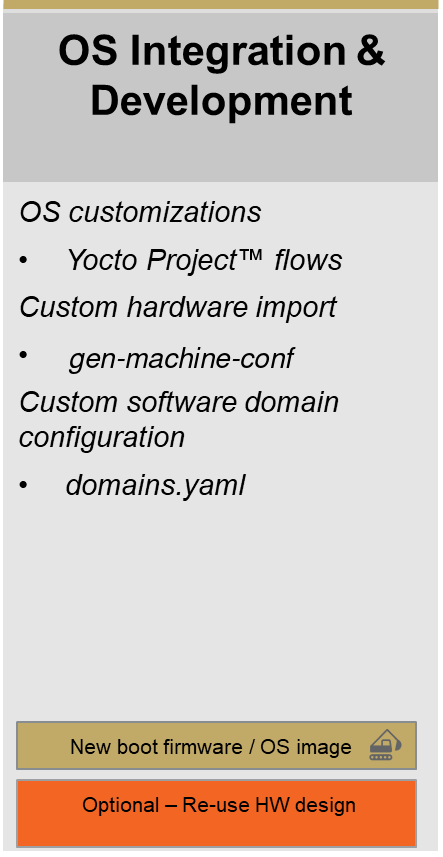
OS Integration and Development persona, from the AMD EDF persona-based development flows
Yocto Project Build Setup Instructions for EDF
This section describes how to get your build host ready to work with EDF meta layers and the required upstream layers.
Pre-requisites: See Preparing Build Host documentation. Several of the host distributions AMD supports ship a default toolchain older than the Yocto Project’s minimum tool versions and need the
buildtoolstarball installed first; see Prepare the Build Host Tools.Configure the git settings before you run the
repocommands.$ git config --global user.email "you@example.com" $ git config --global user.name "Your Name"
Make sure the build host shell is
bash, notcshordash.A basic understanding of the Yocto build system is assumed - consult the documentation for further information https://docs.yoctoproject.org/wrynose/
Download and install the
repotool (if it is not already installed from a previous step).Note
If
repois already installed through a package manager, remove it first; the packaged version is usually out of date and causes issues.Note
curlis used to installrepoand sometimes needs to be installed through the package feed for the host operating system; install it through the host’s package manager (apt-get,dnf,yum, or equivalent) if it is not already present.$ curl https://storage.googleapis.com/git-repo-downloads/repo > repo $ chmod a+x repo $ echo "Create a user specific ~/bin directory if one does not exist" $ mkdir ~/bin $ mv repo ~/bin/ $ PATH=~/bin:$PATH $ repo --help
Initialize the
repoclient.Create the
edfproject directory.$ mkdir -p yocto/edf $ cd yocto/edf
Clone the Yocto meta layer source using the Yocto manifest as shown in the following snippet. A successful initialization ends with a message stating that
repois initialized in your working directory. The working directory now contains a.reposubdirectory whererepocontrol files such as the manifest are stored. There is typically no need to touch this directory directly. To learn more aboutrepo, see https://source.android.com/setup/develop/repo$ repo init -u https://github.com/Xilinx/yocto-manifests.git -b refs/tags/amd-edf-rel-v26.11 -m default-edf.xml
This is the same
repo initinvocation documented in Setting Up the Yocto Environment; that page also covers the manifest-selection options for the-margument.
Fetch all the repositories.
$ repo sync
Start a branch for development starting from the revision specified in the manifest. This is an optional step.
$ repo start <branch_name> --all
Initialize a build environment using the
edf-init-build-envscript. Once the environment is initialized,bblayers.confandlocal.confare set from themeta-amd-edflayer default templates.$ source edf-init-build-env
If you are building without network access, follow these steps (otherwise skip this step):
The
downloadsandsstate-cachebundles used here are optional and are needed only for this offline case. A build machine with a working connection to the Internet fetches everything it needs from the AMD mirrors that the defaultlocal.confalready configures. See Source Downloads and Shared State Cache for the full picture, including how to build offline without the bundles.Unpack the downloads and sstate tarball files into the build directory. Both file names carry the release and a build-date stamp; the pattern below matches whichever stamp the download carries.
$ tar -xf downloads_edf_26.11_*.tar.gz -C <path-to>/yocto/edf/build
$ tar -xf sstate-cache_edf_26.11_*.tar.gz -C <path-to>/yocto/edf/build
Adjust the download (
SOURCE_MIRROR_URL) and sstate (SSTATE_MIRRORS) mirrors variables by editingbuild/conf/local.confto point to local paths as shown in the following snippet.Note
INHERIT += "own-mirrors"is already included in thelocal.conffile.SOURCE_MIRROR_URL = "file:///<path-to>/yocto/edf/build/downloads" SSTATE_MIRRORS = "\ file://.* file:///<path-to>/yocto/edf/build/sstate-cache/PATH \n \ "
Set the
BB_NO_NETWORKvariable inbuild/conf/local.confBB_NO_NETWORK = "1"
Note
An offline build with a downloads mirror and no sstate mirror is the case most likely to expose a host toolchain older than the Yocto Project’s minimum tool versions. Check the host tools before starting one; see Prepare the Build Host Tools.
TMPDIRcannot be on NFS. The Yocto Project requiresTMPDIRto live on a filesystem with standard semantics (unique mixed-case names, POSIX file locking, persistent inodes), which NFS does not provide. By defaultTMPDIRisbuild/tmpinside the build directory; if that directory is on NFS, pointTMPDIRat a local disk inbuild/conf/local.conf:TMPDIR = "/tmp/<user-name>/yocto/release_version/build"
See the Yocto Project reference manual entry for TMPDIR for details.
Depending on the build configuration, tens of GB of storage space can be required in
TMPDIR. Make sure plenty of storage space is available. Alternatively, to ease disk usage, add therm_workclass to yourbuild/conf/local.conf:INHERIT += "rm_work"
With
rm_workenabled, the build system deletes each recipe’s per-recipe workspace under${TMPDIR}/workas soon as that recipe’s packages are produced, rather than keeping it for later inspection.Note
If you are modifying and rebuilding source out of a recipe’s
workdirectory,rm_workdiscards those changes. Exempt the affected recipes by listing them inRM_WORK_EXCLUDE, for example:RM_WORK_EXCLUDE += "busybox glibc"
See the Yocto Project reference manual entry for rm_work for details.
EDF Linux Disk Image: Prebuilt Yocto Machine and Vivado Artifacts
See also
Common Specifications for the boot architecture.
AMD Embedded Development Framework (EDF) for the evaluation boards and their default boot modes.
QSPI/OSPI to SD/UFS Boot (Versal Gen 2)
Build Yocto Project pre-requisites by following Yocto Project Build Setup Instructions for EDF
Build the EDF boot firmware (OSPI image)
$ MACHINE=versal-2ve-2vm-vek385-multidomain bitbake edf-ospi
$ MACHINE=versal-2ve-2vm-vek385-revb-multidomain bitbake edf-ospi
$ MACHINE=versal-2ve-2vm-vek386-multidomain bitbake edf-ospi
$ MACHINE=versal-2ve-2vm-vmk365-multidomain bitbake edf-ospi
Build the EDF Linux disk image (WIC) containing general-purpose Linux
$ MACHINE=amd-cortexa78-mali-common bitbake edf-linux-disk-image
edf-linux-disk-imageis the Linux-only image. To include Xen and OpenAMP firmware example packages on aarch64, buildedf-platform-disk-imageinstead. See the image-variant comparison.To include OpenAMP auxiliary-processor firmware in an EDF disk image, see Installing OpenAMP Firmware Into EDF Yocto Linux Images.
On successful build, the images for the target machine are available in the relevant output directory:
${TMPDIR}/deploy/images/${MACHINE}/$ ls -la tmp/deploy/images/versal-2ve-2vm-vek385-multidomain/ $ ls -la tmp/deploy/images/amd-cortexa78-mali-common/
$ ls -la tmp/deploy/images/versal-2ve-2vm-vek385-revb-multidomain/ $ ls -la tmp/deploy/images/amd-cortexa78-mali-common/
$ ls -la tmp/deploy/images/versal-2ve-2vm-vek386-multidomain/ $ ls -la tmp/deploy/images/amd-cortexa78-mali-common/
$ ls -la tmp/deploy/images/versal-2ve-2vm-vmk365-multidomain/ $ ls -la tmp/deploy/images/amd-cortexa78-mali-common/
Alongside the
edf-ospi-<machine>-<timestamp>.binimage, theedf-ospirecipe also deploys a gzipped copy (.bin.gz) and a JSON manifest (.manifest.json) describing the image metadata, component layout, sizes, and SHA256 hashes for command-line tooling. The same companion artifacts are produced foredf-qspibuilds.Flash the OSPI image at:
${TMPDIR}/deploy/images/versal-2ve-2vm-vek385-multidomain/edf-ospi-versal-2ve-2vm-vek385-multidomain-<timestamp>.bin${TMPDIR}/deploy/images/versal-2ve-2vm-vek385-revb-multidomain/edf-ospi-versal-2ve-2vm-vek385-revb-multidomain-<timestamp>.bin${TMPDIR}/deploy/images/versal-2ve-2vm-vek386-multidomain/edf-ospi-versal-2ve-2vm-vek386-multidomain-<timestamp>.bin${TMPDIR}/deploy/images/versal-2ve-2vm-vmk365-multidomain/edf-ospi-versal-2ve-2vm-vmk365-multidomain-<timestamp>.binFollow Development Flows.
Flash the disk image at:
${TMPDIR}/deploy/images/amd-cortexa78-mali-common/edf-linux-disk-image-amd-cortexa78-mali-common.rootfs-<timestamp>.wic.xzto the SD card, following Development Flows.
Boot the board from OSPI boot mode to boot general-purpose Linux
Upon first boot, set a password for the default user account. The default username is
amd-edf.
SD Card Boot
Build Yocto Project pre-requisites by following Yocto Project Build Setup Instructions for EDF.
Build the
boot.binimage for the board. See Common Specifications for the list of prebuilt machines that support generating one.The
xilinx-bootbinrecipe builds the image:$ MACHINE=<machine-name> bitbake xilinx-bootbin
For example:
$ MACHINE=versal-vck190-sdt-seg bitbake xilinx-bootbin
$ MACHINE=versal-vek280-sdt-seg bitbake xilinx-bootbin
$ MACHINE=versal-vmk180-sdt-seg bitbake xilinx-bootbin
$ MACHINE=versal-vpk120-sdt-seg bitbake xilinx-bootbin
$ MACHINE=versal-vpk180-sdt-seg bitbake xilinx-bootbin
$ MACHINE=zynqmp-zcu102-sdt-full bitbake xilinx-bootbin
$ MACHINE=zynqmp-zcu104-sdt-full bitbake xilinx-bootbin
$ MACHINE=zynqmp-zcu106-sdt-full bitbake xilinx-bootbin
$ MACHINE=zynqmp-zcu111-sdt-full bitbake xilinx-bootbin
$ MACHINE=zynqmp-zcu208-sdt-full bitbake xilinx-bootbin
$ MACHINE=zynqmp-zcu216-sdt-full bitbake xilinx-bootbin
Alongside the
BOOT-<machine>-<timestamp>.binboot image, thexilinx-bootbinrecipe also deploys a.manifest.jsoncompanion file with a stableboot.bin.manifest.jsonsymlink pointing at the timestamped file. The manifest lists the branch and source revision of each component packaged into the boot image.Build the EDF Common disk image containing the EDF Linux OS (WIC) using the
MACHINEvalue for your target board. See the EDF prebuilt Yocto machine definitions table in the Common Specifications reference for Yocto machine definitions and supported recipes.Syntax:
$ MACHINE=<machine-name> bitbake edf-linux-disk-image
For example:
Linux-only image:
$ MACHINE=amd-cortexa72-common bitbake edf-linux-disk-image
Platform image with Xen and OpenAMP examples:
$ MACHINE=amd-cortexa72-common bitbake edf-platform-disk-image
Linux-only image:
$ MACHINE=amd-cortexa53-mali-common bitbake edf-linux-disk-image
$ MACHINE=amd-cortexa53-mali-common bitbake edf-linux-disk-image
$ MACHINE=amd-cortexa53-mali-common bitbake edf-linux-disk-image
$ MACHINE=amd-cortexa53-common bitbake edf-linux-disk-image
$ MACHINE=amd-cortexa53-common bitbake edf-linux-disk-image
$ MACHINE=amd-cortexa53-common bitbake edf-linux-disk-image
Combine the
xilinx-bootbinand EDF Common disk images into a single SD card image (boot.bin,kernel,rootfs, boot script) by adding theboot.binto the EFI partition of the WIC image (Partition 0 = index 1 in the WIC).The
wictool is a separate project and is not on yourPATHafter you set up the build environment. Build it and run it out of the build system’s own sysroot:$ bitbake wic-native -c addto_recipe_sysroot $ oe-run-native wic-native wic help
Every
wiccommand below is run that same way.wicalso callsmcopy, which is provided by themtoolspackage on Canonical Ubuntu (sudo apt install mtools) and is not included in the Yocto setup.List the partition map of the
.wicfile:$ oe-run-native wic-native wic ls tmp/deploy/images/amd-cortexa72-common/edf-linux-disk-image-amd-cortexa72-common.rootfs.wic
$ oe-run-native wic-native wic ls tmp/deploy/images/amd-cortexa53-mali-common/edf-linux-disk-image-amd-cortexa53-mali-common.rootfs.wic
$ oe-run-native wic-native wic ls tmp/deploy/images/amd-cortexa53-mali-common/edf-linux-disk-image-amd-cortexa53-mali-common.rootfs.wic
$ oe-run-native wic-native wic ls tmp/deploy/images/amd-cortexa53-mali-common/edf-linux-disk-image-amd-cortexa53-mali-common.rootfs.wic
$ oe-run-native wic-native wic ls tmp/deploy/images/amd-cortexa53-common/edf-linux-disk-image-amd-cortexa53-common.rootfs.wic
$ oe-run-native wic-native wic ls tmp/deploy/images/amd-cortexa53-common/edf-linux-disk-image-amd-cortexa53-common.rootfs.wic
$ oe-run-native wic-native wic ls tmp/deploy/images/amd-cortexa53-common/edf-linux-disk-image-amd-cortexa53-common.rootfs.wic
For the canonical partition layout (mount points, sizes, and filesystems), see EDF Disk Image Layout.
Show the content of the EFI partition:
$ oe-run-native wic-native wic ls tmp/deploy/images/amd-cortexa72-common/edf-linux-disk-image-amd-cortexa72-common.rootfs.wic:1 Volume in drive : is esp Volume Serial Number is 8573-CFCD Directory for ::/ efi <DIR> 2011-04-05 23:00 image 32381440 2011-04-05 23:00 Image loader <DIR> 2011-04-05 23:00 xen cfg 254 2011-04-05 23:00 xen efi 1180456 2011-04-05 23:00 5 files 33 562 150 bytes 1 037 914 112 bytes free
$ oe-run-native wic-native wic ls tmp/deploy/images/amd-cortexa53-mali-common/edf-linux-disk-image-amd-cortexa53-mali-common.rootfs.wic:1 Volume in drive : is esp Volume Serial Number is 0B04-E4DA Directory for ::/ No files 535 797 760 bytes free
$ oe-run-native wic-native wic ls tmp/deploy/images/amd-cortexa53-mali-common/edf-linux-disk-image-amd-cortexa53-mali-common.rootfs.wic:1 Volume in drive : is esp Volume Serial Number is 0B04-E4DA Directory for ::/ No files 535 797 760 bytes free
$ oe-run-native wic-native wic ls tmp/deploy/images/amd-cortexa53-mali-common/edf-linux-disk-image-amd-cortexa53-mali-common.rootfs.wic:1 Volume in drive : is esp Volume Serial Number is 0B04-E4DA Directory for ::/ No files 535 797 760 bytes free
$ oe-run-native wic-native wic ls tmp/deploy/images/amd-cortexa53-common/edf-linux-disk-image-amd-cortexa53-common.rootfs.wic:1 Volume in drive : is esp Volume Serial Number is 0B04-E4DA Directory for ::/ No files 535 797 760 bytes free
$ oe-run-native wic-native wic ls tmp/deploy/images/amd-cortexa53-common/edf-linux-disk-image-amd-cortexa53-common.rootfs.wic:1 Volume in drive : is esp Volume Serial Number is 0B04-E4DA Directory for ::/ No files 535 797 760 bytes free
$ oe-run-native wic-native wic ls tmp/deploy/images/amd-cortexa53-common/edf-linux-disk-image-amd-cortexa53-common.rootfs.wic:1 Volume in drive : is esp Volume Serial Number is 0B04-E4DA Directory for ::/ No files 535 797 760 bytes free
Copy the
boot.bininto the EFI partition of the WIC image:$ oe-run-native wic-native wic cp tmp/deploy/images/versal-vck190-sdt-seg/boot.bin tmp/deploy/images/amd-cortexa72-common/edf-linux-disk-image-amd-cortexa72-common.rootfs.wic:1
$ oe-run-native wic-native wic cp tmp/deploy/images/versal-vek280-sdt-seg/boot.bin tmp/deploy/images/amd-cortexa72-common/edf-linux-disk-image-amd-cortexa72-common.rootfs.wic:1
$ oe-run-native wic-native wic cp tmp/deploy/images/versal-vmk180-sdt-seg/boot.bin tmp/deploy/images/amd-cortexa72-common/edf-linux-disk-image-amd-cortexa72-common.rootfs.wic:1
$ oe-run-native wic-native wic cp tmp/deploy/images/versal-vpk120-sdt-seg/boot.bin tmp/deploy/images/amd-cortexa72-common/edf-linux-disk-image-amd-cortexa72-common.rootfs.wic:1
$ oe-run-native wic-native wic cp tmp/deploy/images/versal-vpk180-sdt-seg/boot.bin tmp/deploy/images/amd-cortexa72-common/edf-linux-disk-image-amd-cortexa72-common.rootfs.wic:1
$ oe-run-native wic-native wic cp \ tmp/deploy/images/zynqmp-zcu102-sdt-full/boot.bin \ tmp/deploy/images/amd-cortexa53-mali-common/edf-linux-disk-image-amd-cortexa53-mali-common.rootfs.wic:1
$ oe-run-native wic-native wic cp \ tmp/deploy/images/zynqmp-zcu104-sdt-full/boot.bin \ tmp/deploy/images/amd-cortexa53-mali-common/edf-linux-disk-image-amd-cortexa53-mali-common.rootfs.wic:1
$ oe-run-native wic-native wic cp \ tmp/deploy/images/zynqmp-zcu106-sdt-full/boot.bin \ tmp/deploy/images/amd-cortexa53-mali-common/edf-linux-disk-image-amd-cortexa53-mali-common.rootfs.wic:1
$ oe-run-native wic-native wic cp \ tmp/deploy/images/zynqmp-zcu111-sdt-full/boot.bin \ tmp/deploy/images/amd-cortexa53-common/edf-linux-disk-image-amd-cortexa53-common.rootfs.wic:1
$ oe-run-native wic-native wic cp \ tmp/deploy/images/zynqmp-zcu208-sdt-full/boot.bin \ tmp/deploy/images/amd-cortexa53-common/edf-linux-disk-image-amd-cortexa53-common.rootfs.wic:1
$ oe-run-native wic-native wic cp \ tmp/deploy/images/zynqmp-zcu216-sdt-full/boot.bin \ tmp/deploy/images/amd-cortexa53-common/edf-linux-disk-image-amd-cortexa53-common.rootfs.wic:1
Check the content of the WIC:
$ oe-run-native wic-native wic ls tmp/deploy/images/amd-cortexa72-common/edf-linux-disk-image-amd-cortexa72-common.rootfs.wic:1 Volume in drive : is esp Volume Serial Number is 8573-CFCD Directory for ::/ efi <DIR> 2011-04-05 23:00 image 32381440 2011-04-05 23:00 Image loader <DIR> 2011-04-05 23:00 xen cfg 254 2011-04-05 23:00 xen efi 1180456 2011-04-05 23:00 boot bin 3031696 2025-11-20 15:25 6 files 36 593 846 bytes 1 034 878 976 bytes free
$ oe-run-native wic-native wic ls tmp/deploy/images/amd-cortexa53-mali-common/edf-linux-disk-image-amd-cortexa53-mali-common.rootfs.wic:1 Volume in drive : is esp Volume Serial Number is 0B04-E4DA Directory for ::/ boot bin 1850460 2025-11-24 10:03 1 file 1 850 460 bytes 533 946 368 bytes free
$ oe-run-native wic-native wic ls tmp/deploy/images/amd-cortexa53-mali-common/edf-linux-disk-image-amd-cortexa53-mali-common.rootfs.wic:1 Volume in drive : is esp Volume Serial Number is 0B04-E4DA Directory for ::/ boot bin 1850460 2025-11-24 10:03 1 file 1 850 460 bytes 533 946 368 bytes free
$ oe-run-native wic-native wic ls tmp/deploy/images/amd-cortexa53-mali-common/edf-linux-disk-image-amd-cortexa53-mali-common.rootfs.wic:1 Volume in drive : is esp Volume Serial Number is 0B04-E4DA Directory for ::/ boot bin 1850460 2025-11-24 10:03 1 file 1 850 460 bytes 533 946 368 bytes free
$ oe-run-native wic-native wic ls tmp/deploy/images/amd-cortexa53-common/edf-linux-disk-image-amd-cortexa53-common.rootfs.wic:1 Volume in drive : is esp Volume Serial Number is 0B04-E4DA Directory for ::/ boot bin 1850460 2025-11-24 10:03 1 file 1 850 460 bytes 533 946 368 bytes free
$ oe-run-native wic-native wic ls tmp/deploy/images/amd-cortexa53-common/edf-linux-disk-image-amd-cortexa53-common.rootfs.wic:1 Volume in drive : is esp Volume Serial Number is 0B04-E4DA Directory for ::/ boot bin 1850460 2025-11-24 10:03 1 file 1 850 460 bytes 533 946 368 bytes free
$ oe-run-native wic-native wic ls tmp/deploy/images/amd-cortexa53-common/edf-linux-disk-image-amd-cortexa53-common.rootfs.wic:1 Volume in drive : is esp Volume Serial Number is 0B04-E4DA Directory for ::/ boot bin 1850460 2025-11-24 10:03 1 file 1 850 460 bytes 533 946 368 bytes free
Flash the SD card.
The generated image now needs to be flashed to the SD card. Follow the instructions in Discovery and Evaluation.
After the flashing completes, unmount the SD card, then insert it into the SD card slot of the board.
Boot the board as described in Discovery and Evaluation. The default username is
amd-edf.Warning
For the constraints on booting multiple media that share the same root filesystem PARTUUID, see Root Partition Identification (PARTUUID).
EDF Linux Full Command-Line Image Build Using a Prebuilt Yocto Project Machine
The edf-linux-full-cmdline image is a minimal EDF Linux image
based on core-image-full-cmdline that is sized to fit into RAM.
It is intended for basic testing and debug purposes and is not a production
image.
Use this image when you need a quick, self-contained environment to verify hardware bring-up, run diagnostics, or test peripheral drivers without relying on persistent storage.
The image output is a cpio.gz.u-boot archive that can be loaded directly
into RAM by the bootloader. No SD card or persistent storage is required.
On 64-bit Arm boards the image also carries the kexec tooling -
kexec, kdump, makedumpfile, and vmcore-dmesg - which
lets the running kernel boot a second kernel directly, either as a
fast reboot or to capture a crash dump. The four packages add roughly
a quarter of a megabyte to the compressed ramdisk, most of it
makedumpfile. Neither use works until memory is reserved for the
second kernel, which no board does by default; see
Capturing a Crash Dump With kexec and kdump.
Important
edf-linux-full-cmdline builds the kernel and initramfs payload only.
To reach U-Boot and run the RAM-boot flow, the board must already have a
valid boot.bin programmed. Build that boot image by following the
platform-appropriate boot-image flow on this page, for example
Creating a Multi-stage Boot Image or
Creating a Bootable Single-stage Image.
Build Yocto Project pre-requisites by following Yocto Project Build Setup Instructions for EDF.
Build the
edf-linux-full-cmdlineimage using theMACHINEvalue for your target board:$ MACHINE=amd-cortexa78-mali-common bitbake edf-linux-full-cmdline
$ MACHINE=amd-cortexa72-common bitbake edf-linux-full-cmdline
$ MACHINE=amd-cortexa53-mali-common bitbake edf-linux-full-cmdline
$ MACHINE=amd-cortexa53-mali-common bitbake edf-linux-full-cmdline
$ MACHINE=amd-cortexa53-mali-common bitbake edf-linux-full-cmdline
$ MACHINE=amd-cortexa53-common bitbake edf-linux-full-cmdline
$ MACHINE=amd-cortexa53-common bitbake edf-linux-full-cmdline
$ MACHINE=amd-cortexa53-common bitbake edf-linux-full-cmdline
$ MACHINE=amd-cortexa9thf-neon-common bitbake edf-linux-full-cmdline
On a successful build, the image is in the output directory:
$ ls tmp/deploy/images/<machine>/edf-linux-full-cmdline-<machine>.rootfs.cpio.gz.u-boot
Transfer the
cpio.gz.u-bootimage to the target by using TFTP or a similar method and boot from RAM. The default username isamd-edf.
Capturing a Crash Dump With kexec and kdump
kexec boots a second kernel directly from the running one, skipping
the firmware and bootloader. kdump builds on that: it keeps a
capture kernel resident in a reserved region of memory so that when
the production kernel panics, the capture kernel takes over and writes
the memory image of the dead kernel to disk as a vmcore file.
The crash-dump tooling is built for 64-bit Arm targets only, so it is not available on this board and the rest of this section does not apply to it.
The tooling reaches a board two ways:
edf-linux-full-cmdlineinstallskexec,kdump,makedumpfile, andvmcore-dmesgdirectly.The package feed carries those four packages plus
crash, the interactive dump analyzer, so any prebuilt image can gain the tooling without a rebuild:amd-edf:~$ sudo dnf install kexec kdump makedumpfile vmcore-dmesg
crash is absent from edf-linux-full-cmdline by design. It is
far too large for an image that must fit into RAM, and the
usual workflow analyzes the vmcore on the host anyway.
Important
No EDF board reserves crash-kernel memory by default. The
reservation costs memory on every boot for every user, and most
users never capture a crash dump, so it stays opt-in.
Installing the tooling also enables kdump.service. Until the
following steps are complete, though, it starts, arms nothing, and
exits successfully, which is easy to mistake for a working
configuration.
Reserving Memory for the Capture Kernel
Add crashkernel=<size> to the kernel command line. A 512 MiB
reservation is a reasonable starting point on these boards.
How that command line is set depends on the image rather than on the
board, and both images described here run on the same hardware. The
disk images boot through systemd-boot and have a loader entry to edit;
the edf-linux-full-cmdline image is a U-Boot RAM boot with no
ESP and no loader entry at all.
Disk Images
The systemd-bootconf-edf recipe generates the loader entry from a
template that substitutes KERNEL_CMDLINE_EXTRA. To set the
reservation at build time, add one line to local.conf or to your
distro configuration:
KERNEL_CMDLINE_EXTRA:append = " crashkernel=512M"
The generated loader/entries/edf-linux.conf then carries the option
on its options line.
To set it on an image that is already built, edit that same file. From
the host, copy it out of the ESP and back as described in
Inspecting and Modifying the wic Image. On a running target
the ESP is mounted at /efi, so the entry can be edited in
place and takes effect at the next reboot:
amd-edf:~$ sudo vi /efi/loader/entries/edf-linux.conf
Note
Installing or updating the systemd-bootconf-edf package
regenerates the entry on the ESP from the copy under
/boot/loader/entries/, discarding an in-place edit. Prefer the
build-time setting for anything long-lived.
EDF Linux Full Command-Line Image
This image has no ESP and no systemd-boot loader entry, so
KERNEL_CMDLINE_EXTRA has no effect on it. It is loaded over
TFTP and started with booti at the U-Boot prompt, and its
kernel command line comes from the /chosen/bootargs property of the
device tree that U-Boot hands to the kernel. The boot.scr distro-boot
script plays no part here: it loads a kernel from a block device and is
used by the disk images, not by a RAM boot.
No build-time knob equivalent to KERNEL_CMDLINE_EXTRA exists for
this path. Setting the reservation at build time means patching the
system device tree or the boot script.
At runtime, set it from the U-Boot prompt before booting. U-Boot leaves
the bootargs environment variable empty on these boards, so read the
device tree’s value into it first. Appending to an empty bootargs
would replace the kernel command line rather than extend it, costing the
console arguments needed to watch the capture:
Versal> fdt addr ${fdtcontroladdr}
Versal> fdt get value bootargs /chosen bootargs
Versal> setenv bootargs "${bootargs} crashkernel=512M"
versal2> fdt addr ${fdtcontroladdr}
versal2> fdt get value bootargs /chosen bootargs
versal2> setenv bootargs "${bootargs} crashkernel=512M"
ZynqMP> fdt addr ${fdtcontroladdr}
ZynqMP> fdt get value bootargs /chosen bootargs
ZynqMP> setenv bootargs "${bootargs} crashkernel=512M"
Run saveenv afterward to persist the change. The saved value is the
fully expanded command line, so repeat the sequence if the device tree’s
bootargs later changes.
Note
The root file system of this image already occupies a substantial
part of RAM, and a crashkernel= reservation sits on top
of it. A full capture may therefore not be practical on a
memory-constrained board. Using kexec as a fast reboot needs no
reservation and is unaffected. Capture instructions in the following
sections are written against the disk images.
Configuring the kdump Service
After rebooting with the new command line, confirm that the kernel honored the reservation:
amd-edf:~$ cat /sys/kernel/kexec_crash_size
The file reports the reserved size in bytes. A value matching the
requested reservation means the kernel honored crashkernel=. A value
of 0 means it did not, so recheck /proc/cmdline.
The disk images do not carry the crash-dump tooling, so install it from
the package feed before configuring the service. Skip this step on
edf-linux-full-cmdline, which already has the four packages:
amd-edf:~$ sudo dnf install kexec kdump makedumpfile vmcore-dmesg
kdump.service reads its settings from
/etc/sysconfig/kdump.conf, which ships with the values it needs
commented out and with a makedumpfile argument list aimed at a
vmlinux that the EDF images do not install. Set the following three
values:
KDUMP_KIMAGE="/boot/Image"
KDUMP_CMDLINE="$(sed 's/crashkernel=[^ ]*//' /proc/cmdline) maxcpus=1 reset_devices"
MAKEDUMPFILE_ARGS="-E -d 1"
KDUMP_KIMAGE names the kernel the capture kernel boots from.
KDUMP_CMDLINE is the command line handed to it: it reuses the
running one so that the same root file system is found, strips
crashkernel= so that the capture kernel does not try to carve a
second reservation out of the small region into which it was loaded,
and restricts it to one CPU with freshly reset devices.
MAKEDUMPFILE_ARGS replaces the shipped value, which extracts only
the kernel log and requires /boot/vmlinux-$(uname -r) from the
kernel-vmlinux package.
Arm the capture kernel and confirm that it loaded:
amd-edf:~$ sudo systemctl restart kdump
amd-edf:~$ cat /sys/kernel/kexec_crash_loaded
kexec_crash_loaded reports 1 after a capture kernel becomes
resident and 0 if the load did not happen. If it stays 0, run
systemctl status kdump, which names the value the service found
missing.
Capturing and Reducing the vmcore
With the capture kernel armed, a panic boots it automatically. To force one for testing:
amd-edf:~$ echo c | sudo tee /proc/sysrq-trigger
The capture kernel boots the same root file system, kdump.service
finds a non-empty /proc/vmcore, runs makedumpfile to write a
reduced dump under /var/crash/<date>/, and reboots. Collect the file
once the board is back up:
amd-edf:~$ ls /var/crash/*/
makedumpfile shrinks the dump by discarding pages an analysis does
not need. -d 1 excludes zero-filled pages only, which is the
conservative choice; higher dump levels discard more and need debug
information for the running kernel.
For the kernel log alone, vmcore-dmesg reads it straight out of a
saved dump without a vmlinux:
amd-edf:~$ vmcore-dmesg /var/crash/<date>/<vmcore-file> > dmesg.txt
Analyzing the vmcore
The crash utility needs the dump and a matching vmlinux carrying
debug information.
The vmlinux and its debug information ship as two separate packages:
kernel-vmlinux carries the image and kernel-dbg the debug
information split out of it. crash is pointed at the image and finds
the debug file from a reference embedded in it, so install both.
To analyze on the target, install them from the package feed alongside the analyzer:
amd-edf:~$ sudo dnf install crash kernel-vmlinux kernel-dbg
amd-edf:~$ sudo crash /boot/vmlinux-$(uname -r) /var/crash/<date>/<vmcore-file>
To analyze on the host instead, which is the usual workflow, the
crash binary has to be one that runs on the host and reads
aarch64 dumps. That build is crash-cross-canadian-aarch64, and
it is delivered through the SDK rather than as a standalone
command, so add it to the SDK recipe alongside the kernel debug
information the analysis needs:
TOOLCHAIN_HOST_TASK:append = " crash-cross-canadian-aarch64"
TOOLCHAIN_TARGET_TASK:append = " kernel-vmlinux kernel-dbg"
Then build and install the SDK as described in
Building an SDK for Application Cross-Development.
After sourcing the SDK environment script, crash is on the path.
Copy the vmcore off the target and pass it alongside the
vmlinux from the SDK sysroot:
$ crash $OECORE_TARGET_SYSROOT/boot/vmlinux-<version> <vmcore-file>
Note
crash cannot open a dump against a kernel built without debug
information. See
Customizing the Kernel Configuration
for ENABLE_KERNEL_DEBUG and the other kernel configuration
levers.
Using kexec for a Fast Reboot
kexec also boots a new kernel on demand rather than on a panic,
which is useful to cut the time a reboot costs during development. This
use needs no crashkernel= reservation:
amd-edf:~$ sudo kexec -l /boot/Image --reuse-cmdline
amd-edf:~$ sudo systemctl kexec
The EDF kexec-tools build carries the upstream --no-cma option.
By default the kernel tries the CMA allocator when placing the
next kernel, so that its segments land physically contiguous and the
relocation copy at jump time is skipped; --no-cma makes that
allocation bail out and fall back to the classic
find-a-hole-and-copy path:
amd-edf:~$ sudo kexec -s --no-cma -l /boot/Image --reuse-cmdline
Two constraints apply. The option reaches the kernel only on the
file-based load path, selected with -s; on the classic load path it
is ignored. It also has no effect on a crash-dump load, because the
kernel skips the CMA allocator entirely for a capture kernel.
Building Images for QEMU
The following steps describe how to build and combine the artifacts
required to boot an EDF image in QEMU. For reference
documentation on the tools used (runqemu,
qemu-system-amd-fpga-multiarch, and qemuboot-tool), see
Machine Emulation in
the Common Specifications reference.
Set up the build environment and Yocto Project pre-requisites by following Yocto Project Build Setup Instructions for EDF.
Build the boot image. See Common Specifications for the list of prebuilt machines that support generating one.
Build the OSPI boot image and the Cortex-A72 disk image:
$ MACHINE=versal-vek280-multidomain bitbake edf-ospi $ MACHINE=amd-cortexa72-common bitbake edf-linux-disk-image
$ MACHINE=versal-vhk158-multidomain bitbake edf-ospi $ MACHINE=amd-cortexa72-common bitbake edf-linux-disk-image
$ MACHINE=versal-vrk160-multidomain bitbake edf-ospi $ MACHINE=amd-cortexa72-common bitbake edf-linux-disk-image
$ MACHINE=versal-vrk160-revb-multidomain bitbake edf-ospi $ MACHINE=amd-cortexa72-common bitbake edf-linux-disk-image
$ MACHINE=versal-vrk165-multidomain bitbake edf-ospi $ MACHINE=amd-cortexa72-common bitbake edf-linux-disk-image
$ MACHINE=versal-vrk165-revb-multidomain bitbake edf-ospi $ MACHINE=amd-cortexa72-common bitbake edf-linux-disk-image
Your board boots from QSPI, so its boot image comes from
edf-qspirather thanedf-ospi:$ MACHINE=versal-vck190-multidomain bitbake edf-qspi $ MACHINE=amd-cortexa72-common bitbake edf-linux-disk-image
$ MACHINE=versal-vmk180-multidomain bitbake edf-qspi $ MACHINE=amd-cortexa72-common bitbake edf-linux-disk-image
$ MACHINE=versal-vpk120-multidomain bitbake edf-qspi $ MACHINE=amd-cortexa72-common bitbake edf-linux-disk-image
$ MACHINE=versal-vpk180-multidomain bitbake edf-qspi $ MACHINE=amd-cortexa72-common bitbake edf-linux-disk-image
Build the OSPI boot image and the Cortex-A72 disk image.
edf-ospiis the target even though the release publishes no separate public OSPI download for this board:edf-ospideploys theqemu-ospi.binflash image from which QEMU boots.$ MACHINE=versal-2vp-vpk360-multidomain bitbake edf-ospi $ MACHINE=amd-cortexa72-common bitbake edf-linux-disk-image
$ MACHINE=versal-vrk160-revb-multidomain bitbake edf-ospi $ MACHINE=amd-cortexa72-common bitbake edf-linux-disk-image
$ MACHINE=versal-vrk165-revb-multidomain bitbake edf-ospi $ MACHINE=amd-cortexa72-common bitbake edf-linux-disk-image
Build the OSPI boot image and the Cortex-A78 disk image:
$ MACHINE=versal-2ve-2vm-vek385-multidomain bitbake edf-ospi $ MACHINE=amd-cortexa78-mali-common bitbake edf-linux-disk-image
$ MACHINE=versal-2ve-2vm-vek385-revb-multidomain bitbake edf-ospi $ MACHINE=amd-cortexa78-mali-common bitbake edf-linux-disk-image
$ MACHINE=versal-2ve-2vm-vek386-multidomain bitbake edf-ospi $ MACHINE=amd-cortexa78-mali-common bitbake edf-linux-disk-image
$ MACHINE=versal-2ve-2vm-vmk365-multidomain bitbake edf-ospi $ MACHINE=amd-cortexa78-mali-common bitbake edf-linux-disk-image
The release publishes no separate OSPI download for your board, so its artifact listing can read as though there is no flash image to build.
edf-ospiis still the target: it deploys theqemu-ospi.binflash image from which QEMU boots.Build the boot image and the Cortex-A53 disk image:
$ MACHINE=zynqmp-zcu102-sdt-full bitbake xilinx-bootbin $ MACHINE=amd-cortexa53-mali-common bitbake edf-linux-disk-image
$ MACHINE=zynqmp-zcu104-sdt-full bitbake xilinx-bootbin $ MACHINE=amd-cortexa53-mali-common bitbake edf-linux-disk-image
$ MACHINE=zynqmp-zcu106-sdt-full bitbake xilinx-bootbin $ MACHINE=amd-cortexa53-mali-common bitbake edf-linux-disk-image
$ MACHINE=zynqmp-zcu111-sdt-full bitbake xilinx-bootbin $ MACHINE=amd-cortexa53-common bitbake edf-linux-disk-image
$ MACHINE=zynqmp-zcu208-sdt-full bitbake xilinx-bootbin $ MACHINE=amd-cortexa53-common bitbake edf-linux-disk-image
$ MACHINE=zynqmp-zcu216-sdt-full bitbake xilinx-bootbin $ MACHINE=amd-cortexa53-common bitbake edf-linux-disk-image
Build the
qemu-helper-nativepackage to set up QEMU network tap devices.Syntax:
$ MACHINE=<machine-name> bitbake qemu-helper-native
For example:
$ MACHINE=amd-cortexa72-common bitbake qemu-helper-native
$ MACHINE=amd-cortexa78-mali-common bitbake qemu-helper-native
$ MACHINE=amd-cortexa53-mali-common bitbake qemu-helper-native
$ MACHINE=amd-cortexa53-mali-common bitbake qemu-helper-native
$ MACHINE=amd-cortexa53-mali-common bitbake qemu-helper-native
$ MACHINE=amd-cortexa53-common bitbake qemu-helper-native
$ MACHINE=amd-cortexa53-common bitbake qemu-helper-native
$ MACHINE=amd-cortexa53-common bitbake qemu-helper-native
If you do not have sudo permissions on the build host you can skip steps 4 and 5.
Use the
slirpoption if you do not have sudo permissions and tap devices are not enabled on your build host.
Manually configure a tap interface for your build system. As root run
<path-to>/sources/openembedded-core/scripts/runqemu-gen-tapdevs, which should generate a list of tap devices. Once the tap interfaces are successfully created, you should be able to see all of the interfaces by running theifconfigorip acommand.$ sudo <path-to>/sources/openembedded-core/scripts/runqemu-gen-tapdevs $(id -u $USER) $(id -g $USER) 4
Give the board the boot image it starts from.
Your board starts from OSPI flash, and
edf-ospihas already writtenboot.bininto theqemu-ospi.binflash image QEMU attaches, so nothing has to be added to the disk image. That image supplies the kernel, the EFI loader entries and the root filesystem, which U-Boot reaches over EFI once the flash has brought the board up.Your board starts from the first FAT partition of the disk, so the board
boot.binhas to join the kernel, the root filesystem and the boot script in one bootable WIC. Copy it into the EFI partition of the common disk image (Partition 0 = index 1 in the WIC). Your board’s mergedqemuboot.confnameswic.qemu-sdas itsqb_default_fstype, so that is the variant to work on and the onerunqemustarts.The
wictool is a separate project and is not on yourPATHafter you set up the build environment. Build it and run it out of the build system’s own sysroot:$ bitbake wic-native -c addto_recipe_sysroot
Every
wiccommand below is run throughoe-run-native.wicalso callsmcopy, which is provided by themtoolspackage on Canonical Ubuntu (sudo apt install mtools) and is not included in the Yocto setup.Help for
wic:$ oe-run-native wic-native wic help
List the partition map of the
.wicfile:$ oe-run-native wic-native wic ls tmp/deploy/images/amd-cortexa72-common/edf-linux-disk-image-amd-cortexa72-common.rootfs.wic.qemu-sd
$ oe-run-native wic-native wic ls tmp/deploy/images/amd-cortexa53-mali-common/edf-linux-disk-image-amd-cortexa53-mali-common.rootfs.wic.qemu-sd
$ oe-run-native wic-native wic ls tmp/deploy/images/amd-cortexa53-mali-common/edf-linux-disk-image-amd-cortexa53-mali-common.rootfs.wic.qemu-sd
$ oe-run-native wic-native wic ls tmp/deploy/images/amd-cortexa53-mali-common/edf-linux-disk-image-amd-cortexa53-mali-common.rootfs.wic.qemu-sd
$ oe-run-native wic-native wic ls tmp/deploy/images/amd-cortexa53-common/edf-linux-disk-image-amd-cortexa53-common.rootfs.wic.qemu-sd
$ oe-run-native wic-native wic ls tmp/deploy/images/amd-cortexa53-common/edf-linux-disk-image-amd-cortexa53-common.rootfs.wic.qemu-sd
$ oe-run-native wic-native wic ls tmp/deploy/images/amd-cortexa53-common/edf-linux-disk-image-amd-cortexa53-common.rootfs.wic.qemu-sd
For the canonical partition layout (mount points, sizes, and filesystems), see EDF Disk Image Layout.
Show the content of the EFI partition:
$ oe-run-native wic-native wic ls tmp/deploy/images/amd-cortexa72-common/edf-linux-disk-image-amd-cortexa72-common.rootfs.wic.qemu-sd:1
$ oe-run-native wic-native wic ls tmp/deploy/images/amd-cortexa53-mali-common/edf-linux-disk-image-amd-cortexa53-mali-common.rootfs.wic.qemu-sd:1 Volume in drive : is esp Volume Serial Number is 0B04-E4DA Directory for ::/ No files 535 797 760 bytes free
$ oe-run-native wic-native wic ls tmp/deploy/images/amd-cortexa53-mali-common/edf-linux-disk-image-amd-cortexa53-mali-common.rootfs.wic.qemu-sd:1 Volume in drive : is esp Volume Serial Number is 0B04-E4DA Directory for ::/ No files 535 797 760 bytes free
$ oe-run-native wic-native wic ls tmp/deploy/images/amd-cortexa53-mali-common/edf-linux-disk-image-amd-cortexa53-mali-common.rootfs.wic.qemu-sd:1 Volume in drive : is esp Volume Serial Number is 0B04-E4DA Directory for ::/ No files 535 797 760 bytes free
$ oe-run-native wic-native wic ls tmp/deploy/images/amd-cortexa53-common/edf-linux-disk-image-amd-cortexa53-common.rootfs.wic.qemu-sd:1 Volume in drive : is esp Volume Serial Number is 0B04-E4DA Directory for ::/ No files 535 797 760 bytes free
$ oe-run-native wic-native wic ls tmp/deploy/images/amd-cortexa53-common/edf-linux-disk-image-amd-cortexa53-common.rootfs.wic.qemu-sd:1 Volume in drive : is esp Volume Serial Number is 0B04-E4DA Directory for ::/ No files 535 797 760 bytes free
$ oe-run-native wic-native wic ls tmp/deploy/images/amd-cortexa53-common/edf-linux-disk-image-amd-cortexa53-common.rootfs.wic.qemu-sd:1 Volume in drive : is esp Volume Serial Number is 0B04-E4DA Directory for ::/ No files 535 797 760 bytes free
Copy the
boot.bininto the EFI partition of the WIC image:$ oe-run-native wic-native wic cp \ tmp/deploy/images/versal-vck190-multidomain/boot.bin \ tmp/deploy/images/amd-cortexa72-common/edf-linux-disk-image-amd-cortexa72-common.rootfs.wic.qemu-sd:1
$ oe-run-native wic-native wic cp \ tmp/deploy/images/versal-vek280-multidomain/boot.bin \ tmp/deploy/images/amd-cortexa72-common/edf-linux-disk-image-amd-cortexa72-common.rootfs.wic.qemu-sd:1
$ oe-run-native wic-native wic cp \ tmp/deploy/images/versal-vhk158-multidomain/boot.bin \ tmp/deploy/images/amd-cortexa72-common/edf-linux-disk-image-amd-cortexa72-common.rootfs.wic.qemu-sd:1
$ oe-run-native wic-native wic cp \ tmp/deploy/images/versal-vmk180-multidomain/boot.bin \ tmp/deploy/images/amd-cortexa72-common/edf-linux-disk-image-amd-cortexa72-common.rootfs.wic.qemu-sd:1
$ oe-run-native wic-native wic cp \ tmp/deploy/images/versal-vpk120-multidomain/boot.bin \ tmp/deploy/images/amd-cortexa72-common/edf-linux-disk-image-amd-cortexa72-common.rootfs.wic.qemu-sd:1
$ oe-run-native wic-native wic cp \ tmp/deploy/images/versal-vpk180-multidomain/boot.bin \ tmp/deploy/images/amd-cortexa72-common/edf-linux-disk-image-amd-cortexa72-common.rootfs.wic.qemu-sd:1
$ oe-run-native wic-native wic cp tmp/deploy/images/zynqmp-zcu102-sdt-full/boot.bin tmp/deploy/images/amd-cortexa53-mali-common/edf-linux-disk-image-amd-cortexa53-mali-common.rootfs.wic.qemu-sd:1
$ oe-run-native wic-native wic cp tmp/deploy/images/zynqmp-zcu104-sdt-full/boot.bin tmp/deploy/images/amd-cortexa53-mali-common/edf-linux-disk-image-amd-cortexa53-mali-common.rootfs.wic.qemu-sd:1
$ oe-run-native wic-native wic cp tmp/deploy/images/zynqmp-zcu106-sdt-full/boot.bin tmp/deploy/images/amd-cortexa53-mali-common/edf-linux-disk-image-amd-cortexa53-mali-common.rootfs.wic.qemu-sd:1
$ oe-run-native wic-native wic cp tmp/deploy/images/zynqmp-zcu111-sdt-full/boot.bin tmp/deploy/images/amd-cortexa53-common/edf-linux-disk-image-amd-cortexa53-common.rootfs.wic.qemu-sd:1
$ oe-run-native wic-native wic cp tmp/deploy/images/zynqmp-zcu208-sdt-full/boot.bin tmp/deploy/images/amd-cortexa53-common/edf-linux-disk-image-amd-cortexa53-common.rootfs.wic.qemu-sd:1
$ oe-run-native wic-native wic cp tmp/deploy/images/zynqmp-zcu216-sdt-full/boot.bin tmp/deploy/images/amd-cortexa53-common/edf-linux-disk-image-amd-cortexa53-common.rootfs.wic.qemu-sd:1
Check the content of the WIC:
$ oe-run-native wic-native wic ls tmp/deploy/images/amd-cortexa72-common/edf-linux-disk-image-amd-cortexa72-common.rootfs.wic.qemu-sd:1
$ oe-run-native wic-native wic ls tmp/deploy/images/amd-cortexa53-mali-common/edf-linux-disk-image-amd-cortexa53-mali-common.rootfs.wic.qemu-sd:1 Volume in drive : is esp Volume Serial Number is 0B04-E4DA Directory for ::/ boot bin 1850460 2025-11-24 10:03 1 file 1 850 460 bytes 533 946 368 bytes free
$ oe-run-native wic-native wic ls tmp/deploy/images/amd-cortexa53-mali-common/edf-linux-disk-image-amd-cortexa53-mali-common.rootfs.wic.qemu-sd:1 Volume in drive : is esp Volume Serial Number is 0B04-E4DA Directory for ::/ boot bin 1850460 2025-11-24 10:03 1 file 1 850 460 bytes 533 946 368 bytes free
$ oe-run-native wic-native wic ls tmp/deploy/images/amd-cortexa53-mali-common/edf-linux-disk-image-amd-cortexa53-mali-common.rootfs.wic.qemu-sd:1 Volume in drive : is esp Volume Serial Number is 0B04-E4DA Directory for ::/ boot bin 1850460 2025-11-24 10:03 1 file 1 850 460 bytes 533 946 368 bytes free
$ oe-run-native wic-native wic ls tmp/deploy/images/amd-cortexa53-common/edf-linux-disk-image-amd-cortexa53-common.rootfs.wic.qemu-sd:1 Volume in drive : is esp Volume Serial Number is 0B04-E4DA Directory for ::/ boot bin 1850460 2025-11-24 10:03 1 file 1 850 460 bytes 533 946 368 bytes free
$ oe-run-native wic-native wic ls tmp/deploy/images/amd-cortexa53-common/edf-linux-disk-image-amd-cortexa53-common.rootfs.wic.qemu-sd:1 Volume in drive : is esp Volume Serial Number is 0B04-E4DA Directory for ::/ boot bin 1850460 2025-11-24 10:03 1 file 1 850 460 bytes 533 946 368 bytes free
$ oe-run-native wic-native wic ls tmp/deploy/images/amd-cortexa53-common/edf-linux-disk-image-amd-cortexa53-common.rootfs.wic.qemu-sd:1 Volume in drive : is esp Volume Serial Number is 0B04-E4DA Directory for ::/ boot bin 1850460 2025-11-24 10:03 1 file 1 850 460 bytes 533 946 368 bytes free
Now you can simulate the image using QEMU emulator.
Note
To terminate QEMU, the usual command is Ctrl+A followed by X.
Create a directory under
${DEPLOY_DIR}/images(tmp/deploy/images) and copy the board and common artifacts into it.$ mkdir -p tmp/deploy/images/vck190-qemu $ cp -r tmp/deploy/images/versal-vck190-multidomain/* tmp/deploy/images/vck190-qemu $ cp -r tmp/deploy/images/amd-cortexa72-common/* tmp/deploy/images/vck190-qemu
$ mkdir -p tmp/deploy/images/vek280-qemu $ cp -r tmp/deploy/images/versal-vek280-multidomain/* tmp/deploy/images/vek280-qemu $ cp -r tmp/deploy/images/amd-cortexa72-common/* tmp/deploy/images/vek280-qemu
$ mkdir -p tmp/deploy/images/vhk158-qemu $ cp -r tmp/deploy/images/versal-vhk158-multidomain/* tmp/deploy/images/vhk158-qemu $ cp -r tmp/deploy/images/amd-cortexa72-common/* tmp/deploy/images/vhk158-qemu
$ mkdir -p tmp/deploy/images/vmk180-qemu $ cp -r tmp/deploy/images/versal-vmk180-multidomain/* tmp/deploy/images/vmk180-qemu $ cp -r tmp/deploy/images/amd-cortexa72-common/* tmp/deploy/images/vmk180-qemu
$ mkdir -p tmp/deploy/images/vpk120-qemu $ cp -r tmp/deploy/images/versal-vpk120-multidomain/* tmp/deploy/images/vpk120-qemu $ cp -r tmp/deploy/images/amd-cortexa72-common/* tmp/deploy/images/vpk120-qemu
$ mkdir -p tmp/deploy/images/vpk180-qemu $ cp -r tmp/deploy/images/versal-vpk180-multidomain/* tmp/deploy/images/vpk180-qemu $ cp -r tmp/deploy/images/amd-cortexa72-common/* tmp/deploy/images/vpk180-qemu
$ mkdir -p tmp/deploy/images/vpk360-qemu $ cp -r tmp/deploy/images/versal-2vp-vpk360-multidomain/* tmp/deploy/images/vpk360-qemu $ cp -r tmp/deploy/images/amd-cortexa72-common/* tmp/deploy/images/vpk360-qemu
$ mkdir -p tmp/deploy/images/vrk160-qemu $ cp -r tmp/deploy/images/versal-vrk160-multidomain/* tmp/deploy/images/vrk160-qemu $ cp -r tmp/deploy/images/amd-cortexa72-common/* tmp/deploy/images/vrk160-qemu
$ mkdir -p tmp/deploy/images/vrk160revb-qemu $ cp -r tmp/deploy/images/versal-vrk160-revb-multidomain/* tmp/deploy/images/vrk160revb-qemu $ cp -r tmp/deploy/images/amd-cortexa72-common/* tmp/deploy/images/vrk160revb-qemu
$ mkdir -p tmp/deploy/images/vrk165-qemu $ cp -r tmp/deploy/images/versal-vrk165-multidomain/* tmp/deploy/images/vrk165-qemu $ cp -r tmp/deploy/images/amd-cortexa72-common/* tmp/deploy/images/vrk165-qemu
$ mkdir -p tmp/deploy/images/vrk165revb-qemu $ cp -r tmp/deploy/images/versal-vrk165-revb-multidomain/* tmp/deploy/images/vrk165revb-qemu $ cp -r tmp/deploy/images/amd-cortexa72-common/* tmp/deploy/images/vrk165revb-qemu
$ mkdir -p tmp/deploy/images/vek385-qemu $ cp -r tmp/deploy/images/versal-2ve-2vm-vek385-multidomain/* tmp/deploy/images/vek385-qemu $ cp -r tmp/deploy/images/amd-cortexa78-mali-common/* tmp/deploy/images/vek385-qemu
$ mkdir -p tmp/deploy/images/vek385-qemu $ cp -r tmp/deploy/images/versal-2ve-2vm-vek385-revb-multidomain/* tmp/deploy/images/vek385-qemu $ cp -r tmp/deploy/images/amd-cortexa78-mali-common/* tmp/deploy/images/vek385-qemu
$ mkdir -p tmp/deploy/images/vek386-qemu $ cp -r tmp/deploy/images/versal-2ve-2vm-vek386-multidomain/* tmp/deploy/images/vek386-qemu $ cp -r tmp/deploy/images/amd-cortexa78-mali-common/* tmp/deploy/images/vek386-qemu
$ mkdir -p tmp/deploy/images/vmk365-qemu $ cp -r tmp/deploy/images/versal-2ve-2vm-vmk365-multidomain/* tmp/deploy/images/vmk365-qemu $ cp -r tmp/deploy/images/amd-cortexa78-mali-common/* tmp/deploy/images/vmk365-qemu
$ mkdir -p tmp/deploy/images/zcu102-common-qemu-images $ cp -r ./tmp/deploy/images/amd-cortexa53-mali-common/* tmp/deploy/images/zcu102-common-qemu-images/ $ cp -r ./tmp/deploy/images/zynqmp-zcu102-sdt-full/* tmp/deploy/images/zcu102-common-qemu-images/
$ mkdir -p tmp/deploy/images/zcu104-common-qemu-images $ cp -r ./tmp/deploy/images/amd-cortexa53-mali-common/* tmp/deploy/images/zcu104-common-qemu-images/ $ cp -r ./tmp/deploy/images/zynqmp-zcu104-sdt-full/* tmp/deploy/images/zcu104-common-qemu-images/
$ mkdir -p tmp/deploy/images/zcu106-common-qemu-images $ cp -r ./tmp/deploy/images/amd-cortexa53-mali-common/* tmp/deploy/images/zcu106-common-qemu-images/ $ cp -r ./tmp/deploy/images/zynqmp-zcu106-sdt-full/* tmp/deploy/images/zcu106-common-qemu-images/
$ mkdir -p tmp/deploy/images/zcu111-common-qemu-images $ cp -r ./tmp/deploy/images/amd-cortexa53-common/* tmp/deploy/images/zcu111-common-qemu-images/ $ cp -r ./tmp/deploy/images/zynqmp-zcu111-sdt-full/* tmp/deploy/images/zcu111-common-qemu-images/
$ mkdir -p tmp/deploy/images/zcu208-common-qemu-images $ cp -r ./tmp/deploy/images/amd-cortexa53-common/* tmp/deploy/images/zcu208-common-qemu-images/ $ cp -r ./tmp/deploy/images/zynqmp-zcu208-sdt-full/* tmp/deploy/images/zcu208-common-qemu-images/
$ mkdir -p tmp/deploy/images/zcu216-common-qemu-images $ cp -r ./tmp/deploy/images/amd-cortexa53-common/* tmp/deploy/images/zcu216-common-qemu-images/ $ cp -r ./tmp/deploy/images/zynqmp-zcu216-sdt-full/* tmp/deploy/images/zcu216-common-qemu-images/
Merge the board
BOOT-<machine>.qemuboot.confand the commonedf-linux-disk-image-<machine>.rootfs.qemuboot.conffiles into a single combined config using qemuboot-tool.$ ../sources/meta-xilinx/meta-xilinx-core/scripts/qemuboot-tool \ load tmp/deploy/images/vck190-qemu/BOOT-versal-vck190-multidomain.qemuboot.conf \ remove image_link_name \ remove image_name \ merge tmp/deploy/images/vck190-qemu/edf-linux-disk-image-amd-cortexa72-common.rootfs.qemuboot.conf \ > tmp/deploy/images/vck190-qemu/vck190-combined.qemuboot.conf
$ ../sources/meta-xilinx/meta-xilinx-core/scripts/qemuboot-tool \ load tmp/deploy/images/vek280-qemu/BOOT-versal-vek280-multidomain.qemuboot.conf \ remove image_link_name \ remove image_name \ merge tmp/deploy/images/vek280-qemu/edf-linux-disk-image-amd-cortexa72-common.rootfs.qemuboot.conf \ > tmp/deploy/images/vek280-qemu/vek280-combined.qemuboot.conf
$ ../sources/meta-xilinx/meta-xilinx-core/scripts/qemuboot-tool \ load tmp/deploy/images/vhk158-qemu/BOOT-versal-vhk158-multidomain.qemuboot.conf \ remove image_link_name \ remove image_name \ merge tmp/deploy/images/vhk158-qemu/edf-linux-disk-image-amd-cortexa72-common.rootfs.qemuboot.conf \ > tmp/deploy/images/vhk158-qemu/vhk158-combined.qemuboot.conf
$ ../sources/meta-xilinx/meta-xilinx-core/scripts/qemuboot-tool \ load tmp/deploy/images/vmk180-qemu/BOOT-versal-vmk180-multidomain.qemuboot.conf \ remove image_link_name \ remove image_name \ merge tmp/deploy/images/vmk180-qemu/edf-linux-disk-image-amd-cortexa72-common.rootfs.qemuboot.conf \ > tmp/deploy/images/vmk180-qemu/vmk180-combined.qemuboot.conf
$ ../sources/meta-xilinx/meta-xilinx-core/scripts/qemuboot-tool \ load tmp/deploy/images/vpk120-qemu/BOOT-versal-vpk120-multidomain.qemuboot.conf \ remove image_link_name \ remove image_name \ merge tmp/deploy/images/vpk120-qemu/edf-linux-disk-image-amd-cortexa72-common.rootfs.qemuboot.conf \ > tmp/deploy/images/vpk120-qemu/vpk120-combined.qemuboot.conf
$ ../sources/meta-xilinx/meta-xilinx-core/scripts/qemuboot-tool \ load tmp/deploy/images/vpk180-qemu/BOOT-versal-vpk180-multidomain.qemuboot.conf \ remove image_link_name \ remove image_name \ merge tmp/deploy/images/vpk180-qemu/edf-linux-disk-image-amd-cortexa72-common.rootfs.qemuboot.conf \ > tmp/deploy/images/vpk180-qemu/vpk180-combined.qemuboot.conf
$ ../sources/meta-xilinx/meta-xilinx-core/scripts/qemuboot-tool \ load tmp/deploy/images/vpk360-qemu/BOOT-versal-2vp-vpk360-multidomain.qemuboot.conf \ remove image_link_name \ remove image_name \ merge tmp/deploy/images/vpk360-qemu/edf-linux-disk-image-amd-cortexa72-common.rootfs.qemuboot.conf \ > tmp/deploy/images/vpk360-qemu/vpk360-combined.qemuboot.conf
$ ../sources/meta-xilinx/meta-xilinx-core/scripts/qemuboot-tool \ load tmp/deploy/images/vrk160-qemu/BOOT-versal-vrk160-multidomain.qemuboot.conf \ remove image_link_name \ remove image_name \ merge tmp/deploy/images/vrk160-qemu/edf-linux-disk-image-amd-cortexa72-common.rootfs.qemuboot.conf \ > tmp/deploy/images/vrk160-qemu/vrk160-combined.qemuboot.conf
$ ../sources/meta-xilinx/meta-xilinx-core/scripts/qemuboot-tool \ load tmp/deploy/images/vrk160revb-qemu/BOOT-versal-vrk160-revb-multidomain.qemuboot.conf \ remove image_link_name \ remove image_name \ merge tmp/deploy/images/vrk160revb-qemu/edf-linux-disk-image-amd-cortexa72-common.rootfs.qemuboot.conf \ > tmp/deploy/images/vrk160revb-qemu/vrk160revb-combined.qemuboot.conf
$ ../sources/meta-xilinx/meta-xilinx-core/scripts/qemuboot-tool \ load tmp/deploy/images/vrk165-qemu/BOOT-versal-vrk165-multidomain.qemuboot.conf \ remove image_link_name \ remove image_name \ merge tmp/deploy/images/vrk165-qemu/edf-linux-disk-image-amd-cortexa72-common.rootfs.qemuboot.conf \ > tmp/deploy/images/vrk165-qemu/vrk165-combined.qemuboot.conf
$ ../sources/meta-xilinx/meta-xilinx-core/scripts/qemuboot-tool \ load tmp/deploy/images/vrk165revb-qemu/BOOT-versal-vrk165-revb-multidomain.qemuboot.conf \ remove image_link_name \ remove image_name \ merge tmp/deploy/images/vrk165revb-qemu/edf-linux-disk-image-amd-cortexa72-common.rootfs.qemuboot.conf \ > tmp/deploy/images/vrk165revb-qemu/vrk165revb-combined.qemuboot.conf
$ ./<path-to>/yocto/edf/sources/meta-xilinx/meta-xilinx-core/scripts/qemuboot-tool \ load tmp/deploy/images/vek385-qemu/BOOT-versal-2ve-2vm-vek385-multidomain.qemuboot.conf \ remove image_link_name \ remove image_name \ merge tmp/deploy/images/vek385-qemu/edf-linux-disk-image-amd-cortexa78-mali-common.rootfs.qemuboot.conf \ > tmp/deploy/images/vek385-qemu/vek385-combined.qemuboot.conf
$ ./<path-to>/yocto/edf/sources/meta-xilinx/meta-xilinx-core/scripts/qemuboot-tool \ load tmp/deploy/images/vek385-qemu/BOOT-versal-2ve-2vm-vek385-revb-multidomain.qemuboot.conf \ remove image_link_name \ remove image_name \ merge tmp/deploy/images/vek385-qemu/edf-linux-disk-image-amd-cortexa78-mali-common.rootfs.qemuboot.conf \ > tmp/deploy/images/vek385-qemu/vek385-combined.qemuboot.conf
$ ./<path-to>/yocto/edf/sources/meta-xilinx/meta-xilinx-core/scripts/qemuboot-tool \ load tmp/deploy/images/vek386-qemu/BOOT-versal-2ve-2vm-vek386-multidomain.qemuboot.conf \ remove image_link_name \ remove image_name \ merge tmp/deploy/images/vek386-qemu/edf-linux-disk-image-amd-cortexa78-mali-common.rootfs.qemuboot.conf \ > tmp/deploy/images/vek386-qemu/vek386-combined.qemuboot.conf
$ ./<path-to>/yocto/edf/sources/meta-xilinx/meta-xilinx-core/scripts/qemuboot-tool \ load tmp/deploy/images/vmk365-qemu/BOOT-versal-2ve-2vm-vmk365-multidomain.qemuboot.conf \ remove image_link_name \ remove image_name \ merge tmp/deploy/images/vmk365-qemu/edf-linux-disk-image-amd-cortexa78-mali-common.rootfs.qemuboot.conf \ > tmp/deploy/images/vmk365-qemu/vmk365-combined.qemuboot.conf
$ ../sources/meta-xilinx/meta-xilinx-core/scripts/qemuboot-tool \ load tmp/deploy/images/zcu102-common-qemu-images/BOOT-zynqmp-zcu102-sdt-full.qemuboot.conf \ remove image_link_name \ remove image_name \ merge tmp/deploy/images/zcu102-common-qemu-images/edf-linux-disk-image-amd-cortexa53-mali-common.rootfs.qemuboot.conf \ > tmp/deploy/images/zcu102-common-qemu-images/zcu102-common-combined.qemuboot.conf
$ ../sources/meta-xilinx/meta-xilinx-core/scripts/qemuboot-tool \ load tmp/deploy/images/zcu104-common-qemu-images/BOOT-zynqmp-zcu104-sdt-full.qemuboot.conf \ remove image_link_name \ remove image_name \ merge tmp/deploy/images/zcu104-common-qemu-images/edf-linux-disk-image-amd-cortexa53-mali-common.rootfs.qemuboot.conf \ > tmp/deploy/images/zcu104-common-qemu-images/zcu104-common-combined.qemuboot.conf
$ ../sources/meta-xilinx/meta-xilinx-core/scripts/qemuboot-tool \ load tmp/deploy/images/zcu106-common-qemu-images/BOOT-zynqmp-zcu106-sdt-full.qemuboot.conf \ remove image_link_name \ remove image_name \ merge tmp/deploy/images/zcu106-common-qemu-images/edf-linux-disk-image-amd-cortexa53-mali-common.rootfs.qemuboot.conf \ > tmp/deploy/images/zcu106-common-qemu-images/zcu106-common-combined.qemuboot.conf
$ ../sources/meta-xilinx/meta-xilinx-core/scripts/qemuboot-tool \ load tmp/deploy/images/zcu111-common-qemu-images/BOOT-zynqmp-zcu111-sdt-full.qemuboot.conf \ remove image_link_name \ remove image_name \ merge tmp/deploy/images/zcu111-common-qemu-images/edf-linux-disk-image-amd-cortexa53-common.rootfs.qemuboot.conf \ > tmp/deploy/images/zcu111-common-qemu-images/zcu111-common-combined.qemuboot.conf
$ ../sources/meta-xilinx/meta-xilinx-core/scripts/qemuboot-tool \ load tmp/deploy/images/zcu208-common-qemu-images/BOOT-zynqmp-zcu208-sdt-full.qemuboot.conf \ remove image_link_name \ remove image_name \ merge tmp/deploy/images/zcu208-common-qemu-images/edf-linux-disk-image-amd-cortexa53-common.rootfs.qemuboot.conf \ > tmp/deploy/images/zcu208-common-qemu-images/zcu208-common-combined.qemuboot.conf
$ ../sources/meta-xilinx/meta-xilinx-core/scripts/qemuboot-tool \ load tmp/deploy/images/zcu216-common-qemu-images/BOOT-zynqmp-zcu216-sdt-full.qemuboot.conf \ remove image_link_name \ remove image_name \ merge tmp/deploy/images/zcu216-common-qemu-images/edf-linux-disk-image-amd-cortexa53-common.rootfs.qemuboot.conf \ > tmp/deploy/images/zcu216-common-qemu-images/zcu216-common-combined.qemuboot.conf
On a successful merge, the resulting combined
qemuboot.conffile should look similar to the following:$ cat tmp/deploy/images/vck190-qemu/vck190-combined.qemuboot.conf
$ cat tmp/deploy/images/vek280-qemu/vek280-combined.qemuboot.conf
$ cat tmp/deploy/images/vhk158-qemu/vhk158-combined.qemuboot.conf
$ cat tmp/deploy/images/vmk180-qemu/vmk180-combined.qemuboot.conf
$ cat tmp/deploy/images/vpk120-qemu/vpk120-combined.qemuboot.conf
$ cat tmp/deploy/images/vpk180-qemu/vpk180-combined.qemuboot.conf
$ cat tmp/deploy/images/vpk360-qemu/vpk360-combined.qemuboot.conf
$ cat tmp/deploy/images/vrk160-qemu/vrk160-combined.qemuboot.conf
$ cat tmp/deploy/images/vrk160revb-qemu/vrk160revb-combined.qemuboot.conf
$ cat tmp/deploy/images/vrk165-qemu/vrk165-combined.qemuboot.conf
$ cat tmp/deploy/images/vrk165revb-qemu/vrk165revb-combined.qemuboot.conf
Inspect the configuration generated by your build. Confirm that it selects
qemu-hw-devicetrees/multiarch/board-versal-ps-vck190.dtband the boot image you built for VCK190. The platform management controller device tree beside it is your own machine’s, so read the name from your machine configuration rather than expecting a particular one. The common root filesystem must usewic.qemu-sd.Inspect the configuration generated by your build. Confirm that it selects
qemu-hw-devicetrees/multiarch/board-versal-ps-vek280.dtband the boot image you built for VEK280. The platform management controller device tree beside it is your own machine’s, so read the name from your machine configuration rather than expecting a particular one. The common root filesystem must usewic.qemu-sd.Inspect the configuration generated by your build. Confirm that it selects
qemu-hw-devicetrees/multiarch/board-versal-ps-vhk158.dtband the boot image you built for VHK158. The platform management controller device tree beside it is your own machine’s, so read the name from your machine configuration rather than expecting a particular one. The common root filesystem must usewic.qemu-sd.Inspect the configuration generated by your build. Confirm that it selects
qemu-hw-devicetrees/multiarch/board-versal-ps-vmk180.dtband the boot image you built for VMK180. The platform management controller device tree beside it is your own machine’s, so read the name from your machine configuration rather than expecting a particular one. The common root filesystem must usewic.qemu-sd.Inspect the configuration generated by your build. Confirm that it selects
qemu-hw-devicetrees/multiarch/board-versal-ps-vpk120.dtband the boot image you built for VPK120. The platform management controller device tree beside it is your own machine’s, so read the name from your machine configuration rather than expecting a particular one. The common root filesystem must usewic.qemu-sd.Inspect the configuration generated by your build. Confirm that it selects
qemu-hw-devicetrees/multiarch/board-versal-ps-vpk180.dtband the boot image you built for VPK180. The platform management controller device tree beside it is your own machine’s, so read the name from your machine configuration rather than expecting a particular one. The common root filesystem must usewic.qemu-sd.Inspect the configuration generated by your build. Confirm that it selects
qemu-hw-devicetrees/multiarch/board-versal2-ps-vpk360.dtband the boot image you built for VPK360. The platform management controller device tree beside it is your own machine’s, so read the name from your machine configuration rather than expecting a particular one. The common root filesystem must usewic.qemu-sd.Inspect the configuration generated by your build. Confirm that it selects
qemu-hw-devicetrees/multiarch/board-versal-ps-vrk160.dtband the boot image you built for VRK160. The platform management controller device tree beside it is your own machine’s, so read the name from your machine configuration rather than expecting a particular one. The common root filesystem must usewic.qemu-sd.Inspect the configuration generated by your build. Confirm that it selects
qemu-hw-devicetrees/multiarch/board-versal-ps-vrk160-revB.dtband the boot image you built for VRK160 revB. The platform management controller device tree beside it is your own machine’s, so read the name from your machine configuration rather than expecting a particular one. The common root filesystem must usewic.qemu-sd.Inspect the configuration generated by your build. Confirm that it selects
qemu-hw-devicetrees/multiarch/board-versal-ps-vrk165.dtband the boot image you built for VRK165. The platform management controller device tree beside it is your own machine’s, so read the name from your machine configuration rather than expecting a particular one. The common root filesystem must usewic.qemu-sd.Inspect the configuration generated by your build. Confirm that it selects
qemu-hw-devicetrees/multiarch/board-versal-ps-vrk165-revB.dtband the boot image you built for VRK165 revB. The platform management controller device tree beside it is your own machine’s, so read the name from your machine configuration rather than expecting a particular one. The common root filesystem must usewic.qemu-sd.The VPK360 BSP selects these QEMU hardware device trees:
PS:
qemu-hw-devicetrees/multiarch/board-versal2-ps-vpk360.dtbPMC:
qemu-hw-devicetrees/multiarch/board-versal2-pmc-vpk360.dtb
The generated configuration uses
-boot arch=versal2vpand-boot mode=8for OSPI boot, with the common disk attached as an SD drive at index 1. Keep the board configuration’s boot and memory options when merging the common disk configuration. For UART routing and overrides, see UART Configuration and Override Guide.The following output is a historical Rev A capture; a Rev B merge produces the same fields with
revbin the machine name and in the artifact names derived from it.$ cat tmp/deploy/images/vek385-qemu/vek385-combined.qemuboot.conf [config_bsp] deploy_dir_image = . image_link_name = edf-linux-disk-image-amd-cortexa78-mali-common.rootfs image_name = edf-linux-disk-image-amd-cortexa78-mali-common.rootfs-20251120145551 kernel_imagetype = Image machine = versal-2ve-2vm-vek385-multidomain qb_cmdline_ip_slirp = ip=dhcp qb_cmdline_ip_tap = ip=192.168.7.@CLIENT@::192.168.7.@GATEWAY@:255.255.255.0::eth0:off:8.8.8.8 net.ifnames=0 qb_default_fstype = wic.ufs qb_default_kernel = BOOT-versal-2ve-2vm-vek385-multidomain.bin qb_drive_type = /dev/sd qb_dtb = qemu-hw-devicetrees/multiarch/board-versal2-psxc-vek385.dtb qb_graphics = qb_kernel_cmdline = none qb_kernel_cmdline_append = swiotlb=0 qb_machine = -machine arm-generic-fdt qb_mem = -m 8G qb_network_device = -net nic,netdev=net0,macaddr=@MAC@ -net nic qb_nfsrootfs_extra_opt = qb_no_pni = net.ifnames=0 qb_opt_append = -serial null -serial null -serial null -serial mon:stdio -nodefaults -boot mode=8 -bootbin versal_2ve_2vm:@DEPLOY_DIR_IMAGE@/qemu-ospi-versal-2ve-2vm-vek385-multidomain.bin -plm-args ' -M microblaze-fdt -device loader,addr=0xf0000000,data=0xba020004,data-len=4 -device loader,addr=0xf0000004,data=0xb800fffc,data-len=4 -device loader,addr=0xF1110624,data=0x0,data-len=4 -device loader,addr=0xF1110620,data=0x1,data-len=4 -hw-dtb @DEPLOY_DIR_IMAGE@/qemu-hw-devicetrees/multiarch/board-versal2-pmxc-virt.dtb -display none ' -asu-args ' -M riscv-fdt -hw-dtb @DEPLOY_DIR_IMAGE@/qemu-hw-devicetrees/multiarch/board-versal2-asu-virt.dtb -display none ' -drive file=@DEPLOY_DIR_IMAGE@/qemu-ospi-versal-2ve-2vm-vek385-multidomain.bin,if=mtd,format=raw,index=0 qb_rng = qb_rootfs = qb_rootfs_extra_opt = qb_rootfs_opt = -device scsi-hd,drive=d1,bus=scsi.0,channel=0,scsi-id=0,lun=0,logical_block_size=4096,physical_block_size=4096 -drive file=@ROOTFS@,if=none,id=d1,format=raw qb_serial_opt = qb_smp = qb_system_name = qemu-system-aarch64-multiarch serial_consoles = 115200;ttyAMA0 staging_bindir_native = ../../../work/x86_64-linux/qemu-helper-native/1.0/recipe-sysroot-native/usr/bin staging_dir_host = ../../../work/versal_2ve_2vm_vek385_sdt_seg-amd-linux/xilinx-bootbin/1.0/recipe-sysroot staging_dir_native = ../../../work/versal_2ve_2vm_vek385_sdt_seg-amd-linux/xilinx-bootbin/1.0/recipe-sysroot-native tune_arch = aarch64 uninative_loader = ../../../sysroots-uninative/x86_64-linux/lib/ld-linux-x86-64.so.2
$ cat tmp/deploy/images/vek386-qemu/vek386-combined.qemuboot.conf [config_bsp] deploy_dir_image = . image_link_name = edf-linux-disk-image-amd-cortexa78-mali-common.rootfs image_name = edf-linux-disk-image-amd-cortexa78-mali-common.rootfs-<timestamp> kernel_imagetype = Image machine = versal-2ve-2vm-vek386-multidomain qb_cmdline_ip_slirp = ip=dhcp qb_cmdline_ip_tap = ip=192.168.7.@CLIENT@::192.168.7.@GATEWAY@:255.255.255.0::eth0:off:8.8.8.8 net.ifnames=0 qb_default_fstype = wic.ufs qb_default_kernel = BOOT-versal-2ve-2vm-vek386-multidomain.bin qb_drive_type = /dev/sd qb_dtb = qemu-hw-devicetrees/multiarch/board-versal2-psxc-vek386.dtb qb_graphics = qb_kernel_cmdline = none qb_kernel_cmdline_append = swiotlb=0 qb_machine = -machine arm-generic-fdt qb_mem = -machine dynamic-mem=on -device amd-ddr-memory,address=0x800000000,size=0x180000000 -device amd-ddr-memory,address=0x50000000000,size=0x200000000 -device amd-ddr-memory,address=0x60000000000,size=0x100000000 qb_network_device = -net nic,netdev=net0,macaddr=@MAC@ -net nic qb_nfsrootfs_extra_opt = qb_no_pni = net.ifnames=0 qb_opt_append = -serial null -serial null -serial null -serial mon:stdio -nodefaults -boot arch=versal2ve2vm -boot mode=8 -plm-args ' -M microblaze-fdt -hw-dtb @DEPLOY_DIR_IMAGE@/qemu-hw-devicetrees/multiarch/board-versal2-pmxc-virt.dtb -display none ' -asu-args ' -M riscv-fdt -hw-dtb @DEPLOY_DIR_IMAGE@/qemu-hw-devicetrees/multiarch/board-versal2-asu-virt.dtb -display none ' -drive file=@DEPLOY_DIR_IMAGE@/qemu-ospi.bin,if=mtd,format=raw,index=0 qb_rng = qb_rootfs = qb_rootfs_extra_opt = qb_rootfs_opt = -device scsi-hd,drive=d1,bus=scsi.0,channel=0,scsi-id=0,lun=0,logical_block_size=4096,physical_block_size=4096 -drive file=@ROOTFS@,if=none,id=d1,format=raw qb_serial_opt = qb_smp = qb_system_name = qemu-system-amd-fpga-multiarch serial_consoles = 115200;ttyAMA1 staging_bindir_native = ../../../work/x86_64-linux/qemu-helper-native/1.0/recipe-sysroot-native/usr/bin staging_dir_host = ../../../work/versal_2ve_2vm_vek386_multidomain-amd-linux/xilinx-bootbin/1.0/recipe-sysroot staging_dir_native = ../../../work/versal_2ve_2vm_vek386_multidomain-amd-linux/xilinx-bootbin/1.0/recipe-sysroot-native tune_arch = aarch64 uninative_loader = ../../../sysroots-uninative/x86_64-linux/lib/ld-linux-x86-64.so.2
$ cat tmp/deploy/images/vmk365-qemu/vmk365-combined.qemuboot.conf [config_bsp] deploy_dir_image = . image_link_name = edf-linux-disk-image-amd-cortexa78-mali-common.rootfs image_name = edf-linux-disk-image-amd-cortexa78-mali-common.rootfs-<timestamp> kernel_imagetype = Image machine = versal-2ve-2vm-vmk365-multidomain qb_cmdline_ip_slirp = ip=dhcp qb_cmdline_ip_tap = ip=192.168.7.@CLIENT@::192.168.7.@GATEWAY@:255.255.255.0::eth0:off:8.8.8.8 net.ifnames=0 qb_default_fstype = wic.ufs qb_default_kernel = BOOT-versal-2ve-2vm-vmk365-multidomain.bin qb_drive_type = /dev/sd qb_dtb = qemu-hw-devicetrees/multiarch/board-versal2-psxc-vmk365.dtb qb_graphics = qb_kernel_cmdline = none qb_kernel_cmdline_append = swiotlb=0 qb_machine = -machine arm-generic-fdt qb_mem = -machine dynamic-mem=on -device amd-ddr-memory,address=0x800000000,size=0x180000000 -device amd-ddr-memory,address=0x50000000000,size=0x200000000 -device amd-ddr-memory,address=0x60000000000,size=0x100000000 qb_network_device = -net nic,netdev=net0,macaddr=@MAC@ -net nic qb_nfsrootfs_extra_opt = qb_no_pni = net.ifnames=0 qb_opt_append = -serial null -serial null -serial null -serial mon:stdio -nodefaults -boot arch=versal2ve2vm -boot mode=8 -plm-args ' -M microblaze-fdt -hw-dtb @DEPLOY_DIR_IMAGE@/qemu-hw-devicetrees/multiarch/board-versal2-pmxc-virt.dtb -display none ' -asu-args ' -M riscv-fdt -hw-dtb @DEPLOY_DIR_IMAGE@/qemu-hw-devicetrees/multiarch/board-versal2-asu-virt.dtb -display none ' -drive file=@DEPLOY_DIR_IMAGE@/qemu-ospi.bin,if=mtd,format=raw,index=0 qb_rng = qb_rootfs = qb_rootfs_extra_opt = qb_rootfs_opt = -device scsi-hd,drive=d1,bus=scsi.0,channel=0,scsi-id=0,lun=0,logical_block_size=4096,physical_block_size=4096 -drive file=@ROOTFS@,if=none,id=d1,format=raw qb_serial_opt = qb_smp = qb_system_name = qemu-system-amd-fpga-multiarch serial_consoles = 115200;ttyAMA1 staging_bindir_native = ../../../work/x86_64-linux/qemu-helper-native/1.0/recipe-sysroot-native/usr/bin staging_dir_host = ../../../work/versal_2ve_2vm_vmk365_multidomain-amd-linux/xilinx-bootbin/1.0/recipe-sysroot staging_dir_native = ../../../work/versal_2ve_2vm_vmk365_multidomain-amd-linux/xilinx-bootbin/1.0/recipe-sysroot-native tune_arch = aarch64 uninative_loader = ../../../sysroots-uninative/x86_64-linux/lib/ld-linux-x86-64.so.2
Note
The
qb_dtbbelow names the ZCU102’s board file. That is correct and is not a copy-paste error: the QEMU device tree set carries no ZCU106 board file, so the ZCU106 machine configuration selects the ZCU102’s.Note
The
qb_dtbbelow names the ZCU102’s board file. That is correct and is not a copy-paste error: the QEMU device tree set carries no ZCU111 board file, so the ZCU111 machine configuration selects the ZCU102’s.Note
The
qb_dtbbelow names the ZCU102’s board file. That is correct and is not a copy-paste error: the QEMU device tree set carries no ZCU208 board file, so the ZCU208 machine configuration selects the ZCU102’s.Note
The
qb_dtbbelow names the ZCU102’s board file. That is correct and is not a copy-paste error: the QEMU device tree set carries no ZCU216 board file, so the ZCU216 machine configuration selects the ZCU102’s.$ cat tmp/deploy/images/zcu102-common-qemu-images/zcu102-common-combined.qemuboot.conf [config_bsp] deploy_dir_image = . image_link_name = edf-linux-disk-image-amd-cortexa53-mali-common.rootfs image_name = edf-linux-disk-image-amd-cortexa53-mali-common.rootfs-<timestamp> kernel_imagetype = Image machine = zynqmp-zcu102-sdt-full qb_cmdline_ip_slirp = ip=dhcp qb_cmdline_ip_tap = ip=192.168.7.@CLIENT@::192.168.7.@GATEWAY@:255.255.255.0::eth0:off:8.8.8.8 net.ifnames=0 qb_default_fstype = wic.qemu-sd qb_default_kernel = BOOT-zynqmp-zcu102-sdt-full.bin qb_drive_type = /dev/sd qb_dtb = qemu-hw-devicetrees/multiarch/board-zynqmp-zcu102.dtb qb_graphics = qb_kernel_cmdline = none qb_kernel_cmdline_append = swiotlb=0 qb_machine = -machine arm-generic-fdt qb_mem = -m 4G qb_network_device = -net nic -net nic -net nic -net nic,netdev=net0,macaddr=@MAC@ qb_nfsrootfs_extra_opt = qb_no_pni = net.ifnames=0 qb_opt_append = -nodefaults -global xlnx,zynqmp-boot.cpu-num=0 -global xlnx,zynqmp-boot.use-pmufw=true -device loader,addr=0xfffc0000,data=0x584c4e5801000000,data-be=true,data-len=8 -device loader,addr=0xfffc0008,data=0x0000000800000000,data-be=true,data-len=8 -device loader,addr=0xfffc0010,data=0x1000000000000000,data-be=true,data-len=8 -device loader,addr=0xffd80048,data=0xfffc0000,data-len=4,attrs-secure=on -device loader,file=@DEPLOY_DIR_IMAGE@/arm-trusted-firmware.elf,cpu-num=0 -device loader,file=@DEPLOY_DIR_IMAGE@/u-boot.elf -device loader,file=@DEPLOY_DIR_IMAGE@/system.dtb,addr=0x100000,force-raw=on -boot mode=5 -pmu-args ' -M microblaze-fdt -display none -hw-dtb @DEPLOY_DIR_IMAGE@/qemu-hw-devicetrees/multiarch/zynqmp-pmu.dtb -kernel @DEPLOY_DIR_IMAGE@/pmu-rom.elf -device loader,file=@DEPLOY_DIR_IMAGE@/pmu-firmware-zynqmp-zcu102-sdt-full.elf -device loader,addr=0xfd1a0074,data=0x1011003,data-len=4 -device loader,addr=0xfd1a007C,data=0x1010f03,data-len=4 ' qb_rng = qb_rootfs = qb_rootfs_extra_opt = qb_rootfs_opt = -drive if=sd,index=1,file=@ROOTFS@,format=raw qb_serial_opt = qb_smp = qb_system_name = qemu-system-aarch64-multiarch serial_consoles = 115200;ttyPS0 115200;ttyPS1 staging_bindir_native = ../../../work/x86_64-linux/qemu-helper-native/1.0/recipe-sysroot-native/usr/bin staging_dir_host = ../../../work/zynqmp_zcu102_sdt_full-amd-linux/xilinx-bootbin/1.0/recipe-sysroot staging_dir_native = ../../../work/zynqmp_zcu102_sdt_full-amd-linux/xilinx-bootbin/1.0/recipe-sysroot-native tune_arch = aarch64 uninative_loader = ../../../sysroots-uninative/x86_64-linux/lib/ld-linux-x86-64.so.2
$ cat tmp/deploy/images/zcu104-common-qemu-images/zcu104-common-combined.qemuboot.conf [config_bsp] deploy_dir_image = . image_link_name = edf-linux-disk-image-amd-cortexa53-mali-common.rootfs image_name = edf-linux-disk-image-amd-cortexa53-mali-common.rootfs-<timestamp> kernel_imagetype = Image machine = zynqmp-zcu104-sdt-full qb_cmdline_ip_slirp = ip=dhcp qb_cmdline_ip_tap = ip=192.168.7.@CLIENT@::192.168.7.@GATEWAY@:255.255.255.0::eth0:off:8.8.8.8 net.ifnames=0 qb_default_fstype = wic.qemu-sd qb_default_kernel = BOOT-zynqmp-zcu104-sdt-full.bin qb_drive_type = /dev/sd qb_dtb = qemu-hw-devicetrees/multiarch/board-zynqmp-zcu104.dtb qb_graphics = qb_kernel_cmdline = none qb_kernel_cmdline_append = swiotlb=0 qb_machine = -machine arm-generic-fdt qb_mem = -m 4G qb_network_device = -net nic -net nic -net nic -net nic,netdev=net0,macaddr=@MAC@ qb_nfsrootfs_extra_opt = qb_no_pni = net.ifnames=0 qb_opt_append = -nodefaults -global xlnx,zynqmp-boot.cpu-num=0 -global xlnx,zynqmp-boot.use-pmufw=true -device loader,addr=0xfffc0000,data=0x584c4e5801000000,data-be=true,data-len=8 -device loader,addr=0xfffc0008,data=0x0000000800000000,data-be=true,data-len=8 -device loader,addr=0xfffc0010,data=0x1000000000000000,data-be=true,data-len=8 -device loader,addr=0xffd80048,data=0xfffc0000,data-len=4,attrs-secure=on -device loader,file=@DEPLOY_DIR_IMAGE@/arm-trusted-firmware.elf,cpu-num=0 -device loader,file=@DEPLOY_DIR_IMAGE@/u-boot.elf -device loader,file=@DEPLOY_DIR_IMAGE@/system.dtb,addr=0x100000,force-raw=on -boot mode=5 -pmu-args ' -M microblaze-fdt -display none -hw-dtb @DEPLOY_DIR_IMAGE@/qemu-hw-devicetrees/multiarch/zynqmp-pmu.dtb -kernel @DEPLOY_DIR_IMAGE@/pmu-rom.elf -device loader,file=@DEPLOY_DIR_IMAGE@/pmu-firmware-zynqmp-zcu104-sdt-full.elf -device loader,addr=0xfd1a0074,data=0x1011003,data-len=4 -device loader,addr=0xfd1a007C,data=0x1010f03,data-len=4 ' qb_rng = qb_rootfs = qb_rootfs_extra_opt = qb_rootfs_opt = -drive if=sd,index=1,file=@ROOTFS@,format=raw qb_serial_opt = qb_smp = qb_system_name = qemu-system-aarch64-multiarch serial_consoles = 115200;ttyPS0 115200;ttyPS1 staging_bindir_native = ../../../work/x86_64-linux/qemu-helper-native/1.0/recipe-sysroot-native/usr/bin staging_dir_host = ../../../work/zynqmp_zcu104_sdt_full-amd-linux/xilinx-bootbin/1.0/recipe-sysroot staging_dir_native = ../../../work/zynqmp_zcu104_sdt_full-amd-linux/xilinx-bootbin/1.0/recipe-sysroot-native tune_arch = aarch64 uninative_loader = ../../../sysroots-uninative/x86_64-linux/lib/ld-linux-x86-64.so.2
$ cat tmp/deploy/images/zcu106-common-qemu-images/zcu106-common-combined.qemuboot.conf [config_bsp] deploy_dir_image = . image_link_name = edf-linux-disk-image-amd-cortexa53-mali-common.rootfs image_name = edf-linux-disk-image-amd-cortexa53-mali-common.rootfs-<timestamp> kernel_imagetype = Image machine = zynqmp-zcu106-sdt-full qb_cmdline_ip_slirp = ip=dhcp qb_cmdline_ip_tap = ip=192.168.7.@CLIENT@::192.168.7.@GATEWAY@:255.255.255.0::eth0:off:8.8.8.8 net.ifnames=0 qb_default_fstype = wic.qemu-sd qb_default_kernel = BOOT-zynqmp-zcu106-sdt-full.bin qb_drive_type = /dev/sd qb_dtb = qemu-hw-devicetrees/multiarch/board-zynqmp-zcu102.dtb qb_graphics = qb_kernel_cmdline = none qb_kernel_cmdline_append = swiotlb=0 qb_machine = -machine arm-generic-fdt qb_mem = -m 4G qb_network_device = -net nic -net nic -net nic -net nic,netdev=net0,macaddr=@MAC@ qb_nfsrootfs_extra_opt = qb_no_pni = net.ifnames=0 qb_opt_append = -nodefaults -global xlnx,zynqmp-boot.cpu-num=0 -global xlnx,zynqmp-boot.use-pmufw=true -device loader,addr=0xfffc0000,data=0x584c4e5801000000,data-be=true,data-len=8 -device loader,addr=0xfffc0008,data=0x0000000800000000,data-be=true,data-len=8 -device loader,addr=0xfffc0010,data=0x1000000000000000,data-be=true,data-len=8 -device loader,addr=0xffd80048,data=0xfffc0000,data-len=4,attrs-secure=on -device loader,file=@DEPLOY_DIR_IMAGE@/arm-trusted-firmware.elf,cpu-num=0 -device loader,file=@DEPLOY_DIR_IMAGE@/u-boot.elf -device loader,file=@DEPLOY_DIR_IMAGE@/system.dtb,addr=0x100000,force-raw=on -boot mode=5 -pmu-args ' -M microblaze-fdt -display none -hw-dtb @DEPLOY_DIR_IMAGE@/qemu-hw-devicetrees/multiarch/zynqmp-pmu.dtb -kernel @DEPLOY_DIR_IMAGE@/pmu-rom.elf -device loader,file=@DEPLOY_DIR_IMAGE@/pmu-firmware-zynqmp-zcu106-sdt-full.elf -device loader,addr=0xfd1a0074,data=0x1011003,data-len=4 -device loader,addr=0xfd1a007C,data=0x1010f03,data-len=4 ' qb_rng = qb_rootfs = qb_rootfs_extra_opt = qb_rootfs_opt = -drive if=sd,index=1,file=@ROOTFS@,format=raw qb_serial_opt = qb_smp = qb_system_name = qemu-system-aarch64-multiarch serial_consoles = 115200;ttyPS0 115200;ttyPS1 staging_bindir_native = ../../../work/x86_64-linux/qemu-helper-native/1.0/recipe-sysroot-native/usr/bin staging_dir_host = ../../../work/zynqmp_zcu106_sdt_full-amd-linux/xilinx-bootbin/1.0/recipe-sysroot staging_dir_native = ../../../work/zynqmp_zcu106_sdt_full-amd-linux/xilinx-bootbin/1.0/recipe-sysroot-native tune_arch = aarch64 uninative_loader = ../../../sysroots-uninative/x86_64-linux/lib/ld-linux-x86-64.so.2
$ cat tmp/deploy/images/zcu111-common-qemu-images/zcu111-common-combined.qemuboot.conf [config_bsp] deploy_dir_image = . image_link_name = edf-linux-disk-image-amd-cortexa53-common.rootfs image_name = edf-linux-disk-image-amd-cortexa53-common.rootfs-<timestamp> kernel_imagetype = Image machine = zynqmp-zcu111-sdt-full qb_cmdline_ip_slirp = ip=dhcp qb_cmdline_ip_tap = ip=192.168.7.@CLIENT@::192.168.7.@GATEWAY@:255.255.255.0::eth0:off:8.8.8.8 net.ifnames=0 qb_default_fstype = wic.qemu-sd qb_default_kernel = BOOT-zynqmp-zcu111-sdt-full.bin qb_drive_type = /dev/sd qb_dtb = qemu-hw-devicetrees/multiarch/board-zynqmp-zcu102.dtb qb_graphics = qb_kernel_cmdline = none qb_kernel_cmdline_append = swiotlb=0 qb_machine = -machine arm-generic-fdt qb_mem = -m 4G qb_network_device = -net nic -net nic -net nic -net nic,netdev=net0,macaddr=@MAC@ qb_nfsrootfs_extra_opt = qb_no_pni = net.ifnames=0 qb_opt_append = -nodefaults -global xlnx,zynqmp-boot.cpu-num=0 -global xlnx,zynqmp-boot.use-pmufw=true -device loader,addr=0xfffc0000,data=0x584c4e5801000000,data-be=true,data-len=8 -device loader,addr=0xfffc0008,data=0x0000000800000000,data-be=true,data-len=8 -device loader,addr=0xfffc0010,data=0x1000000000000000,data-be=true,data-len=8 -device loader,addr=0xffd80048,data=0xfffc0000,data-len=4,attrs-secure=on -device loader,file=@DEPLOY_DIR_IMAGE@/arm-trusted-firmware.elf,cpu-num=0 -device loader,file=@DEPLOY_DIR_IMAGE@/u-boot.elf -device loader,file=@DEPLOY_DIR_IMAGE@/system.dtb,addr=0x100000,force-raw=on -boot mode=5 -pmu-args ' -M microblaze-fdt -display none -hw-dtb @DEPLOY_DIR_IMAGE@/qemu-hw-devicetrees/multiarch/zynqmp-pmu.dtb -kernel @DEPLOY_DIR_IMAGE@/pmu-rom.elf -device loader,file=@DEPLOY_DIR_IMAGE@/pmu-firmware-zynqmp-zcu111-sdt-full.elf -device loader,addr=0xfd1a0074,data=0x1011003,data-len=4 -device loader,addr=0xfd1a007C,data=0x1010f03,data-len=4 ' qb_rng = qb_rootfs = qb_rootfs_extra_opt = qb_rootfs_opt = -drive if=sd,index=1,file=@ROOTFS@,format=raw qb_serial_opt = qb_smp = qb_system_name = qemu-system-aarch64-multiarch serial_consoles = 115200;ttyPS0 115200;ttyPS1 staging_bindir_native = ../../../work/x86_64-linux/qemu-helper-native/1.0/recipe-sysroot-native/usr/bin staging_dir_host = ../../../work/zynqmp_zcu111_sdt_full-amd-linux/xilinx-bootbin/1.0/recipe-sysroot staging_dir_native = ../../../work/zynqmp_zcu111_sdt_full-amd-linux/xilinx-bootbin/1.0/recipe-sysroot-native tune_arch = aarch64 uninative_loader = ../../../sysroots-uninative/x86_64-linux/lib/ld-linux-x86-64.so.2
$ cat tmp/deploy/images/zcu208-common-qemu-images/zcu208-common-combined.qemuboot.conf [config_bsp] deploy_dir_image = . image_link_name = edf-linux-disk-image-amd-cortexa53-common.rootfs image_name = edf-linux-disk-image-amd-cortexa53-common.rootfs-<timestamp> kernel_imagetype = Image machine = zynqmp-zcu208-sdt-full qb_cmdline_ip_slirp = ip=dhcp qb_cmdline_ip_tap = ip=192.168.7.@CLIENT@::192.168.7.@GATEWAY@:255.255.255.0::eth0:off:8.8.8.8 net.ifnames=0 qb_default_fstype = wic.qemu-sd qb_default_kernel = BOOT-zynqmp-zcu208-sdt-full.bin qb_drive_type = /dev/sd qb_dtb = qemu-hw-devicetrees/multiarch/board-zynqmp-zcu102.dtb qb_graphics = qb_kernel_cmdline = none qb_kernel_cmdline_append = swiotlb=0 qb_machine = -machine arm-generic-fdt qb_mem = -m 4G qb_network_device = -net nic -net nic -net nic -net nic,netdev=net0,macaddr=@MAC@ qb_nfsrootfs_extra_opt = qb_no_pni = net.ifnames=0 qb_opt_append = -nodefaults -global xlnx,zynqmp-boot.cpu-num=0 -global xlnx,zynqmp-boot.use-pmufw=true -device loader,addr=0xfffc0000,data=0x584c4e5801000000,data-be=true,data-len=8 -device loader,addr=0xfffc0008,data=0x0000000800000000,data-be=true,data-len=8 -device loader,addr=0xfffc0010,data=0x1000000000000000,data-be=true,data-len=8 -device loader,addr=0xffd80048,data=0xfffc0000,data-len=4,attrs-secure=on -device loader,file=@DEPLOY_DIR_IMAGE@/arm-trusted-firmware.elf,cpu-num=0 -device loader,file=@DEPLOY_DIR_IMAGE@/u-boot.elf -device loader,file=@DEPLOY_DIR_IMAGE@/system.dtb,addr=0x100000,force-raw=on -boot mode=5 -pmu-args ' -M microblaze-fdt -display none -hw-dtb @DEPLOY_DIR_IMAGE@/qemu-hw-devicetrees/multiarch/zynqmp-pmu.dtb -kernel @DEPLOY_DIR_IMAGE@/pmu-rom.elf -device loader,file=@DEPLOY_DIR_IMAGE@/pmu-firmware-zynqmp-zcu208-sdt-full.elf -device loader,addr=0xfd1a0074,data=0x1011003,data-len=4 -device loader,addr=0xfd1a007C,data=0x1010f03,data-len=4 ' qb_rng = qb_rootfs = qb_rootfs_extra_opt = qb_rootfs_opt = -drive if=sd,index=1,file=@ROOTFS@,format=raw qb_serial_opt = qb_smp = qb_system_name = qemu-system-aarch64-multiarch serial_consoles = 115200;ttyPS0 115200;ttyPS1 staging_bindir_native = ../../../work/x86_64-linux/qemu-helper-native/1.0/recipe-sysroot-native/usr/bin staging_dir_host = ../../../work/zynqmp_zcu208_sdt_full-amd-linux/xilinx-bootbin/1.0/recipe-sysroot staging_dir_native = ../../../work/zynqmp_zcu208_sdt_full-amd-linux/xilinx-bootbin/1.0/recipe-sysroot-native tune_arch = aarch64 uninative_loader = ../../../sysroots-uninative/x86_64-linux/lib/ld-linux-x86-64.so.2
$ cat tmp/deploy/images/zcu216-common-qemu-images/zcu216-common-combined.qemuboot.conf [config_bsp] deploy_dir_image = . image_link_name = edf-linux-disk-image-amd-cortexa53-common.rootfs image_name = edf-linux-disk-image-amd-cortexa53-common.rootfs-<timestamp> kernel_imagetype = Image machine = zynqmp-zcu216-sdt-full qb_cmdline_ip_slirp = ip=dhcp qb_cmdline_ip_tap = ip=192.168.7.@CLIENT@::192.168.7.@GATEWAY@:255.255.255.0::eth0:off:8.8.8.8 net.ifnames=0 qb_default_fstype = wic.qemu-sd qb_default_kernel = BOOT-zynqmp-zcu216-sdt-full.bin qb_drive_type = /dev/sd qb_dtb = qemu-hw-devicetrees/multiarch/board-zynqmp-zcu102.dtb qb_graphics = qb_kernel_cmdline = none qb_kernel_cmdline_append = swiotlb=0 qb_machine = -machine arm-generic-fdt qb_mem = -m 4G qb_network_device = -net nic -net nic -net nic -net nic,netdev=net0,macaddr=@MAC@ qb_nfsrootfs_extra_opt = qb_no_pni = net.ifnames=0 qb_opt_append = -nodefaults -global xlnx,zynqmp-boot.cpu-num=0 -global xlnx,zynqmp-boot.use-pmufw=true -device loader,addr=0xfffc0000,data=0x584c4e5801000000,data-be=true,data-len=8 -device loader,addr=0xfffc0008,data=0x0000000800000000,data-be=true,data-len=8 -device loader,addr=0xfffc0010,data=0x1000000000000000,data-be=true,data-len=8 -device loader,addr=0xffd80048,data=0xfffc0000,data-len=4,attrs-secure=on -device loader,file=@DEPLOY_DIR_IMAGE@/arm-trusted-firmware.elf,cpu-num=0 -device loader,file=@DEPLOY_DIR_IMAGE@/u-boot.elf -device loader,file=@DEPLOY_DIR_IMAGE@/system.dtb,addr=0x100000,force-raw=on -boot mode=5 -pmu-args ' -M microblaze-fdt -display none -hw-dtb @DEPLOY_DIR_IMAGE@/qemu-hw-devicetrees/multiarch/zynqmp-pmu.dtb -kernel @DEPLOY_DIR_IMAGE@/pmu-rom.elf -device loader,file=@DEPLOY_DIR_IMAGE@/pmu-firmware-zynqmp-zcu216-sdt-full.elf -device loader,addr=0xfd1a0074,data=0x1011003,data-len=4 -device loader,addr=0xfd1a007C,data=0x1010f03,data-len=4 ' qb_rng = qb_rootfs = qb_rootfs_extra_opt = qb_rootfs_opt = -drive if=sd,index=1,file=@ROOTFS@,format=raw qb_serial_opt = qb_smp = qb_system_name = qemu-system-aarch64-multiarch serial_consoles = 115200;ttyPS0 115200;ttyPS1 staging_bindir_native = ../../../work/x86_64-linux/qemu-helper-native/1.0/recipe-sysroot-native/usr/bin staging_dir_host = ../../../work/zynqmp_zcu216_sdt_full-amd-linux/xilinx-bootbin/1.0/recipe-sysroot staging_dir_native = ../../../work/zynqmp_zcu216_sdt_full-amd-linux/xilinx-bootbin/1.0/recipe-sysroot-native tune_arch = aarch64 uninative_loader = ../../../sysroots-uninative/x86_64-linux/lib/ld-linux-x86-64.so.2
Launch the QEMU boot instance by executing the runqemu script.
Booting an EDF machine in QEMU takes several minutes. At multiple points the boot apparently stalls for long periods. On a well-resourced host machine the entire boot to the Linux user-space command line takes over six minutes; getting to QEMU’s
APUline takes around three minutes, at which point it pauses for about two minutes before continuing.$ runqemu tmp/deploy/images/vck190-qemu/vck190-combined.qemuboot.conf nographic slirp
$ runqemu tmp/deploy/images/vek280-qemu/vek280-combined.qemuboot.conf nographic slirp
$ runqemu tmp/deploy/images/vhk158-qemu/vhk158-combined.qemuboot.conf nographic slirp
$ runqemu tmp/deploy/images/vmk180-qemu/vmk180-combined.qemuboot.conf nographic slirp
$ runqemu tmp/deploy/images/vpk120-qemu/vpk120-combined.qemuboot.conf nographic slirp
$ runqemu tmp/deploy/images/vpk180-qemu/vpk180-combined.qemuboot.conf nographic slirp
$ runqemu tmp/deploy/images/vpk360-qemu/vpk360-combined.qemuboot.conf nographic slirp
$ runqemu tmp/deploy/images/vrk160-qemu/vrk160-combined.qemuboot.conf nographic slirp
$ runqemu tmp/deploy/images/vrk160revb-qemu/vrk160revb-combined.qemuboot.conf nographic slirp
$ runqemu tmp/deploy/images/vrk165-qemu/vrk165-combined.qemuboot.conf nographic slirp
$ runqemu tmp/deploy/images/vrk165revb-qemu/vrk165revb-combined.qemuboot.conf nographic slirp
$ runqemu tmp/deploy/images/vek385-qemu/vek385-combined.qemuboot.conf nographic slirp
$ runqemu tmp/deploy/images/vek386-qemu/vek386-combined.qemuboot.conf nographic slirp
$ runqemu tmp/deploy/images/vmk365-qemu/vmk365-combined.qemuboot.conf nographic slirp
$ runqemu tmp/deploy/images/zcu102-common-qemu-images/zcu102-common-combined.qemuboot.conf nographic slirp
$ runqemu tmp/deploy/images/zcu104-common-qemu-images/zcu104-common-combined.qemuboot.conf nographic slirp
$ runqemu tmp/deploy/images/zcu106-common-qemu-images/zcu106-common-combined.qemuboot.conf nographic slirp
$ runqemu tmp/deploy/images/zcu111-common-qemu-images/zcu111-common-combined.qemuboot.conf nographic slirp
$ runqemu tmp/deploy/images/zcu208-common-qemu-images/zcu208-common-combined.qemuboot.conf nographic slirp
$ runqemu tmp/deploy/images/zcu216-common-qemu-images/zcu216-common-combined.qemuboot.conf nographic slirp
Upon first boot, Linux requires a password to be set for the default user account. The default username is
amd-edf.
Build and Deploy Zephyr RTOS DomU Guest OS Image
A prebuilt Zephyr RTOS Xen DomU Guest OS Image is provided. This
Guest OS uses the zephyr-synchronization kernel image. See
Discovery and Evaluation AMD Versal Device Portfolio.
The following tutorial shows how to build and deploy Zephyr RTOS
Guest OS Image.
Set up the build environment and Yocto Project pre-requisites by following Yocto Project Build Setup Instructions for EDF
Use the
xenvmgicv3machine to buildzephyr-synchronizationor another Zephyr kernel available in https://github.com/Xilinx/meta-zephyr/tree/rel-v2026.2/meta-zephyr-core/recipes-kernel/zephyr-kernel . See Yocto Project Zephyr BuildCreate a recipe
xen-custom-domu-image$ mkdir -p <meta-custom-layer>/recipes-extended/xen-custom-domu-image $ mkdir -p <meta-custom-layer>/recipes-extended/xen-custom-domu-image/xen-custom-domu-image $ touch <meta-custom-layer>/recipes-extended/xen-custom-domu-image/xen-custom-domu-image.bb
To run the Zephyr RTOS DomU Guest OS, first create the Xen DomU configuration file.
$ touch <meta-custom-layer>/recipes-extended/xen-custom-domu-image/xen-custom-domu-image/zephyr-synchronization-xenvmgicv3.cfg
Its contents should look like below.
# Guest name name = "zephyr-synchronization-xenvmgicv3" # Kernel image to boot kernel = "/boot/zephyr-synchronization-xenvmgicv3.bin" # Kernel command line options - Allocate 32MB memory = 32 # Number of VCPUS vcpus = 1
Copy the
zephyr-synchronization-xenvmgicv3.binfile from${TMPDIR}/deploy/images/xenvmgicv3directory to<meta-custom-layer>/recipes-extended/xen-custom-domu-image/xen-custom-domu-image/or host this binary on a web server similar to the layout published under https://edf.amd.com/sswreleases/rel-v2026.2/.$ cp -r ${TMPDIR}/deploy/images/xenvmgicv3/zephyr-synchronization-xenvmgicv3-{TIMESTAMP}.bin <meta-custom-layer>/recipes-extended/xen-custom-domu-image/xen-custom-domu-image/zephyr-synchronization-xenvmgicv3.bin
Now add these files to recipe and deploy to rootfs as shown.
SUMMARY = "Xen Zephyr synchronization DomU Guest OS image recipe" LICENSE = "MIT" LIC_FILES_CHKSUM = "file://${COMMON_LICENSE_DIR}/MIT;md5=0835ade698e0bcf8506ecda2f7b4f302" SRC_URI = "\ file://zephyr-synchronization-xenvmgicv3.bin \ file://zephyr-synchronization-xenvmgicv3.cfg \ " COMPATIBLE_MACHINE = "^$" COMPATIBLE_MACHINE:versal = "${MACHINE}" COMPATIBLE_MACHINE:versal-2vp = "${MACHINE}" COMPATIBLE_MACHINE:versal-2ve-2vm = "${MACHINE}" do_configure() { : } do_compile() { : } do_install () { install -d ${D}/boot install -m 0644 ${WORKDIR}/zephyr-synchronization-xenvmgicv3.bin ${D}/boot install -d -m 0755 ${D}${sysconfdir}/xen install -m 0644 ${WORKDIR}/zephyr-synchronization-xenvmgicv3.cfg ${D}${sysconfdir}/xen/zephyr-synchronization-xenvmgicv3.cfg } FILES:${PN} += " \ /boot/* \ ${sysconfdir}/xen/zephyr-synchronization-xenvmgicv3.cfg \ "
Add xen-custom-domu-image recipe to
IMAGE_INSTALLvariable inbuild/conf/local.conffile.IMAGE_INSTALL:append = "xen-custom-domu-image"
Build the
edf-linux-disk-image.$ MACHINE=amd-cortexa72-common bitbake edf-linux-disk-image
$ MACHINE=amd-cortexa78-mali-common bitbake edf-linux-disk-image
See Discovery and Evaluation AMD Versal Device Portfolio on how to run xen domu image.
Building an SDK for Application Cross-Development
A prebuilt SDK for Linux application cross-development is provided. See Software Application Development for instructions on how to use it. An SDK is not extensible; if a user wants to enable additional dev tools or dev packages in the SDK, a new SDK has to be built and installed. The following tutorial shows how to modify and build a new EDF Linux SDK.
Set up the build environment and Yocto Project pre-requisites by following Yocto Project Build Setup Instructions for EDF.
The SDK recipe can be found in
sources/meta-amd-edf/meta-amd-edf-core/recipes-core/meta/meta-edf-app-sdk.bb.Modify the recipe as needed - for example, append additional recipes to the
TOOLCHAIN_TARGET_TASKlist.Build the SDK using the
MACHINEvalue for your target board:$ MACHINE=amd-cortexa72-common bitbake meta-edf-app-sdk
$ MACHINE=amd-cortexa78-mali-common bitbake meta-edf-app-sdk
$ MACHINE=amd-cortexa53-mali-common bitbake meta-edf-app-sdk
$ MACHINE=amd-cortexa53-mali-common bitbake meta-edf-app-sdk
$ MACHINE=amd-cortexa53-mali-common bitbake meta-edf-app-sdk
$ MACHINE=amd-cortexa53-common bitbake meta-edf-app-sdk
$ MACHINE=amd-cortexa53-common bitbake meta-edf-app-sdk
$ MACHINE=amd-cortexa53-common bitbake meta-edf-app-sdk
On a successful build, a self-extracting installer is deposited in
tmp/deploy/sdk/:$ ls tmp/deploy/sdk/*.sh tmp/deploy/sdk/amd-edf-glibc-x86_64-meta-edf-app-sdk-<tune>-<machine>-toolchain-<release>+release-<sha>.sh
See Software Application Development for installing the generated SDK and for cross-building an example hello-world application.
Steps to Build Linux Only Images
This section describes how to build a Linux-only EDF boot image on the Versal Gen 2 Mali platform. The flow disables every non-Linux multiconfig target (OP-TEE, Xen, Zephyr, the baremetal Cortex-R52 image) so the resulting boot image carries only the Linux payload. Use this when the production system does not need a hypervisor, secure-world OS, or RPU companion firmware.
Yocto EDF Project Setup Using Repo
Follow the standard
Yocto Project Build Setup Instructions for EDF
to prepare the build host, fetch the manifests with repo init /
repo sync, and source edf-init-build-env. The Linux-only
flow uses the same manifest, the same layers, and the same build
directory layout; only the conf/local.conf adjustments and the
gen-machine-conf configuration differ from a full multidomain
build.
Disable Features Using gen-machine-conf
Open the gen-machine-conf menuconfig:
$ gen-machine-conf parse-sdt \
--template <path-to-machine-template-yaml> \
-c <path-to-conf-dir> \
--menuconfig
In the menu, disable each non-Linux feature:
Under
optee configuration, disable the OP-TEE config option (pressN).Under
Multiconfig Targets:Remove the Xen
.dtsientry (if any) from theDTSI path for linuxoption.Disable
cortexr52-0-zephyr(pressN).Disable
cortexr52-1-baremetal(pressN).
Clear the
Domain file pathvalue: select the option and delete the existing path.
Save the changes and exit the menu.
Build Steps
Add the following line to conf/local.conf to mask the
xilinx-bootbin .bbappend that pulls in the
cortexr52-1-baremetal multiconfig:
BBMASK .= "|meta-amd-adaptive-socs-bsp/dynamic-layers/meta-amd-edf-core/recipes-bsp/bootbin/xilinx-bootbin.bbappend"
The xilinx-bootbin.bbappend recipe pulls in a
hello-world application that depends on the
cortexr52-1-baremetal multiconfig. Because that multiconfig is
disabled in the Linux-only flow, leaving the .bbappend active
leaves an unresolved dependency and causes the
xilinx-bootbin build to fail. Masking it removes the
multiconfig-dependent hello-world from the dependency graph and
lets xilinx-bootbin build successfully.
Run the build:
$ MACHINE=<machine-name> bitbake xilinx-bootbin
On a successful build, the output artifacts are in the deploy
directory for the selected MACHINE (for example,
tmp/deploy/images/versal-2ve-2vm-vek385-revb-sdt-seg/):
BOOT-<machine>-<timestamp>.binand theboot.binsymlink that points at it.arm-trusted-firmware--<version>-<timestamp>.bin/.elf/.uband thearm-trusted-firmware.bin/.elf/.ubsymlinks (also exported asatf-uboot.ub).plm-<machine>.elf,HashBlock0.bin, theCDO/directory and thepmc_cdo.binsymlink, theboot.bin-extracted/staging directory, and theBOOT-<machine>-<timestamp>.qemuboot.confcompanion file.u-boot-<machine>-<version>.bin/.dtb/.elfand the matchingu-boot-nodtb-*artifacts andu-boot.bin/.dtb/.elfsymlinks.u-boot-xlnx-initial-env-<machine>-<version>and.bin, with the same un-versioned symlinks alongside.qemu-ospi-<machine>-<timestamp>.bin(and theqemu-ospi-<machine>.binsymlink) for QEMU runs.A
devicetree/directory plus thesystem-dt-<timestamp>/staging tree, withsystem.dtband<machine>-system-<timestamp>.dtbsymlinks pointing atdevicetree/cortexa78-linux.dtb.base-pdi-unique-id-<machine>-<timestamp>.txt,bootbin-version-header-<machine>-<timestamp>.bin/.manifest/.txt, andbootbin-version-string-<machine>-<timestamp>.txt(each with the matching un-versioned symlink).
The matching prebuilt Platform Disk Image is published in Downloads.
Removing OP-TEE From the Default Configuration
The default Versal Gen 2 EDF configuration builds and boots an OP-TEE secure-world OS. If your system does not require a secure-world OS, you can edit the configuration to remove OP-TEE and rebuild the boot image.
Warning
Removing OP-TEE reduces platform functionality. In particular, the ASU is no longer available once OP-TEE is removed from the configuration. Only remove OP-TEE if your system does not depend on the ASU or on secure-world services.
Unlike the Linux-only flow, this procedure changes only the OP-TEE setting and leaves the other multiconfig targets in place.
Disable OP-TEE Using gen-machine-conf
Open the gen-machine-conf menuconfig:
$ gen-machine-conf parse-sdt \
--template <path-to-machine-template-yaml> \
-c <path-to-conf-dir> \
--menuconfig
In the menu, under optee configuration, disable the OP-TEE
config option (press N), then save the changes and exit the menu.
Rebuild the Boot Image
Rebuild the boot image with the updated configuration:
$ MACHINE=<machine-name> bitbake xilinx-bootbin
On a successful build, the rebuilt boot image is in the deploy
directory for the selected MACHINE (for example,
tmp/deploy/images/<machine>/); the key artifact is
BOOT-<machine>-<timestamp>.bin and the boot.bin symlink
that points at it.
The resulting boot image no longer contains the OP-TEE payload.
As noted above, the rebuilt image runs with reduced functionality and
does not provide the ASU.
Customizing the Kernel Configuration
The EDF Linux kernel configuration is layered: a Minimal,
Base, or Debug variant on top of xilinx_defconfig, with
optional feature fragments (PCIe NVMe, USB gadget, USB Wi-Fi,
Time-Sensitive Networking) wired in by KERNEL_FEATURES. The
levers - ENABLE_TSN, ENABLE_KERNEL_DEBUG, and the
COMBINED_FEATURES tokens that gate USB gadget and Wi-Fi
support - all live in local.conf or in the machine
configuration. Each lever appends one or more .scc fragments
to KERNEL_FEATURES.
For the per-variant detail, the per-feature wiring with layer
paths (meta-amd-edf, meta-xilinx-tsn, the upstream
Yocto kernel cache), the per-fragment knob attributions, and
the KERNEL_FEATURES:append snippets to enable a single
feature without rebuilding the full set, see
Kernel Configuration Detail.
Editing the RootFS Configuration
Several flows and options exist for editing the rootfs.
See also
Yocto Project customizing-images documentation for the full set of upstream-supported flows.
Extend the existing rootfs and image recipes under
meta-amd-edf/meta-amd-edf-core/recipes-extended/(for example,edf-linux-disk-imageoredf-linux-full-cmdline).Add additional packages through
conf/local.conf:# Append a package using delayed append (to avoid unintentional effects). IMAGE_INSTALL:append = " openssh"
Use a
.bbappendfile (created in your own layer, added to the build):$ mkdir meta-foo && mkdir recipes-foo $ cd recipes-foo $ vi edf-linux-disk-image.bbappend
IMAGE_INSTALL:append = " openssh"
Add the new layer to
conf/bblayers.conf:BBLAYERS = " \ ... \ <path>/meta-foo \ "
Create your own custom image recipe (and include or run as a build target). Create a new recipe (
.bb) that inherits an existing recipe and includes additional packages, then target the new recipe at build time:require recipes-core/images/your-selected-image.bb
Worked Example
To edit the packages that are installed into the EDF rootfs, follow the steps below. See also the common specification pages to locate the source configuration for the EDF builds: EDF Common Specifications.
Select a predefined image recipe. Start by choosing an existing Yocto image recipe that matches your desired image variant, such as the EDF images in the
meta-amd-edf/meta-amd-edf-core/recipes-extended/directory. Examples:edf-linux-disk-imageandedf-platform-disk-image, both of which inherit and extendedf-image-common.inc(viaedf-disk-image.inc, which lists the common package set). Then create a custom image recipe in your layer that requires the selected image recipe:require recipes-core/images/your-selected-image.bb
Customize the packages based on machine features. Tailor your custom image recipe to conditionally add, remove, or modify packages based on the target machine’s features. Use
MACHINE_FEATURESandbb.utils.containsto check for specific features and adjust package lists accordingly:IMAGE_INSTALL:append = "${@bb.utils.contains('MACHINE_FEATURES', 'feature-name', ' package-to-add', '', d)}" IMAGE_INSTALL:remove = "${@bb.utils.contains('MACHINE_FEATURES', 'feature-name', ' package-to-remove', '', d)}"
Add custom configurations. In your image recipe or
conf/local.conf, define your custom settings such as user management, package configurations (usingPACKAGECONFIG), custom files, and file permissions.Package groups and layers. Create package groups to manage sets of related packages, and use custom or third-party Yocto layers to incorporate additional software and components matching the desired image type.
Rootfs size and post-processing. Depending on the image variant and machine features, adjust the rootfs size or perform post-processing tasks as needed. Use the
IMAGE_ROOTFS_*variables andROOTFS_POSTPROCESS_COMMANDto manage rootfs configurations.
Customizing the Kernel in Your Yocto Build
The
Customizing the Kernel Configuration
section above describes the EDF-specific kernel feature
levers (KERNEL_FEATURES, ENABLE_TSN,
ENABLE_KERNEL_DEBUG, and the COMBINED_FEATURES tokens).
This section covers the underlying generic Yocto Project patterns
for substituting or extending the kernel .config.
Several flows and options exist for substituting or extending the
kernel .config.
See also
Yocto Project kernel-dev documentation for the full set of upstream-supported flows.
Changing the Configuration covers swapping in a complete
defconfig.Creating Configuration Fragments covers appending
.cfgfragments to the existing config.
Specify a complete new
.configfile to be used in the build. Copy the.configto the recipe (${PN}) directory in your layer’srecipes-kernel/linuxdirectory and rename it todefconfig. Then create alinux-yocto.bbappendin your layer:FILESEXTRAPATHS:prepend := "${THISDIR}/${PN}:" SRC_URI += "file://defconfig"
Append config fragments to the build, extending the existing
.config. Create a config fragment (.cfg) usingmenuconfiganddiffconfig(or manually), then create alinux-yocto.bbappendin your layer to pull in the fragment:FILESEXTRAPATHS:prepend := "${THISDIR}/${PN}:" SRC_URI += "file://<myFragName>.cfg"
Creating a Multi-stage Boot Image (Primary -> Secondary Boot Device)
The EDF default boot architecture uses a two-stage boot.
See also
Common Specifications for the boot architecture.
AMD Embedded Development Framework (EDF) for the evaluation boards and their default boot modes.
Boot firmware loads from the primary flash device, selecting the design to load (
boot.bin), which is hosted on the same flash. The boot firmware provides image selection, secure A/B update, and recovery functionality. The primary boot device could contain only aboot.binif this functionality is not required in your custom design or during development.Operating systems are then loaded from the secondary flash device, which also hosts the root file systems.
The build flow has two parts: the primary boot device and the secondary boot device.
Set up Yocto prerequisites. See the Yocto Project Build Setup Instructions for EDF section above. Then source the environment to build using
bitbake:$ source edf-init-build-env
Build the
boot.binand EDF boot firmware if applicable. See EDF Common Specifications for the list of prebuilt machines that support generating aboot.binfile for evaluation boards. For custom designs and boards, theMACHINEis the customMACHINEcreated bygen-machine-conf:$ MACHINE=versal-2ve-2vm-vek385-multidomain bitbake edf-ospi
$ MACHINE=versal-2ve-2vm-vek385-revb-multidomain bitbake edf-ospi
$ MACHINE=versal-2ve-2vm-vek386-multidomain bitbake edf-ospi
$ MACHINE=versal-2ve-2vm-vmk365-multidomain bitbake edf-ospi
$ MACHINE=versal-vek280-multidomain bitbake edf-ospi
$ MACHINE=versal-vhk158-multidomain bitbake edf-ospi
$ MACHINE=versal-vck190-multidomain bitbake edf-qspi
$ MACHINE=versal-vmk180-multidomain bitbake edf-qspi
$ MACHINE=versal-vpk120-multidomain bitbake edf-qspi
$ MACHINE=versal-vpk180-multidomain bitbake edf-qspi
$ MACHINE=versal-2vp-vpk360-multidomain bitbake edf-ospi
$ MACHINE=zynqmp-zcu104-multidomain bitbake edf-qspi
Build the EDF common disk images containing EDF Linux OS, using the correct
MACHINEfor your device family (Versal, MPSoC, and so on). See the EDF prebuilt Yocto machine definitions table for the predefined machines that ship with EDF.Syntax:
$ MACHINE=<machine-name> bitbake edf-linux-disk-image
For example:
$ MACHINE=amd-cortexa78-mali-common bitbake edf-linux-disk-image
$ MACHINE=amd-cortexa72-common bitbake edf-linux-disk-image
$ MACHINE=amd-cortexa53-mali-common bitbake edf-linux-disk-image
If you arrived from Building Images for Custom Hardware and already built
boot.binwith the generated custommachine-nameand built the common Linux disk image for the device family, continue with the remaining flash and boot steps that follow.Check the output deploy directory:
$ ls -la tmp/deploy/images/versal-2ve-2vm-vek385-multidomain/
$ ls -la tmp/deploy/images/amd-cortexa78-mali-common/
$ ls -la tmp/deploy/images/versal-2ve-2vm-vek385-revb-multidomain/
$ ls -la tmp/deploy/images/amd-cortexa78-mali-common/
$ ls -la tmp/deploy/images/versal-2ve-2vm-vek386-multidomain/
$ ls -la tmp/deploy/images/amd-cortexa78-mali-common/
$ ls -la tmp/deploy/images/versal-2ve-2vm-vmk365-multidomain/
$ ls -la tmp/deploy/images/amd-cortexa78-mali-common/
$ ls -la tmp/deploy/images/versal-vek280-multidomain/ $ ls -la tmp/deploy/images/amd-cortexa72-common/
$ ls -la tmp/deploy/images/versal-vhk158-multidomain/ $ ls -la tmp/deploy/images/amd-cortexa72-common/
$ ls -la tmp/deploy/images/versal-2vp-vpk360-multidomain/ $ ls -la tmp/deploy/images/amd-cortexa72-common/
$ ls -la tmp/deploy/images/versal-vck190-multidomain/ $ ls -la tmp/deploy/images/amd-cortexa72-common/
$ ls -la tmp/deploy/images/versal-vmk180-multidomain/ $ ls -la tmp/deploy/images/amd-cortexa72-common/
$ ls -la tmp/deploy/images/versal-vpk120-multidomain/ $ ls -la tmp/deploy/images/amd-cortexa72-common/
$ ls -la tmp/deploy/images/versal-vpk180-multidomain/ $ ls -la tmp/deploy/images/amd-cortexa72-common/
$ ls -la tmp/deploy/images/zynqmp-zcu104-multidomain/ $ ls -la tmp/deploy/images/amd-cortexa53-mali-common/
Write to the flashes:
OSPI / QSPI (boot firmware,
boot.bin, andboot.pdiwhere applicable): System Controller,fwupdatetool, Vivado.SD card / UFS (common Linux image): BMAP, Balena Etcher,
dd, or System Controller for UFS.
Boot your board.
Creating a Bootable Single-stage Image (SD / eMMC / USB / UFS)
To boot from SD card or other single-stage boot sources (eMMC,
UFS, USB), the board-specific boot.bin (boot.pdi,
TF-A, U-Boot) needs to be added to the EDF Linux common
disk image.
See also
Common Specifications for the boot architecture and the files that go into an image.
AMD Embedded Development Framework (EDF) for the evaluation boards and their default boot modes.
Set up Yocto prerequisites. See the Yocto Project Build Setup Instructions for EDF section above.
Build the
boot.binusing predefined Yocto machines and provided recipes, with either prebuilt PDI artifacts (for an evaluation board) or a compile of a custom design. See the EDF prebuilt Yocto machine definitions table in the Common Specifications reference for the list of prebuilt machines that support generating aboot.binfile.Syntax:
$ MACHINE=<machine-name> bitbake xilinx-bootbin
For example:
$ MACHINE=versal-vck190-sdt-seg bitbake xilinx-bootbin
Build the
boot.binusing predefined Yocto machines and provided recipes, with either prebuilt PDI artifacts (for an evaluation board) or a compile of a custom design. See the EDF prebuilt Yocto machine definitions table in the Common Specifications reference for the list of prebuilt machines that support generating aboot.binfile.Syntax:
$ MACHINE=<machine-name> bitbake xilinx-bootbin
For example:
$ MACHINE=versal-vek280-sdt-seg bitbake xilinx-bootbin
Build the
boot.binusing predefined Yocto machines and provided recipes, with either prebuilt PDI artifacts (for an evaluation board) or a compile of a custom design. See the EDF prebuilt Yocto machine definitions table in the Common Specifications reference for the list of prebuilt machines that support generating aboot.binfile.Syntax:
$ MACHINE=<machine-name> bitbake xilinx-bootbin
For example:
$ MACHINE=versal-vmk180-sdt-seg bitbake xilinx-bootbin
Build the
boot.binusing predefined Yocto machines and provided recipes, with either prebuilt PDI artifacts (for an evaluation board) or a compile of a custom design. See the EDF prebuilt Yocto machine definitions table in the Common Specifications reference for the list of prebuilt machines that support generating aboot.binfile.Syntax:
$ MACHINE=<machine-name> bitbake xilinx-bootbin
For example:
$ MACHINE=versal-vpk120-sdt-seg bitbake xilinx-bootbin
Build the
boot.binusing predefined Yocto machines and provided recipes, with either prebuilt PDI artifacts (for an evaluation board) or a compile of a custom design. See the EDF prebuilt Yocto machine definitions table in the Common Specifications reference for the list of prebuilt machines that support generating aboot.binfile.Syntax:
$ MACHINE=<machine-name> bitbake xilinx-bootbin
For example:
$ MACHINE=versal-vpk180-sdt-seg bitbake xilinx-bootbin
Build the
boot.binusing predefined Yocto machines and provided recipes, with either prebuilt PDI artifacts (for an evaluation board) or a compile of a custom design. See the EDF prebuilt Yocto machine definitions table in the Common Specifications reference for the list of prebuilt machines that support generating aboot.binfile.Syntax:
$ MACHINE=<machine-name> bitbake xilinx-bootbin
For example:
$ MACHINE=zynqmp-zcu102-sdt-full bitbake xilinx-bootbin
Build the
boot.binusing predefined Yocto machines and provided recipes, with either prebuilt PDI artifacts (for an evaluation board) or a compile of a custom design. See the EDF prebuilt Yocto machine definitions table in the Common Specifications reference for the list of prebuilt machines that support generating aboot.binfile.Syntax:
$ MACHINE=<machine-name> bitbake xilinx-bootbin
For example:
$ MACHINE=zynqmp-zcu104-sdt-full bitbake xilinx-bootbin
Build the
boot.binusing predefined Yocto machines and provided recipes, with either prebuilt PDI artifacts (for an evaluation board) or a compile of a custom design. See the EDF prebuilt Yocto machine definitions table in the Common Specifications reference for the list of prebuilt machines that support generating aboot.binfile.Syntax:
$ MACHINE=<machine-name> bitbake xilinx-bootbin
For example:
$ MACHINE=zynqmp-zcu106-sdt-full bitbake xilinx-bootbin
Build the
boot.binusing predefined Yocto machines and provided recipes, with either prebuilt PDI artifacts (for an evaluation board) or a compile of a custom design. See the EDF prebuilt Yocto machine definitions table in the Common Specifications reference for the list of prebuilt machines that support generating aboot.binfile.Syntax:
$ MACHINE=<machine-name> bitbake xilinx-bootbin
For example:
$ MACHINE=zynqmp-zcu111-sdt-full bitbake xilinx-bootbin
Build the
boot.binusing predefined Yocto machines and provided recipes, with either prebuilt PDI artifacts (for an evaluation board) or a compile of a custom design. See the EDF prebuilt Yocto machine definitions table in the Common Specifications reference for the list of prebuilt machines that support generating aboot.binfile.Syntax:
$ MACHINE=<machine-name> bitbake xilinx-bootbin
For example:
$ MACHINE=zynqmp-zcu208-sdt-full bitbake xilinx-bootbin
Build the
boot.binusing predefined Yocto machines and provided recipes, with either prebuilt PDI artifacts (for an evaluation board) or a compile of a custom design. See the EDF prebuilt Yocto machine definitions table in the Common Specifications reference for the list of prebuilt machines that support generating aboot.binfile.Syntax:
$ MACHINE=<machine-name> bitbake xilinx-bootbin
For example:
$ MACHINE=zynqmp-zcu216-sdt-full bitbake xilinx-bootbin
Build the EDF common disk images containing EDF Linux OS, using the correct
MACHINEfor your device family (Versal, MPSoC, and so on). See the EDF prebuilt Yocto machine definitions table in the Common Specifications reference for Yocto machine definitions and supported recipes.Syntax:
$ MACHINE=<machine-name> bitbake edf-linux-disk-image
For example:
$ MACHINE=amd-cortexa72-common bitbake edf-linux-disk-image
$ MACHINE=amd-cortexa53-mali-common bitbake edf-linux-disk-image
$ MACHINE=amd-cortexa53-mali-common bitbake edf-linux-disk-image
$ MACHINE=amd-cortexa53-mali-common bitbake edf-linux-disk-image
$ MACHINE=amd-cortexa53-common bitbake edf-linux-disk-image
$ MACHINE=amd-cortexa53-common bitbake edf-linux-disk-image
$ MACHINE=amd-cortexa53-common bitbake edf-linux-disk-image
If you arrived from Building Images for Custom Hardware and already built
boot.binwith the generated custommachine-nameand built the common Linux disk image for the device family, continue with the remaining image assembly and boot steps that follow.Add the
boot.bin(created withxilinx-bootbin) to the EDF common disk image to make a single SD card image (boot.bin, kernel, rootfs, boot script). Add theboot.binto the EFI partition in the WIC image (partition 0, index 1 in the WIC).The flows below use the WIC tooling.
wicis a separate project and is not on yourPATHafter you set up the build environment, so build it and run it out of the build system’s own sysroot:$ bitbake wic-native -c addto_recipe_sysroot
Every
wiccommand below is run throughoe-run-native.wicalso callsmcopy, which is provided by themtoolspackage on Canonical Ubuntu and is not included in the Yocto setup:$ sudo apt install mtools
Other flows and tools can be used to update the
.tar.gzarchive version.Help for
wic:$ oe-run-native wic-native wic help
List the partition map of the
.wicfile:$ oe-run-native wic-native wic ls tmp/deploy/images/amd-cortexa72-common/edf-linux-disk-image-amd-cortexa72-common.rootfs.wic
$ oe-run-native wic-native wic ls tmp/deploy/images/amd-cortexa53-mali-common/edf-linux-disk-image-amd-cortexa53-mali-common.rootfs.wic
$ oe-run-native wic-native wic ls tmp/deploy/images/amd-cortexa53-mali-common/edf-linux-disk-image-amd-cortexa53-mali-common.rootfs.wic
$ oe-run-native wic-native wic ls tmp/deploy/images/amd-cortexa53-mali-common/edf-linux-disk-image-amd-cortexa53-mali-common.rootfs.wic
$ oe-run-native wic-native wic ls tmp/deploy/images/amd-cortexa53-common/edf-linux-disk-image-amd-cortexa53-common.rootfs.wic
$ oe-run-native wic-native wic ls tmp/deploy/images/amd-cortexa53-common/edf-linux-disk-image-amd-cortexa53-common.rootfs.wic
$ oe-run-native wic-native wic ls tmp/deploy/images/amd-cortexa53-common/edf-linux-disk-image-amd-cortexa53-common.rootfs.wic
For the canonical partition layout (mount points, sizes, and filesystems), see EDF Disk Image Layout.
Show the contents of the EFI partition (index 1):
$ oe-run-native wic-native wic ls tmp/deploy/images/amd-cortexa72-common/edf-linux-disk-image-amd-cortexa72-common.rootfs.wic:1
Volume in drive : is esp
 Volume Serial Number is 8573-CFCD
Directory for ::/

efi          <DIR>     2011-04-05  23:00
image         32381440 2011-04-05  23:00  Image
loader       <DIR>     2011-04-05  23:00
xen      cfg       254 2011-04-05  23:00
xen      efi   1180456 2011-04-05  23:00
        5 files          33 562 150 bytes
                      1 037 914 112 bytes free
$ oe-run-native wic-native wic ls tmp/deploy/images/amd-cortexa53-mali-common/edf-linux-disk-image-amd-cortexa53-mali-common.rootfs.wic:1
Volume in drive : is esp
 Volume Serial Number is 0B04-E4DA
Directory for ::/

No files
                        535 797 760 bytes free
$ oe-run-native wic-native wic ls tmp/deploy/images/amd-cortexa53-mali-common/edf-linux-disk-image-amd-cortexa53-mali-common.rootfs.wic:1
Volume in drive : is esp
 Volume Serial Number is 0B04-E4DA
Directory for ::/

No files
                        535 797 760 bytes free
$ oe-run-native wic-native wic ls tmp/deploy/images/amd-cortexa53-mali-common/edf-linux-disk-image-amd-cortexa53-mali-common.rootfs.wic:1
Volume in drive : is esp
 Volume Serial Number is 0B04-E4DA
Directory for ::/

No files
                        535 797 760 bytes free
$ oe-run-native wic-native wic ls tmp/deploy/images/amd-cortexa53-common/edf-linux-disk-image-amd-cortexa53-common.rootfs.wic:1
Volume in drive : is esp
 Volume Serial Number is 0B04-E4DA
Directory for ::/

No files
                        535 797 760 bytes free
$ oe-run-native wic-native wic ls tmp/deploy/images/amd-cortexa53-common/edf-linux-disk-image-amd-cortexa53-common.rootfs.wic:1
Volume in drive : is esp
 Volume Serial Number is 0B04-E4DA
Directory for ::/

No files
                        535 797 760 bytes free
$ oe-run-native wic-native wic ls tmp/deploy/images/amd-cortexa53-common/edf-linux-disk-image-amd-cortexa53-common.rootfs.wic:1
Volume in drive : is esp
 Volume Serial Number is 0B04-E4DA
Directory for ::/

No files
                        535 797 760 bytes free
Copy the
boot.bininto the EFI partition of the.wicimage:$ oe-run-native wic-native wic cp \ tmp/deploy/images/versal-vck190-sdt-seg/boot.bin \ tmp/deploy/images/amd-cortexa72-common/edf-linux-disk-image-amd-cortexa72-common.rootfs.wic:1
$ oe-run-native wic-native wic cp \ tmp/deploy/images/versal-vek280-sdt-seg/boot.bin \ tmp/deploy/images/amd-cortexa72-common/edf-linux-disk-image-amd-cortexa72-common.rootfs.wic:1
$ oe-run-native wic-native wic cp \ tmp/deploy/images/versal-vmk180-sdt-seg/boot.bin \ tmp/deploy/images/amd-cortexa72-common/edf-linux-disk-image-amd-cortexa72-common.rootfs.wic:1
$ oe-run-native wic-native wic cp \ tmp/deploy/images/versal-vpk120-sdt-seg/boot.bin \ tmp/deploy/images/amd-cortexa72-common/edf-linux-disk-image-amd-cortexa72-common.rootfs.wic:1
$ oe-run-native wic-native wic cp \ tmp/deploy/images/versal-vpk180-sdt-seg/boot.bin \ tmp/deploy/images/amd-cortexa72-common/edf-linux-disk-image-amd-cortexa72-common.rootfs.wic:1
$ oe-run-native wic-native wic cp \
    tmp/deploy/images/zynqmp-zcu102-sdt-full/boot.bin \
    tmp/deploy/images/amd-cortexa53-mali-common/edf-linux-disk-image-amd-cortexa53-mali-common.rootfs.wic:1
$ oe-run-native wic-native wic cp \
    tmp/deploy/images/zynqmp-zcu104-sdt-full/boot.bin \
    tmp/deploy/images/amd-cortexa53-mali-common/edf-linux-disk-image-amd-cortexa53-mali-common.rootfs.wic:1
$ oe-run-native wic-native wic cp \
    tmp/deploy/images/zynqmp-zcu106-sdt-full/boot.bin \
    tmp/deploy/images/amd-cortexa53-mali-common/edf-linux-disk-image-amd-cortexa53-mali-common.rootfs.wic:1
$ oe-run-native wic-native wic cp \
    tmp/deploy/images/zynqmp-zcu111-sdt-full/boot.bin \
    tmp/deploy/images/amd-cortexa53-common/edf-linux-disk-image-amd-cortexa53-common.rootfs.wic:1
$ oe-run-native wic-native wic cp \
    tmp/deploy/images/zynqmp-zcu208-sdt-full/boot.bin \
    tmp/deploy/images/amd-cortexa53-common/edf-linux-disk-image-amd-cortexa53-common.rootfs.wic:1
$ oe-run-native wic-native wic cp \
    tmp/deploy/images/zynqmp-zcu216-sdt-full/boot.bin \
    tmp/deploy/images/amd-cortexa53-common/edf-linux-disk-image-amd-cortexa53-common.rootfs.wic:1
Check the contents of the
.wicimage:$ oe-run-native wic-native wic ls tmp/deploy/images/amd-cortexa72-common/edf-linux-disk-image-amd-cortexa72-common.rootfs.wic:1 Volume in drive : is esp Volume Serial Number is 8573-CFCD Directory for ::/ efi <DIR> 2011-04-05 23:00 image 32381440 2011-04-05 23:00 Image loader <DIR> 2011-04-05 23:00 xen cfg 254 2011-04-05 23:00 xen efi 1180456 2011-04-05 23:00 boot bin 3031696 2025-11-20 15:25 6 files 36 593 846 bytes 1 034 878 976 bytes free
$ oe-run-native wic-native wic ls tmp/deploy/images/amd-cortexa53-mali-common/edf-linux-disk-image-amd-cortexa53-mali-common.rootfs.wic:1
Volume in drive : is esp
 Volume Serial Number is 0B04-E4DA
Directory for ::/

boot     bin   1850460 2025-11-24  10:03
        1 file            1 850 460 bytes
                        533 946 368 bytes free
$ oe-run-native wic-native wic ls tmp/deploy/images/amd-cortexa53-mali-common/edf-linux-disk-image-amd-cortexa53-mali-common.rootfs.wic:1
Volume in drive : is esp
 Volume Serial Number is 0B04-E4DA
Directory for ::/

boot     bin   1850460 2025-11-24  10:03
        1 file            1 850 460 bytes
                        533 946 368 bytes free
$ oe-run-native wic-native wic ls tmp/deploy/images/amd-cortexa53-mali-common/edf-linux-disk-image-amd-cortexa53-mali-common.rootfs.wic:1
Volume in drive : is esp
 Volume Serial Number is 0B04-E4DA
Directory for ::/

boot     bin   1850460 2025-11-24  10:03
        1 file            1 850 460 bytes
                        533 946 368 bytes free
$ oe-run-native wic-native wic ls tmp/deploy/images/amd-cortexa53-common/edf-linux-disk-image-amd-cortexa53-common.rootfs.wic:1
Volume in drive : is esp
 Volume Serial Number is 0B04-E4DA
Directory for ::/

boot     bin   1850460 2025-11-24  10:03
        1 file            1 850 460 bytes
                        533 946 368 bytes free
$ oe-run-native wic-native wic ls tmp/deploy/images/amd-cortexa53-common/edf-linux-disk-image-amd-cortexa53-common.rootfs.wic:1
Volume in drive : is esp
 Volume Serial Number is 0B04-E4DA
Directory for ::/

boot     bin   1850460 2025-11-24  10:03
        1 file            1 850 460 bytes
                        533 946 368 bytes free
$ oe-run-native wic-native wic ls tmp/deploy/images/amd-cortexa53-common/edf-linux-disk-image-amd-cortexa53-common.rootfs.wic:1
Volume in drive : is esp
 Volume Serial Number is 0B04-E4DA
Directory for ::/

boot     bin   1850460 2025-11-24  10:03
        1 file            1 850 460 bytes
                        533 946 368 bytes free
Flash the
.wicimage (or other updated image) to the SD card.