Image Recovery Configuration, Build, and Usage Guide
Overview
The Image Recovery feature provides a minimal bootable recovery environment for AMD adaptive SoCs. Deployed in dedicated 20 MiB flash partitions, it enables system recovery, firmware updates, and platform restoration.
The system comprises a minimal linux-xlnx-small kernel (AArch64),
image-recovery-tiny-initramfs rootfs, and
xilinx-image-recovery distribution.
Builds support standalone mode
(DISTRO = "xilinx-image-recovery") or multiconfig integration
(BBMULTICONFIG) for parallel builds. Flash partitioning uses
device tree overlays (imgrcvry-system-conf.dtsi for OSPI,
imgrcvry-zynqmp-system-conf.dtsi for QSPI) with dual-bank A/B
firmware update support.
Supported Platforms
Image Recovery supports the following AMD adaptive SoC platform families:
Platform Family |
Description |
|---|---|
Versal |
All Versal Adaptive SoC platforms (for example, VRK160, VEK280) |
Versal Gen 2 |
All Versal Gen 2 (versal-2ve-2vm) platforms (for example, VEK385) |
ZynqMP |
Zynq UltraScale+ MPSoC platforms |
Note
Kria system-on-modules (ZynqMP-based): For Kria platforms
(KV/KR/KD), use the bare-metal-image-recovery.
Architecture
The Image Recovery system is a minimal, purpose-built recovery environment that provides essential tools and services for system recovery, firmware updates, and field maintenance. The architecture consists of the following key components:
Kernel -
linux-xlnx-small: A minimal kernel configuration optimized for size, supporting AArch64 platforms only. This reduced configuration minimizes the flash footprint while providing essential drivers for recovery operations.Distribution -
xilinx-image-recovery: Custom distribution based onamd-edf-small, configured specifically for recovery scenarios with only essential packages included.Bootloader -
u-boot-xlnx-imgrcvry: Specialized U-Boot configuration with pre-configured recovery features and boot commands for Image Recovery operations.Root Filesystem -
image-recovery-tiny-initramfs: Minimal initramfs-based rootfs that includes:Network Access: Dropbear SSH server for remote access and management
Flash Management: MTD utilities for flash device operations
Firmware Update Tools: bmap-writer and libubootenv for image writing and U-Boot environment manipulation
Recovery Utilities: Image recovery launcher, i2c-tools, ufs-utils, and system configuration tools
Core System: packagegroup-core-boot, bash shell, and essential utilities
Image Type -
imgrcvry: Custom image type that generates bootable*.binfiles usingbootgenwith Boot Image Format (BIF) configuration.Partition Layout: Device tree overlays defining dedicated flash partition schemes for QSPI (512 Mb) and OSPI (2 Gb) devices with separate partitions for Image Selector, Image Recovery, dual-bank firmware storage, and metadata.
Flash Partition Layout
Octal SPI Flash Layout (Versal/Versal Gen 2)
The Octal SPI (OSPI) flash layout for Image Recovery provides dedicated partitions:
Partition Name |
Offset |
Size |
|---|---|---|
Image Selector |
|
|
Image Selector Backup |
|
|
Image Selector Scratchpad |
|
|
Image Recovery |
|
|
Image Recovery Scratchpad |
|
|
SystemReady-DT Update Metadata |
|
|
SystemReady-DT Update Metadata Backup |
|
|
U-Boot Variables |
|
|
U-Boot Variables Backup |
|
|
Bank A Space |
|
|
U-Boot Variables Bank A |
|
|
U-Boot Variables Bank A Backup |
|
|
Bank B Space |
|
|
U-Boot Variables Bank B |
|
|
U-Boot Variables Bank B Backup |
|
|
Custom Scratchpad |
|
|
QSPI Flash Layout (ZynqMP)
The QSPI flash layout for Image Recovery (512 Mb flash):
Partition Name |
Offset |
Size |
|---|---|---|
Image Selector |
|
|
Image Selector Backup |
|
|
Image Selector Scratchpad |
|
|
Image Recovery |
|
|
Image Recovery Scratchpad |
|
|
SystemReady-DT Update Metadata |
|
|
SystemReady-DT Update Metadata Backup |
|
|
U-Boot Variables |
|
|
U-Boot Variables Backup |
|
|
Bank A Space |
|
|
U-Boot Variables Bank A |
|
|
U-Boot Variables Bank A Backup |
|
|
Bank B Space |
|
|
U-Boot Variables Bank B |
|
|
U-Boot Variables Bank B Backup |
|
|
Custom Scratchpad |
|
|
Configuration
There are two methods to configure and build Image Recovery:
Method 1: Direct Configuration
This method directly sets the distribution and builds the recovery image.
Step 1: Add the Image Recovery Layer
Verify that the meta-xilinx-imgrcvry layer is included in your
conf/bblayers.conf:
BBLAYERS ?= " \
    /path/to/openembedded-core/meta \
    /path/to/meta-yocto/meta-poky \
    /path/to/meta-openembedded/meta-oe \
    /path/to/meta-openembedded/meta-python \
    /path/to/meta-openembedded/meta-filesystems \
    /path/to/meta-openembedded/meta-networking \
    /path/to/meta-xilinx/meta-xilinx-core \
    /path/to/meta-xilinx/meta-xilinx-standalone \
    /path/to/meta-xilinx/meta-xilinx-standalone-sdt \
    /path/to/meta-xilinx/meta-xilinx-imgrcvry \
"
Step 2: Configure Machine and Distribution
In your conf/local.conf, set the machine and distribution:
# Set the target machine to a supported platform family

# Versal, Versal Gen 2, or ZynqMP family
# (update machine name as needed)
# MACHINE = "versal-2ve-2vm-vek385-revb-multidomain"
# Set the Image Recovery distribution
DISTRO = "xilinx-image-recovery"
Step 3: Build the Image
Build the Image Recovery image:
$ bitbake image-recovery-tiny-initramfs
The build generates:
image-recovery-tiny-initramfs-<MACHINE>.imgrcvry.bin- The bootable recovery imageimage-recovery-tiny-initramfs-<MACHINE>.cpio.lzma.u-boot- The compressed initramfs
Method 2: Multiconfig Build (Recommended)
This method uses Yocto’s multiconfig feature to build the recovery image alongside your main system image without changing your primary distribution.
Important
Even when using multiconfig, your main MACHINE setting must specify
a platform that supports Image Recovery. The imgrcvry recipe has
COMPATIBLE_MACHINE restrictions and skips the build if your machine
lacks support.
Supported platform families:
Versal family & Versal Gen 2 - All Versal Adaptive SoC platforms (for example, versal-vek280-sdt, versal-2ve-2vm-vek385)
ZynqMP family
Note
For Kria ZynqMP platforms (KV/KR/KD), use bare-metal-image-recovery
instead of the Linux-based Image Recovery.
Step 1: Set Compatible Machine
First, verify that your MACHINE in conf/local.conf specifies a
supported platform family.
Image Recovery supports both single-domain and multidomain machine
configurations.
# Versal, Versal Gen 2, or ZynqMP family (update machine name as needed)
MACHINE = "versal-2ve-2vm-vek385-multidomain"
Step 2: Include Configuration File
In your machine configuration file or conf/local.conf, include the
Image Recovery multiconfig enablement:
include conf/enable-amd-imgrcvry.conf
Or manually add to conf/local.conf:
BBMULTICONFIG += "xilinx-image-recovery"

IMGRCVRY_DEPENDS = ""
IMGRCVRY_MCDEPENDS = "mc::xilinx-image-recovery:image-recovery-tiny-initramfs:do_image_complete"
IMGRCVRY_DEPLOY_DIR = "${TMPDIR}-${MACHINE}-xilinx-image-recovery/deploy/images/${MACHINE}"
IMGRCVRY_IMAGE_NAME = "image-recovery-tiny-initramfs-${MACHINE}.imgrcvry"
Step 3: Build Using Multiconfig
Build the Image Recovery binary using the imgrcvry recipe:
$ bitbake imgrcvry
This:
Triggers a multiconfig build of
image-recovery-tiny-initramfsCopies the resulting binary into the default deploy directory
Makes it available as
image-recovery-<MACHINE>.bin
Build Outputs
After a successful build, the following artifacts become available:
Main Image Files
File |
Description |
|---|---|
|
Bootable Image Recovery binary (BIN format) |
|
Compressed initramfs with U-Boot header |
|
Boot Image Format file (build artifact) |
|
Version information file |
Included Packages
The image-recovery-tiny-initramfs includes:
Package/Group |
Purpose |
|---|---|
packagegroup-core-boot |
Core system utilities |
dropbear |
SSH server for remote access |
image-recovery-linux-dev |
Recovery-specific device files and scripts |
mtd-utils |
Flash memory management utilities |
i2c-tools |
I2C bus utilities |
libubootenv-bin |
U-Boot environment manipulation |
ufs-utils |
UFS storage utilities |
bmap-writer |
Block map-based image writing |
bash |
Bash shell |
fwenv-initramfs |
Firmware environment configuration |
address-config |
Media access control address configuration |
image-recovery-launcher |
Recovery application launcher |
Customization
Kernel Configuration
To customize the kernel configuration:
Create a
.bbappendfile in your layer:$ mkdir -p meta-custom/recipes-kernel/linux $ cat > meta-custom/recipes-kernel/linux/linux-xlnx-small_%.bbappend << 'EOF' FILESEXTRAPATHS:prepend := "${THISDIR}/files:" SRC_URI += "file://custom.cfg" EOF
Add your kernel configuration fragment:
$ mkdir -p meta-custom/recipes-kernel/linux/files
$ cat > meta-custom/recipes-kernel/linux/files/custom.cfg << 'EOF'
CONFIG_CUSTOM_OPTION=y
EOF
Adding Custom Packages
To add packages to the Image Recovery rootfs, append to
PACKAGE_INSTALL in your layer:
# In meta-custom/recipes-core/images/image-recovery-tiny-initramfs.bbappend
PACKAGE_INSTALL:append = " custom-package another-package"
Modifying Partition Layout
To modify the flash partition layout:
Create a custom device tree overlay:
$ mkdir -p meta-custom/recipes-bsp/device-tree/files
$ cp meta-xilinx/meta-xilinx-imgrcvry/recipes-bsp/device-tree/files/imgrcvry-system-conf.dtsi \
   meta-custom/recipes-bsp/device-tree/files/custom-imgrcvry-system-conf.dtsi
Edit the partition definitions as needed
Create a
.bbappendto include your custom overlay:# In meta-custom/recipes-bsp/device-tree/device-tree.bbappend FILESEXTRAPATHS:prepend := "${THISDIR}/files:" SRC_URI:append:imgrcvry = " file://custom-imgrcvry-system-conf.dtsi"
Customizing U-Boot
To customize U-Boot for Image Recovery:
Add custom U-Boot defconfig or configuration fragments
Create a
.bbappendforu-boot-xlnx-imgrcvry
# In meta-custom/recipes-bsp/u-boot/u-boot-xlnx-imgrcvry_%.bbappend
FILESEXTRAPATHS:prepend := "${THISDIR}/files:"

SRC_URI += "file://custom_uboot.cfg"
Changing Image Format
The default image format is cpio.lzma.u-boot for the initramfs.
To change it:
# In conf/local.conf or machine configuration
IMAGE_TYPEDEP:imgrcvry = "cpio.gz.u-boot"
Supported formats include: cpio.gz.u-boot, cpio.lzma.u-boot,
cpio.lz4.u-boot
BIF Partition Customization
The Boot Image Format (BIF) file defines how Bootgen packages the Image Recovery components. You can customize partitions by setting variables:
# In conf/local.conf or custom .bbappend

# Add custom partition to IMGRCVRY_ATTR
IMGRCVRY_ATTR:append = " custom-partition"

# Define partition attributes
BIF_PARTITION_ATTR[custom-partition] = "type=raw, load=0x3000000"
BIF_PARTITION_IMAGE[custom-partition] = "${DEPLOY_DIR_IMAGE}/custom.bin"
BIF_PARTITION_ID[custom-partition] = "0x1d000000"
System Boot Image Recovery Tool
The System Boot Image Recovery Tool provides a web-based GUI for updating boot firmware and WIC images through the Ethernet Recovery and USB Recovery tabs, and configuring UFS through the Configuration Settings tab. This section describes how to flash the OSPI image, launch the tool, and use these features.
Prerequisites
Gather the artifacts needed to boot the board and flash the OSPI
image. Use the artifacts for your target board and selected EDF build.
In the examples below, replace <artifacts-dir> with the build’s artifacts
directory, <machine> with the target machine name, and <timestamp>
with the image build timestamp.
BOOT BIN:
<artifacts-dir>/<machine>_edf-ospi/BOOT-<machine>-<timestamp>.bin
OSPI BIN:
<artifacts-dir>/<machine>_edf-ospi/edf-ospi-<machine>-<timestamp>.bin
Flash the OSPI Image
You can flash the OSPI image using either the BEAM tool on supported boards with a System Controller, or XSDB and U-Boot through JTAG.
For the BEAM procedure, see OSPI programming using the BEAM tool. After flashing, continue with the Image Recovery Tool Instructions to launch recovery using the board’s firmware update pushbutton.
To flash using XSDB and U-Boot, follow these steps. Boot to U-Boot using
JTAG, then write the OSPI image using the U-Boot sf commands. Use the
target IDs reported by ta for your session. In the following example,
target 5 is xc2ve3858 and target 1 is the
DAP.
Set the board to JTAG boot mode. In the XSDB terminal, connect and program the boot image:
xsdb% connect
xsdb% ta
xsdb% ta 5
xsdb% device program <artifacts-dir>/<machine>_edf-ospi/BOOT-<machine>-<timestamp>.bin
In the serial terminal, interrupt autoboot to stop at the U-Boot prompt.
In the XSDB terminal, select the DAP and download the OSPI image to DDR address
0x20000000:xsdb% ta 1 xsdb% dow -force -data <artifacts-dir>/<machine>_edf-ospi/edf-ospi-<machine>-<timestamp>.bin 0x20000000
In the serial terminal, flash the OSPI image at the U-Boot prompt. These commands erase and write
0x10000000bytes (256 MiB), matching the full OSPI image used in this example:$versal2> sf probe 0 0 0 $versal2> sf erase 0x0 0x10000000 $versal2> sf write 0x20000000 0x0 0x10000000
Image Recovery Tool Instructions
Launch Linux-Based Image Recovery Shell
After programming OSPI, launch Linux-based Image Recovery using the board’s firmware update pushbutton. The following steps use VEK385 Rev B as an example. Refer to your board user guide for the button location and boot mode switch settings.
Power off the evaluation board.
Set the boot mode switches to OSPI boot.
Press and hold the FWUEN (SW14) pushbutton.
While holding the button, power on the board.
After 3 to 5 seconds, release the pushbutton.
The board boots into the Linux-based Image Recovery shell. Check the serial console for the image recovery boot log (for example,
Image_recovery_boot.log).Image recovery boot log
NOTICE:  TF-A running on Silicon v0.0, RTL v8.6, PS v8.6, PMC v8.6
NOTICE:  BL31: Executing from 0x1600000
NOTICE:  BL31: Non secure code at 0x40000000
NOTICE:  SCMI: Server initialized f80feb6 2026-09-30 06:50:08
NOTICE:  BL31: v2.14.0(release):xlnx-rebase-v2.14_2026.1-65-gfc32e8dbc
NOTICE:  BL31: Built : 06:11:01, Sep 25 2026
NOTICE:  Reset scope via PM_SYSTEM_SHUTDOWN will be deprecated.
NOTICE:  Use PSCI SYSTEM_RESET or SYSTEM_RESET2 instead.


U-Boot 2026.01 (Sep 23 2026 - 14:33:49 +0000)

DRAM:  2 GiB (total 10 GiB)
EL Level:       EL2
Core:  24 devices, 8 uclasses, devicetree: board
Loading Environment from <NULL>... OK
In:    serial@f1930000
Out:   serial@f1930000
Err:   serial@f1930000
   Uncompressing Kernel Image to 0
## Loading init Ramdisk from Legacy Image at 24000000 ...
   Image Name:   image-recovery-tiny-initramfs-ve
   Image Type:   AArch64 Linux RAMDisk Image (uncompressed)
   Data Size:    12000747 Bytes = 11.4 MiB
   Load Address: 00000000
   Entry Point:  00000000
   Verifying Checksum ... OK
## Flattened Device Tree blob at 7be7bae0
   Booting using the fdt blob at 0x7be7bae0
Working FDT set to 7be7bae0
   Loading Ramdisk to 7a309000, end 7ae7adeb ... OK
   Loading Device Tree to 000000007a2e9000, end 000000007a308104 ... OK
Working FDT set to 7a2e9000

Starting kernel ...

[    0.000000] Booting Linux on physical CPU 0x0000000000 [0x410fd423]
[    0.000000] Linux version 6.18.40-xilinx-g838aad764562 (oe-user@oe-host) (aarch64-imgrcvry-linux-gcc (GCC) 15.3.0, GNU ld (GNU Binutils) 2.46.1.20260718) #1 SMP Thu Sep 24 12:35:07 UTC 2026
[    0.000000] Machine model: AMD Versal VEK385 revA
[    0.000000] earlycon: pl11 at MMIO32 0x00000000f1930000 (options '')
[    0.000000] printk: legacy bootconsole [pl11] enabled
[    0.000000] efi: UEFI not found.
[    0.000000] OF: reserved mem: 0x0000000001600000..0x00000000017fffff (2048 KiB) nomap non-reusable tf-a
[    0.000000] OF: reserved mem: 0x0000000020000000..0x000000002001ffff (128 KiB) nomap non-reusable memory@20000000
[    0.000000] OF: reserved mem: 0x0000000000000000..0x0000000000ffffff (16384 KiB) nomap non-reusable plm_reserved_memory@00000000
[    0.000000] OF: reserved mem: 0x0000000001000000..0x00000000015fffff (6144 KiB) nomap non-reusable tfa_reserved_memory@1000000
[    0.000000] OF: reserved mem: 0x000000007ff00000..0x000000007fffffff (1024 KiB) nomap non-reusable asu_firmware@7ff00000
[    0.000000] OF: reserved mem: node cma_reserved@0840000000 compatible matching fail
[    0.000000] OF: reserved mem: node cma_reserved@50000000000 compatible matching fail
[    0.000000] OF: reserved mem: node cma_reserved@60000000000 compatible matching fail
[    0.000000] OF: reserved mem: 0x0000000009800100..0x000000000985deff (375 KiB) nomap non-reusable ddrboot@9800100
[    0.000000] OF: reserved mem: 0x000000000985f000..0x000000000985ffff (4 KiB) nomap non-reusable trace@985f000
[    0.000000] OF: reserved mem: 0x0000000009880000..0x0000000009883fff (16 KiB) nomap non-reusable vdev0vring0@9880000
[    0.000000] OF: reserved mem: 0x0000000009884000..0x0000000009887fff (16 KiB) nomap non-reusable vdev0vring1@9884000
[    0.000000] Reserved memory: created DMA memory pool at 0x0000000009888000, size 0 MiB
[    0.000000] OF: reserved mem: initialized node vdev0buffer@9888000, compatible id shared-dma-pool
[    0.000000] OF: reserved mem: 0x0000000009888000..0x00000000098fffff (480 KiB) nomap non-reusable vdev0buffer@9888000
[    0.000000] OF: reserved mem: 0x0000000009800000..0x00000000098000ff (0 KiB) nomap non-reusable rsctbl@9800000
[    0.000000] OF: reserved mem: 0x0000000009968000..0x00000000099c7fff (384 KiB) nomap non-reusable libmetal_elf@9968000
[    0.000000] OF: reserved mem: 0x00000000099c8000..0x00000000099cbfff (16 KiB) nomap non-reusable libmetal_desc0@99c8000
[    0.000000] OF: reserved mem: 0x00000000099cc000..0x00000000099cffff (16 KiB) nomap non-reusable libmetal_desc1@99cc000
[    0.000000] OF: reserved mem: 0x00000000099d0000..0x0000000009a0ffff (256 KiB) nomap non-reusable libmetal_data@99d0000
[    0.000000] OF: reserved mem: 0x000000000c000000..0x000000000f7fffff (57344 KiB) nomap non-reusable rproc6@c000000
[    0.000000] OF: reserved mem: 0x000000000f800000..0x000000000f827fff (160 KiB) nomap non-reusable rpu6-calib-load@f800000
[    0.000000] OF: reserved mem: 0x000000000f828000..0x0000000010828fff (16388 KiB) nomap non-reusable rpu6-hal-mem-priv@f828000
[    0.000000] OF: reserved mem: 0x000000001082a000..0x0000000014029fff (57344 KiB) nomap non-reusable rproc7@1082a000
[    0.000000] OF: reserved mem: 0x000000001402a000..0x0000000014051fff (160 KiB) nomap non-reusable rpu7-calib-load@1402a000
[    0.000000] OF: reserved mem: 0x0000000014052000..0x0000000015052fff (16388 KiB) nomap non-reusable rpu7-hal-mem-priv@14052000
[    0.000000] OF: reserved mem: 0x0000000015054000..0x0000000018853fff (57344 KiB) nomap non-reusable rproc8@15054000
[    0.000000] OF: reserved mem: 0x0000000018854000..0x000000001887bfff (160 KiB) nomap non-reusable rpu8-calib-load@18854000
[    0.000000] OF: reserved mem: 0x000000001887c000..0x000000001987cfff (16388 KiB) nomap non-reusable rpu8-hal-mem-priv@1887c000
[    0.000000] OF: reserved mem: 0x000000001987e000..0x000000001d07dfff (57344 KiB) nomap non-reusable rproc9@1987e000
[    0.000000] OF: reserved mem: 0x000000001d07e000..0x000000001d0a5fff (160 KiB) nomap non-reusable rpu9-calib-load@1d07e000
[    0.000000] OF: reserved mem: 0x000000001d0a6000..0x000000001e0a6fff (16388 KiB) nomap non-reusable rpu9-hal-mem-priv@1d0a6000
[    0.000000] OF: reserved mem: 0x000000001e0a8000..0x000000001e4a7fff (4096 KiB) nomap non-reusable isp_mbox_buffer@1e0a8000
[    0.000000] OF: reserved mem: 0x000000001e4a8000..0x000000001e4e7fff (256 KiB) nomap non-reusable rpu-shared-mem@1e4a8000
[    0.000000] OF: reserved mem: 0x000000001e4e8000..0x000000001e4f7fff (64 KiB) nomap non-reusable isp_sensor_bin@1e4e8000
[    0.000000] OF: reserved mem: 0x000000001fff7000..0x000000001fffefff (32 KiB) nomap non-reusable vring@1fff7000
[    0.000000] Zone ranges:
[    0.000000]   DMA32    [mem 0x0000000000000000-0x00000000ffffffff]
[    0.000000]   Normal   [mem 0x0000000100000000-0x000006007fffffff]
[    0.000000] Movable zone start for each node
[    0.000000] Early memory node ranges
[    0.000000]   node   0: [mem 0x0000000000000000-0x00000000017fffff]
[    0.000000]   node   0: [mem 0x0000000001800000-0x00000000097fffff]
[    0.000000]   node   0: [mem 0x0000000009800000-0x000000000985cfff]
[    0.000000]   node   0: [mem 0x000000000985e000-0x000000000985efff]
[    0.000000]   node   0: [mem 0x000000000985f000-0x000000000985ffff]
[    0.000000]   node   0: [mem 0x0000000009860000-0x000000000987ffff]
[    0.000000]   node   0: [mem 0x0000000009880000-0x00000000098fffff]
[    0.000000]   node   0: [mem 0x0000000009900000-0x0000000009967fff]
[    0.000000]   node   0: [mem 0x0000000009968000-0x0000000009a0ffff]
[    0.000000]   node   0: [mem 0x0000000009a10000-0x000000000bffffff]
[    0.000000]   node   0: [mem 0x000000000c000000-0x0000000010828fff]
[    0.000000]   node   0: [mem 0x0000000010829000-0x0000000010829fff]
[    0.000000]   node   0: [mem 0x000000001082a000-0x0000000015052fff]
[    0.000000]   node   0: [mem 0x0000000015053000-0x0000000015053fff]
[    0.000000]   node   0: [mem 0x0000000015054000-0x000000001987cfff]
[    0.000000]   node   0: [mem 0x000000001987d000-0x000000001987dfff]
[    0.000000]   node   0: [mem 0x000000001987e000-0x000000001e0a6fff]
[    0.000000]   node   0: [mem 0x000000001e0a7000-0x000000001e0a7fff]
[    0.000000]   node   0: [mem 0x000000001e0a8000-0x000000001e4f7fff]
[    0.000000]   node   0: [mem 0x000000001e4f8000-0x000000001fff6fff]
[    0.000000]   node   0: [mem 0x000000001fff7000-0x000000001fffefff]
[    0.000000]   node   0: [mem 0x000000001ffff000-0x000000001fffffff]
[    0.000000]   node   0: [mem 0x0000000020000000-0x000000002001ffff]
[    0.000000]   node   0: [mem 0x0000000020020000-0x000000007fefffff]
[    0.000000]   node   0: [mem 0x000000007ff00000-0x000000007fffffff]
[    0.000000]   node   0: [mem 0x0000000800000000-0x000000087fffffff]
[    0.000000]   node   0: [mem 0x0000050000000000-0x00000500ffffffff]
[    0.000000]   node   0: [mem 0x0000060000000000-0x000006007fffffff]
[    0.000000] Initmem setup node 0 [mem 0x0000000000000000-0x000006007fffffff]
[    0.000000] On node 0, zone DMA32: 1 pages in unavailable ranges
[    0.000000] psci: probing for conduit method from DT.
[    0.000000] psci: PSCIv1.1 detected in firmware.
[    0.000000] psci: Using standard PSCI v0.2 function IDs
[    0.000000] psci: MIGRATE_INFO_TYPE not supported.
[    0.000000] psci: SMC Calling Convention v1.5
[    0.000000] Number of cores (8) exceeds configured maximum of 2 - clipping
[    0.000000] percpu: Embedded 17 pages/cpu s38680 r0 d30952 u69632
[    0.000000] Detected PIPT I-cache on CPU0
[    0.000000] CPU features: detected: Address authentication (architected QARMA5 algorithm)
[    0.000000] CPU features: detected: GICv3 CPU interface
[    0.000000] CPU features: detected: Virtualization Host Extensions
[    0.000000] CPU features: detected: Spectre-v4
[    0.000000] CPU features: detected: Spectre-BHB
[    0.000000] CPU features: detected: Broken broadcast TLBI completion
[    0.000000] alternatives: applying boot alternatives
[    0.000000] Kernel command line: earlycon=pl011,mmio32,0xf1930000 console=ttyAMA1,115200
[    0.000000] printk: log buffer data + meta data: 65536 + 229376 = 294912 bytes
[    0.000000] Dentry cache hash table entries: 2097152 (order: 12, 16777216 bytes, linear)
[    0.000000] Inode-cache hash table entries: 1048576 (order: 11, 8388608 bytes, linear)
[    0.000000] software IO TLB: area num 2.
[    0.000000] software IO TLB: mapped [mem 0x000000007bf00000-0x000000007ff00000] (64MB)
[    0.000000] Built 1 zonelists, mobility grouping on.  Total pages: 2621439
[    0.000000] mem auto-init: stack:all(zero), heap alloc:off, heap free:off
[    0.000000] SLUB: HWalign=64, Order=0-3, MinObjects=0, CPUs=2, Nodes=1
[    0.000000] rcu: Hierarchical RCU implementation.
[    0.000000] rcu:     RCU event tracing is enabled.
[    0.000000] rcu: RCU calculated value of scheduler-enlistment delay is 25 jiffies.
[    0.000000] NR_IRQS: 64, nr_irqs: 64, preallocated irqs: 0
[    0.000000] GICv3: GIC: Using split EOI/Deactivate mode
[    0.000000] GICv3: 512 SPIs implemented
[    0.000000] GICv3: 0 Extended SPIs implemented
[    0.000000] Root IRQ handler: gic_handle_irq
[    0.000000] GICv3: GICv3 features: 16 PPIs
[    0.000000] GICv3: GICD_CTLR.DS=0, SCR_EL3.FIQ=1
[    0.000000] GICv3: CPU0: found redistributor 0 region 0:0x00000000e2060000
[    0.000000] ITS [mem 0xe2040000-0xe205ffff]
[    0.000000] ITS@0x00000000e2040000: allocated 8192 Devices @800040000 (indirect, esz 8, psz 64K, shr 1)
[    0.000000] ITS@0x00000000e2040000: allocated 32768 Interrupt Collections @800050000 (flat, esz 2, psz 64K, shr 1)
[    0.000000] GICv3: using LPI property table @0x0000000800060000
[    0.000000] GICv3: CPU0: using allocated LPI pending table @0x0000000800070000
[    0.000000] rcu: srcu_init: Setting srcu_struct sizes based on contention.
[    0.000000] clocksource: jiffies: mask: 0xffffffff max_cycles: 0xffffffff, max_idle_ns: 7645041785100000 ns
[    0.000000] arch_timer: cp15 timer running at 100.00MHz (phys).
[    0.000000] clocksource: arch_sys_counter: mask: 0x1ffffffffffffff max_cycles: 0x171024e7e0, max_idle_ns: 440795205315 ns
[    0.000000] sched_clock: 57 bits at 100MHz, resolution 10ns, wraps every 4398046511100ns
[    0.008290] Console: colour dummy device 80x25
[    0.012790] Calibrating delay loop (skipped), value calculated using timer frequency.. 200.00 BogoMIPS (lpj=400000)
[    0.023342] pid_max: default: 32768 minimum: 301
[    0.028059] Mount-cache hash table entries: 32768 (order: 6, 262144 bytes, linear)
[    0.035748] Mountpoint-cache hash table entries: 32768 (order: 6, 262144 bytes, linear)
[    0.044055] CPU node for /cpus/cpu@10000 exist but the possible cpu range is :0-1
[    0.051627] CPU node for /cpus/cpu@10100 exist but the possible cpu range is :0-1
[    0.059193] CPU node for /cpus/cpu@20000 exist but the possible cpu range is :0-1
[    0.066757] CPU node for /cpus/cpu@20100 exist but the possible cpu range is :0-1
[    0.074321] CPU node for /cpus/cpu@30000 exist but the possible cpu range is :0-1
[    0.081885] CPU node for /cpus/cpu@30100 exist but the possible cpu range is :0-1
[    0.089728] rcu: Hierarchical SRCU implementation.
[    0.094567] rcu:     Max phase no-delay instances is 1000.
[    0.099904] Timer migration: 1 hierarchy levels; 8 children per group; 1 crossnode level
[    0.108150] EFI services will not be available.
[    0.112761] smp: Bringing up secondary CPUs ...
[    0.117527] Detected PIPT I-cache on CPU1
[    0.117603] GICv3: CPU1: found redistributor 100 region 0:0x00000000e2080000
[    0.117609] GICv3: CPU1: using allocated LPI pending table @0x0000000800080000
[    0.117623] CPU1: Booted secondary processor 0x0000000100 [0x410fd423]
[    0.117659] smp: Brought up 1 node, 2 CPUs
[    0.146852] SMP: Total of 2 processors activated.
[    0.151600] CPU: All CPU(s) started at EL2
[    0.155734] CPU features: detected: 32-bit EL0 Support
[    0.160923] CPU features: detected: Data cache clean to the PoU not required for I/D coherence
[    0.169627] CPU features: detected: Common not Private translations
[    0.175957] CPU features: detected: CRC32 instructions
[    0.181146] CPU features: detected: Generic authentication (architected QARMA5 algorithm)
[    0.189410] CPU features: detected: RCpc load-acquire (LDAPR)
[    0.195213] CPU features: detected: LSE atomic instructions
[    0.200840] CPU features: detected: Privileged Access Never
[    0.206468] CPU features: detected: RAS Extension Support
[    0.211921] CPU features: detected: Speculative Store Bypassing Safe (SSBS)
[    0.218973] alternatives: applying system-wide alternatives
[    0.226228] CPU features: detected: Hardware dirty bit management on CPU0-1
[    0.233326] Memory: 9855416K/10485756K available (7872K kernel code, 584K rwdata, 1692K rodata, 1088K init, 230K bss, 626296K reserved, 0K cma-reserved)
[    0.247326] devtmpfs: initialized
[    0.253130] posixtimers hash table entries: 1024 (order: 2, 16384 bytes, linear)
[    0.260620] futex hash table entries: 512 (32768 bytes on 1 NUMA nodes, total 32 KiB, linear).
[    0.269333] 29840 pages in range for non-PLT usage
[    0.269334] 521360 pages in range for PLT usage
[    0.274183] pinctrl core: initialized pinctrl subsystem
[    0.284107] DMI not present or invalid.
[    0.288111] NET: Registered PF_NETLINK/PF_ROUTE protocol family
[    0.294226] DMA: preallocated 2048 KiB GFP_KERNEL pool for atomic allocations
[    0.301503] DMA: preallocated 2048 KiB GFP_KERNEL|GFP_DMA32 pool for atomic allocations
[    0.309672] ASID allocator initialised with 65536 entries
[    0.315146] Serial: AMBA PL011 UART driver
[    0.321615] /axi/mmi_dptx@ede00000: Fixed dependency cycle(s) with /axi/mmi_dc@edd00000
[    0.329714] /axi/mmi_dc@edd00000: Fixed dependency cycle(s) with /axi/mmi_dptx@ede00000
[    0.337841] /axi/i2c@f1000000/usb-pd@22/connector: Fixed dependency cycle(s) with /axi/phy@edeb8000
[    0.347017] /axi/phy@edeb8000: Fixed dependency cycle(s) with /axi/i2c@f1000000/usb-pd@22/connector
[    0.356193] /axi/interrupt-controller@e2000000: Fixed dependency cycle(s) with /axi/interrupt-controller@e2000000
[    0.366632] /axi/mmi_dptx@ede00000: Fixed dependency cycle(s) with /axi/mmi_dc@edd00000
[    0.374783] /axi/mmi_dptx@ede00000: Fixed dependency cycle(s) with /axi/mmi_dc@edd00000
[    0.382885] /axi/mmi_dc@edd00000: Fixed dependency cycle(s) with /axi/mmi_dptx@ede00000
[    0.391385] /axi/i2c@f1000000/usb-pd@22/connector: Fixed dependency cycle(s) with /axi/phy@edeb8000
[    0.400811] /axi/i2c@f1000000/usb-pd@22/connector: Fixed dependency cycle(s) with /axi/phy@edeb8000
[    0.409968] /axi/phy@edeb8000: Fixed dependency cycle(s) with /axi/i2c@f1000000/usb-pd@22/connector
[    0.419148] /axi/pcie@ed931000: Fixed dependency cycle(s) with /axi/pcie@ed931000/interrupt-controller
[    0.429863] iommu: Default domain type: Translated
[    0.434708] iommu: DMA domain TLB invalidation policy: strict mode
[    0.441020] SCSI subsystem initialized
[    0.444832] usbcore: registered new interface driver usbfs
[    0.450378] usbcore: registered new interface driver hub
[    0.455747] usbcore: registered new device driver usb
[    0.460864] pps_core: LinuxPPS API ver. 1 registered
[    0.465876] pps_core: Software ver. 5.3.6 - Copyright 2005-2007 Rodolfo Giometti <giometti@linux.it>
[    0.475108] PTP clock support registered
[    0.479082] scmi_core: SCMI protocol bus registered
[    0.484085] zynqmp-ipi-mbox child@eb310000: Registered ZynqMP IPI mbox with TX/RX channels.
[    0.492549] zynqmp-ipi-mbox child@eb330000: Registered ZynqMP IPI mbox with TX/RX channels.
[    0.501004] zynqmp-ipi-mbox child@eb340000: Registered ZynqMP IPI mbox with TX/RX channels.
[    0.509450] zynqmp-ipi-mbox child@eb3b0000: Registered ZynqMP IPI mbox with TX/RX channels.
[    0.517902] zynqmp-ipi-mbox child@eb350000: Registered ZynqMP IPI mbox with TX/RX channels.
[    0.526348] zynqmp-ipi-mbox child@eb3b1000: Registered ZynqMP IPI mbox with TX/RX channels.
[    0.534799] zynqmp-ipi-mbox child@eb360000: Registered ZynqMP IPI mbox with TX/RX channels.
[    0.543248] zynqmp-ipi-mbox child@eb3b2000: Registered ZynqMP IPI mbox with TX/RX channels.
[    0.551698] zynqmp-ipi-mbox child@eb370000: Registered ZynqMP IPI mbox with TX/RX channels.
[    0.560144] zynqmp-ipi-mbox child@eb3b3000: Registered ZynqMP IPI mbox with TX/RX channels.
[    0.568595] zynqmp-ipi-mbox child@eb380000: Registered ZynqMP IPI mbox with TX/RX channels.
[    0.577041] zynqmp-ipi-mbox child@eb3b4000: Registered ZynqMP IPI mbox with TX/RX channels.
[    0.585487] zynqmp-ipi-mbox child@eb3a0000: Registered ZynqMP IPI mbox with TX/RX channels.
[    0.593936] zynqmp-ipi-mbox child@eb3b5000: Registered ZynqMP IPI mbox with TX/RX channels.
[    0.602389] zynqmp-ipi-mbox child@eb320000: Registered ZynqMP IPI mbox with TX/RX channels.
[    0.610835] zynqmp-ipi-mbox child@eb390000: Registered ZynqMP IPI mbox with TX/RX channels.
[    0.619346] zynqmp-ipi-mbox child@eb310000: Registered ZynqMP IPI mbox with TX/RX channels.
[    0.627802] zynqmp-ipi-mbox child@eb330000: Registered ZynqMP IPI mbox with TX/RX channels.
[    0.636253] zynqmp-ipi-mbox child@eb340000: Registered ZynqMP IPI mbox with TX/RX channels.
[    0.644700] zynqmp-ipi-mbox child@eb3b0000: Registered ZynqMP IPI mbox with TX/RX channels.
[    0.653151] zynqmp-ipi-mbox child@eb350000: Registered ZynqMP IPI mbox with TX/RX channels.
[    0.661596] zynqmp-ipi-mbox child@eb3b1000: Registered ZynqMP IPI mbox with TX/RX channels.
[    0.670049] zynqmp-ipi-mbox child@eb360000: Registered ZynqMP IPI mbox with TX/RX channels.
[    0.678496] zynqmp-ipi-mbox child@eb3b2000: Registered ZynqMP IPI mbox with TX/RX channels.
[    0.686948] zynqmp-ipi-mbox child@eb370000: Registered ZynqMP IPI mbox with TX/RX channels.
[    0.695394] zynqmp-ipi-mbox child@eb3b3000: Registered ZynqMP IPI mbox with TX/RX channels.
[    0.703845] zynqmp-ipi-mbox child@eb380000: Registered ZynqMP IPI mbox with TX/RX channels.
[    0.712290] zynqmp-ipi-mbox child@eb3b4000: Registered ZynqMP IPI mbox with TX/RX channels.
[    0.720735] zynqmp-ipi-mbox child@eb3a0000: Registered ZynqMP IPI mbox with TX/RX channels.
[    0.729183] zynqmp-ipi-mbox child@eb3b5000: Registered ZynqMP IPI mbox with TX/RX channels.
[    0.737633] zynqmp-ipi-mbox child@eb320000: Registered ZynqMP IPI mbox with TX/RX channels.
[    0.746080] zynqmp-ipi-mbox child@eb390000: Registered ZynqMP IPI mbox with TX/RX channels.
[    0.754576] zynqmp-ipi-mbox child@eb310000: Registered ZynqMP IPI mbox with TX/RX channels.
[    0.763030] zynqmp-ipi-mbox child@eb330000: Registered ZynqMP IPI mbox with TX/RX channels.
[    0.771481] zynqmp-ipi-mbox child@eb340000: Registered ZynqMP IPI mbox with TX/RX channels.
[    0.779927] zynqmp-ipi-mbox child@eb3b0000: Registered ZynqMP IPI mbox with TX/RX channels.
[    0.788377] zynqmp-ipi-mbox child@eb350000: Registered ZynqMP IPI mbox with TX/RX channels.
[    0.796824] zynqmp-ipi-mbox child@eb3b1000: Registered ZynqMP IPI mbox with TX/RX channels.
[    0.805275] zynqmp-ipi-mbox child@eb360000: Registered ZynqMP IPI mbox with TX/RX channels.
[    0.813721] zynqmp-ipi-mbox child@eb3b2000: Registered ZynqMP IPI mbox with TX/RX channels.
[    0.822171] zynqmp-ipi-mbox child@eb370000: Registered ZynqMP IPI mbox with TX/RX channels.
[    0.830617] zynqmp-ipi-mbox child@eb3b3000: Registered ZynqMP IPI mbox with TX/RX channels.
[    0.839067] zynqmp-ipi-mbox child@eb380000: Registered ZynqMP IPI mbox with TX/RX channels.
[    0.847513] zynqmp-ipi-mbox child@eb3b4000: Registered ZynqMP IPI mbox with TX/RX channels.
[    0.855958] zynqmp-ipi-mbox child@eb3a0000: Registered ZynqMP IPI mbox with TX/RX channels.
[    0.864405] zynqmp-ipi-mbox child@eb3b5000: Registered ZynqMP IPI mbox with TX/RX channels.
[    0.872857] zynqmp-ipi-mbox child@eb320000: Registered ZynqMP IPI mbox with TX/RX channels.
[    0.881305] zynqmp-ipi-mbox child@eb390000: Registered ZynqMP IPI mbox with TX/RX channels.
[    0.889789] zynqmp-ipi-mbox child@eb310000: Registered ZynqMP IPI mbox with TX/RX channels.
[    0.898237] zynqmp-ipi-mbox child@eb330000: Registered ZynqMP IPI mbox with TX/RX channels.
[    0.906684] zynqmp-ipi-mbox child@eb340000: Registered ZynqMP IPI mbox with TX/RX channels.
[    0.915128] zynqmp-ipi-mbox child@eb3b0000: Registered ZynqMP IPI mbox with TX/RX channels.
[    0.923575] zynqmp-ipi-mbox child@eb350000: Registered ZynqMP IPI mbox with TX/RX channels.
[    0.932019] zynqmp-ipi-mbox child@eb3b1000: Registered ZynqMP IPI mbox with TX/RX channels.
[    0.940466] zynqmp-ipi-mbox child@eb360000: Registered ZynqMP IPI mbox with TX/RX channels.
[    0.948910] zynqmp-ipi-mbox child@eb3b2000: Registered ZynqMP IPI mbox with TX/RX channels.
[    0.957356] zynqmp-ipi-mbox child@eb370000: Registered ZynqMP IPI mbox with TX/RX channels.
[    0.965801] zynqmp-ipi-mbox child@eb3b3000: Registered ZynqMP IPI mbox with TX/RX channels.
[    0.974247] zynqmp-ipi-mbox child@eb380000: Registered ZynqMP IPI mbox with TX/RX channels.
[    0.982690] zynqmp-ipi-mbox child@eb3b4000: Registered ZynqMP IPI mbox with TX/RX channels.
[    0.991136] zynqmp-ipi-mbox child@eb3a0000: Registered ZynqMP IPI mbox with TX/RX channels.
[    0.999580] zynqmp-ipi-mbox child@eb3b5000: Registered ZynqMP IPI mbox with TX/RX channels.
[    1.008026] zynqmp-ipi-mbox child@eb320000: Registered ZynqMP IPI mbox with TX/RX channels.
[    1.016470] zynqmp-ipi-mbox child@eb390000: Registered ZynqMP IPI mbox with TX/RX channels.
[    1.024950] zynqmp-ipi-mbox child@eb310000: Registered ZynqMP IPI mbox with TX/RX channels.
[    1.033398] zynqmp-ipi-mbox child@eb330000: Registered ZynqMP IPI mbox with TX/RX channels.
[    1.041844] zynqmp-ipi-mbox child@eb340000: Registered ZynqMP IPI mbox with TX/RX channels.
[    1.050290] zynqmp-ipi-mbox child@eb3b0000: Registered ZynqMP IPI mbox with TX/RX channels.
[    1.058736] zynqmp-ipi-mbox child@eb350000: Registered ZynqMP IPI mbox with TX/RX channels.
[    1.067180] zynqmp-ipi-mbox child@eb3b1000: Registered ZynqMP IPI mbox with TX/RX channels.
[    1.075626] zynqmp-ipi-mbox child@eb360000: Registered ZynqMP IPI mbox with TX/RX channels.
[    1.084071] zynqmp-ipi-mbox child@eb3b2000: Registered ZynqMP IPI mbox with TX/RX channels.
[    1.092517] zynqmp-ipi-mbox child@eb370000: Registered ZynqMP IPI mbox with TX/RX channels.
[    1.100961] zynqmp-ipi-mbox child@eb3b3000: Registered ZynqMP IPI mbox with TX/RX channels.
[    1.109407] zynqmp-ipi-mbox child@eb380000: Registered ZynqMP IPI mbox with TX/RX channels.
[    1.117850] zynqmp-ipi-mbox child@eb3b4000: Registered ZynqMP IPI mbox with TX/RX channels.
[    1.126294] zynqmp-ipi-mbox child@eb3a0000: Registered ZynqMP IPI mbox with TX/RX channels.
[    1.134739] zynqmp-ipi-mbox child@eb3b5000: Registered ZynqMP IPI mbox with TX/RX channels.
[    1.143185] zynqmp-ipi-mbox child@eb320000: Registered ZynqMP IPI mbox with TX/RX channels.
[    1.151629] zynqmp-ipi-mbox child@eb390000: Registered ZynqMP IPI mbox with TX/RX channels.
[    1.160136] zynqmp-ipi-mbox mailbox@eb3f0440: Registered ZynqMP IPI mbox with TX/RX channels.
[    1.169005] vgaarb: loaded
[    1.171757] clocksource: Switched to clocksource arch_sys_counter
[    1.179092] NET: Registered PF_INET protocol family
[    1.184190] IP idents hash table entries: 262144 (order: 9, 2097152 bytes, linear)
[    1.195243] tcp_listen_portaddr_hash hash table entries: 8192 (order: 5, 131072 bytes, linear)
[    1.203982] Table-perturb hash table entries: 65536 (order: 6, 262144 bytes, linear)
[    1.211810] TCP established hash table entries: 131072 (order: 8, 1048576 bytes, linear)
[    1.220093] TCP bind hash table entries: 65536 (order: 9, 2097152 bytes, linear)
[    1.228360] TCP: Hash tables configured (established 131072 bind 65536)
[    1.235073] UDP hash table entries: 8192 (order: 7, 524288 bytes, linear)
[    1.242131] UDP-Lite hash table entries: 8192 (order: 7, 524288 bytes, linear)
[    1.249577] NET: Registered PF_UNIX/PF_LOCAL protocol family
[    1.255305] PCI: CLS 0 bytes, default 64
[    1.259325] Trying to unpack rootfs image as initramfs...
[    1.267911] workingset: timestamp_bits=62 max_order=22 bucket_order=0
[    1.275827] Block layer SCSI generic (bsg) driver version 0.4 loaded (major 248)
[    1.283303] io scheduler mq-deadline registered
[    1.287877] io scheduler kyber registered
[    1.291925] io scheduler bfq registered
[    2.645619] Serial: AMBA driver
[    3.376764] brd: module loaded
[    3.380537] loop: module loaded
[    3.384215] tun: Universal TUN/TAP device driver, 1.6
[    3.391793] usbcore: registered new interface driver uas
[    3.397164] usbcore: registered new interface driver usb-storage
[    3.403236] usbcore: registered new device driver onboard-usb-dev
[    3.409652] UDC core: g_ether: couldn't find an available UDC
[    3.415462] UDC core: g_mass_storage: couldn't find an available UDC
[    3.421887] UDC core: g_serial: couldn't find an available UDC
[    3.427805] i2c_dev: i2c /dev entries driver
[    3.432271] sdhci: Secure Digital Host Controller Interface driver
[    3.438516] sdhci: Copyright(c) Pierre Ossman
[    3.442913] sdhci-pltfm: SDHCI platform and OF driver helper
[    3.449226] arm-scmi arm-scmi.0.auto: Using scmi_smc_transport
[    3.455124] arm-scmi arm-scmi.0.auto: SCMI max-rx-timeout: 30ms / max-msg-size: 104bytes / max-msg: 20
[    3.464639] scmi_protocol scmi_dev.1: Enabled polling mode TX channel - prot_id:16
[    3.472339] arm-scmi arm-scmi.0.auto: SCMI Notifications - Core Enabled.
[    3.479145] arm-scmi arm-scmi.0.auto: SCMI Protocol v2.0 'AMD:Versal Gen 2' Firmware version 0x0
[    3.488041] arm-scmi arm-scmi.0.auto: Enabling SCMI Quirk [quirk_clock_rates_triplet_out_of_spec]
[    3.523203] Freeing initrd memory: 11716K
[    3.534115] SMCCC: SOC_ID: ID = jep106:0049:4db0 Revision = 0x00101010
[    3.540788] zynqmp_firmware_probe Platform Management API v2.0
[    3.546682] zynqmp_firmware_probe Trustzone version v1.0
[    3.553213] xlnx_event_manager xlnx_event_manager: SGI 15 Registered over TF-A
[    3.560525] xlnx_event_manager xlnx_event_manager: Xilinx Event Management driver probed
[    3.568963] usbcore: registered new interface driver usbhid
[    3.574598] usbhid: USB HID core driver
[    3.578560] NET: Registered PF_INET6 protocol family
[    3.583842] Segment Routing with IPv6
[    3.587545] In-situ OAM (IOAM) with IPv6
[    3.591525] sit: IPv6, IPv4 and MPLS over IPv4 tunneling driver
[    3.597634] NET: Registered PF_PACKET protocol family
[    3.604670] f1930000.serial: ttyAMA1 at MMIO 0xf1930000 (irq = 20, base_baud = 0) is a PL011 rev3
[    3.613697] printk: console [ttyAMA1] enabled
[    3.613697] printk: console [ttyAMA1] enabled
[    3.622443] printk: legacy bootconsole [pl11] disabled
[    3.622443] printk: legacy bootconsole [pl11] disabled
[    3.634917] spi-nor spi0.0: supply vcc not found, using dummy regulator
[    3.639178] spi-nor spi0.0: switched to 8D-8D-8D mode successfully
[    3.639235] 17 fixed-partitions partitions found on MTD device f1010000.spi.0
[    3.639238] Creating 17 MTD partitions on "f1010000.spi.0":
[    3.639240] 0x000000000000-0x000000060000 : "Image Selector"
[    3.639462] 0x000000060000-0x0000000c0000 : "Image Selector Backup"
[    3.639622] 0x0000000c0000-0x0000000e0000 : "Image Selector Scratchpad"
[    3.639779] 0x0000000e0000-0x0000014e0000 : "Image Recovery"
[    3.639996] 0x0000014e0000-0x000001500000 : "Image Recovery Scratchpad"
[    3.640132] 0x000001500000-0x000001520000 : "SystemReady-DT Update Metadata"
[    3.640269] 0x000001520000-0x000001540000 : "SystemReady-DT Update Metadata Backup"
[    3.640407] 0x000001540000-0x000001560000 : "U-Boot Variables"
[    3.640537] 0x000001560000-0x000001580000 : "U-Boot Variables Backup"
[    3.640667] 0x000001580000-0x0000015c0000 : "U-Boot UEFI Variables"
[    3.640798] 0x0000015c0000-0x0000087c0000 : "Bank A Space"
[    3.640933] 0x0000087c0000-0x0000087e0000 : "U-Boot Variables Bank A"
[    3.641066] 0x0000087e0000-0x000008800000 : "U-Boot Variables Bank A Backup"
[    3.641199] 0x000008800000-0x00000fa00000 : "Bank B Space"
[    3.641330] 0x00000fa00000-0x00000fa20000 : "U-Boot Variables Bank B"
[    3.641458] 0x00000fa20000-0x00000fa40000 : "U-Boot Variables Bank B Backup"
[    3.641583] 0x00000fa40000-0x000010000000 : "User Scratchpad"
[    3.641866] macb f1a60000.ethernet: invalid hw address, using random
[    3.643063] macb f1a60000.ethernet eth0: Cadence GEM rev 0x0107010b at 0xf1a60000 irq 24 (00:00:5e:00:53:03)
[    3.643172] macb ed920000.ethernet: invalid hw address, using random
[    3.643314] macb ed920000.ethernet eth1: Cadence GEM rev 0x000c010e at 0xed920000 irq 25 (00:00:5e:00:53:04)
[    3.645199] xhci-hcd xhci-hcd.1.auto: xHCI Host Controller
[    3.645205] xhci-hcd xhci-hcd.1.auto: new USB bus registered, assigned bus number 1
[    3.645251] xhci-hcd xhci-hcd.1.auto: USB3 root hub has no ports
[    3.645261] xhci-hcd xhci-hcd.1.auto: hcc params 0x0238fe65 hci version 0x110 quirks 0x0000808000000810
[    3.645270] xhci-hcd xhci-hcd.1.auto: irq 27, io mem 0xf1c00000
[    3.645322] usb usb1: New USB device found, idVendor=1d6b, idProduct=0002, bcdDevice= 6.18
[    3.645325] usb usb1: New USB device strings: Mfr=3, Product=2, SerialNumber=1
[    3.645326] usb usb1: Product: xHCI Host Controller
[    3.645327] usb usb1: Manufacturer: Linux 6.18.40-xilinx-g838aad764562 xhci-hcd
[    3.645328] usb usb1: SerialNumber: [omitted]
[    3.645431] hub 1-0:1.0: USB hub found
[    3.645437] hub 1-0:1.0: 1 port detected
[    3.667832] dwc3 edec0000.usb: Disable GBMUCTL axi_storder_en
[    3.667900] xhci-hcd xhci-hcd.2.auto: xHCI Host Controller
[    3.667904] xhci-hcd xhci-hcd.2.auto: new USB bus registered, assigned bus number 2
[    3.668217] xhci-hcd xhci-hcd.2.auto: hcc params 0x0118ffcd hci version 0x120 quirks 0x0000808000000810
[    3.668228] xhci-hcd xhci-hcd.2.auto: irq 28, io mem 0xedec0000
[    3.668233] xhci-hcd xhci-hcd.2.auto: xHCI Host Controller
[    3.668235] xhci-hcd xhci-hcd.2.auto: new USB bus registered, assigned bus number 3
[    3.668237] xhci-hcd xhci-hcd.2.auto: Host supports USB 3.1 Enhanced SuperSpeed
[    3.668278] usb usb2: New USB device found, idVendor=1d6b, idProduct=0002, bcdDevice= 6.18
[    3.668280] usb usb2: New USB device strings: Mfr=3, Product=2, SerialNumber=1
[    3.668282] usb usb2: Product: xHCI Host Controller
[    3.668283] usb usb2: Manufacturer: Linux 6.18.40-xilinx-g838aad764562 xhci-hcd
[    3.668284] usb usb2: SerialNumber: [omitted]
[    3.668368] hub 2-0:1.0: USB hub found
[    3.668373] hub 2-0:1.0: 1 port detected
[    3.668446] usb usb3: New USB device found, idVendor=1d6b, idProduct=0003, bcdDevice= 6.18
[    3.668448] usb usb3: New USB device strings: Mfr=3, Product=2, SerialNumber=1
[    3.668449] usb usb3: Product: xHCI Host Controller
[    3.668450] usb usb3: Manufacturer: Linux 6.18.40-xilinx-g838aad764562 xhci-hcd
[    3.668451] usb usb3: SerialNumber: [omitted]
[    3.668521] hub 3-0:1.0: USB hub found
[    3.668525] hub 3-0:1.0: 1 port detected
[    3.668633] cdns-i2c f1950000.i2c: can't get pinctrl, bus recovery not supported
[    3.668999] pca953x 9-0020: supply vcc not found, using dummy regulator
[    3.669013] pca953x 9-0020: using no AI
[    3.674345] at24 9-0054: supply vcc not found, using dummy regulator
[    3.675734] at24 9-0054: 16384 byte 24c128 EEPROM, writable, 1 bytes/write
[    3.675774] pca954x 9-0077: supply vdd not found, using dummy regulator
[    3.677091] i2c i2c-9: Added multiplexed i2c bus 10
[    3.677123] i2c i2c-9: Added multiplexed i2c bus 11
[    3.677158] i2c i2c-9: Added multiplexed i2c bus 12
[    3.677186] i2c i2c-9: Added multiplexed i2c bus 13
[    3.677231] i2c i2c-9: Added multiplexed i2c bus 14
[    3.677256] i2c i2c-9: Added multiplexed i2c bus 15
[    3.677279] i2c i2c-9: Added multiplexed i2c bus 16
[    3.677303] i2c i2c-9: Added multiplexed i2c bus 17
INIT: [    3.677304] pca954x 9-0077: registered 8 multiplexed busses for I2C switch pca9548
[    3.677315] i2c i2c-2: Added multiplexed i2c bus 9
[    3.677316] pca9541 2-0072: registered master selector for I2C pca9541
[    3.677324] cdns-i2c f1950000.i2c: 400 kHz mmio f1950000 irq 29
version 3.14 booting[    3.677361] cdns-i2c f1000000.i2c: can't get pinctrl, bus recovery not supported
[    3.677498] /axi/i2c@f1000000/usb-pd@22/connector: Fixed dependency cycle(s) with /axi/phy@edeb8000
[    3.677522] cdns-i2c f1000000.i2c: 400 kHz mmio f1000000 irq 30
[    3.678914] ufshcd-versal2 f10b0000.ufs: ufshcd_populate_vreg: Unable to find vdd-hba-supply regulator, assuming enabled
[    3.678917] ufshcd-versal2 f10b0000.ufs: ufshcd_populate_vreg: Unable to find vcc-supply regulator, assuming enabled
[    3.678918] ufshcd-versal2 f10b0000.ufs: ufshcd_populate_vreg: Unable to find vccq-supply regulator, assuming enabled
[    3.678920] ufshcd-versal2 f10b0000.ufs: ufshcd_populate_vreg: Unable to find vccq2-supply regulator, assuming enabled
[    3.737768] scsi host0: ufshcd
[    3.748473] scsi 0:0:0:49488: Well-known LUN    MICRON   MT064GBCAV1U31AA 0302 PQ: 0 ANSI: 6
[    3.751767] scsi 0:0:0:49476: Well-known LUN    MICRON   MT064GBCAV1U31AA 0302 PQ: 0 ANSI: 6
[    3.754875] scsi 0:0:0:49456: Well-known LUN    MICRON   MT064GBCAV1U31AA 0302 PQ: 0 ANSI: 6
[    3.758176] scsi 0:0:0:0: Direct-Access     MICRON   MT064GBCAV1U31AA 0302 PQ: 0 ANSI: 6

[    3.761651] sd 0:0:0:0: [sda] 5242880 4096-byte logical blocks: (21.5 GB/20.0 GiB)
[    3.761683] scsi 0:0:0:1: Direct-Access     MICRON   MT064GBCAV1U31AA 0302 PQ: 0 ANSI: 6
[    3.761929] sd 0:0:0:0: [sda] Write Protect is off
[    3.762228] sd 0:0:0:0: [sda] Write cache: disabled, read cache: enabled, supports DPO and FUA
[    3.762360] sd 0:0:0:0: [sda] Preferred minimum I/O size 4096 bytes
[    3.762362] sd 0:0:0:0: [sda] Optimal transfer size 524288 bytes
[    3.765210] scsi 0:0:0:2: Direct-Access     MICRON   MT064GBCAV1U31AA 0302 PQ: 0 ANSI: 6
[    3.765238] sd 0:0:0:1: [sdb] 262144 4096-byte logical blocks: (1.07 GB/1.00 GiB)
[    3.765550] sd 0:0:0:1: [sdb] Write Protect is off
[    3.765929] sd 0:0:0:1: [sdb] Write cache: enabled, read cache: enabled, supports DPO and FUA
[    3.766105] sd 0:0:0:1: [sdb] Preferred minimum I/O size 4096 bytes
[    3.766106] sd 0:0:0:1: [sdb] Optimal transfer size 524288 bytes
[    3.768877] sd 0:0:0:2: [sdc] 1048576 4096-byte logical blocks: (4.29 GB/4.00 GiB)
[    3.769043] sd 0:0:0:2: [sdc] Write Protect is off
[    3.769374] sd 0:0:0:2: [sdc] Write cache: disabled, read cache: enabled, supports DPO and FUA
[    3.769542] sd 0:0:0:2: [sdc] Preferred minimum I/O size 4096 bytes
[    3.769544] sd 0:0:0:2: [sdc] Optimal transfer size 524288 bytes
[    3.783545] zynqmp_firmware firmware:versal2-firmware: sync_state() pending due to remoteproc@ebb80000
[    3.783548] zynqmp_firmware firmware:versal2-firmware: sync_state() pending due to remoteproc@ebc00000
[    3.783593] clk: Disabling unused clocks
[    3.787303] PM: genpd: Disabling unused power domains
Starting udev[    3.850279]  sda: sda1 sda2 sda3

[    3.850372] sd 0:0:0:0: [sda] Attached SCSI disk
[    3.856699] sd 0:0:0:1: [sdb] Attached SCSI disk
[    3.968643] sd 0:0:0:2: [sdc] Attached SCSI disk
[    3.968743] Freeing unused kernel memory: 1088K
[    3.968829] Run /init as init process
[    4.099078] usb 1-1: new high-speed USB device number 2 using xhci-hcd
[    4.300255] usb 1-1: New USB device found, idVendor=0424, idProduct=2744, bcdDevice= 2.21
[    4.300261] usb 1-1: New USB device strings: Mfr=1, Product=2, SerialNumber=0
[    4.300262] usb 1-1: Product: USB2744
[    4.300263] usb 1-1: Manufacturer: Microchip Tech
[    4.340398] /dev/root: Can't lookup blockdev
[    4.349412] hub 1-1:1.0: USB hub found
[    4.367014] hub 1-1:1.0: 4 ports detected
[    4.391179] udevd[87]: starting version 3.2.14
[    4.393000] udevd[88]: starting eudev-3.2.14
[    4.687761] usb 1-1.4: new high-speed USB device number 3 using xhci-hcd
[    4.747788] usb 3-1: new SuperSpeed Plus Gen 2x1 USB device number 2 using xhci-hcd
[    4.765574] usb 3-1: New USB device found, idVendor=0951, idProduct=177f, bcdDevice= 1.00
[    4.765581] usb 3-1: New USB device strings: Mfr=1, Product=2, SerialNumber=3
[    4.765584] usb 3-1: Product: DataTraveler Max
[    4.765586] usb 3-1: Manufacturer: Kingston
[    4.765588] usb 3-1: SerialNumber: [omitted]
[    4.768974] scsi host1: uas
[    4.770718] scsi 1:0:0:0: Direct-Access     Kingston DataTraveler Max      PQ: 0 ANSI: 6
[    4.772973] sd 1:0:0:0: [sdd] 500118192 512-byte logical blocks: (256 GB/238 GiB)
[    4.773006] sd 1:0:0:0: [sdd] Write Protect is off
[    4.773078] sd 1:0:0:0: [sdd] Write cache: enabled, read cache: enabled, doesn't support DPO or FUA
[    4.776456] usb 1-1.4: New USB device found, idVendor=0424, idProduct=2740, bcdDevice= 2.00
[    4.776459] usb 1-1.4: New USB device strings: Mfr=1, Product=2, SerialNumber=0
[    4.776461] usb 1-1.4: Product: Hub Controller
[    4.776462] usb 1-1.4: Manufacturer: Microchip Tech
[    4.877091]  sdd: sdd1
[    4.877182] sd 1:0:0:0: [sdd] Attached SCSI disk
[    5.131761] usb 1-1.3: new high-speed USB device number 4 using xhci-hcd
[    5.220391] usb 1-1.3: New USB device found, idVendor=0781, idProduct=5581, bcdDevice= 1.00
[    5.220399] usb 1-1.3: New USB device strings: Mfr=1, Product=2, SerialNumber=3
[    5.220402] usb 1-1.3: Product:  SanDisk 3.2Gen1
[    5.220403] usb 1-1.3: Manufacturer:  USB
[    5.220405] usb 1-1.3: SerialNumber: [omitted]
[    5.220925] usb-storage 1-1.3:1.0: USB Mass Storage device detected
[    5.221147] scsi host2: usb-storage 1-1.3:1.0
Starting MAC address configuration...
mac-config: Network subsystem ready
mac-config: Found EEPROM at /sys/bus/i2c/devices/9-0054/eeprom
[    5.310629] macb f1a60000.ethernet eth0: PHY [f1a60000.ethernet-ffffffff:01] driver [TI DP83867] (irq=POLL)
mac-config: Set eth0 to 00:00:5e:[    5.310765] macb f1a60000.ethernet eth0: configuring for phy/rgmii-id link mode
00:53:01
[    5.311128] macb f1a60000.ethernet: gem-ptp-timer ptp clock registered.
[    5.361282] macb ed920000.ethernet eth1: configuring for fixed/10gbase-r link mode
[    5.375784] macb ed920000.ethernet: gem-ptp-timer ptp clock registered.
mac-config: Set eth1 to 00:00:5e:00:53:02
mac-config: MAC configuration completed successfully
hwclock: can't open '/dev/misc/rtc': No such file or directory
date: invalid date '030912342018.56'
hwclock: can't open '/dev/misc/rtc': No such file or directory
[    6.248516] scsi 2:0:0:0: Direct-Access      USB      SanDisk 3.2Gen1 1.00 PQ: 0 ANSI: 6
[    6.261610] sd 2:0:0:0: [sde] 60125184 512-byte logical blocks: (30.8 GB/28.7 GiB)
[    6.269663] sd 2:0:0:0: [sde] Write Protect is off
[    6.274711] sd 2:0:0:0: [sde] Write cache: disabled, read cache: enabled, doesn't support DPO or FUA
[    6.318558]  sde: sde1 sde2 sde3
[    6.319840] sd 2:0:0:0: [sde] Attached SCSI removable disk
[    6.336432] random: crng init done
INIT: Entering runlevel: 5misc/rt
Configuring network interfaces... udhcpc: started, v1.37.0
udhcpc: broadcasting discover
[    8.111409] macb ed920000.ethernet eth1: USX PCS block lock not achieved
[    8.111429] macb ed920000.ethernet eth1: Link is Up - 10Gbps/Full - flow control off
[    9.384074] macb f1a60000.ethernet eth0: Link is Up - 1Gbps/Full - flow control rx/tx
udhcpc: broadcasting discover
udhcpc: broadcasting select for 192.0.2.21, server 192.0.2.251
udhcpc: lease of 192.0.2.21 obtained from 192.0.2.251, lease time 3600
/etc/udhcpc.d/50default: Adding DNS 192.0.2.201
/etc/udhcpc.d/50default: Adding DNS 192.0.2.203
/etc/udhcpc.d/50default: Adding DNS 192.0.2.204
ifconfig: SIOCGIFFLAGS: No such device
Starting Dropbear SSH server: Generating 2048 bit rsa key, this may take a while...
dropbear.
Starting syslogd/klogd: done
udhcpc: link is up, IP assigned -> 192.0.2.21
   ##############################################################################################
   #                                                                                            #
   #Launching to Image Recovery shell, Use 192.0.2.21:8080 to launch the Image Recovery web app.#
   #                                                                                            #
   ##############################################################################################

AMD Xilinx Image Recovery distribution 1.2 amd-edf /dev/ttyAMA1

amd-edf login: amd-edf
You are required to change your password immediately (administrator enforced).
New password:
Retype new password:
AMD Embedded Development Framework

WARNING: Embedded Development Framework is a reference Yocto Project
distribution intended for testing and development purposes only.

amd-edf:~$ sudo su

We trust you have received the usual lecture from the local System
Administrator. It usually boils down to these three things:

    #1) Respect the privacy of others.
    #2) Think before you type.
    #3) With great power comes great responsibility.

For security reasons, the password you type will not be visible.

Password:
amd-edf:/home/amd-edf#
Launch Image Recovery Web Interface
To access the Image Recovery Web Interface, use the IP address that appears on the UART console during Image Recovery boot.
In the serial terminal, locate a message similar to:
##############################################################################################
#                                                                                            #
#Launching to Image Recovery shell, Use 192.0.2.21:8080 to launch the Image Recovery web app.#
#                                                                                            #
##############################################################################################
On the host machine, open a browser (for example, Firefox) and navigate to:
http://192.0.2.21:8080
This opens the Image Recovery Web Interface.
Image Recovery Web Interface Overview
The Image Recovery Web Interface provides the following four tabs:
System Information
Ethernet Recovery
USB Recovery
Configuration Settings
The System Information tab displays the following information blocks:
System Board Information
Board name (for example, VEK385)
Revision
Serial number
Part number
Note
System Board Information requires valid IPMI FRU data in the EEPROM. Checksum errors, invalid FRU headers, missing board areas, or board-area decode failures can prevent the tool from retrieving this information. The Image Recovery shell can report errors such as:
Failed to read FRU header
FRU board area not present in EEPROM
Failed to decode FRU board area
Boot Image Status
Bank A status
Bank B status
Active bank
Previous active bank
Bank A version
Bank B version
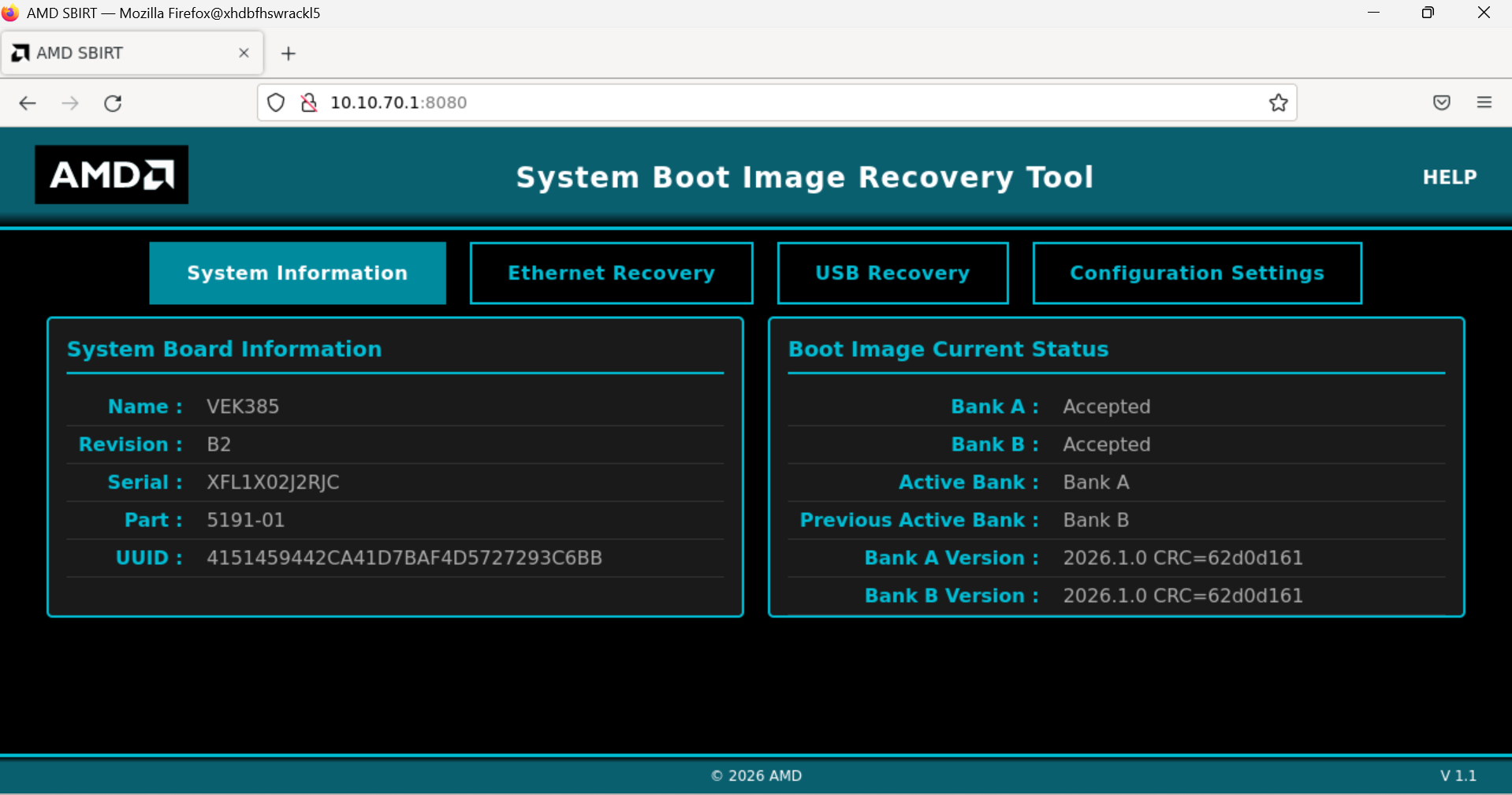
Image Recovery Web Interface - System Information tab.
Ethernet Recovery
Ethernet Recovery supports updating the boot firmware
BOOT.BINimage and the Linux WIC image.Update the boot firmware:
Click the Ethernet Recovery tab.
Select the Boot Image option.
Browse and select the required
BOOT.BINimage.Click Upload.
The tool writes the new boot image to the inactive boot bank. After the update completes, check the Boot Image Status information to verify the bank status before rebooting.
After a successful
BOOT.BINupload, the tool stores debug messages and update details under/var/log/image_recoveryin the Image Recovery shell.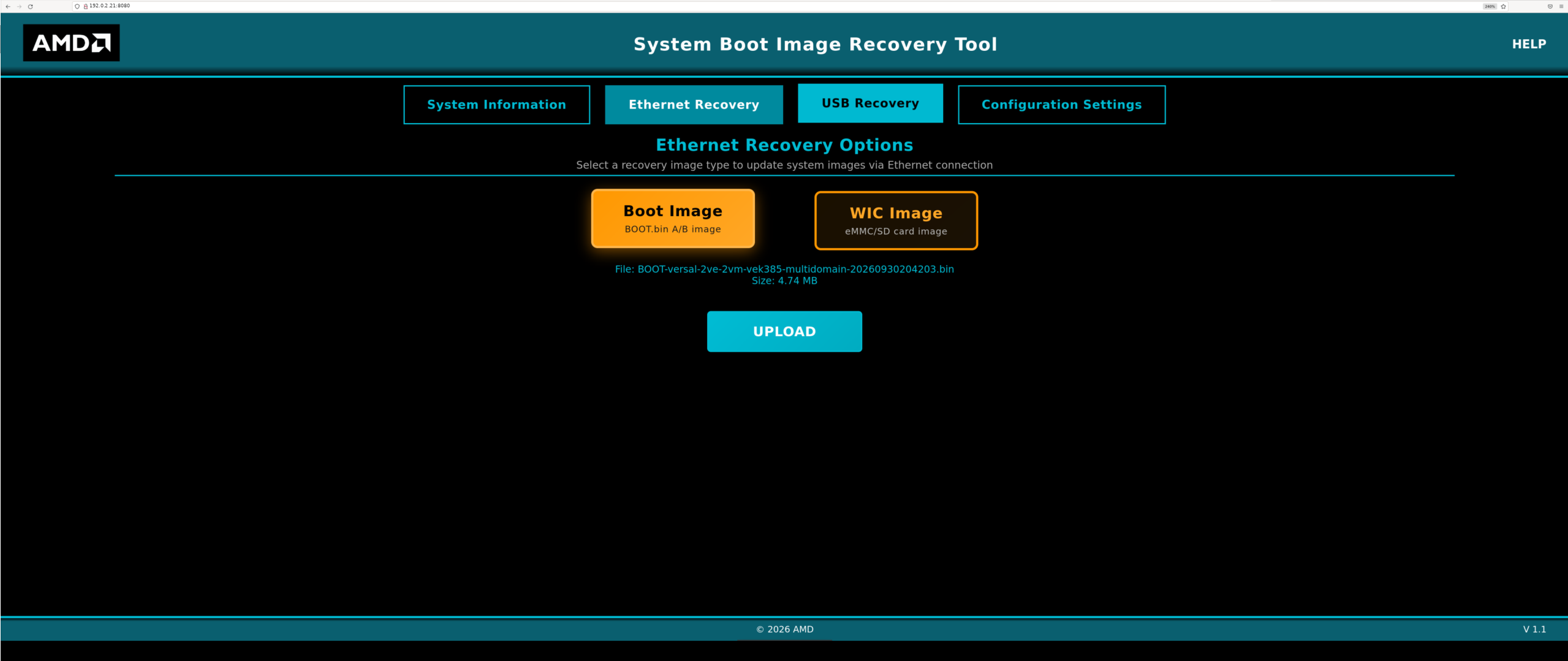
Ethernet Recovery - selecting a
BOOT.BINimage.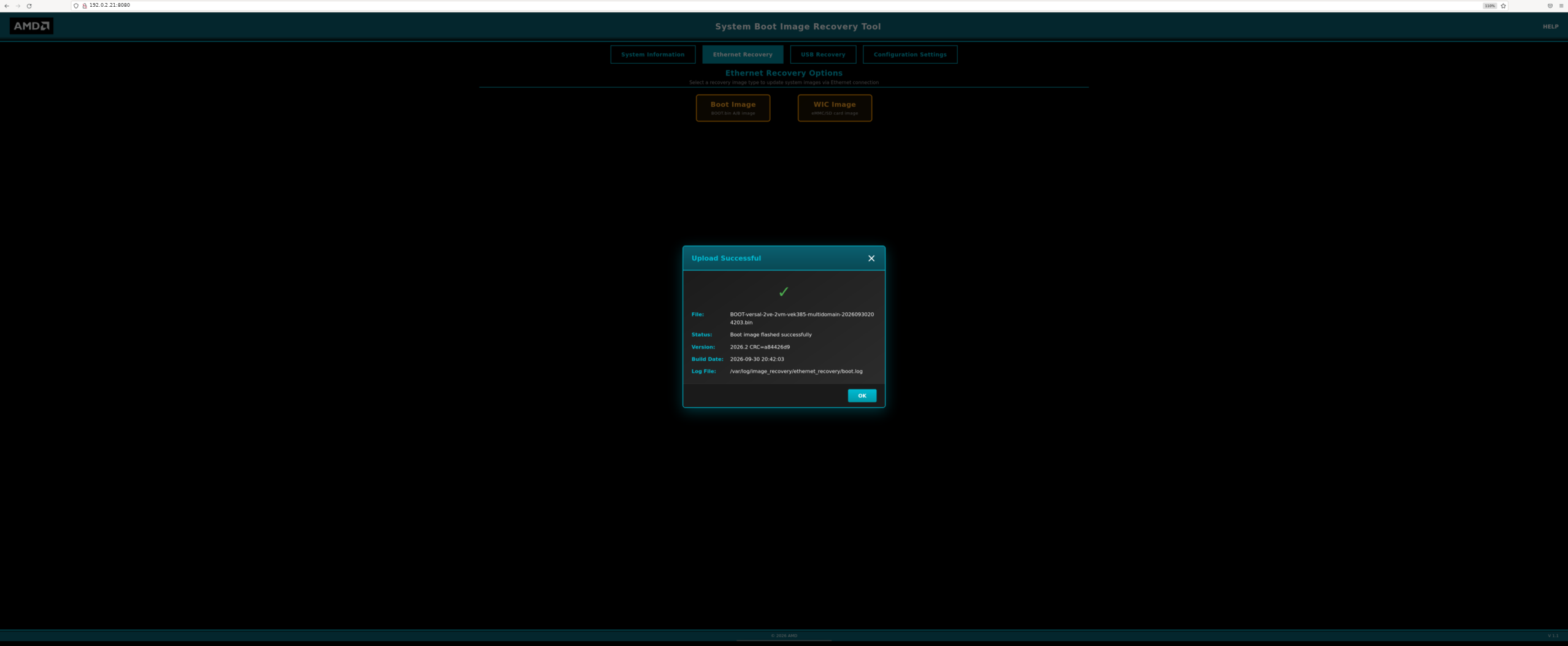
Ethernet Recovery - successful
BOOT.BINupdate.Update the Linux image:
Click the Ethernet Recovery tab.
Select the WIC Image option.
Browse and select the required WIC image (for example,
*.wic.ufs.xz).Optionally browse and select the matching
.bmapfile to accelerate flashing by writing only the mapped blocks.Select the target storage device (for example,
/dev/sda).Click Upload.
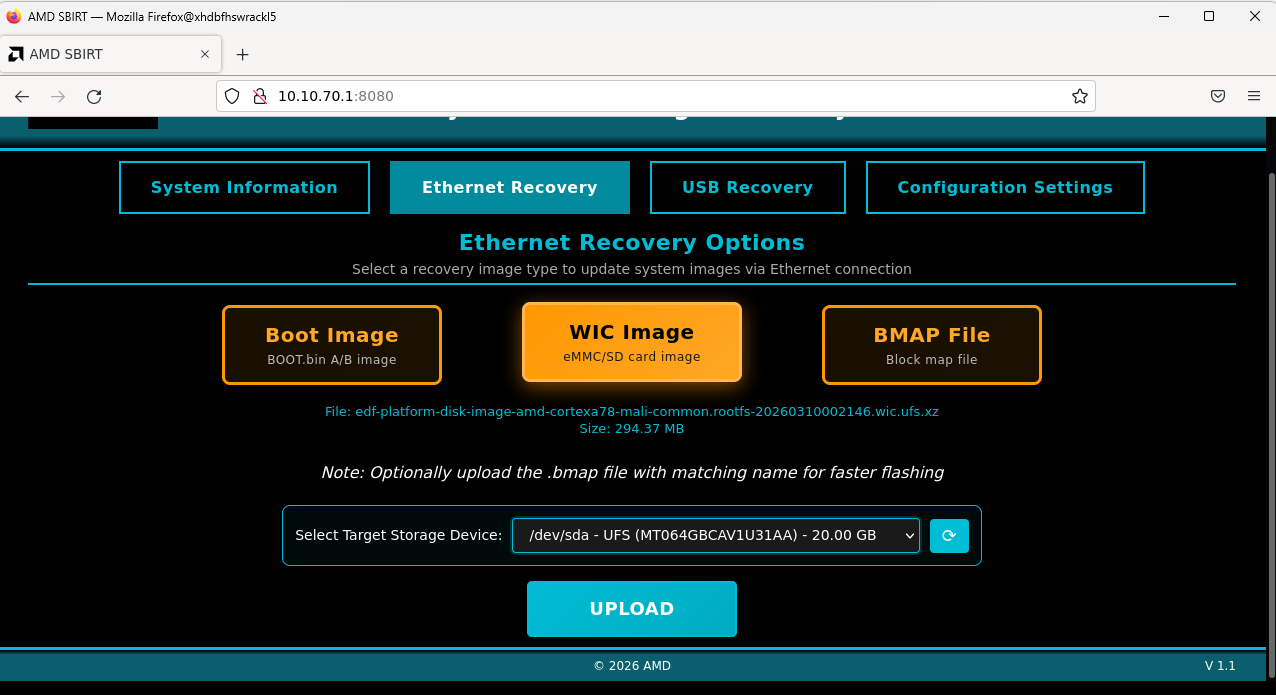
Image Recovery Web Interface - Ethernet Recovery, uploading a WIC image.
A confirmation dialog box appears after the image update succeeds (typically 1 to 2 minutes).
After a successful WIC upload, debug messages and update details are stored under
/var/log/image_recoveryin the Image Recovery shell.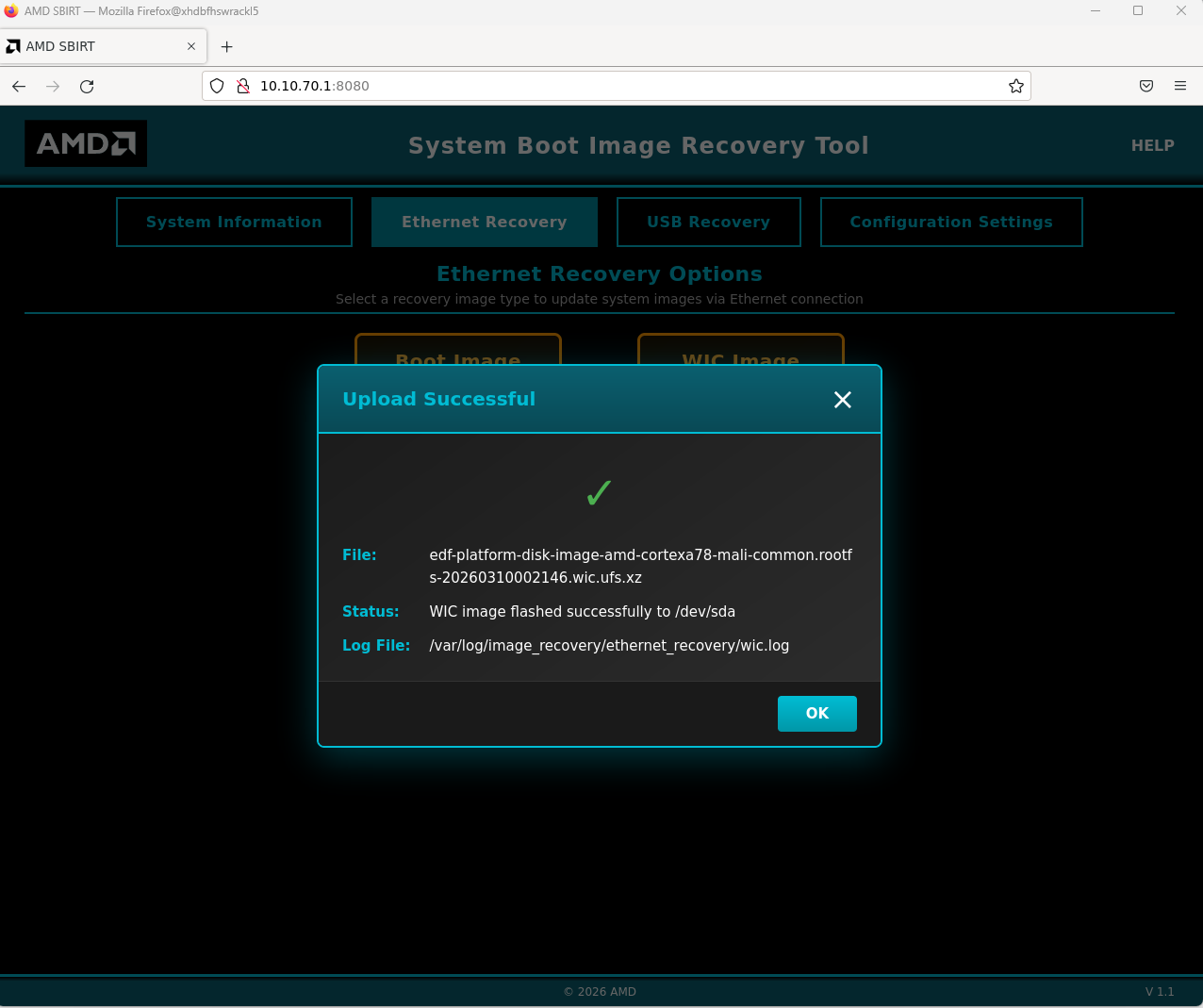
Confirmation pop-up after a successful Ethernet WIC update.
USB Recovery
USB Recovery supports updating both the boot firmware
BOOT.BINimage and the Linux WIC image using a USB flash drive.Prerequisites
Prepare the USB flash drive as follows:
Insert the USB drive into a Windows or Linux host machine.
Format the USB drive as FAT32.
Copy the
BOOT.BINand WIC image files to the root directory of the USB drive:BOOT-<machine>-<timestamp>.bin edf-linux-disk-image-*.wic.ufs.xz
Do not rename the files.
Do not place the file inside any directory.
Insert the USB drive into the evaluation board (for example,
vek385_revB).Click the USB Recovery tab.
The USB Recovery interface scans the USB device and displays available image files.
Update Boot Firmware
Select the
BOOT.BINimage from the detected USB device.Select the Boot Image option.
Click Upload.
The tool writes the new boot image to the inactive boot bank. After the update completes, check the Boot Image Status information to verify the bank status before rebooting. The tool stores debug messages and update details under
/var/log/image_recoveryin the Image Recovery shell.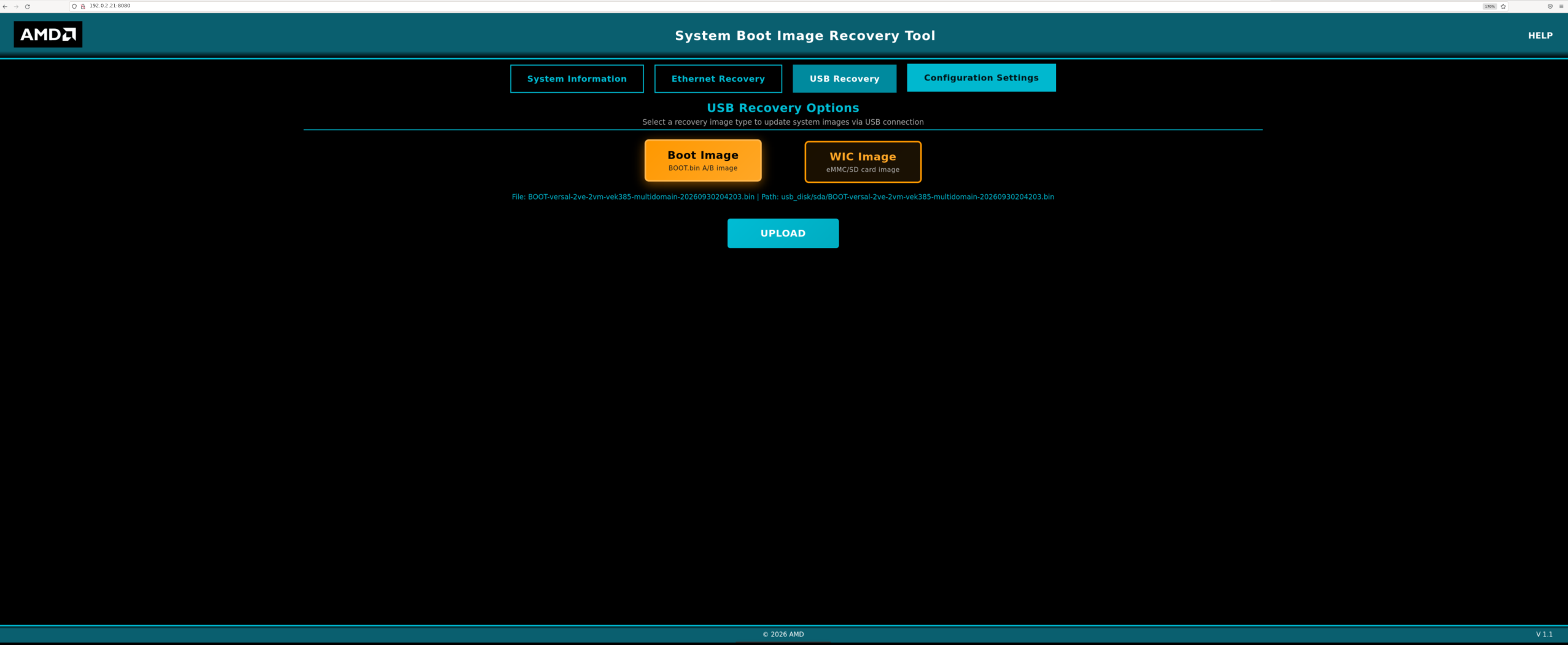
USB Recovery - selecting a
BOOT.BINimage.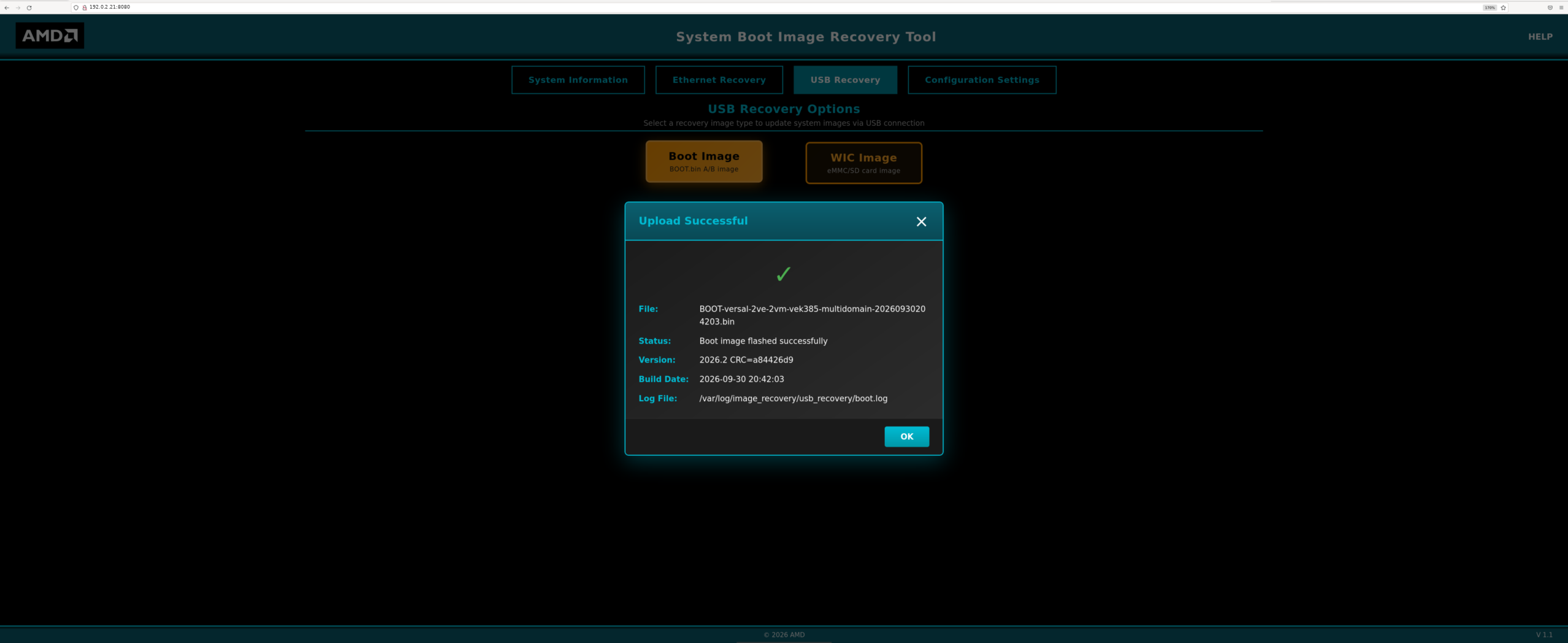
USB Recovery - successful
BOOT.BINupdate.Update Linux Image
Select the WIC image from the detected USB device.
Select the WIC Image option.
Optionally select the matching
.bmapfile to accelerate flashing by writing only the mapped blocks.Select the target storage device (for example,
/dev/sda).Click Upload.
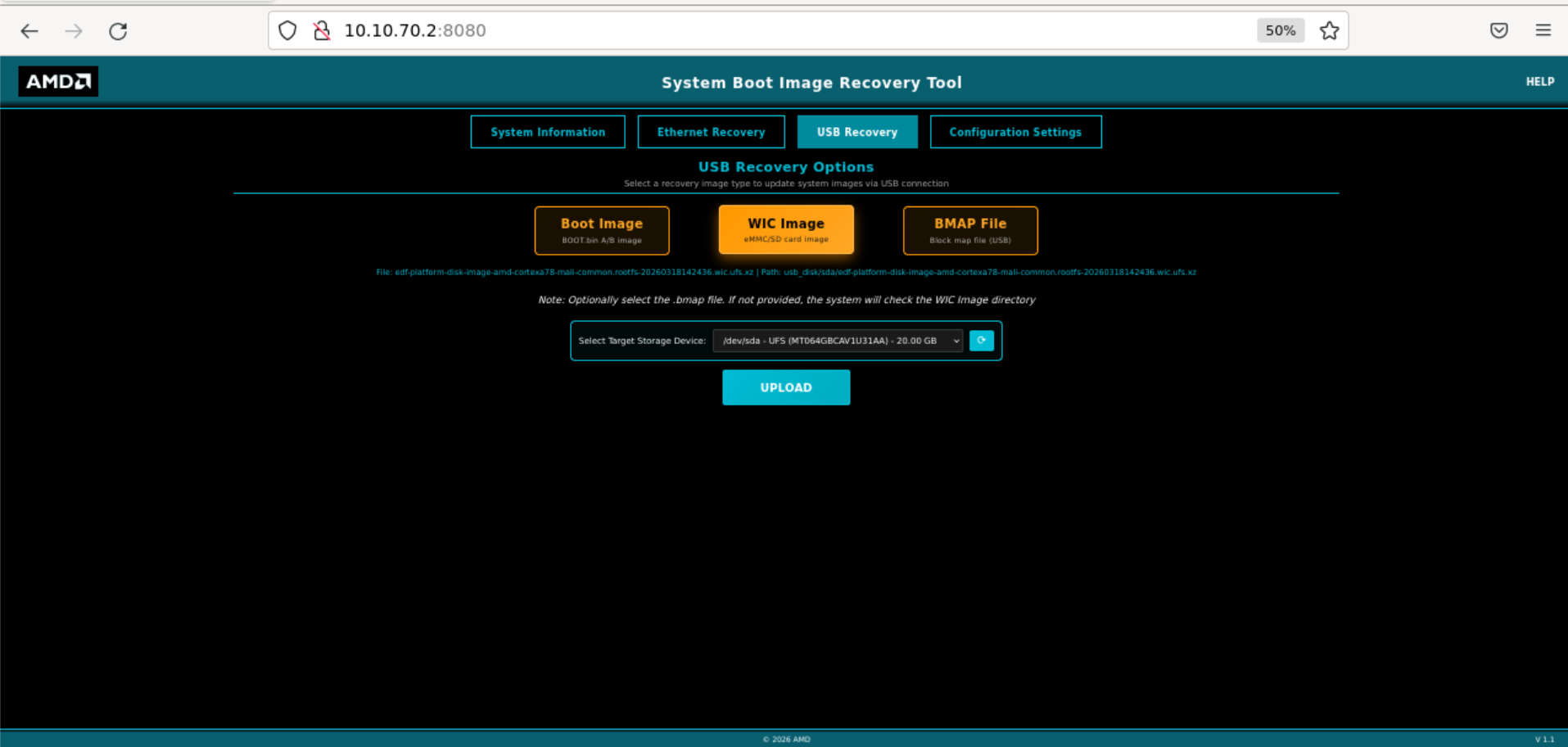
Image Recovery Web Interface - USB Recovery, uploading a WIC image.
A confirmation dialog box appears after the image update succeeds (typically 3 to 10 minutes, depending on image size and media).
After a successful WIC upload, debug messages and update details are stored under
/var/log/image_recoveryin the Image Recovery shell.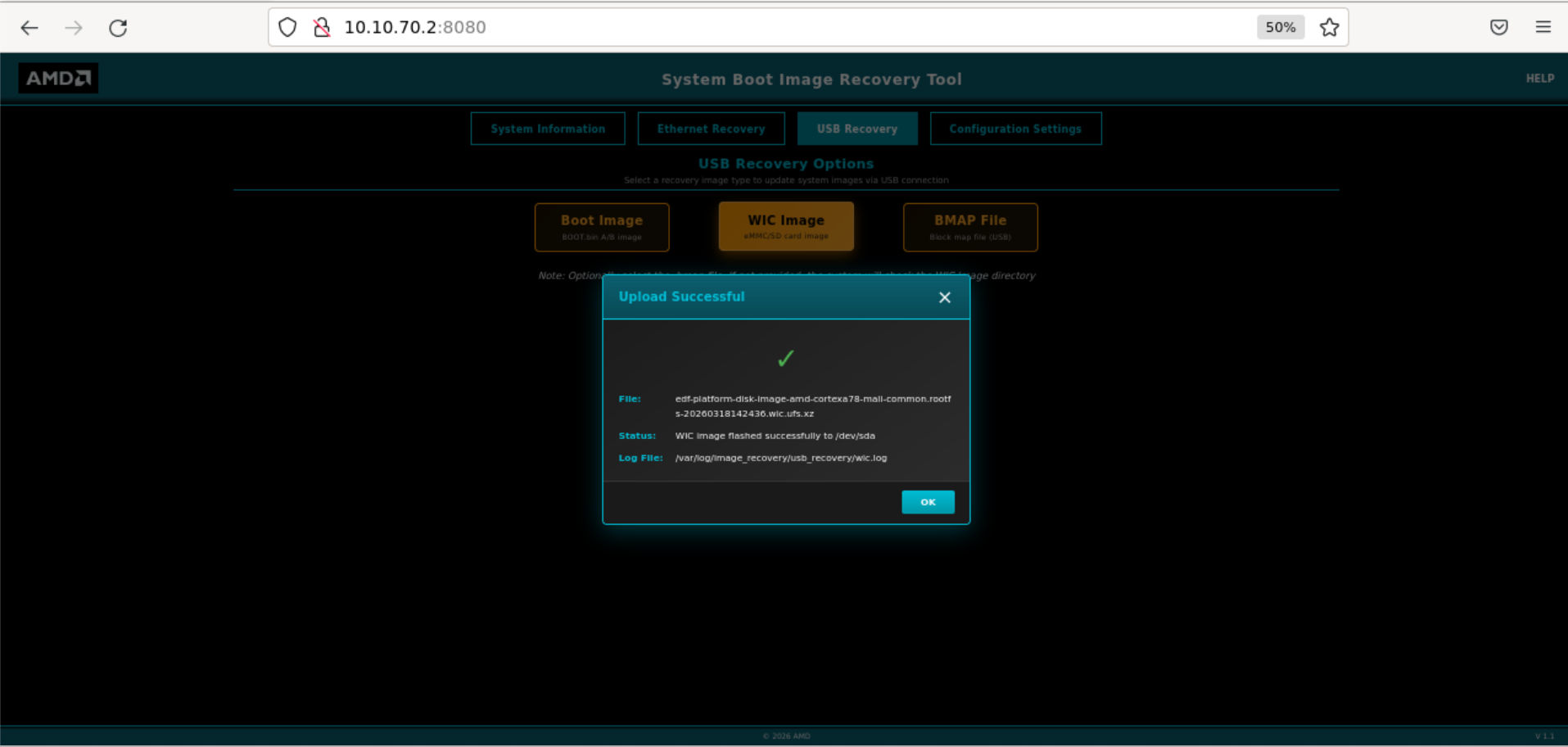
Configuration Settings
The Configuration Settings tab supports configuring the UFS logical-unit (LU) configuration on supported platforms. On platforms without a UFS storage device, the tool reports that no UFS devices are found.
To configure the UFS device:
Click the Configuration Settings tab.
Query the device first. The tool fetches the UFS device path and retrieves the current logical-unit configuration.
Review the query output in the logical-unit configuration table.
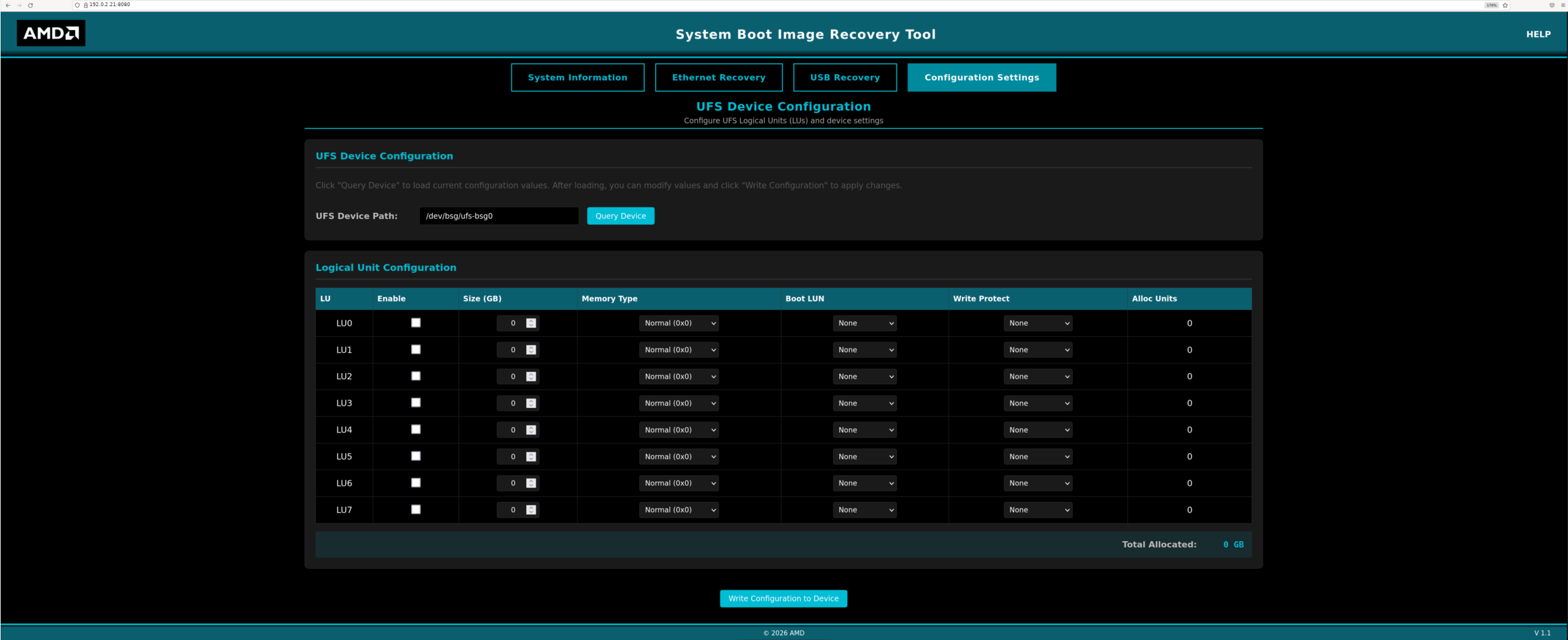
UFS Logical Unit Configuration Logical Unit Parameters
LU0
LU1
LU Enable
1
1
Size
20 GB
2 GB
Memory Type
Normal (0x0)
Normal (0x0)
Boot LUN
Boot A (0x1)
Boot B (0x2)
Write Protect
None (0x0)
None (0x0)
Allocation Units (dNumAllocUnits)
5120
512
Update the required logical-unit settings in the table.
Click Write to write the configuration to the device.
Reboot the board to apply the new configuration.
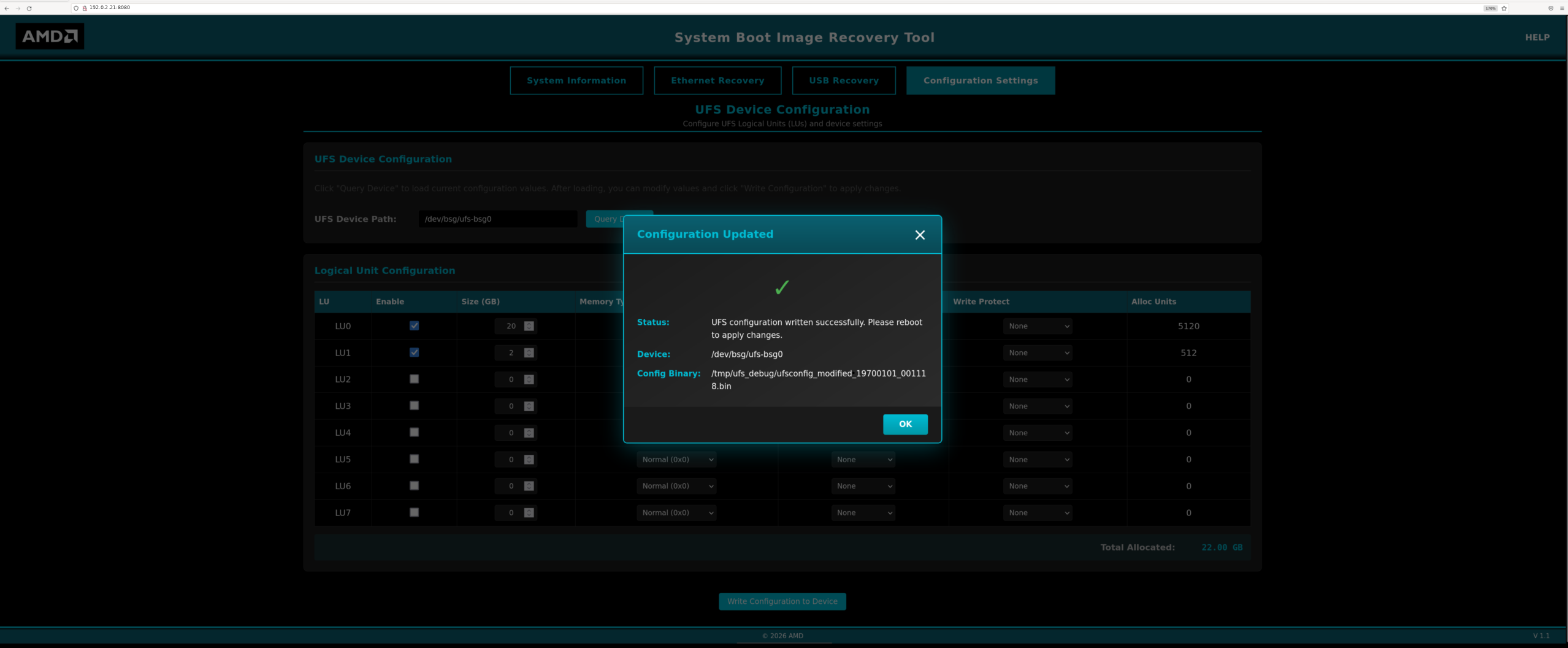
The tool saves the query log to
/var/log/image_recovery/ufs_recovery/ufs_config_query.log. After a successful configuration update, the tool stores debug messages and update details under/var/log/image_recoveryin the Image Recovery shell. For command-line query and update examples, see UFS Configuration Query.
Image Recovery Linux Rootfs Command-Line Utility
Overview
The image-recovery-cli utility is a user-space command-line tool that
wraps existing CGI image recovery
functions. It supports image recovery operations, system information
queries, USB scanning, BOOT.BIN and WIC flashing, and UFS
configuration directly from the shell without the web interface.
Usage
The utility supports a global option to override the CGI directory and to display help. Use one primary command
option per invocation, such as --sysinfo, --bootstatus, or
--version.
image-recovery-cli [options] [command options]
The following sections describe each command option, its purpose, arguments, typical output, and example usage.
System Information (--sysinfo)
Retrieve and display system information read from the device EEPROM. This is commonly used to verify board identity, serial number, and revision. Run:
amd-edf:/home/amd-edf# image-recovery-cli --sysinfo
Example output:
SysBoardInfo: {
  BoardName: VEK385
  RevisionNo: A01
  SerialNo: 519101A01074
  PartNo: 5191-01
  UUID: BA117386C7454E93BBC48459D73BA359
}
See IPMI FRU data requirements;
the same EEPROM requirement applies to --sysinfo.
Boot Status and Version Information (--bootstatus)
Query and display the current boot status and firmware version information, including the active and inactive boot banks. The output reports:
Which bank (A or B) is currently active or selected for boot.
Boot firmware versions for Device Boot FW A and Device Boot FW B, parsed from the EDF boot firmware versioning data in image headers.
Run:
amd-edf:/home/amd-edf# image-recovery-cli --bootstatus
Example output:
BankAStatus: true
BankBStatus: true
ActiveBank: ImageA
PrevActiveBank: ImageB
version_active: 2026.1 CRC=bcbe49f4
version_prev: 2026.1 CRC=bcbe49f4
Component Version Information (--version)
Display version information for:
Image Recovery Application
Image Selector Application
The currently active bank (A or B) and its associated firmware version
Run:
amd-edf:/var/imgrcry_web/cgi-bin# image-recovery-cli --version
Example output:
Content-type: text/plain

Image Recovery Application: Image Recovery (versal-2ve-2vm-vek385-multidomain)-1.2-2026.2
Image Selector Application: Image Selector (versal-2ve-2vm-vek385-multidomain)-1.2-2026.2
Bank A image ver: AMD EDF Boot Firmware (versal-2ve-2vm-vek385-multidomain)
Bank B image ver: AMD EDF Boot Firmware (versal-2ve-2vm-vek385-multidomain)
USB Storage Scanning (--scan-usb)
Scan for and list available USB storage devices for recovery operations. The command also enumerates UFS storage and attempts to mount each detected partition, then walks the directory tree of any partition it could mount.
Typical workflow:
Connect the USB storage device that contains
boot.binor a WIC image to the target system.Run
--scan-usband note the detected device path for the flash operation.
Run:
amd-edf:/home/amd-edf# image-recovery-cli --scan-usb
Example output:
image-recovery-cli --scan-usb output
Content-type: text/plain

Device: sdb1
FILE: usb_disk/sdb1/edf-version.txt
DIR: usb_disk/sdb1/EFI
DIR: usb_disk/sdb1/EFI/BOOT
FILE: usb_disk/sdb1/EFI/BOOT/bootaa64.efi
FILE: usb_disk/sdb1/Image
FILE: usb_disk/sdb1/image.manifest
DIR: usb_disk/sdb1/loader
FILE: usb_disk/sdb1/loader/loader.conf
DIR: usb_disk/sdb1/loader/entries
FILE: usb_disk/sdb1/loader/entries/edf-linux.conf
FILE: usb_disk/sdb1/loader/entries/edf-xen.conf
FILE: usb_disk/sdb1/loader/random-seed
FILE: usb_disk/sdb1/xen.cfg
FILE: usb_disk/sdb1/xen.efi
FILE: usb_disk/sdb1/ubootefi.var
Device: sdb2
Flash Boot Image (--upload-bootbin)
Flash the specified BOOT.BIN image to the inactive boot bank (A or B), so
that the new boot image becomes active on the next reboot. This updates the
boot firmware while keeping the currently active bank intact for safe
rollback.
Run:
amd-edf:/home/amd-edf# image-recovery-cli --upload-bootbin \
  BOOT-versal-2ve-2vm-vek385-multidomain-20260419183525.bin
Example output:
Content-type: text/html
<html><body><pre>
USB_PATH_SAVED=SUCCESS
</pre></body></html>
flash_eraseall has been replaced by `flash_erase <mtddev> 0 0`; please use it
Content-type: text/html
<html><body><pre>
Flashing IMAGE B
FLASH_PROGRESS=60
Erasing 116736 Kibyte @ 0 -- 100 % complete
FLASH_PROGRESS=70
FLASH_PROGRESS=95
FLASH_PROGRESS=96
FLASH_PROGRESS=98
FLASH_PROGRESS=100
FLASH_STATUS=SUCCESS
FLASH_REASON=Boot image flashed successfully
FLASH_LOG=/var/log/image_recovery/usb_recovery/boot.log
FLASH_VERSION=2026.1 CRC=bcbe49f4 SW_HDR_SHA256=5b5583f3d725d116af9dee3d5bcb4a2c85648509828155066bdc7335c31a9c32
FLASH_BUILD_DATE=2026-04-19 18:35:25
</pre></body></html>
Note
On success or failure, review log files under
/var/log/image_recovery/usb_recovery/ for detailed information.
Flash WIC Image (--upload-wic)
Write a WIC image to a target storage device (for example, eMMC, SD, or UFS). Run:
amd-edf:/home/amd-edf# image-recovery-cli --upload-wic \
  </path/to/file.wic.xz> \
  --device /dev/sdb --bmap </path/to/file.bmap>
Example output:
Content-type: text/html
<html><body><pre>
USB_PATHS_SAVED=SUCCESS
</pre></body></html>
Content-type: text/html
<html><body><pre>
FLASH_PROGRESS=10
FLASH_PROGRESS=20
FLASH_INFO=Target device: /dev/sdb
FLASH_PROGRESS=30
FLASH_INFO=Unmounting device partitions...
FLASH_PROGRESS=40
FLASH_PROGRESS=50
FLASH_PROGRESS=95
FLASH_PROGRESS=98
FLASH_STATUS=SUCCESS
FLASH_REASON=WIC image flashed successfully to /dev/sdb
FLASH_LOG=/var/log/image_recovery/usb_recovery/wic.log
FLASH_PROGRESS=100
</pre></body></html>
Note
Update the appropriate partition. The command reports validation and write progress, then returns a success or failure message. Errors can include an invalid WIC image, a missing device argument, or partition access failures.
UFS Configuration Query (--ufs-query)
Query the current UFS logical unit configuration and save it as a JSON file. This enables inspection, backup, and later modification of UFS configuration. The utility displays the UFS configuration in a readable format and writes the JSON output to the specified file. Errors, such as missing devices or partition access failures, are printed as messages.
Run:
amd-edf:/home/amd-edf# image-recovery-cli --ufs-query ufsconfig.json
Example output:
Querying UFS device:
Saving configuration JSON to: ufsconfig.json
Querying UFS device: /dev/bsg/ufs-bsg0
LU0: enable=0x1->1, boot=0x1->1, alloc=0x100->256
LU1: enable=0x0->0, boot=0x0->0, alloc=0x100->256
LU2: enable=0x0->0, boot=0x0->0, alloc=0x400->1024
LU3: enable=0x0->0, boot=0x0->0, alloc=0x0->0
LU4: enable=0x0->0, boot=0x0->0, alloc=0x0->0
LU5: enable=0x0->0, boot=0x0->0, alloc=0x0->0
LU6: enable=0x0->0, boot=0x0->0, alloc=0x0->0
LU7: enable=0x0->0, boot=0x0->0, alloc=0x0->0
SUCCESS: UFS configuration JSON saved to ufsconfig.json
Next, review and (optionally) update the configuration:
Review the configuration:
amd-edf:/home/amd-edf# cat ufsconfig.json
Each per-LU entry in the captured output uses three fields:
enable: logical unit enable state (0= off,1= on).boot: boot LUN mapping.0: not a boot LUN.1: Boot A.2: Boot B.
alloc: allocation units (dNumAllocUnits) for the LU.
Example logical unit output:
Logical unit parameters captured by--ufs-queryLogical Unit Parameters LU Enable Size Memory Type Boot LUN Write Protect Allocation Units (dNumAllocUnits) LU0 LU Enable: 1 Size: 5120 Memory Type: Normal (0x0) Boot LUN: Boot A (0x1) Write Protect: None (0x0) Allocation Units: 0x1400 LU1 LU Enable: 0 Size: 512 Memory Type: Normal (0x0) Boot LUN: Boot B (0x0) Write Protect: None (0x0) Allocation Units: 0x0200
Edit the JSON file as needed.
Write the configuration back to the device:
amd-edf:/home/amd-edf# image-recovery-cli --ufs-write ufsconfig.json
Reboot the system to apply changes.
Note
Reboot the system to apply UFS configuration changes.
Help and Usage Summary (--help)
Display help text and a summary of all supported options. Run:
amd-edf:/home/amd-edf# image-recovery-cli --help
Example output:
Usage: image-recovery-cli [options] [command options]
Command options include: --sysinfo, --bootstatus, --version,
--scan-usb, --upload-bootbin, --upload-wic, --ufs-query,
--ufs-write, --help
Boot Firmware Updates Using image-mgmt
The image-mgmt utility is a command-line AMD System Boot Image Recovery
tool for EDF rootfs targets. You can use it to perform safe A/B boot
image updates by flashing the inactive bank, then using switch-bank to
update boot metadata and CRC so the selected bank boots on the next reboot.
The utility also provides get and set operations for MAC
addresses in the EEPROM. Boards must expose the EEPROM_WC_B
write-control pin to support these updates. The utility uses this pin to
manage write protection before updating the addresses.
You can also use this utility to switch the active boot bank for rollout or rollback. On supported platforms (for example, VEK385), you can also query and update UFS configuration.
Command Synopsis
usage: image-mgmt [-h] [-v] {image-info,bootstatus,upload-boot,ufs-config,switch-bank,eeprom} ...

AMD System Boot Image Recovery Tool

positional arguments:
  {image-info,bootstatus,upload-boot,ufs-config,switch-bank,eeprom}
                        Available commands
    image-info          Show image version information
    bootstatus          Show boot status information
    upload-boot         Upload and flash boot.bin image
    ufs-config          Configure UFS device
    switch-bank         Switch active boot bank
    eeprom              Manage EEPROM MAC addresses

options:
  -h, --help            show this help message and exit
  -v, --version         show version information and exit
Use Cases
Update the boot image (A/B) on EDF rootfs systems without leaving the board unbootable: Copy a new
BOOT-*.binimage, runupload-boot, activate the flashed bank usingswitch-bank, reboot, then verify usingimage-infoandbootstatus.Switch or roll back boot banks: Use
switch-bankto change the active bank in metadata, reboot, and confirm usingbootstatus.Use
ufs-configto initialize or modify the UFS configuration on supported platforms (for example, VEK385).Manage EEPROM MAC addresses: Use
eepromto check write protection, read and back up MAC addresses, or set MAC addresses.
--version Option
Print the version of the image-mgmt tool itself and exit:
amd-edf:/home/amd-edf# image-mgmt --version
image-mgmt v1.2
image-info Command
Display the boot image version information: the image recovery application version, the image selector version, and the boot firmware version programmed into each bank.
Note
Use image-mgmt image-info in place of the version subcommand
from earlier releases. image-mgmt --version now reports the
version of the tool itself.
Options:
--type {recovery,selector,bank-a,bank-b,all}Query a specific image type. Default is
all(show all versions).
Example output:
amd-edf:/home/amd-edf# image-mgmt image-info
============================================================
Version Information
============================================================
[INFO] Image Recovery: Image Recovery (versal-vek280-multidomain)-1.2-2026.2
[INFO] Image Selector: Image Selector (versal-vek280-multidomain)-1.2-2026.2
[INFO] Bank A image ver: AMD EDF Boot Firmware (versal-vek280-multidomain)
[INFO] Bank A Vivado version: 2026.2.0
[INFO] Bank B image ver: AMD EDF Boot Firmware (versal-vek280-multidomain)
[INFO] Bank B Vivado version: 2026.2.0
============================================================
Use this command to confirm the currently installed boot firmware version on each bank and the recovery/selector application versions.
bootstatus Command
Display the current boot status, including the active bank, CRC values, and FRU details. Example output:
amd-edf:/home/amd-edf# image-mgmt bootstatus
============================================================
Boot Status
============================================================
[INFO] Bank A Status: Bootable (Accepted - All images valid)
[INFO] Bank B Status: Bootable (Accepted - All images valid)
[SUCCESS] Active Bank: A
[INFO] Previous Bank: B
------------------------------------------------------------
Bank CRC Values
------------------------------------------------------------
[INFO] Bank A CRC: cc461e0d
[INFO] Bank B CRC: cc461e0d
------------------------------------------------------------
FRU Information
------------------------------------------------------------
[INFO] Auto-selected EEPROM device (only one available): /sys/bus/i2c/devices/1-0054/eeprom
[INFO] Product Name: VEK280
[INFO] Product Revision: B01
[INFO] UUID: C13A1FE1-FC44-45DA-9174-4F9C0DCCF4B1
============================================================
See IPMI FRU data requirements;
the same EEPROM requirement applies to the FRU Information in bootstatus.
After switching banks or updating an image, re-run bootstatus to verify
the new active bank and CRC values.
Copy a New Boot Image
Copy the new BOOT-*.bin image from your host system to the target
EDF rootfs system using scp. For example:
$ scp \
  user@<host-ip-or-name>:/path/to/artifacts/BOOT-versal-vek280-multidomain.bin .
Verify that the image exists on the target:
amd-edf:/home/amd-edf# ls BOOT-versal-vek280-multidomain.bin
upload-boot Command
Upload and flash a new BOOT-*.bin image to the inactive boot bank, then
update metadata to mark the flashed bank as ready. Run switch-bank to
activate that bank before rebooting.
Before it erases or writes any flash partition, upload-boot validates
the supplied file by inspecting its boot image header. The following checks
are applied in order:
The file must exist and must not be empty.
The file must be large enough to contain a boot header (at least 40 bytes).
The file must contain a valid AMD/Xilinx boot header. The utility looks for the boot header sync word together with the
XNLXidentifier at the header offsets used by ZynqMP and Versal boot images.
If any check fails, the utility prints an [ERROR] message and exits
with a non-zero status. It does not erase or write any partition or change
the active-bank metadata. For example, if the supplied file is not a valid
boot image, the utility reports:
amd-edf:/home/amd-edf# image-mgmt upload-boot /tmp/fake_boot.bin
[ERROR] Invalid boot.bin, boot.bin was corrupted boot image
If the file is smaller than the minimum header size, the utility reports:
amd-edf:/home/amd-edf# image-mgmt upload-boot /tmp/tiny_boot.bin
[ERROR] File too small to be a valid boot.bin (minimum 40 bytes required)
Note
Header validation confirms that the file is a well-formed AMD/Xilinx boot image. The utility also checks hardware compatibility using the boot image device ID before flashing. Always flash a boot image that matches the target board.
After the supplied image passes these checks, upload-boot flashes the
inactive bank and updates the boot metadata. The following example flashes
Bank B while Bank A is the active bank:
image-mgmt upload-boot session
amd-edf:/home/amd-edf# image-mgmt upload-boot \
     BOOT-versal-vek280-multidomain.bin
[INFO] Hardware compatibility check passed: xcve2802 matches boot.bin device ID
============================================================
[INFO] Boot file: BOOT-versal-vek280-multidomain.bin
[INFO] File size: 2,978,960 bytes (2.84 MB)
============================================================
[Step 1/4] Reading current boot metadata
[####------------------------------------]  10% - Reading metadata...
[INFO] Reading from /dev/mtd6
[SUCCESS] Current active bank: Bank A
[INFO] Target: /dev/mtd14 - Bank B (inactive - flash target)
[########--------------------------------]  20% - Preparing to flash Bank B...
[Step 2/4] Flashing boot image to Bank B (inactive - flash target)
[################------------------------]  40% - Erasing flash partition...
[INFO] Erasing /dev/mtd14
[SUCCESS] Flash partition erased
[########################----------------]  60% - Writing boot image to flash...
[INFO] Writing image to /dev/mtd14 using flashcp
[SUCCESS] Boot image written successfully
[Step 3/4] Updating boot metadata
[################################--------]  80% - Marking flashed bank as ready...
[SUCCESS] Bank B marked as ready (use 'switch-bank' to activate)
[Step 4/4] Finalizing boot configuration
[####################################----]  90% - Calculating and updating CRC32...
[INFO] Calculating CRC32 for metadata
[SUCCESS] Calculated CRC32: 0x2a2a0042
[SUCCESS] CRC32 updated in metadata file
[INFO] Erasing Metadata partition /dev/mtd6
[INFO] Erasing Metadata Backup partition /dev/mtd7
[INFO] Flashing Metadata to /dev/mtd6
[SUCCESS] Metadata flashed successfully
[INFO] Flashing Metadata Backup to /dev/mtd7
[SUCCESS] Metadata Backup flashed successfully
[########################################] 100% - Flash operation completed
============================================================
[SUCCESS] Boot image flashed successfully to Bank B
[INFO] Version: xcve2802-vsvh1760-2MP-e-S
[INFO] Build Date: 2026-09-08 21:53:16
============================================================
[INFO] Bank B is ready but NOT active yet
[INFO] To activate Bank B, run: image-mgmt switch-bank b
switch-bank Command
Manually switch the active boot bank in metadata so that the selected bank becomes active on the next reboot.
Example output:
amd-edf:/home/amd-edf# image-mgmt switch-bank
usage: image-mgmt switch-bank [-h] {a,b,A,B,0,1}
image-mgmt switch-bank: error: the following arguments are required: bank
amd-edf:/home/amd-edf# image-mgmt switch-bank -h
usage: image-mgmt switch-bank [-h] {a,b,A,B,0,1}
positional arguments:
{a,b,A,B,0,1}  Target bank to activate (a/A/0 for Bank A, b/B/1 for Bank B)
options:
-h, --help     show this help message and exit
Valid positional arguments for the target bank are a, b, A,
B, 0 (Bank A), and 1 (Bank B). This is a positional value, not
an option flag.
Example: activate Bank B after flashing it.
amd-edf:/home/amd-edf# image-mgmt switch-bank b
============================================================
[INFO] Switching to Bank B
============================================================
[INFO] Reading metadata from /dev/mtd6
[SUCCESS] Current active bank: Bank A
[INFO] Validating Bank B boot image...
[SUCCESS] Bank B contains a valid boot image
[INFO] Updating metadata to switch to Bank B
[INFO] Target bank status: 0xfc
[SUCCESS] Metadata updated successfully
[INFO] Calculating CRC32 for metadata
[SUCCESS] Calculated CRC32: 0x1a4a5695
[SUCCESS] CRC32 updated in metadata file
[INFO] Erasing Metadata partition /dev/mtd6
[INFO] Erasing Metadata Backup partition /dev/mtd7
[INFO] Flashing Metadata to /dev/mtd6
[SUCCESS] Metadata flashed successfully
[INFO] Flashing Metadata Backup to /dev/mtd7
[SUCCESS] Metadata Backup flashed successfully
============================================================
[SUCCESS] Active bank switched to Bank B
[WARNING] Bank B will boot on next reboot
============================================================
Note
Metadata changes take effect only after a reboot.
Use image-mgmt bootstatus after reboot to confirm the active bank.
Before updating the metadata, switch-bank validates that the target
bank actually contains a bootable image by checking the boot header on the
bank’s Memory Technology Device (MTD) partition. A bank whose leading
region is uniformly erased or zeroed is reported as empty, and a bank whose
contents do not carry a valid header is reported as corrupted. In either
case, the command refuses to switch and exits non-zero, leaving the active
bank unchanged:
amd-edf:/home/amd-edf# image-mgmt switch-bank b
============================================================
[INFO] Switching to Bank B
============================================================
[INFO] Reading metadata from /dev/mtd6
[SUCCESS] Current active bank: Bank A
[INFO] Validating Bank B boot image...
[ERROR] Cannot switch to Bank B: Bank is empty (contains no boot image)
============================================================
The command also checks the target bank’s recorded health status, which it
reports as a raw byte (for example [INFO] Target bank status: 0xfc).
The command accepts a bank with a healthy (0xfc) or warning (0xfd)
status. It rejects any other value, including critical (0xfe), and reports
[ERROR] Target bank status is unhealthy (0x..).
ufs-config Command
Use this command to configure UFS on supported platforms (for
example, VEK385). It queries /dev/bsg/ufs-bsg0 and writes the current
configuration to a JSON file. You can edit the JSON file and
write the updated configuration back to the device.
amd-edf:/home/amd-edf# image-mgmt ufs-config --query
[INFO] Querying UFS device: /dev/bsg/ufs-bsg0
[SUCCESS] Query results saved to: /home/amd-edf/ufs_config_query.json
This command dumps the current UFS configuration into a JSON file. See Logical unit parameters captured by --ufs-query for a sample of the captured logical unit parameters.
Edit the JSON file as required, then write it back:
amd-edf:/home/amd-edf# image-mgmt ufs-config --write \
  /home/amd-edf/ufs_config_query.json

[INFO] Configuring UFS device: /dev/bsg/ufs-bsg0
[INFO] UFS Version: 3.1+
[INFO] Reading current configuration...
[SUCCESS] Configuration read successfully (230 bytes)
[INFO] Enabling bBootEnable in Device Descriptor
[INFO] Processing 8 LUs from configuration
[INFO] LU0: 5024 units, boot=1
[INFO] LU1: 256 units, boot=0
[INFO] Modified config saved to: /tmp/ufs_debug/ufsconfig_modified_20260420_103114.bin
[INFO] Writing configuration to device...
[SUCCESS] Configuration written successfully
[WARNING] Please reboot to apply changes.
Warning
Reboot the system to apply UFS configuration changes.
On a platform without a UFS device, the command reports:
amd-edf:/home/amd-edf# image-mgmt ufs-config
[ERROR] No UFS devices found on this platform
[ERROR] UFS configuration requires a UFS storage device
eeprom Command
Manage MAC addresses in the EEPROM, check write protection,
and back up its contents. If you omit --device, the utility detects the
EEPROM and prompts for selection when it finds multiple devices.
Command synopsis and examples:
amd-edf:/home/amd-edf# image-mgmt eeprom
usage: image-mgmt eeprom [-h] [--device DEVICE] [-v] {check-wp,get-mac,set-mac} ...

positional arguments:
  {check-wp,get-mac,set-mac}  EEPROM operations
    check-wp                  Check write protection status
    get-mac                   Get DUT MAC addresses (auto-saves .bin and .yaml)
    set-mac                   Set DUT MAC addresses in EEPROM

options:
  -h, --help                  show this help message and exit
  --device DEVICE             Path to EEPROM sysfs device. Example: --device /sys/bus/i2c/devices/2-0054/eeprom get-mac. If omitted, will auto-detect and prompt for selection if multiple devices found.
  -v, --verbose               Enable verbose output (shows debug messages). Example: image-mgmt eeprom -v get-mac

Examples:
  sudo image-mgmt eeprom check-wp
  sudo image-mgmt eeprom get-mac
  sudo image-mgmt eeprom set-mac mac0=00:0A:35:AA:BB:CC
  sudo image-mgmt eeprom --device /sys/bus/i2c/devices/2-0054/eeprom get-mac
  sudo image-mgmt eeprom -v get-mac  # Verbose mode
Check EEPROM write protection:
amd-edf:/home/amd-edf# image-mgmt eeprom check-wp
[INFO] Auto-selected EEPROM device (only one available): /sys/bus/i2c/devices/1-0054/eeprom

EEPROM Write Protection Status:
============================================================
EEPROM Device: /sys/bus/i2c/devices/1-0054/eeprom
File System Writable: True
============================================================

To disable write protection, run:
  sudo timeout 1 gpioset EEPROM_WC_B=0

Note: The write command will attempt this automatically.
Read DUT MAC addresses and automatically save binary and YAML backups:
amd-edf:/home/amd-edf# image-mgmt eeprom get-mac
[INFO] Auto-selected EEPROM device (only one available): /sys/bus/i2c/devices/1-0054/eeprom
[SUCCESS] Binary backup saved to: /tmp/eeprom_backup/eeprom_20260705_044728.bin
[SUCCESS] YAML backup saved to: /tmp/eeprom_backup/eeprom_20260705_044728.yaml

DUT MAC Addresses (Found 3 MAC(s)):
  mac0: 00:0A:35:1C:FF:66
  mac1: 00:0A:35:1C:FF:67
  mac2: 00:0A:35:1C:FF:68
Set a DUT MAC address. In this example, the utility aborts
the write because the board does not expose the EEPROM_WC_B GPIO needed
to disable write protection:
amd-edf:/home/amd-edf# image-mgmt eeprom set-mac mac0=00:0A:35:AA:BB:CC
[INFO] Auto-selected EEPROM device (only one available): /sys/bus/i2c/devices/1-0054/eeprom
[INFO] EEPROM backed up to ./eeprom_20260705_044745.backup
[INFO] Writing 25 bytes at offset 121 (partial write)
[INFO] Writing 25 bytes to EEPROM at offset 121 (partial write)
[ERROR] EEPROM_WC_B GPIO pin was not found on this board. Cannot disable EEPROM write protection. EEPROM write aborted.
On a board that exposes the EEPROM_WC_B GPIO, the DUT
MAC address write completes and is verified:
amd-edf:/home/amd-edf# image-mgmt eeprom set-mac mac0=00:0A:35:AA:BB:CC
[INFO] Auto-selected EEPROM device (only one available): /sys/bus/i2c/devices/2-0054/eeprom
[INFO] EEPROM backed up to ./eeprom_20250529_184934.backup
[INFO] Writing 13 bytes at offset 90 (partial write)
[INFO] Writing 13 bytes to EEPROM at offset 90 (partial write)
[INFO] Write complete
[SUCCESS] Successfully updated DUT MAC addresses
[INFO] Verifying written MAC addresses...
[SUCCESS] Verification successful: All MAC addresses match expected values

DUT MAC Addresses (Found 1 MAC(s)):
  mac0: 00:0A:35:AA:BB:CC